TheHive -> Cortex -> eg. FileInfo Analyzer
Hi,
First sorry if this is not for TheHive and it's for Cortex or Cortex-Analyzers part
We have -> From about screen:
TheHive: 3.1.2-1
Elastic4Play 1.6.3
Play 2.6.18
Elastic4s 5.6.6
ElasticSearch 5.6.9
CORTEX test - 2.1.2 (OK)
Issue occurs when we chose eg. FileInfo on observable.
File is transferred to Cortex and on Cortex we can see that analysis is done but TheHive never return data to TheHive observable like for eg. VirusTotal.
Some log that maybe points to an issue
Cortex
[info] o.t.c.s.ErrorHandler - GET /api/analyzer/FileInfo_4_0 returned 404
org.elastic4play.NotFoundError: worker FileInfo_4_0 not found
        at org.thp.cortex.services.WorkerSrv.$anonfun$getForOrganization$2(WorkerSrv.scala:103)
        at scala.Option.getOrElse(Option.scala:121)
        at org.thp.cortex.services.WorkerSrv.$anonfun$getForOrganization$1(WorkerSrv.scala:103)
        at scala.util.Success.$anonfun$map$1(Try.scala:251)
        at scala.util.Success.map(Try.scala:209)
        at scala.concurrent.Future.$anonfun$map$1(Future.scala:288)
        at scala.concurrent.impl.Promise.liftedTree1$1(Promise.scala:29)
        at scala.concurrent.impl.Promise.$anonfun$transform$1(Promise.scala:29)
        at scala.concurrent.impl.CallbackRunnable.run(Promise.scala:60)
        at akka.dispatch.BatchingExecutor$AbstractBatch.processBatch(BatchingExecutor.scala:55)
[info] o.t.c.s.JobSrv - Looking for similar job (worker=961a89ee58e432dfa1a50a38f2608b1a, dataType=file, data=Right(Attachment(Hook up.pdf,ArrayBuffer(b34c27480504c5aa924a7676254cfa08c53c30e83f997df061d5d65c33940755, 2270665dddda3e7b52e6bb265cd0a4e1dec57389, 31fa3c3ee65a497afe90944b5331aa38),348198,application/octet-stream,b34c27480504c5aa924a7676254cfa08c53c30e83f997df061d5d65c33940755)), tlp=2, parameters={}
TheHive
[warn] p.s.a.o.a.n.r.b.NettyReactiveStreamsBody - Stream has already been consumed and cannot be reset
[info] o.e.ErrorHandler - POST /api/connector/cortex/job returned 500
java.util.concurrent.TimeoutException: Request timeout to /172.30.0.3:9001 after 120000 ms
        at play.shaded.ahc.org.asynchttpclient.netty.timeout.TimeoutTimerTask.expire(TimeoutTimerTask.java:43)
        at play.shaded.ahc.org.asynchttpclient.netty.timeout.RequestTimeoutTimerTask.run(RequestTimeoutTimerTask.java:48)
        at play.shaded.ahc.io.netty.util.HashedWheelTimer$HashedWheelTimeout.expire(HashedWheelTimer.java:663)
        at play.shaded.ahc.io.netty.util.HashedWheelTimer$HashedWheelBucket.expireTimeouts(HashedWheelTimer.java:738)
        at play.shaded.ahc.io.netty.util.HashedWheelTimer$Worker.run(HashedWheelTimer.java:466)
        at java.base/java.lang.Thread.run(Thread.java:844)
[warn] p.s.a.o.a.n.r.b.NettyReactiveStreamsBody - Stream has already been consumed and cannot be reset
[warn] p.s.a.o.a.n.r.b.NettyReactiveStreamsBody - Stream has already been consumed and cannot be reset
[warn] p.s.a.o.a.n.r.b.NettyReactiveStreamsBody - Stream has already been consumed and cannot be reset
[warn] p.s.a.o.a.n.r.b.NettyReactiveStreamsBody - Stream has already been consumed and cannot be reset
 Idriel
All 45 comments
If you have the latest Cortex-Analyzers version then FileInfo needs to be re-enabled since it's no longer a 4.0 but a 5.0. Can you please double check.
 nadouani
on 30 Oct 2018
nadouani
on 30 Oct 2018
Hi. same issue. Changed to v5
info] o.t.c.s.ErrorHandler - GET /api/analyzer/FileInfo_5_0 returned 404
org.elastic4play.NotFoundError: worker FileInfo_5_0 not found
        at org.thp.cortex.services.WorkerSrv.$anonfun$getForOrganization$2(WorkerSrv.scala:103)
        at scala.Option.getOrElse(Option.scala:121)
        at org.thp.cortex.services.WorkerSrv.$anonfun$getForOrganization$1(WorkerSrv.scala:103)
        at scala.util.Success.$anonfun$map$1(Try.scala:251)
        at scala.util.Success.map(Try.scala:209)
        at scala.concurrent.Future.$anonfun$map$1(Future.scala:288)
        at scala.concurrent.impl.Promise.liftedTree1$1(Promise.scala:29)
        at scala.concurrent.impl.Promise.$anonfun$transform$1(Promise.scala:29)
        at scala.concurrent.impl.CallbackRunnable.run(Promise.scala:60)
        at akka.dispatch.BatchingExecutor$AbstractBatch.processBatch(BatchingExecutor.scala:55)
[info] o.t.c.s.JobSrv - Looking for similar job (worker=8035791c12cc9004e3d75f0c330e14e9, dataType=file, data=Right(Attachment(Hook up.pdf,ArrayBuffer(b34c27480504c5aa924a7676254cfa08c53c30e83f997df061d5d65c33940755, 2270665dddda3e7b52e6bb265cd0a4e1dec57389, 31fa3c3ee65a497afe90944b5331aa38),348198,application/octet-stream,b34c27480504c5aa924a7676254cfa08c53c30e83f997df061d5d65c33940755)), tlp=2, parameters={}
What happens when your run this analysis from Cortex UI?
nadouani
on 30 Oct 2018
It'll successfully start. And I got the .json report.
Test doc with macro.
{
  "summary": {
    "taxonomies": [
      {
        "level": "info",
        "namespace": "FileInfo",
        "predicate": "Filetype",
        "value": "DOC"
      },
      {
        "level": "suspicious",
        "namespace": "FileInfo",
        "predicate": "Olevba",
        "value": "Base64 string"
      },
      {
        "level": "suspicious",
        "namespace": "FileInfo",
        "predicate": "Olevba",
        "value": "Hex string"
      },
      {
        "level": "safe",
        "namespace": "FileInfo",
        "predicate": "DDE",
        "value": "None"
      }
    ]
  },
  "full": {
    "results": [
      {
        "submodule_name": "Basic properties",
        "results": [
          {
            "submodule_section_header": "Hashes",
            "submodule_section_content": {
              "md5": "7dee4fe8fbae1cfcbadd2d358c703c59",
              "sha1": "b9159a39c0ad10a7421baa030b08e8997d7b6f34",
              "sha256": "5a03e0d1fcaa5ca4926e3c9938fabfe8764dd8d95039e1f722b9b55d9f81b85b",
              "ssdeep": "384:Hh+5GnjItW1PLisQzssjba30juzMnbqKVr:HcG4MOb4f4bqKVr"
            }
          },
          {
            "submodule_section_header": "Exif Info",
            "submodule_section_content": {
              "ExifTool:ExifToolVersion": 11.13,
              "FlashPix:AppVersion": 10.3501,
              "FlashPix:Author": "zurc",
              "FlashPix:CharCountWithSpaces": 99,
              "FlashPix:Characters": 84,
              "FlashPix:CodePage": "Windows Hebrew",
              "FlashPix:Comments": "",
              "FlashPix:CompObjUserType": "Microsoft Word Document",
              "FlashPix:CompObjUserTypeLen": 24,
              "FlashPix:Company": "Aladdin Knowledge Systems - Haifa",
              "FlashPix:CreateDate": "2002:12:01 08:12:00",
              "FlashPix:DocFlags": "1Table, ExtChar",
              "FlashPix:HeadingPairs": [
                "Title",
                1
              ],
              "FlashPix:HyperlinksChanged": "No",
              "FlashPix:Identification": "Word 8.0",
              "FlashPix:Keywords": "",
              "FlashPix:LanguageCode": "Hebrew",
              "FlashPix:LastModifiedBy": "zurc",
              "FlashPix:LastPrinted": "0000:00:00 00:00:00",
              "FlashPix:LastSavedBy": "zurc ()",
              "FlashPix:Lines": 1,
              "FlashPix:LinksUpToDate": "No",
              "FlashPix:ModifyDate": "2003:05:27 08:40:00",
              "FlashPix:Pages": 1,
              "FlashPix:Paragraphs": 1,
              "FlashPix:RevisionNumber": 17,
              "FlashPix:ScaleCrop": "No",
              "FlashPix:Security": "None",
              "FlashPix:SharedDoc": "No",
              "FlashPix:Software": "Microsoft Word 10.0",
              "FlashPix:Subject": "",
              "FlashPix:System": "Windows",
              "FlashPix:Template": "Normal.dot",
              "FlashPix:Title": "eSafe Test File",
              "FlashPix:TitleOfParts": "eSafe Test File",
              "FlashPix:TotalEditTime": "26 minutes",
              "FlashPix:Word97": "No",
              "FlashPix:Words": 16
            }
          },
          {
            "submodule_section_header": "File information",
            "submodule_section_content": {
              "Magic literal": "Composite Document File V2 Document, Little Endian, Os: Windows, Version 5.1, Code page: 1255, Title: eSafe Test File, Author: zurc, Template: Normal.dot, Last Saved By: zurc, Revision Number: 17, Name of Creating Application: Microsoft Word 10.0, Total Editing Time: 26:00, Create Time/Date: Sun Dec  1 08:12:00 2002, Last Saved Time/Date: Tue May 27 08:40:00 2003, Number of Pages: 1, Number of Words: 16, Number of Characters: 84, Security: 0",
              "MimeType": "application/msword",
              "Filetype": "DOC",
              "Filesize": 41984
            }
          }
        ],
        "summary": {
          "taxonomies": [
            {
              "level": "info",
              "namespace": "FileInfo",
              "predicate": "Filetype",
              "value": "DOC"
            }
          ]
        }
      },
      {
        "submodule_name": "Oletools Submodule",
        "results": [
          {
            "submodule_section_header": "Olevba",
            "submodule_section_content": {
              "container": null,
              "file": "/tmp/cortex-job-AWbEbkExwyNJZ1cd_WbO-7421694931004452162",
              "json_conversion_successful": true,
              "analysis": [
                {
                  "type": "AutoExec",
                  "keyword": "Document_open",
                  "description": "Runs when the Word or Publisher document is opened"
                },
                {
                  "type": "Suspicious",
                  "keyword": "copyfile",
                  "description": "May copy a file"
                },
                {
                  "type": "Suspicious",
                  "keyword": "CreateTextFile",
                  "description": "May create a text file"
                },
                {
                  "type": "Suspicious",
                  "keyword": "Shell",
                  "description": "May run an executable file or a system command"
                },
                {
                  "type": "Suspicious",
                  "keyword": "WScript.Shell",
                  "description": "May run an executable file or a system command"
                },
                {
                  "type": "Suspicious",
                  "keyword": "CreateObject",
                  "description": "May create an OLE object"
                },
                {
                  "type": "Suspicious",
                  "keyword": "Hex Strings",
                  "description": "Hex-encoded strings were detected, may be used to obfuscate strings (option --decode to see all)"
                },
                {
                  "type": "Suspicious",
                  "keyword": "Base64 Strings",
                  "description": "Base64-encoded strings were detected, may be used to obfuscate strings (option --decode to see all)"
                },
                {
                  "type": "IOC",
                  "keyword": "http://www.esafe.com",
                  "description": "URL"
                },
                {
                  "type": "Hex String",
                  "keyword": "\\xfc\\xfb=*",
                  "description": "FCFB3D2A"
                },
                {
                  "type": "Hex String",
                  "keyword": "\b\u0000+3q\\xb5",
                  "description": "08002B3371B5"
                },
                {
                  "type": "Base64 String",
                  "keyword": "\t�Zn)b�'�",
                  "description": "Capabilities"
                }
              ],
              "code_deobfuscated": "\nPrivate Sub Document_open()\n\n'End Sub\n'Private Sub Zur()\n'eSafe MS-Word Macro test\n'http://www.esafe.com\\scrt\\\n\n'On Error Resume Next\n\nSet WshShell = CreateObject(\"WScript.Shell\")\nSet fso = CreateObject(\"Scripting.FileSystemObject\")\nSet dirs = fso.GetSpecialFolder(0)\n\nDesktop = WshShell.SpecialFolders(\"AllUsersDesktop\")\n\nIf fso.FolderExists(Desktop & \"\\eSafe HTTP Macro test\") Then fso.DeleteFolder Desktop & \"\\eSafe HTTP Macro test\"\nfso.CreateFolder Desktop & \"\\eSafe HTTP Macro test\"\nfso.copyfile dirs.Path & \"\\win.ini\", Desktop & \"\\eSafe HTTP Macro test\\Win.ini\", True\nSet f = fso.CreateTextFile(Desktop & \"\\eSafe HTTP Macro test\\About this test.txt\", True)\nf.writeline \"eSafe Test *** eSafe Test *** eSafe Test *** eSafe Test *** eSafe Test ***\" & vbNewLine\n\nf.writeline \"eSafe HTTP Word Macro test summary - \" & Date & \" - \" & Time & vbNewLine\nf.writeline \"Capabilities\"\nf.writeline \"A macro is a code which is written in the internal language of an application.\"\nf.writeline \"A macro virus usually functions within Microsoft Office documents.\" & vbNewLine\nf.writeline \"Configuration\"\nf.writeline \"This macro test virus should be automatically blocked using the default configurations.\" & vbNewLine\nf.writeline \"Notes : The test opens a Microsoft Word document containing a harmless macro.\" & vbNewLine\nf.writeline \"=========================================================================================================\"\nf.writeline \"A copy of your win.ini file was copied to this folder.\"\nf.writeline \"You can safely delete this file and folder.\"\n\nf.Close\n\nEnd Sub\n\nAttribute VB_Name = \"Class1\"\nAttribute VB_Base = \"0{FCFB3D2A-A0FA-1068-A738-08002B3371B5}\"\nAttribute VB_GlobalNameSpace = False\nAttribute VB_Creatable = False\nAttribute VB_PredeclaredId = False\nAttribute VB_Exposed = False\nAttribute VB_TemplateDerived = False\nAttribute VB_Customizable = False\n",
              "do_deobfuscate": true,
              "type": "OLE",
              "macros": [
                {
                  "vba_filename": "ThisDocument.cls",
                  "subfilename": "/tmp/cortex-job-AWbEbkExwyNJZ1cd_WbO-7421694931004452162",
                  "ole_stream": "Macros/VBA/ThisDocument",
                  "code": "Attribute VB_Name = \"ThisDocument\"\r\nAttribute VB_Base = \"1Normal.ThisDocument\"\r\nAttribute VB_GlobalNameSpace = False\r\nAttribute VB_Creatable = False\r\nAttribute VB_PredeclaredId = True\r\nAttribute VB_Exposed = True\r\nAttribute VB_TemplateDerived = True\r\nAttribute VB_Customizable = True\r\n\r\nPrivate Sub Document_open()\r\n\r\n'End Sub\r\n'Private Sub Zur()\r\n'eSafe MS-Word Macro test\r\n'http://www.esafe.com\\scrt\\\r\n\r\n'On Error Resume Next\r\n\r\nSet WshShell = CreateObject(\"WScript.Shell\")\r\nSet fso = CreateObject(\"Scripting.FileSystemObject\")\r\nSet dirs = fso.GetSpecialFolder(0)\r\n\r\nDesktop = WshShell.SpecialFolders(\"AllUsersDesktop\")\r\n\r\nIf fso.FolderExists(Desktop & \"\\eSafe HTTP Macro test\") Then fso.DeleteFolder Desktop & \"\\eSafe HTTP Macro test\"\r\nfso.CreateFolder Desktop & \"\\eSafe HTTP Macro test\"\r\nfso.copyfile dirs.Path & \"\\win.ini\", Desktop & \"\\eSafe HTTP Macro test\\Win.ini\", True\r\nSet f = fso.CreateTextFile(Desktop & \"\\eSafe HTTP Macro test\\About this test.txt\", True)\r\nf.writeline \"eSafe Test *** eSafe Test *** eSafe Test *** eSafe Test *** eSafe Test ***\" & vbNewLine\r\n\r\nf.writeline \"eSafe HTTP Word Macro test summary - \" & Date & \" - \" & Time & vbNewLine\r\nf.writeline \"Capabilities\"\r\nf.writeline \"A macro is a code which is written in the internal language of an application.\"\r\nf.writeline \"A macro virus usually functions within Microsoft Office documents.\" & vbNewLine\r\nf.writeline \"Configuration\"\r\nf.writeline \"This macro test virus should be automatically blocked using the default configurations.\" & vbNewLine\r\nf.writeline \"Notes : The test opens a Microsoft Word document containing a harmless macro.\" & vbNewLine\r\nf.writeline \"=========================================================================================================\"\r\nf.writeline \"A copy of your win.ini file was copied to this folder.\"\r\nf.writeline \"You can safely delete this file and folder.\"\r\n\r\nf.Close\r\n\r\nEnd Sub"
                },
                {
                  "vba_filename": "Class1.cls",
                  "subfilename": "/tmp/cortex-job-AWbEbkExwyNJZ1cd_WbO-7421694931004452162",
                  "ole_stream": "Macros/VBA/Class1",
                  "code": "Attribute VB_Name = \"Class1\"\r\nAttribute VB_Base = \"0{FCFB3D2A-A0FA-1068-A738-08002B3371B5}\"\r\nAttribute VB_GlobalNameSpace = False\r\nAttribute VB_Creatable = False\r\nAttribute VB_PredeclaredId = False\r\nAttribute VB_Exposed = False\r\nAttribute VB_TemplateDerived = False\r\nAttribute VB_Customizable = False"
                }
              ]
            }
          },
          {
            "submodule_section_header": "DDE Analysis",
            "submodule_section_content": {
              "Info": "No DDE URLs found."
            }
          }
        ],
        "summary": {
          "taxonomies": [
            {
              "level": "suspicious",
              "namespace": "FileInfo",
              "predicate": "Olevba",
              "value": "Base64 string"
            },
            {
              "level": "suspicious",
              "namespace": "FileInfo",
              "predicate": "Olevba",
              "value": "Hex string"
            },
            {
              "level": "safe",
              "namespace": "FileInfo",
              "predicate": "DDE",
              "value": "None"
            }
          ],
          "Olevba": "0.53.1",
          "Msodde": "0.53"
        }
      }
    ]
  },
  "success": true,
  "artifacts": [
    {
      "data": "5a03e0d1fcaa5ca4926e3c9938fabfe8764dd8d95039e1f722b9b55d9f81b85b",
      "dataType": "hash",
      "message": null,
      "tags": [],
      "tlp": 2
    },
    {
      "data": "WScript.Shell",
      "dataType": "domain",
      "message": null,
      "tags": [],
      "tlp": 2
    },
    {
      "data": "Class1.cls",
      "dataType": "domain",
      "message": null,
      "tags": [],
      "tlp": 2
    },
    {
      "data": "http://www.esafe.com",
      "dataType": "url",
      "message": null,
      "tags": [],
      "tlp": 2
    },
    {
      "data": "b9159a39c0ad10a7421baa030b08e8997d7b6f34",
      "dataType": "hash",
      "message": null,
      "tags": [],
      "tlp": 2
    },
    {
      "data": "ThisDocument.cls",
      "dataType": "domain",
      "message": null,
      "tags": [],
      "tlp": 2
    },
    {
      "data": "Normal.dot",
      "dataType": "domain",
      "message": null,
      "tags": [],
      "tlp": 2
    },
    {
      "data": "7dee4fe8fbae1cfcbadd2d358c703c59",
      "dataType": "hash",
      "message": null,
      "tags": [],
      "tlp": 2
    }
  ],
  "operations": []
}
How much time does this analysis take?
nadouani
on 30 Oct 2018
few seconds. short time.
Idriel
on 30 Oct 2018
I don't understand the following error then:
[info] o.e.ErrorHandler - POST /api/connector/cortex/job returned 500
java.util.concurrent.TimeoutException: Request timeout to /172.30.0.3:9001 after 120000 ms
Did you change the cortex configuration in thehive's application.conf file?
nadouani
on 30 Oct 2018
Yes.
play.modules.enabled += connectors.cortex.CortexConnector

cortex {
  "test" {
    url = "https://172.30.0.3:9001"
    key = "+111111tU794n722222218123SarFHVj"
  }
 ws {
   ssl {
     trustManager =  {
       stores = [
          { type = "PEM", path = "/etc/thehive/cert/RootCA.crt" }
          ]
     }
   }
 }
  refreshDelay = 1 minute
  maxRetryOnError = 3
  statusCheckInterval = 1 minute
}
Based on your config, TheHive will wait 1 minute before polling Cortex to get the job result, and it will make it 3 times, right?
nadouani
on 30 Oct 2018
yes.
Idriel
on 30 Oct 2018
can you update the config like below and restart TheHive:
refreshDelay = 30 seconds
maxRetryOnError = 6
The same
[info] o.e.ErrorHandler - POST /api/connector/cortex/job returned 500
java.util.concurrent.TimeoutException: Request timeout to /172.30.0.3:9001 after 120000 ms
        at play.shaded.ahc.org.asynchttpclient.netty.timeout.TimeoutTimerTask.expire(TimeoutTimerTask.java:43)
        at play.shaded.ahc.org.asynchttpclient.netty.timeout.RequestTimeoutTimerTask.run(RequestTimeoutTimerTask.java:48)
        at play.shaded.ahc.io.netty.util.HashedWheelTimer$HashedWheelTimeout.expire(HashedWheelTimer.java:663)
        at play.shaded.ahc.io.netty.util.HashedWheelTimer$HashedWheelBucket.expireTimeouts(HashedWheelTimer.java:738)
        at play.shaded.ahc.io.netty.util.HashedWheelTimer$Worker.run(HashedWheelTimer.java:466)
        at java.base/java.lang.Thread.run(Thread.java:844)
When I switched Cortex to HTTP then analyzers working again.
it's strange that it'll push job over HTTP but will not get status?
Will turn on debug to see what's the issue.
Idriel
on 30 Oct 2018
here are SSL Error's even If I have configured.
loose.acceptAnyCertificate=true
and the Cortex is green in the Hive. Looks like maybe there is some issue with HTTPS in this version? I didn't have this issue on older versions so I know that the https and CA's are configured good.
[error] c.c.s.CortexAnalyzerSrv - Request to Cortex fails
java.net.ConnectException: General SSLEngine problem
        at play.shaded.ahc.org.asynchttpclient.netty.channel.NettyConnectListener.onFailure(NettyConnectListener.java:168)
        at play.shaded.ahc.org.asynchttpclient.netty.channel.NettyConnectListener$1.onFailure(NettyConnectListener.java:139)
        at play.shaded.ahc.org.asynchttpclient.netty.SimpleFutureListener.operationComplete(SimpleFutureListener.java:26)
        at play.shaded.ahc.io.netty.util.concurrent.DefaultPromise.notifyListener0(DefaultPromise.java:507)
        at play.shaded.ahc.io.netty.util.concurrent.DefaultPromise.notifyListeners0(DefaultPromise.java:500)
        at play.shaded.ahc.io.netty.util.concurrent.DefaultPromise.notifyListenersNow(DefaultPromise.java:479)
        at play.shaded.ahc.io.netty.util.concurrent.DefaultPromise.notifyListeners(DefaultPromise.java:420)
        at play.shaded.ahc.io.netty.util.concurrent.DefaultPromise.tryFailure(DefaultPromise.java:122)
        at play.shaded.ahc.io.netty.handler.ssl.SslHandler.notifyHandshakeFailure(SslHandler.java:1443)
        at play.shaded.ahc.io.netty.handler.ssl.SslHandler.setHandshakeFailure(SslHandler.java:1435)
Caused by: javax.net.ssl.SSLHandshakeException: General SSLEngine problem
        at java.base/sun.security.ssl.Handshaker.checkThrown(Handshaker.java:1602)
        at java.base/sun.security.ssl.SSLEngineImpl.checkTaskThrown(SSLEngineImpl.java:497)
        at java.base/sun.security.ssl.SSLEngineImpl.readNetRecord(SSLEngineImpl.java:745)
        at java.base/sun.security.ssl.SSLEngineImpl.unwrap(SSLEngineImpl.java:680)
        at java.base/javax.net.ssl.SSLEngine.unwrap(SSLEngine.java:626)
        at play.shaded.ahc.io.netty.handler.ssl.SslHandler$SslEngineType$3.unwrap(SslHandler.java:272)
        at play.shaded.ahc.io.netty.handler.ssl.SslHandler.unwrap(SslHandler.java:1175)
        at play.shaded.ahc.io.netty.handler.ssl.SslHandler.decodeJdkCompatible(SslHandler.java:1087)
        at play.shaded.ahc.io.netty.handler.ssl.SslHandler.decode(SslHandler.java:1122)
        at play.shaded.ahc.io.netty.handler.codec.ByteToMessageDecoder.decodeRemovalReentryProtection(ByteToMessageDecoder.java:491)
Caused by: javax.net.ssl.SSLHandshakeException: General SSLEngine problem
        at java.base/sun.security.ssl.Alerts.getSSLException(Alerts.java:198)
        at java.base/sun.security.ssl.SSLEngineImpl.fatal(SSLEngineImpl.java:1830)
        at java.base/sun.security.ssl.SSLEngineImpl.fatal(SSLEngineImpl.java:1735)
        at java.base/sun.security.ssl.Handshaker.fatalSE(Handshaker.java:347)
        at java.base/sun.security.ssl.Handshaker.fatalSE(Handshaker.java:339)
        at java.base/sun.security.ssl.ClientHandshaker.checkServerCerts(ClientHandshaker.java:1968)
        at java.base/sun.security.ssl.ClientHandshaker.serverCertificate(ClientHandshaker.java:1777)
        at java.base/sun.security.ssl.ClientHandshaker.processMessage(ClientHandshaker.java:264)
        at java.base/sun.security.ssl.Handshaker.processLoop(Handshaker.java:1098)
        at java.base/sun.security.ssl.Handshaker$1.run(Handshaker.java:1031)
Caused by: sun.security.validator.ValidatorException: PKIX path building failed: sun.security.provider.certpath.SunCertPathBuilderException: unable to find valid certification path to requested target
        at java.base/sun.security.validator.PKIXValidator.doBuild(PKIXValidator.java:385)
        at java.base/sun.security.validator.PKIXValidator.engineValidate(PKIXValidator.java:290)
        at java.base/sun.security.validator.Validator.validate(Validator.java:264)
        at java.base/sun.security.ssl.X509TrustManagerImpl.validate(X509TrustManagerImpl.java:343)
        at java.base/sun.security.ssl.X509TrustManagerImpl.checkTrusted(X509TrustManagerImpl.java:284)
        at java.base/sun.security.ssl.X509TrustManagerImpl.checkServerTrusted(X509TrustManagerImpl.java:145)
        at java.base/sun.security.ssl.ClientHandshaker.checkServerCerts(ClientHandshaker.java:1952)
        at java.base/sun.security.ssl.ClientHandshaker.serverCertificate(ClientHandshaker.java:1777)
        at java.base/sun.security.ssl.ClientHandshaker.processMessage(ClientHandshaker.java:264)
        at java.base/sun.security.ssl.Handshaker.processLoop(Handshaker.java:1098)
Caused by: sun.security.provider.certpath.SunCertPathBuilderException: unable to find valid certification path to requested target
        at java.base/sun.security.provider.certpath.SunCertPathBuilder.build(SunCertPathBuilder.java:141)
        at java.base/sun.security.provider.certpath.SunCertPathBuilder.engineBuild(SunCertPathBuilder.java:126)
        at java.base/java.security.cert.CertPathBuilder.build(CertPathBuilder.java:297)
        at java.base/sun.security.validator.PKIXValidator.doBuild(PKIXValidator.java:380)
        at java.base/sun.security.validator.PKIXValidator.engineValidate(PKIXValidator.java:290)
        at java.base/sun.security.validator.Validator.validate(Validator.java:264)
        at java.base/sun.security.ssl.X509TrustManagerImpl.validate(X509TrustManagerImpl.java:343)
        at java.base/sun.security.ssl.X509TrustManagerImpl.checkTrusted(X509TrustManagerImpl.java:284)
        at java.base/sun.security.ssl.X509TrustManagerImpl.checkServerTrusted(X509TrustManagerImpl.java:145)
        at java.base/sun.security.ssl.ClientHandshaker.checkServerCerts(ClientHandshaker.java:1952)
At which level did you set the loose.acceptAnyCertificate=true.
PS: please surround multiline blocks of code/logs by 3 backquotes (I've updated all your previous comments ;))
nadouani
on 30 Oct 2018
play.modules.enabled += connectors.cortex.CortexConnector

cortex {
  "test" {
    # URL of the Cortex server
    url = "https://172.30.0.3:9001"
    # Key of the Cortex user, mandatory for Cortex 2
    key = "+111111tU7222222SCq18333333HVj"
  }
 ws {
   ssl {
     trustManager =  {
       stores = [
          { type = "PEM", path = "/etc/thehive/cert/RootCA.crt" }
          { type = "PEM", path = "/etc/thehive/cert/IssuingCA.crt" }
          { type = "PEM", path = "/etc/thehive/cert/IntermediateCA.crt" }
          ]
     }
    loose.acceptAnyCertificate=true
#    debug = {
#         ssl = true
#         trustmanager = true
#         keymanager = true
#         sslctx = true
#         handshake = true
#         verbose = true
#         data = true
#         certpath = true
#    }
   }
 }
  refreshDelay = 1 minute
  # Maximum number of successive errors before give up
  maxRetryOnError = 3
  # Check remote Cortex status time interval
  statusCheckInterval = 1 minute
}
Could you please also share your Cortex SSL configuration please ? Thx
 jeromeleonard
on 30 Oct 2018
jeromeleonard
on 30 Oct 2018
https.port: 9001

play.server.https.keyStore {
  path: "/etc/cortex/cert/server.p12"
  type: "pkcs12"
  password: "password"
}
Do you have a reverse proxy in front of Cortex? I don't think but I prefer to ask :)
nadouani
on 30 Oct 2018
Well I honestly that the
HTTP client configuration, more details in section 8
ws {
   proxy {}
   ssl {}
}
bloc should be inside the definition of the cortex instance (error in the documentation):
cortex {
  "test" {
    # URL of the Cortex server
    url = "https://172.30.0.3:9001"
    # Key of the Cortex user, mandatory for Cortex 2
    key = "+111111tU7222222SCq18333333HVj"

    ws {
      ssl {
        trustManager =  {
          stores = [
              { type = "PEM", path = "/etc/thehive/cert/RootCA.crt" }
              { type = "PEM", path = "/etc/thehive/cert/IssuingCA.crt" }
              { type = "PEM", path = "/etc/thehive/cert/IntermediateCA.crt" }
          ]
        }
      }
    }
  }

  refreshDelay = 1 minute
  # Maximum number of successive errors before give up
  maxRetryOnError = 3
  # Check remote Cortex status time interval
  statusCheckInterval = 1 minute
}
The cortex property allow declaring multiple Cortex servers, and every Cortex server can have it's own SSL config, so please give the conf above a try ;)
nadouani
on 30 Oct 2018
Same error. TheHive and Cortex are green like everything is working but when I click on analyzer in TheHive WebUI then the log will print and I dont get info that it's successfully started analyzer.
[warn] p.s.a.o.a.n.r.b.NettyReactiveStreamsBody - Stream has already been consumed and cannot be reset
Idriel
on 30 Oct 2018
I'm having very similar issues, but only with file observables. Text based observables like IP addresses, URLs, and everything else works just fine.
Here are the errors I'm seeing:
2018-11-21 15:33:54,963 [WARN] from play.shaded.ahc.org.asynchttpclient.netty.request.body.NettyReactiveStreamsBody in A
syncHttpClient-5-1 - Stream has already been consumed and cannot be reset
2018-11-21 15:33:57,758 [WARN] from play.shaded.ahc.org.asynchttpclient.netty.request.body.NettyReactiveStreamsBody in A
syncHttpClient-5-3 - Stream has already been consumed and cannot be reset
2018-11-21 15:34:04,422 [WARN] from play.shaded.ahc.org.asynchttpclient.netty.request.body.NettyReactiveStreamsBody in A
syncHttpClient-5-4 - Stream has already been consumed and cannot be reset
2018-11-21 15:34:33,356 [INFO] from org.elastic4play.ErrorHandler in application-akka.actor.default-dispatcher-18 - POST
 /api/connector/cortex/job returned 500
java.util.concurrent.TimeoutException: Request timeout to /127.0.0.1:9444 after 120000 ms
        at play.shaded.ahc.org.asynchttpclient.netty.timeout.TimeoutTimerTask.expire(TimeoutTimerTask.java:43)
        at play.shaded.ahc.org.asynchttpclient.netty.timeout.RequestTimeoutTimerTask.run(RequestTimeoutTimerTask.java:48
)
        at play.shaded.ahc.io.netty.util.HashedWheelTimer$HashedWheelTimeout.expire(HashedWheelTimer.java:663)
        at play.shaded.ahc.io.netty.util.HashedWheelTimer$HashedWheelBucket.expireTimeouts(HashedWheelTimer.java:738)
        at play.shaded.ahc.io.netty.util.HashedWheelTimer$Worker.run(HashedWheelTimer.java:466)
        at java.lang.Thread.run(Thread.java:748)
 h0wlsec
on 21 Nov 2018
h0wlsec
on 21 Nov 2018
@howellzd did enable SSL on Cortex using the config file (without a reverse proxy)?
We already found issues related to how PlayFramework handles SSL and this part is a bit unstable, and that's why we start recommending using a reverse proxy to configure SSL.
Let us know so we can investigate better.
Thanks
nadouani
on 21 Nov 2018
@nadouani Yes I've enabled SSL on Cortex without a reverse proxy.
Right, I see.
Is there an option to enabling the http port and only making it available to loopback/localhost? My Hive and Cortex are on the same server, so it could be a potential solution to just point my Hive integration to the http port instead.
h0wlsec
on 21 Nov 2018
So you're right about the SSL causing the problem. After changing my Cortex to work over HTTP, the file type analyzers are working again.
As I said before, I now want to host the http endpoint to localhost only and make https available externally.
So I've added this to to my Cortex configuration file:
http {
    port = 9445
    port = ${?http.port}
    address = "localhost"
    address = ${?http.address}
}

https {
    port = 9444
    address = "0.0.0.0"
    address = ${?https.address}
    keystore {
        path: "*************"
        type: "JKS"
        password: "***********"
    }
}
However, in my application.log for Cortex it doesn't seem that the address for https is being used:
2018-11-22 09:31:20,089 [INFO] from play.api.Play in main - Application started (Prod)
2018-11-22 09:31:20,586 [INFO] from play.core.server.AkkaHttpServer in main - Enabling HTTP/2 on Akka HTTP server...
2018-11-22 09:31:20,588 [INFO] from play.core.server.AkkaHttpServer in main - Listening for HTTP on /127.0.0.1:9445
2018-11-22 09:31:20,589 [INFO] from play.core.server.AkkaHttpServer in main - Listening for HTTPS on /127.0.0.1:9444
Any pointers?
I've attempted to use this as my guide: https://www.playframework.com/documentation/2.6.x/SettingsNetty
h0wlsec
on 21 Nov 2018
So I have a current work around to have this operate the way we want it to.
Basically we make both the HTTP and HTTPS endpoints available and only use the HTTP for Hive-Cortex communication and use the HTTPS interface for management as we would be logging into this with our credentials. A little messy, but at least it means our analyzers are working.
http {
    port = 9445
    port = ${?http.port}
    address = "0.0.0.0"
    address = ${?http.address}
}

https {
    port = 9444
    port = ${?https.port}
    address = "0.0.0.0"
    address = ${?https.address}
    }
}
play.server.https.keyStore {
  path: "/**********/*****.jks"
  type: "JKS"
  password: "************"
  }
Log details:
2018-11-22 09:59:12,052 [INFO] from play.api.Play in main - Application started (Prod)
2018-11-22 09:59:14,321 [INFO] from play.core.server.AkkaHttpServer in main - Enabling HTTP/2 on Akka HTTP server...
2018-11-22 09:59:14,326 [INFO] from play.core.server.AkkaHttpServer in main - Listening for HTTP on /0:0:0:0:0:0:0:0:9445
2018-11-22 09:59:14,328 [INFO] from play.core.server.AkkaHttpServer in main - Listening for HTTPS on /0:0:0:0:0:0:0:0:9444
Technically we could use something like iptables to make port 9445 unavailable, but this is just more configuration to maintain on the server.
Apologies for the spam of edits!
h0wlsec
on 21 Nov 2018
Closing the issue, please feel free to reopen if the problem still there
nadouani
on 12 Feb 2019
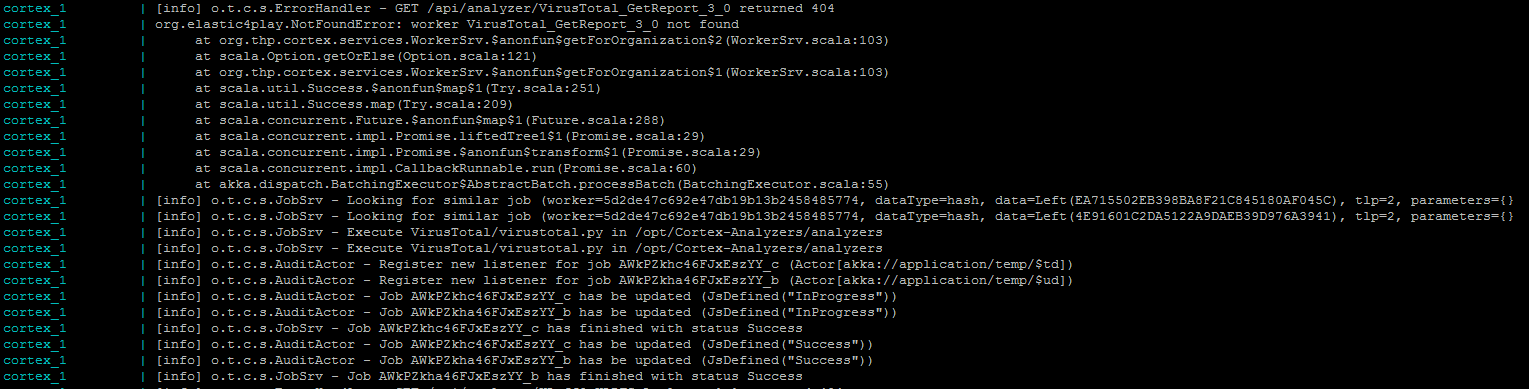
Got the same problem with cortex, @nadouani :
cortex_1 | [info] o.t.c.s.ErrorHandler - GET /api/analyzer/VirusTotal_GetReport_3_0 returned 404
cortex_1 | org.elastic4play.NotFoundError: worker VirusTotal_GetReport_3_0 not found
cortex_1 | at org.thp.cortex.services.WorkerSrv.$anonfun$getForOrganization$2(WorkerSrv.scala:103)
cortex_1 | at scala.Option.getOrElse(Option.scala:121)
cortex_1 | at org.thp.cortex.services.WorkerSrv.$anonfun$getForOrganization$1(WorkerSrv.scala:103)
cortex_1 | at scala.util.Success.$anonfun$map$1(Try.scala:251)
cortex_1 | at scala.util.Success.map(Try.scala:209)
cortex_1 | at scala.concurrent.Future.$anonfun$map$1(Future.scala:288)
cortex_1 | at scala.concurrent.impl.Promise.liftedTree1$1(Promise.scala:29)
cortex_1 | at scala.concurrent.impl.Promise.$anonfun$transform$1(Promise.scala:29)
cortex_1 | at scala.concurrent.impl.CallbackRunnable.run(Promise.scala:60)
i'm using the latest docker containers and my docker-compose.yml:
version: "2"
services:
  elasticsearch:
    image: docker.elastic.co/elasticsearch/elasticsearch:5.6.0
    environment:
      - http.host=0.0.0.0
      - transport.host=0.0.0.0
      - xpack.security.enabled=false
      - cluster.name=hive
      - script.inline=true
      - thread_pool.index.queue_size=100000
      - thread_pool.search.queue_size=100000
      - thread_pool.bulk.queue_size=100000
    ulimits:
      nofile:
        soft: 65536
        hard: 65536
  cortex:
    image: thehiveproject/cortex:latest
    depends_on:
      - elasticsearch
    ports:
      - "0.0.0.0:9001:9001"
    volumes:
      - /opt/docker/thehive/analyzers/Cortex-Analyzers:/opt/Cortex-Analyzers:ro
    command: --analyzer-path /opt/Cortex-Analyzers/analyzers/
    command: --responder-path /opt/Cortex-Analyzers/responders/
  thehive:
    image: thehiveproject/thehive:latest
    depends_on:
      - elasticsearch
      - cortex
    ports:
      - "0.0.0.0:9000:9000"
    command: --cortex-key MY_KEY_THERE
All analyzers work fine.
 tr0mb1r
on 21 Feb 2019
tr0mb1r
on 21 Feb 2019
curl -H 'Authorization: Bearer MY_API_KEY' 'http://localhost:9001/api/analyzer?range=all'
returns all analyzers, but when i'm trying to make next request:
curl -H 'Authorization: Bearer MY_API_KEY' 'http://localhost:9001/api/analyzer/VirusTotal_GetReport_3_0'
i'm getting error:
{"type":"NotFoundError","message":"worker VirusTotal_GetReport_3_0 not found"}
tr0mb1r
on 21 Feb 2019
I think you have to use the analyzer ID not its definition Id
nadouani
on 21 Feb 2019
make sure it's also enabled for the organisation which the API key belongs to
nadouani
on 21 Feb 2019
I think you have to use the analyzer ID not its definition Id
Yes it works fine this way.
make sure it's also enabled for the organisation which the API key belongs to
It's enabled (if it wasn't i couldn't start it from theHive) and the user is configured:

anyway i'm getting 404 Error in cortex logs when running analyzers from theHive
tr0mb1r
on 21 Feb 2019
seems like theHive makes GET request /api/analyzer/VirusTotal_GetReport_3_0 to analyzers definition ID instead of elastic ID. because after this error i see request to similar job:
[info] o.t.c.s.JobSrv - Looking for similar job (worker=5d2de47c692e47db19b13b2458485774, dataType=hash, data=Left(EA715502EB398BA8F21C845180AF045C), tlp=2, parameters={}
5d2de47c692e47db19b13b2458485774 is an ID of VirusTotal_GetReport_3_0 analyzer
tr0mb1r
on 21 Feb 2019
So the analyzer is listed in TheHive, but it fails with 404 when you run it?
nadouani
on 21 Feb 2019
So the analyzer is listed in TheHive, but it fails with 404 when you run it?
Analyzer doesn't fail it runs OK, but after alternative request that i showed above
tr0mb1r
on 21 Feb 2019
tr0mb1r
on 21 Feb 2019
Well, what's the problem then? The 404 INFO log? :)
nadouani
on 21 Feb 2019
anyway that's not a normal behavior :)
tr0mb1r
on 21 Feb 2019
It depends what do you mean by normal ;)
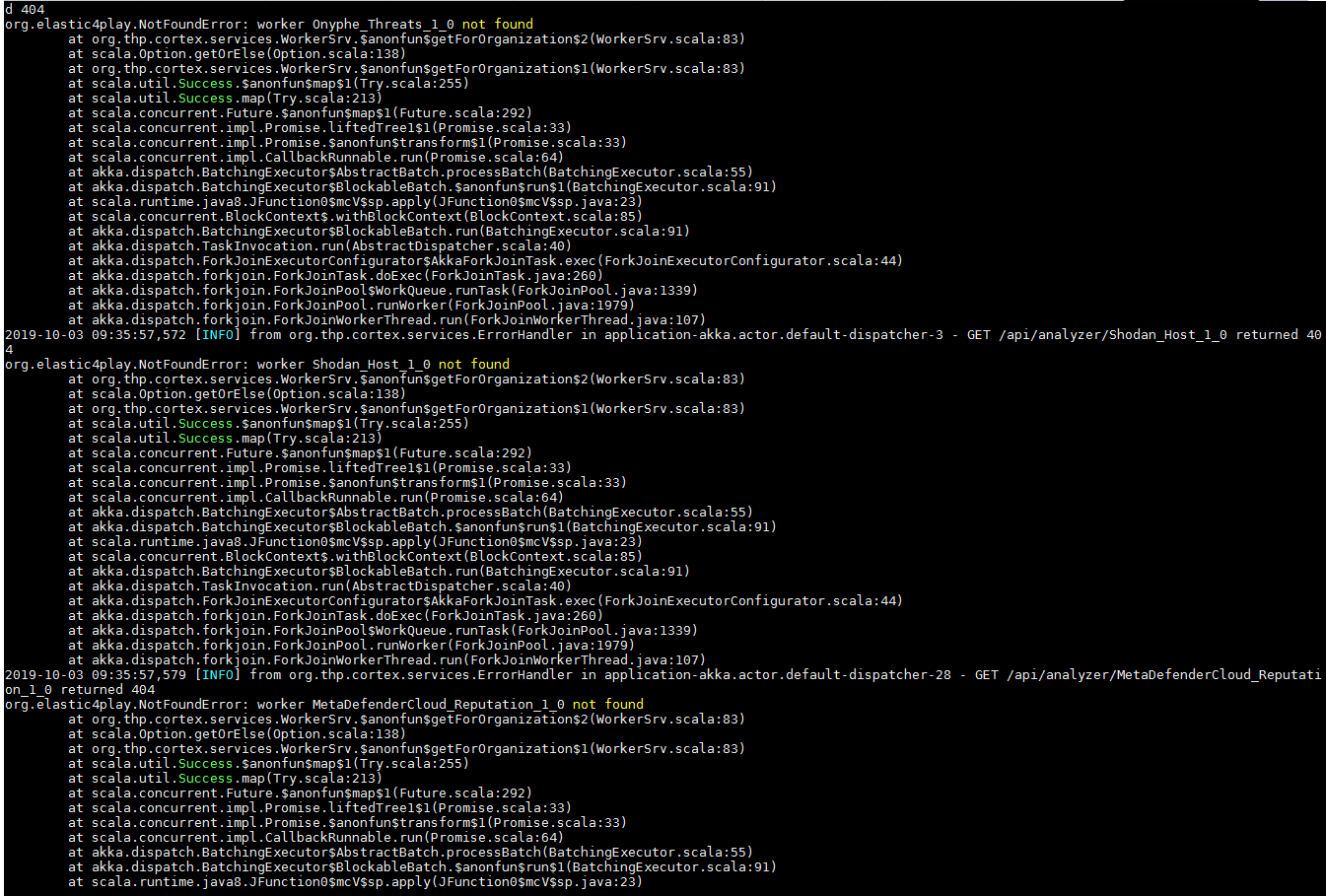
TheHive supports both Cortex 1 and Cortex 2, and for a backward compatibility reasons, TheHive tries the analyzer definition name (for Cortex 1) and if if gets a 404 it tries the internal ID (for Cortex 2)
Anyways, if you want to catch just errors, please make your Logs level to ERROR, so you don't get bothered by INFO stuff ;)
nadouani
on 21 Feb 2019
When you have a big amount of data that should be analyzed twinned requests will make Cortex cry, especially when you're getting Cortex version on a handshake with TheHive.
tr0mb1r
on 21 Feb 2019
If you have a big amount of data, you might thing of load balancing few cortex instances.
nadouani
on 21 Feb 2019
it won't solve twinned requests)
tr0mb1r
on 21 Feb 2019
Same issue. After starting FileInfo on a file observable, TheHive doesn't show its report. (Job's state in Cortex is "success"). Why?
 martinacen
on 16 Jun 2019
martinacen
on 16 Jun 2019
How to disable this behavior?
For example, with 1000 observables and 20 analyzers, cortex is going to try 40k queries instead 20k!
 garanews
on 3 Oct 2019
garanews
on 3 Oct 2019
Related issues
 UndecodedFuture
·
5Comments
UndecodedFuture
·
5Comments
 Passimist
·
4Comments
Passimist
·
4Comments
 torsolaso
·
6Comments
torsolaso
·
6Comments
 rhaist
·
4Comments
rhaist
·
4Comments
 zpriddy
·
3Comments
zpriddy
·
3Comments
Most helpful comment
It depends what do you mean by normal ;)
TheHive supports both Cortex 1 and Cortex 2, and for a backward compatibility reasons, TheHive tries the analyzer definition name (for Cortex 1) and if if gets a 404 it tries the internal ID (for Cortex 2)
Anyways, if you want to catch just errors, please make your Logs level to ERROR, so you don't get bothered by INFO stuff ;)