Thegreatsuspender: Suspended tabs show blockhead favicon on restart
Sometimes when restarting chrome after a crash or by 'continuing where i left off' some of the restored tabs that were suspended before previous shutdown will not load the proper 'faded' favicon.
Instead they will show the extension blockhead icon. Once these tabs are clicked, they will update to the correct favicon.

I think the problem has something to do with how chrome prioritises tab reloads on chrome restart. It seems to stagger the reloading of non-focused tabs trying to get the focussed tab fully functional first. It seems that for some of these background tabs, it never allows the javascript on the suspended page to run - this is what updates the favicon and page title.
But when you give one of these tabs focus, it then runs the page load javascript, and the favicon and title update as expected.
This bug happens very infrequently for me and is very hard to reproduce.
 deanoemcke
All 21 comments
Still happens for me on my old Win7 laptop with 8GB RAM and a few hundred tabs open across ~20 windows. Much less common on a newer machine. Perhaps it's the large number of windows part that is making it more common for me.

At least the tab title is correct with the 7.x branch, which wasn't always true with 6.30.
 fwextensions
on 22 Aug 2018
fwextensions
on 22 Aug 2018
@fwextensions sorry if i've already asked you this, but you're saying the icons stay like this permanently?
Because it happens to me exactly the same, except that _eventually_ they update to the proper icons. It maybe takes up to 2 minutes, depending on how many tabs I have open.
Also, that screenshot is from an older version. Have you tried the most recent update?
deanoemcke
on 23 Aug 2018
Yes, they stay that way throughout the session, and most after a restart as well. However, as soon as they're focused, the favicon does update.
The tabs in the screenshot were suspended with 7.0.72. I've been meaning to try the latest build on my personal laptop with 16GB RAM. I think it's a combination of lots of tabs, lots of windows, and lots of memory pressure.
All the tabs with the default icon seem to be in the discarded state, so that explains why they update when focused. This is different than 6.30, when the background page sometimes wouldn't be available and the title was just "Suspended Tab".
Actually, I wonder if tab discarding explains the suspended tabs with default icons. In other words, lots of tabs are suspended and then get discarded because of low memory. On relaunch, Chrome leaves the suspended.html tabs discarded, and assumes the TGS icon is the right one, since it is a TGS page. Then, because there are a lot of tabs and a lot of open windows with active tabs showing heavy pages (GDocs, etc.) and not enough memory, Chrome doesn't bother undiscarding those suspended pages. So the page is never loaded, the extension is never notified, and it never gets a chance to update the icon.
I supposed a workaround would be for TGS to check for discarded tabs sometime after launch, check each if it's suspended.html and its favicon is the TGS icon, then update the icon to the correct one.
fwextensions
on 23 Aug 2018
The fact that the favicon updates when it gains focus definitely confirms it's an issue with the javascript on the suspended tab not being run in the background. But is allowed to run once it gains focus. Although it's interesting that the title does update as this is also set via the same javascript. Perhaps the title is cached somehow.
Your theory about discarded tabs sounds mostly correct. I don't think that the discarded state of a tab before chrome is closed carries over to a restart, although it is highly likely that when restarting chrome under heavy memory pressure, some tabs are discarded before they have a chance to load.
On a related note, the latest version has a new feature which detects tab discarding, and instead suspends the tab. Although perhaps during startup, the discarding is happening before the extension has a chance to load and run the detection code.
Your idea about checking for discarded tabs after launch is a good lead. I'll have a play around and see what I can do. Although first I'll need to be able to reliably reproduce the issue :/
Perhaps a virtual machine with low memory will work.
deanoemcke
on 23 Aug 2018
Open the first 200 links on nytimes.com into tabs across 10 windows in a 4GB Win7 VM, and that'll probably do the trick. :)
fwextensions
on 23 Aug 2018
Just happened with version 109 installed from GitHub:
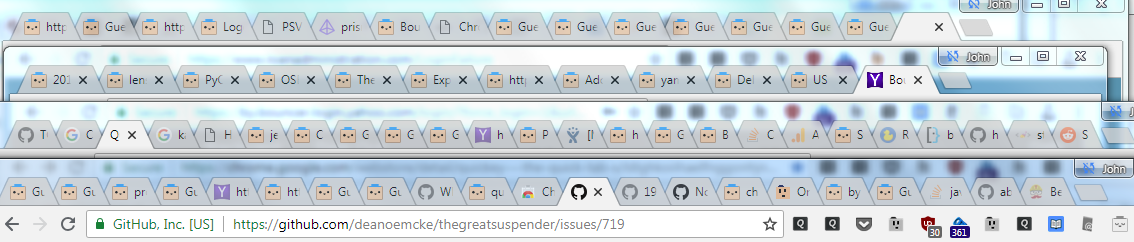
I'd set 109 to never suspend, but I guess the "suspend instantly when memory is low" option was set by default, and at some point I noticed it going through discarded tabs and suspending them. So I turned off that feature.
About an hour ago, I had to restart the OS and Chrome. I don't think I noticed the blockheads at first, because they didn't appear in the couple of windows I was using most. But just now, I noticed lots of tabs with correct titles but the faded out blockhead icon.
I have 361 tabs open, 277 of which are discarded, and 211 of those are pages suspended by v109. Win7, Chrome 68.
I pasted the log from v109 here, with URLs removed (it would probably be good to not print URLs to the console to make it easier for testers to share logs): https://gist.github.com/fwextensions/cf35acf781058a3fe24e52b3a20af2b9
I launched Chrome at 2:55pm, so it looks like it's missing the first 10 minutes after startup. One thing to notice is that it's setting a tabFlag on tab 1063 ~45 times in a row, and then getting 45 responses. This happens with some other tabs, like 921 (which happens to be this tab, strangely).
1063 is a tab that has an Enterprise Gdoc open, which I think we determined was blocking content scripts from being injected. So maybe that's causing the looping? (Though it's strange that it's getting a response if there was no script to respond, or perhaps it's in a weird state.)
fwextensions
on 28 Aug 2018
@fwextensions thanks for pointing out the bug with the "suspend instantly when memory is low" option if you have "time to suspend" set to never. when tabs are discarded in this situation it should not suspend the tab, as i don't want this feature to appear like a bug (ie. the never suspend option appears to not work).
i have also remove the logging of the tab url. although it may still appear as part of the change info object. in your logs these objects appear simply as 'object' which is unfortunate, as it makes it harder to debug. i'm not sure why your log prints like this? in mine it shows a serialised version of these objects.
investigating now why some of your tabs seem to be calling chrome.tabs.onUpdated so frequently..
deanoemcke
on 31 Aug 2018
I have managed to recreate this issue (by discarded on tabs on extension start) before doing the extension initialisation. I have committed some new code to force any suspended tabs that get discarded during startup to undiscard themselves. Hopefully this doesn't cause any performance issues (given that the tabs are only being discarded due to low memory).
Thanks for all your help with this one @fwextensions
deanoemcke
on 31 Aug 2018
Rather than setting the URL of the discarded tab, which will cause a Chrome process to fire up and load suspended.html, is it possible to just set the tab's favicon URL directly? Hmm. After poking around, I see that it's suspended.js that sets the favicon, and chrome.tabs.update() doesn't seem to let you set it, so maybe there's no way to change it from outside the page. Just seeing if there was a way to avoid loading the discarded page.
I noticed in the code that generates the transparent favicon, it will default to the blockhead if the URL is empty or the image is totally transparent. Is that what's causing the default icon to show? I wonder if the favicon sometimes just isn't available during startup, and so Chrome is returning an empty one. But maybe if the suspended page didn't set it to the default favicon, Chrome would later load the correct/cached one?
Re: logs, I think all those objects were live toggle-able objects in the console, but changed to "object" when the logs were copied. I think you'd have to explicitly serialize them to a string when calling console.log() to make them copyable as a string.
fwextensions
on 31 Aug 2018
@fwextensions my experience with copy/pasting in the logs is that the objects get properly serialized when you paste them into a text document. who knows why this does not happen with you.
as for the favicons. the favicon defined in suspended.html is the blockhead icon. therefore, when chrome navigates to that url, it will always show this icon first. it has nothing to do with whether the 'proper' favicon for the original site exists or is transparent etc.
as you pointed out, the swapping of the blockhead favicon for the 'proper' one happens in the javascript. if the tab is discarded before this javascript can run, then the favicon never gets updated.
the real problem is, once a tab is discarded, it is completely unreachable. it will not accept message requests. it does not even get returned with chrome.extension.getViews() which is supposed to return every open tab owned by the extension (which should be all suspended tabs).
the only way i can see to run that javascript is by reloading the tab (which is actually just the equivalent of suspending it, so it's not that bad).
also, this code is only run during extension initialisation. and it runs in such a way that the checking for discarded suspended tabs is staggered. so the tab will stay discarded for a few seconds at least, giving chrome it's wish of freeing up system resources when it needs them.
the one caveat to this however, is that you may still encounter the blockhead favicon issue if restoring a lot of suspended tabs outside of chrome restart. ie: restoring a lot of suspended tabs via a session manager.
deanoemcke
on 2 Sep 2018
Probably this isn't super helpful, since it's an old build, but I'd been running the 110 build from GitHub for awhile with no issues. IT just rebooted my Windows 10 laptop and after I logged in, Chrome eventually auto-started (maybe 30 seconds after login) and restored the previous session of about 240 tabs and 7 windows. All the suspended tabs showed blockhead favicons and didn't update on their own.
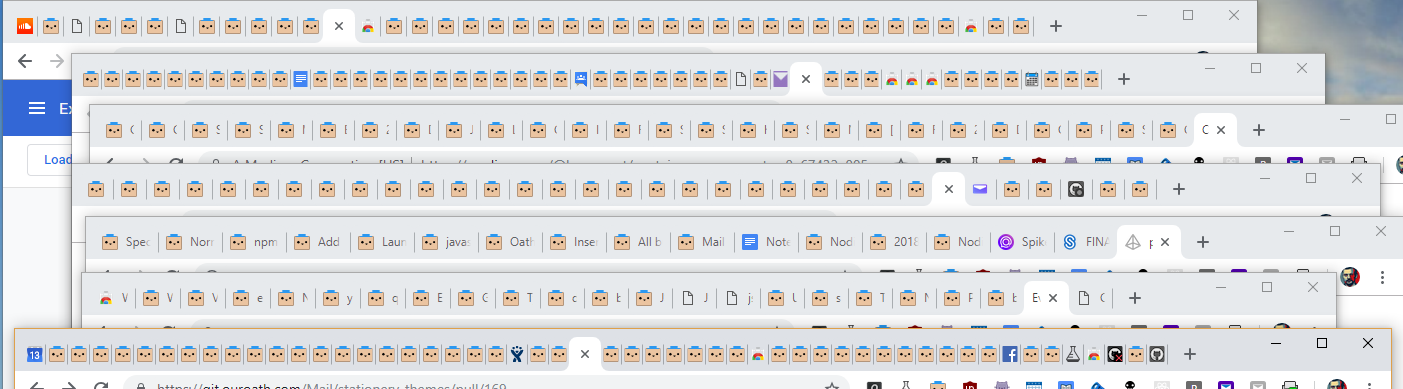
All the titles are fine and focusing the tab does fix up the favicon. It looks like maybe a few of the favicons updated after the auto-restart, but the vast majority didn't. I'd previously quit and restarted Chrome, and the favicons had updated in the background. What was different in this case was the forced restart, then login and auto-start of Chrome while other apps were also restarting.
Chrome Version 71.0.3578.98 (Official Build) (64-bit), Win 10 Enterprise, v1703, 16GB RAM
Gist of the console after the forced restart. Lots of tab initialization failures, as expected.
fwextensions
on 14 Dec 2018
I haven't restarted since the above, and now I'm noticing that tabs are getting suspended into a bad state, where it's just showing a blank suspended.html page, with the title just the URL. The console has "Could not establish connection. Receiving end does not exist." errors, looks like one for each suspended tab.
However, I just realized I'd pulled from upstream master, but didn't reload the extension, which is loaded from the unpacked /src folder. I'd assumed Chrome had already cached those for the extension, but maybe it's pulling in those new source files, which must be incompatible with what's in memory.
I refreshed the extension, and then remembered why I hadn't before: all the suspended tabs closed, which was a little terrifying. But v155 did recover all the tabs (I think) and all the blockhead icons were updated. So hopefully it won't happen again with this version.
fwextensions
on 15 Dec 2018
@fwextensions Thanks a lot for your report. Sorry about the scare, but thanks to your detailed account, I can confirm that it was indeed due to pulling master without restarting the extension.
the latest version (7.0.155) has done away with the suspended.js file completely, which is what all the older versions relied on to load the suspended tab.
i'm assuming that what happened to you will not happen to production users, given that an extension restart is forced when the code updates.
let me know if you encounter any more favicon issues. and i'm glad your tabs recovered correctly! you should also have a saved session that accompanies any new version update.
deanoemcke
on 18 Dec 2018
I also have this issue was going to report but saw it was already posted. I have to focus on the tab (I hold down ctrl+tab and scroll thru all of them)
 samboa86
on 27 Dec 2018
samboa86
on 27 Dec 2018
I haven't noticed any blockhead issues since 155. The only other issue was the wrong Gdocs icons, which is fixed in 159.
fwextensions
on 4 Jan 2019
@samboa86 can you please let me know the version of the extension you were using when you encountered the blockhead icon? and do you still have the same issue on the latest development version here on gitHub?
deanoemcke
on 26 Jan 2019
I'm on version 6.30, Chrome 73.0.3683.103, Win 10 with 16 GB of RAM.
Getting blockhead icon instead of favicon after restart AND during normal use (without restart).
 inside83
on 9 May 2019
inside83
on 9 May 2019
@deanoemcke I finally pulled the latest version (7.1.4) last week and have been running that. After a restart with ~450 tabs (probably 3/4 suspended) and 10 windows, almost all the icons updated. I did notice a line of maybe 10 in a row that still had the blockhead after all the other tabs updated. I didn't get a chance to report it then, but now a couple days later, I don't see the blockheads anymore. So it seems like they fixed themselves at some point. The icon handling seems pretty buttoned-up at this point. 👍
@inside83 That's a known bug in 6.30 which seems to have been fixed in the latest (unreleased) versions.
fwextensions
on 24 May 2019
Yeah, thank you for the reply.
I installed v7.1.0 and it's beyond great.
I'm just wondering why is not released yet.
inside83
on 24 May 2019
Updating TGS is tricky, because Chrome will close all of the suspended tabs when it updates, and then the extension has to reopen them all, so there's a potential for losing tabs. I think it's already rolled out to a bucket of users.
fwextensions
on 24 May 2019
This issue reproduces consistently for me in a 32-bit Chrome restoring 30 tabs on its startup (after a clean exit). Around 12 tabs are from white-listed sites and load normally, some of them quite heavy on memory. Other tabs expose un-dimmed TGS icon however long I wait.
Chrome 75.0 (32-bit, official build), TGS 7.1.0 (from Chrome Web Store).
How can I help better diagnose the issue?
2019-09-02: after the recent TGS-suggested update to v7.1.0 (hmm, why is the version number the same?), the issue no longer happens (Chrome 76.0). Thanks!
 HamRusTal
on 10 Jul 2019
HamRusTal
on 10 Jul 2019
Related issues
 geirman
·
4Comments
geirman
·
4Comments
 dumblob
·
4Comments
dumblob
·
4Comments
 codemedic
·
3Comments
codemedic
·
3Comments
 minig0d
·
4Comments
minig0d
·
4Comments
 ducc-coder
·
3Comments
ducc-coder
·
3Comments