Thegreatsuspender: Can no longer suspend Google Doc pages hosted on an Enterprise Gsuite instance
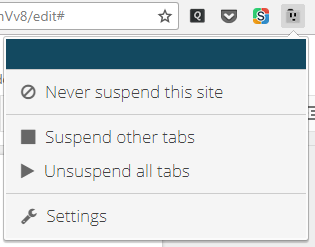
I initially had google.com on the whitelist and thought maybe this issue was related to that, but I'm no longer able to manually suspend Google Doc pages, even after removing Google from the whitelist. When I'm on a Google Doc page, the keyboard shortcuts don't work and I don't see Suspend this site in the extension menu anymore. The Great Suspender icon is greyed out.
I can suspend Google search pages, drive.google.com, and other pages, but not docs.google.com pages, nor chrome.google.com. I thought maybe it had something to do with the Do not suspend tabs that contain unsaved form inputs option, but unchecking that had no effect. This is extremely frustrating, because it used to work and Google Docs can use a lot of RAM, so it's helpful to be able to temporarily suspend them.
This is what the menu looks like when it's not working:
 fwextensions
All 16 comments
There are two separate issues here.
The first is docs.google.com. This should work and does for me under v6.30. What happens if you right click on the extension icon and select 'Inspect Popup' ? Do you see any red errors in the console? Perhaps a simple chrome restart will fix this issue. Or even closing the tab and reopening it?
Secondly, the url chrome.google.com. This is a special case url that cannot be suspended. The reason for this is that this is the url that the webstore operates on, and chrome does not allow extensions to interact with these pages for security reasons. See this issue for more info: https://github.com/deanoemcke/thegreatsuspender/issues/302
Let me know if you're still having issues with the first case, and what errors (if any) you are seeing when you debug the popup menu.
 deanoemcke
on 23 Oct 2017
deanoemcke
on 23 Oct 2017
Yes, the Gdocs issue is still there with v6.30. I don't see any errors in the console when inspecting the extension.
If I click the button while a large doc is loading, the menu looks normal:
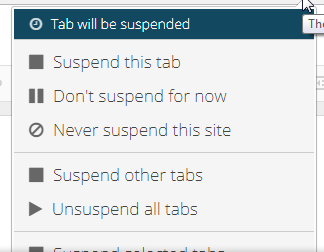
Then at some point during the load, the menu switches to the one shown above. Closing and reopening the tab produces the same result.
fwextensions
on 23 Oct 2017
Ah, this seems to be happening only with documents that are hosted on our company's Gsuite instance, which is almost all I use Gdocs for. In a personal account, I can suspend a document. This used to work with internal docs as well, however.
Could something about the security settings have changed to block extensions? How does the extension know it can't interact with a page like chrome.google.com? I'm wondering if as the page loads, something about the code tells Chrome to lock out extensions.
fwextensions
on 23 Oct 2017
The chrome.google.com special case is handled by checking for that exact domain.
Can you please post a full url example of one of the docs that cant be suspended? You can change it for anonymity, but I am mainly wanting to see the protocol and domain parts of the url.
Also, could you try checking the actual (google docs) page that fails to suspend for errors in the console.
deanoemcke
on 24 Oct 2017
It's the same https://docs.google.com/document/d/<hash>/edit format for both internal and public docs.
There are a few font-related errors in the Gdoc console, like: GET filesystem:https://docs.google.com/persistent/docs/fonts/2Dm66NBhgsbJgMaLaomyEQ.woff2 net::ERR_FILE_NOT_FOUND. But nothing else.
I tried the handy Copytables extension in a personal Gdoc in an incognito tab and in an enterprise doc. It was able to find the table in the personal doc but not the enterprise one. It also didn't respond to alt-dragging to select like it did in the personal account. That implies to me it could not install its content scripts in the enterprise doc page.
I haven't found anything that directly covers controlling access to Gdocs for generic Chrome extensions, but there is this page about controlling access for third-party apps that use the Drive API in enterprise installations: https://support.google.com/a/answer/6105699?hl=en
fwextensions
on 24 Oct 2017
Definitely looks like the extension isn't getting loaded for the internal docs. This is the console filter in a normal, public Gdoc:
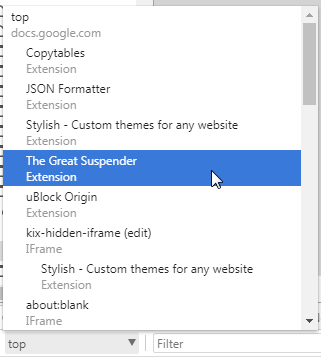
And this is the one in the enterprise doc:
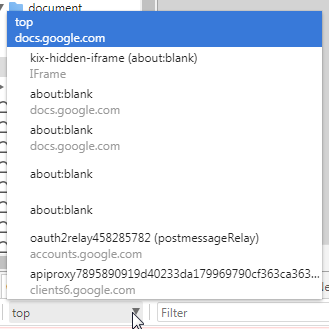
Looks like maybe Chrome is redirecting the extension pages to about:blank?
fwextensions
on 24 Oct 2017
Does the extension need to have access to the page code itself? I just modified an extension of mine that only has tab and history permissions to redirect a selected tab to chrome-extension://klbibkeccnjlkjkiokjodocebajanakg/suspended.html#ttl=${encodeURIComponent(tab.title)}&uri=${tab.url} (I can't seem to get back-ticks to appear in the comment, but assume they're there). That produced the normal suspended page for an internal Gdoc (though it didn't include the title for some reason):
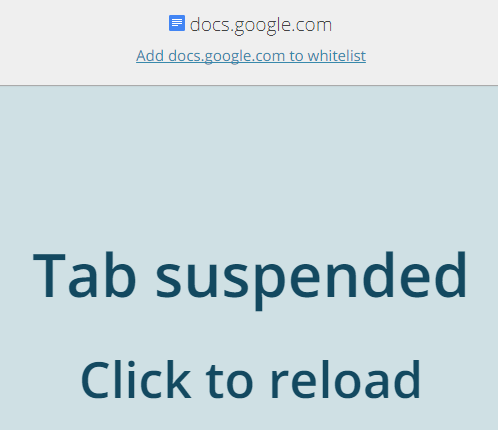
Clicking that page would unsuspend the page just like it would for a normal page. So it seems like the "edit any page you visit" permission is what is blocking The Great Suspender from loading on locked-down Gdoc pages, but just having the tabs permission (and maybe history) is enough to redirect a tab to the suspended state.
fwextensions
on 24 Oct 2017
My best guess would be as you said, that something has changed about google docs to prevent extensions from operating.
Do you have some kindof google drive extension or app installed?
It will be pretty hard to make progress on this as I don't have access to an enterprise google account to test against.
deanoemcke
on 24 Oct 2017
Regarding your last comment (it just loaded for me):
That test you performed may be a bit misleading. Was the page you redirected a problematic google docs page? And how did you do the redirection?
What happens if you try something like this?
chrome.tabs.query({url: 'docs.google.com'}, function (tabs) {
  var tab = tabs[0];
  chrome.tabs.update(tab.id, {url: `chrome-extension://klbibkeccnjlkjkiokjodocebajanakg/suspended.html#ttl=${encodeURIComponent(tab.title)}&uri=${tab.url}`}, function (result) { console.log(result); });
}
The reason the suspended tab you're seeing does not have a title is because there is no database entry representing the suspended tab you're referencing with the url. And notice the favicon is not a 'suspended' version of the favicon, it's just the fallback favicon found by appending 'chrome://favicon/' before the url.
deanoemcke
on 24 Oct 2017
Yup, it was an enterprise doc and I called update() just like you show. I modified my QuicKey extension to suspend the selected tab on shift-enter, instead of unsuspending suspended tabs like it normally does. It was able to suspend a chrome.google.com page as well, though again without the right title and favicon:
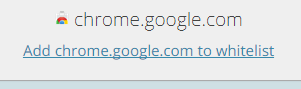
I think what's happening is that the injected content script isn't getting injected, or gets removed at some point during the Gdoc load. So when the background page calls requestTabInfoFromContentScript(), it doesn't get anything back, so the tab's status is "unknown", which causes the suspend menu item to be hidden.
I haven't dug into what the content script does, but I assume it's tracking activity and creating timers to trigger suspension after inactivity. I think a workaround for when the script isn't injected would be to simply leave the suspend menu item available, so that the tab can be manually suspended even if it won't auto-suspend. That would be a huge help in my case.
There may still be ways for the background page to auto-suspend tabs by tracking when they're unfocused and starting timers for them. It may not be as fine-grained as what the content script does, and you wouldn't be able to prevent it when text fields are being edited, but it might be something.
fwextensions
on 24 Oct 2017
Cool, thanks for all your help with this. I've made some changes to the upcoming release that will allow for basic suspend and popup functionality even when the content script is unresponsive.
You will now be able to suspend or whitelist a tab without needing a content script. But auto-suspend won't work as the timer is in the content script and I do not want to duplicate this logic in the background process.
deanoemcke
on 25 Oct 2017
Thanks! It'll be great to have that functionality back.
BTW, if I loaded the unpacked extension locally, would it read/write from the same local storage and handle the existing suspended tabs? I'd be happy to help debug things, but wouldn't want to lose all ~150 suspended tabs.
fwextensions
on 25 Oct 2017
Installing locally will give you a new extension id. That means a completely separate local storage and so a different set of options and session history.
You can run both versions at the same time, but it gets confusing as to which extension is doing what.
If you disable the webstore version, all of your suspended tabs will disappear. So you'll need to uninstall them first. I recommend installing session buddy to be safe, and save your session before uninstalling.
Let me know if i haven't been clear about any of this.
deanoemcke
on 26 Oct 2017
Uninstall? Do you mean unsuspend the tabs? I think I'd probably just run both and deal with the confusion. Maybe turn off auto-suspend in the unpacked copy to reduce the overlap between then.
fwextensions
on 26 Oct 2017
Yep, he meant unsuspend
On Fri, 27 Oct 2017 at 5:48 AM, John Dunning notifications@github.com
wrote:
Uninstall? Do you mean unsuspend the tabs? I think I'd probably just run
both and deal with the confusion. Maybe turn off auto-suspend in the
unpacked copy to reduce the overlap between then.—
You are receiving this because you are subscribed to this thread.
Reply to this email directly, view it on GitHub
https://github.com/deanoemcke/thegreatsuspender/issues/591#issuecomment-339727757,
or mute the thread
https://github.com/notifications/unsubscribe-auth/ABFQeXUEA6QOLmsVK7TUA2k64HhrW6EWks5swLdHgaJpZM4PVfbU
.
 liamjohnston
on 26 Oct 2017
liamjohnston
on 26 Oct 2017
Just wanted to confirm that suspending works again with Enterprise Gsuite docs.
fwextensions
on 18 Dec 2018
Related issues
 elig0n
·
4Comments
elig0n
·
4Comments
 ducc-coder
·
3Comments
ducc-coder
·
3Comments
 hzhongmj
·
4Comments
hzhongmj
·
4Comments
 squidbe
·
4Comments
squidbe
·
4Comments
 jimlynch22
·
4Comments
jimlynch22
·
4Comments