Theano: how i can downgrade to theano 0.9 version from 0.10
Sir i recently installed theano bleeding edge version with cuda 9 but i am unable to use gpu. Previously i was using theano version 0.9 and it was working fine with device=gpu.
It throws the following error.
Can not use cuDNN on context None: cannot compile with cuDNN. We got this error:
c:\users\acer\appdata\local\temp\try_flags_ocijig.c:4:19: fatal error: cudnn.h: No such file or directory
compilation terminated.
ERROR (theano.gpuarray): Could not initialize pygpu, support disabled
I cant use cuDNN as the compute capability of my gpu is 2.1. Kindly help me out how i can downgrade to theano 0.9 version from 0.10.
 Rabia-Noureen
All 26 comments
Did you follow the instruction on this page to use the new back-en https://github.com/Theano/Theano/wiki/Converting-to-the-new-gpu-back-end%28gpuarray%29 ?
Which version of Theano 0.10 do you have? There isn't yet a final 0.10 version.
Can you give the full stack trace? Normally, this should just disable cudnn (and maybe print a warning about that). It should not make Theano crash.
With that, you should be able to use the new Theano.
 nouiz
on 27 Sep 2017
nouiz
on 27 Sep 2017
Yes i think i have followed all the instructions and i was trying to run check_blas.py in order to test the gpu:
https://raw.githubusercontent.com/Theano/Theano/master/theano/misc/check_blas.py
I have theano version as shown below

The full error is
(env_name27) C:\Users\Acer>python check_blas.py
Can not use cuDNN on context None: cannot compile with cuDNN. We got this error:
c:\users\acer\appdata\local\temp\try_flags_oob7dp.c:4:19: fatal error: cudnn.h: No such file or directory
compilation terminated.
ERROR (theano.gpuarray): Could not initialize pygpu, support disabled
Traceback (most recent call last):
File "C:\Users\Acer\AppData\Roaming\Python\Python27\site-packages\theano\gpuarray__init__.py", line 220, in
use(config.device)
File "C:\Users\Acer\AppData\Roaming\Python\Python27\site-packages\theano\gpuarray__init__.py", line 207, in use
init_dev(device, preallocate=preallocate)
File "C:\Users\Acer\AppData\Roaming\Python\Python27\site-packages\theano\gpuarray__init__.py", line 152, in init_dev
pygpu.blas.gemm(0, tmp, tmp, 0, tmp, overwrite_c=True)
File "pygpu\blas.pyx", line 149, in pygpu.blas.gemm
File "pygpu\blas.pyx", line 47, in pygpu.blas.pygpu_blas_rgemm
GpuArrayException: ('nvrtcCompileProgram: NVRTC_ERROR_INVALID_OPTION', 3)
    Some results that you can compare against. They were 10 executions
    of gemm in float64 with matrices of shape 2000x2000 (M=N=K=2000).
    All memory layout was in C order.

    CPU tested: Xeon E5345(2.33Ghz, 8M L2 cache, 1333Mhz FSB),
                Xeon E5430(2.66Ghz, 12M L2 cache, 1333Mhz FSB),
                Xeon E5450(3Ghz, 12M L2 cache, 1333Mhz FSB),
                Xeon X5560(2.8Ghz, 12M L2 cache, hyper-threads?)
                Core 2 E8500, Core i7 930(2.8Ghz, hyper-threads enabled),
                Core i7 950(3.07GHz, hyper-threads enabled)
                Xeon X5550(2.67GHz, 8M l2 cache?, hyper-threads enabled)


    Libraries tested:
        * numpy with ATLAS from distribution (FC9) package (1 thread)
        * manually compiled numpy and ATLAS with 2 threads
        * goto 1.26 with 1, 2, 4 and 8 threads
        * goto2 1.13 compiled with multiple threads enabled

                      Xeon   Xeon   Xeon  Core2 i7    i7     Xeon   Xeon
    lib/nb threads    E5345  E5430  E5450 E8500 930   950    X5560  X5550

    numpy 1.3.0 blas                                                775.92s
    numpy_FC9_atlas/1 39.2s  35.0s  30.7s 29.6s 21.5s 19.60s
    goto/1            18.7s  16.1s  14.2s 13.7s 16.1s 14.67s
    numpy_MAN_atlas/2 12.0s  11.6s  10.2s  9.2s  9.0s
    goto/2             9.5s   8.1s   7.1s  7.3s  8.1s  7.4s
    goto/4             4.9s   4.4s   3.7s  -     4.1s  3.8s
    goto/8             2.7s   2.4s   2.0s  -     4.1s  3.8s
    openblas/1                                        14.04s
    openblas/2                                         7.16s
    openblas/4                                         3.71s
    openblas/8                                         3.70s
    mkl 11.0.083/1            7.97s
    mkl 10.2.2.025/1                                         13.7s
    mkl 10.2.2.025/2                                          7.6s
    mkl 10.2.2.025/4                                          4.0s
    mkl 10.2.2.025/8                                          2.0s
    goto2 1.13/1                                                     14.37s
    goto2 1.13/2                                                      7.26s
    goto2 1.13/4                                                      3.70s
    goto2 1.13/8                                                      1.94s
    goto2 1.13/16                                                     3.16s

    Test time in float32. There were 10 executions of gemm in
    float32 with matrices of shape 5000x5000 (M=N=K=5000)
    All memory layout was in C order.


    cuda version      8.0    7.5    7.0
    gpu
    M40               0.45s  0.47s
    k80               0.92s  0.96s
    K6000/NOECC       0.71s         0.69s
    P6000/NOECC       0.25s

    Titan X (Pascal)  0.28s
    GTX Titan X       0.45s  0.45s  0.47s
    GTX Titan Black   0.66s  0.64s  0.64s
    GTX 1080          0.35s
    GTX 980 Ti               0.41s
    GTX 970                  0.66s
    GTX 680                         1.57s
    GTX 750 Ti               2.01s  2.01s
    GTX 750                  2.46s  2.37s
    GTX 660                  2.32s  2.32s
    GTX 580                  2.42s
    GTX 480                  2.87s
    TX1                             7.6s (float32 storage and computation)
    GT 610                          33.5s
Some Theano flags:
blas.ldflags= -LC:\Users\Acer\Anaconda2\Library\bin -lmkl_rt
compiledir= C:\Users\Acer\AppData\Local\Theano\compiledir_Windows-10-10.0.10240-Intel64_Family_6_Model_58_Stepping_9_GenuineIntel-2.7.13-64
floatX= float32
device= cuda
Some OS information:
sys.platform= win32
sys.version= 2.7.13 |Anaconda 4.4.0 (64-bit)| (default, May 11 2017, 13:17:26) [MSC v.1500 64 bit (AMD64)]
sys.prefix= C:\Users\Acer\Anaconda2\envs\env_name27
Some environment variables:
MKL_NUM_THREADS= None
OMP_NUM_THREADS= None
GOTO_NUM_THREADS= None
Numpy config: (used when the Theano flag "blas.ldflags" is empty)
atlas_3_10_blas_threads_info:
libraries = ['numpy-atlas']
library_dirs = ['C:\projects\numpy-wheels\windows-wheel-builder\atlas-builds\atlas-3.11.38-sse2-64\lib']
define_macros = [('HAVE_CBLAS', None), ('ATLAS_INFO', '"\"None\""')]
language = c
lapack_opt_info:
libraries = ['numpy-atlas', 'numpy-atlas']
library_dirs = ['C:\projects\numpy-wheels\windows-wheel-builder\atlas-builds\atlas-3.11.38-sse2-64\lib']
define_macros = [('ATLAS_INFO', '"\"None\""')]
language = f77
blas_opt_info:
libraries = ['numpy-atlas']
library_dirs = ['C:\projects\numpy-wheels\windows-wheel-builder\atlas-builds\atlas-3.11.38-sse2-64\lib']
define_macros = [('HAVE_CBLAS', None), ('ATLAS_INFO', '"\"None\""')]
language = c
openblas_info:
NOT AVAILABLE
blis_info:
NOT AVAILABLE
openblas_lapack_info:
NOT AVAILABLE
atlas_3_10_threads_info:
libraries = ['numpy-atlas', 'numpy-atlas']
library_dirs = ['C:\projects\numpy-wheels\windows-wheel-builder\atlas-builds\atlas-3.11.38-sse2-64\lib']
define_macros = [('ATLAS_INFO', '"\"None\""')]
language = f77
lapack_mkl_info:
NOT AVAILABLE
blas_mkl_info:
NOT AVAILABLE
Numpy dot module: numpy.core.multiarray
Numpy location: C:\Users\Acer\Anaconda2\envs\env_name27\lib\site-packages\numpy__init__.pyc
Numpy version: 1.13.1
We executed 10 calls to gemm with a and b matrices of shapes (5000, 5000) and (5000, 5000).
Total execution time: 133.37s on CPU (with direct Theano binding to blas).
Try to run this script a few times. Experience shows that the first time is not as fast as followings calls. The difference is not big, but consistent.
and my theanorc file is
[global]
floatx = float32
cxx = C:\Users\Acer\Anaconda2\envs\env_name27\Library\mingw-w64\bin\g++.exe
mode = FAST_RUN
device = cuda
[blas]
ldflags = -LC:\Users\Acer\Anaconda2\Library\bin -lmkl_rt
[gcc]
cxxflags = -LC:\Users\Acer\Anaconda2\envs\env_name27\Library\mingw-w64\include -LC:\Users\Acer\Anaconda2\envs\env_name27\Library\mingw-w64\lib -lm
[nvcc]
flags=--cl-version=2012 -D_FORCE_INLINES
[lib]
cnmem=0.70
Rabia-Noureen
on 27 Sep 2017
Kindly help me out i am stuck with this issue or suggest me how to down grade to theano 0.9 bleeding edge development version....
Rabia-Noureen
on 28 Sep 2017
Hi @Rabia-Noureen , if you want to downgrade to theano 0.9, you can:
1) run pip uninstall theano some couple of times, until all theano versions are uninstalled.
2) then install theano through conda (I guess you use a conda environment ?) with conda install theano=0.9
 notoraptor
on 28 Sep 2017
notoraptor
on 28 Sep 2017
@notoraptor thanks for your response. Yes i have conda but i want bleeding edge development version so conda install theano=0.9 will install that?
Rabia-Noureen
on 28 Sep 2017
It will install the conda package for theano 0.9.
If you want the bleeding-edge version of theano 0.9, you can instead use pip:
pip install git+https://github.com/theano/[email protected]
But this branch is not more developed. Also, installing via conda will automatically install all dependencies for you, so I strongly suggest you use conda installation.
About the last theano development version (version 0.10 from master branch), it seems there was a bug with pygpu on Windows related to NVRTC, as shown in your post above. I am not sure it is already fixed.
notoraptor
on 28 Sep 2017
@notoraptor I just installed theano 0.9 using conda install theano=0.9 and i got this error while running the file

my theanorc file is
[global]
floatx = float32
cxx = C:\Users\Acer\Anaconda2\envs\env_name27\Library\mingw-w64\bin\g++.exe
mode = FAST_RUN
device = gpu
[blas]
ldflags = -LC:\Users\Acer\Anaconda2\Library\bin -lmkl_rt
[gcc]
cxxflags = -LC:\Users\Acer\Anaconda2\envs\env_name27\Library\mingw-w64\include -LC:\Users\Acer\Anaconda2\envs\env_name27\Library\mingw-w64\lib -lm
[nvcc]
flags=--cl-version=2012 -D_FORCE_INLINES
[lib]
cnmem=0.70
Rabia-Noureen
on 28 Sep 2017
Could you use the new backend instead ? In your .theanorc, replace
device=gpu
with
device=cuda
and also add another section:
[cuda]
enabled=False
Then check if everything runs.
notoraptor
on 28 Sep 2017
I have made the changes mentioned above but i got this error and my code ran on cpu

then i tried to update pygpu i got
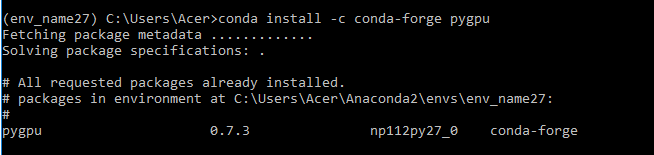
Previously using device=gpu was working fine on bleeding edge development version 0.9 until now when i made the fresh installations for windows and anaconda.
Rabia-Noureen
on 28 Sep 2017
Theano 0.9 requires pygpu 0.6*. Run:
conda remove pygpu
conda install pygpu=0.6
@notoraptor thanks alot for being supportive.I uninstalled theano and pygpu and again installed theano 0.9 that installed pygpu 0.6.9 and now it says

I have not restarted my system after the installation.
Rabia-Noureen
on 28 Sep 2017
I have not downloaded cudnn because my gpu GT 620 does not have the computation capability required.
Rabia-Noureen
on 28 Sep 2017
Are you sure you now use pygpu 0,6 ? Can you check it via python -c "import pygpu; print(pygpu.__version__)" ?
If so, it will be really strange.
notoraptor
on 28 Sep 2017
That is

Rabia-Noureen
on 28 Sep 2017
Ok, so it will be hard to debug. And that means it is not related to theano version, as it happens with 0.10* too.
Not sure if it will change something, but could you try with cuda 8 instead of cuda 9 ?
notoraptor
on 28 Sep 2017
Previously i was using cuda_6.5.14_windows_notebook_32. Then i will try to uninstall cuda 9 and try with cuda 8. It means my issue with also theano version 0.10 also cannot be solved?
Rabia-Noureen
on 28 Sep 2017
Maybe with latest theano master branch, but I can't give guarantee. I am not currently on Windows, so I can't test. Normally, everything should work with theano 0.9 (and with new back-end), as it is a stable version released some months ago. So, may be it is related to dependencies.
If you try the latest theano master branch (0.10), don't forget that:
- theano 0.10 requires pygpu 0.7* . Latest pygpu can be installed from here: https://anaconda.org/mila-udem/pygpu
- theano 0.9 requires pygpu 0.6* (not 0.7 as there are API changes). It can be installed from conda default packages.
notoraptor
on 28 Sep 2017
Okay thanks for your time i will try different alternative if something works. Thanks again
Rabia-Noureen
on 28 Sep 2017
A GPU 620 will probably be slower then your CPU. Do you really want to use
it?
Also, we won't support Theano 0.9 anymore. I won't recommand that you use
it. I think using the lastest dev version (that is very close to the
bleeding edge) is probably better for you for this, you can do:
conda install -c mila-udem/label/pre theano
On Wed, Sep 27, 2017 at 9:57 AM Rabia-Noureen notifications@github.com
wrote:
Yes i think i have followed all the instructions and i was trying to run
check_blas.py in order to test the gpu:https://raw.githubusercontent.com/Theano/Theano/master/theano/misc/check_blas.py
I have theano version as shown below
[image: image]
https://user-images.githubusercontent.com/29410483/30917303-20e97c00-a3b5-11e7-979a-a36229ca97f8.pngThe full error is
(env_name27) C:\Users\Acer>python check_blas.py
Can not use cuDNN on context None: cannot compile with cuDNN. We got this
error:
c:\users\acer\appdata\local\temp\try_flags_oob7dp.c:4:19: fatal error:
cudnn.h: No such file or directory
compilation terminated.ERROR (theano.gpuarray): Could not initialize pygpu, support disabled
Traceback (most recent call last):
File
"C:\Users\Acer\AppData\Roaming\Python\Python27\site-packages\theano\gpuarray_
init_.py", line 220, in
use(config.device)
File
"C:\Users\Acer\AppData\Roaming\Python\Python27\site-packages\theano\gpuarray_
init_.py", line 207, in use
init_dev(device, preallocate=preallocate)
File
"C:\Users\Acer\AppData\Roaming\Python\Python27\site-packages\theano\gpuarray_
init_.py", line 152, in init_dev
pygpu.blas.gemm(0, tmp, tmp, 0, tmp, overwrite_c=True)
File "pygpu\blas.pyx", line 149, in pygpu.blas.gemm
File "pygpu\blas.pyx", line 47, in pygpu.blas.pygpu_blas_rgemm
GpuArrayException: ('nvrtcCompileProgram: NVRTC_ERROR_INVALID_OPTION', 3)Some results that you can compare against. They were 10 executions of gemm in float64 with matrices of shape 2000x2000 (M=N=K=2000). All memory layout was in C order. CPU tested: Xeon E5345(2.33Ghz, 8M L2 cache, 1333Mhz FSB), Xeon E5430(2.66Ghz, 12M L2 cache, 1333Mhz FSB), Xeon E5450(3Ghz, 12M L2 cache, 1333Mhz FSB), Xeon X5560(2.8Ghz, 12M L2 cache, hyper-threads?) Core 2 E8500, Core i7 930(2.8Ghz, hyper-threads enabled), Core i7 950(3.07GHz, hyper-threads enabled) Xeon X5550(2.67GHz, 8M l2 cache?, hyper-threads enabled) Libraries tested: * numpy with ATLAS from distribution (FC9) package (1 thread) * manually compiled numpy and ATLAS with 2 threads * goto 1.26 with 1, 2, 4 and 8 threads * goto2 1.13 compiled with multiple threads enabled Xeon Xeon Xeon Core2 i7 i7 Xeon Xeon lib/nb threads E5345 E5430 E5450 E8500 930 950 X5560 X5550 numpy 1.3.0 blas 775.92s numpy_FC9_atlas/1 39.2s 35.0s 30.7s 29.6s 21.5s 19.60s goto/1 18.7s 16.1s 14.2s 13.7s 16.1s 14.67s numpy_MAN_atlas/2 12.0s 11.6s 10.2s 9.2s 9.0s goto/2 9.5s 8.1s 7.1s 7.3s 8.1s 7.4s goto/4 4.9s 4.4s 3.7s - 4.1s 3.8s goto/8 2.7s 2.4s 2.0s - 4.1s 3.8s openblas/1 14.04s openblas/2 7.16s openblas/4 3.71s openblas/8 3.70s mkl 11.0.083/1 7.97s mkl 10.2.2.025/1 13.7s mkl 10.2.2.025/2 7.6s mkl 10.2.2.025/4 4.0s mkl 10.2.2.025/8 2.0s goto2 1.13/1 14.37s goto2 1.13/2 7.26s goto2 1.13/4 3.70s goto2 1.13/8 1.94s goto2 1.13/16 3.16s Test time in float32. There were 10 executions of gemm in float32 with matrices of shape 5000x5000 (M=N=K=5000) All memory layout was in C order. cuda version 8.0 7.5 7.0 gpu M40 0.45s 0.47s k80 0.92s 0.96s K6000/NOECC 0.71s 0.69s P6000/NOECC 0.25s Titan X (Pascal) 0.28s GTX Titan X 0.45s 0.45s 0.47s GTX Titan Black 0.66s 0.64s 0.64s GTX 1080 0.35s GTX 980 Ti 0.41s GTX 970 0.66s GTX 680 1.57s GTX 750 Ti 2.01s 2.01s GTX 750 2.46s 2.37s GTX 660 2.32s 2.32s GTX 580 2.42s GTX 480 2.87s TX1 7.6s (float32 storage and computation) GT 610 33.5sSome Theano flags:
blas.ldflags= -LC:\Users\Acer\Anaconda2\Library\bin -lmkl_rt
compiledir=
C:\Users\Acer\AppData\Local\Theano\compiledir_Windows-10-10.0.10240-Intel64_Family_6_Model_58_Stepping_9_GenuineIntel-2.7.13-64
floatX= float32
device= cuda
Some OS information:
sys.platform= win32
sys.version= 2.7.13 |Anaconda 4.4.0 (64-bit)| (default, May 11 2017,
13:17:26) [MSC v.1500 64 bit (AMD64)]
sys.prefix= C:\Users\Acer\Anaconda2\envs\env_name27
Some environment variables:
MKL_NUM_THREADS= None
OMP_NUM_THREADS= None
GOTO_NUM_THREADS= NoneNumpy config: (used when the Theano flag "blas.ldflags" is empty)
atlas_3_10_blas_threads_info:
libraries = ['numpy-atlas']
library_dirs =
['C:\projects\numpy-wheels\windows-wheel-builder\atlas-builds\atlas-3.11.38-sse2-64\lib']
define_macros = [('HAVE_CBLAS', None), ('ATLAS_INFO', '"\"None\""')]
language = c
lapack_opt_info:
libraries = ['numpy-atlas', 'numpy-atlas']
library_dirs =
['C:\projects\numpy-wheels\windows-wheel-builder\atlas-builds\atlas-3.11.38-sse2-64\lib']
define_macros = [('ATLAS_INFO', '"\"None\""')]
language = f77
blas_opt_info:
libraries = ['numpy-atlas']
library_dirs =
['C:\projects\numpy-wheels\windows-wheel-builder\atlas-builds\atlas-3.11.38-sse2-64\lib']
define_macros = [('HAVE_CBLAS', None), ('ATLAS_INFO', '"\"None\""')]
language = c
openblas_info:
NOT AVAILABLE
blis_info:
NOT AVAILABLE
openblas_lapack_info:
NOT AVAILABLE
atlas_3_10_threads_info:
libraries = ['numpy-atlas', 'numpy-atlas']
library_dirs =
['C:\projects\numpy-wheels\windows-wheel-builder\atlas-builds\atlas-3.11.38-sse2-64\lib']
define_macros = [('ATLAS_INFO', '"\"None\""')]
language = f77
lapack_mkl_info:
NOT AVAILABLE
blas_mkl_info:
NOT AVAILABLE
Numpy dot module: numpy.core.multiarray
Numpy location:
C:\Users\Acer\Anaconda2\envs\env_name27\lib\site-packages\numpy_init
_.pyc
Numpy version: 1.13.1We executed 10 calls to gemm with a and b matrices of shapes (5000, 5000)
and (5000, 5000).Total execution time: 133.37s on CPU (with direct Theano binding to blas).
Try to run this script a few times. Experience shows that the first time
is not as fast as followings calls. The difference is not big, but
consistent.and my theanorc file is
[global]
floatx = float32
cxx = C:\Users\Acer\Anaconda2\envs\env_name27\Library\mingw-w64\bin\g++.exe
mode = FAST_RUN
device = cuda[blas]
ldflags = -LC:\Users\Acer\Anaconda2\Library\bin -lmkl_rt[gcc]
cxxflags =
-LC:\Users\Acer\Anaconda2\envs\env_name27\Library\mingw-w64\include
-LC:\Users\Acer\Anaconda2\envs\env_name27\Library\mingw-w64\lib -lm[nvcc]
flags=--cl-version=2012 -D_FORCE_INLINES[lib]
cnmem=0.70—
You are receiving this because you commented.
Reply to this email directly, view it on GitHub
https://github.com/Theano/Theano/issues/6448#issuecomment-332529394, or mute
the thread
https://github.com/notifications/unsubscribe-auth/AALC-_9xH8V14X0tshAq42fT3DVgCptaks5smlQ2gaJpZM4PleEk
.
nouiz
on 28 Sep 2017
@nouiz Currently i have GEFORCE 620M and i5 processor, is it slower than my cpu? I am new to deep learning so i dont have any idea....
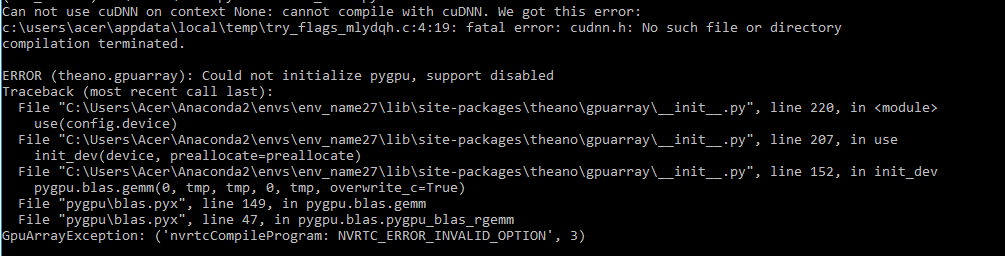
I tried the installation with
conda install -c mila-udem/label/pre theano
Rabia-Noureen
on 28 Sep 2017
The problem is that cuda 9 dropped support for sm_2.x and your GPU is sm_2.1. If you downgrade to cuda 8 it will work with both Theano 0.9 and 0.10.
 abergeron
on 28 Sep 2017
abergeron
on 28 Sep 2017
OK, so the problem indeed comes from cuda version.
So, it should work with cuda 8 and latest theano (0.10) and pygpu (0.7).
notoraptor
on 28 Sep 2017
@abergeron thanks for your suggestion i will try cuda 8 and check if every thing works fine.
Rabia-Noureen
on 28 Sep 2017
I have downgraded to cuda 8 and its now working fine with theano 0.9 version, device=gpu. With theano 0.10 it had issues regarding cudnn (device=cuda).... Thank you all for the suggestions

Rabia-Noureen
on 28 Sep 2017
Note, https://github.com/Theano/libgpuarray/pull/544 should give a better user error in when cuda is too recent for the GPU being used.
nouiz
on 3 Oct 2017
@Rabia-Noureen @notoraptor How did you get cuda 8 i mean downgrading? i am also encountering exactly the same problems like you.
 Sayantan17
on 15 May 2018
Sayantan17
on 15 May 2018
Related issues
 kaare-mikkelsen
·
5Comments
kaare-mikkelsen
·
5Comments
 aditsanghvi94
·
3Comments
aditsanghvi94
·
3Comments
 guoxuesong
·
8Comments
guoxuesong
·
8Comments
 liorshk
·
3Comments
liorshk
·
3Comments
 asimkievich
·
7Comments
asimkievich
·
7Comments
Most helpful comment
It will install the conda package for theano
0.9.If you want the bleeding-edge version of theano 0.9, you can instead use pip:
But this branch is not more developed. Also, installing via conda will automatically install all dependencies for you, so I strongly suggest you use conda installation.
About the last theano development version (version 0.10 from master branch), it seems there was a bug with pygpu on Windows related to NVRTC, as shown in your post above. I am not sure it is already fixed.