Theano: Problem with spaces in path (Theano 0.9.0.dev4 / Windows 10 Machine, 64-bit)
Problem is space in user name (represented below as "User Name") splits import path, so that import fails (i.e., no such file or directory).
So that the full paths (which do exist): "C:\Users\User Name\AppData\Local\Theano\compiledir_Windows-10-10.0.14393-Intel64_Family_6_Model_94_Stepping_3_GenuineIntel-3.4.5-64\lazylinker_ext\lazylinker_ext.pyd" and "C:\Users\User Name\AppData\Local\Theano\compiledir_Windows-10-10.0.14393-Intel64_Family_6_Model_94_Stepping_3_GenuineIntel-3.4.5-64\lazylinker_ext\mod.cpp"
Become split into "C:\Users\User" and "Name\AppData\Local\Theano\compiledir_Windows-10-10.0.14393-Intel64_Family_6_Model_94_Stepping_3_GenuineIntel-3.4.5-64\lazylinker_ext\lazylinker_ext.pyd" or "Name\AppData\Local\Theano\compiledir_Windows-10-10.0.14393-Intel64_Family_6_Model_94_Stepping_3_GenuineIntel-3.4.5-64\lazylinker_ext\mod.cpp", respectively.
.theanorc:
[global]
cxx="C:\Users\User Name\Anaconda3\envs\py34\MinGW\bin\g++.exe"
Trace:
Problem occurred during compilation with the command line below:
"C:\Users\User Name\Anaconda3\envs\py34\MinGW\bin\g++.exe" -shared -g -DNPY_NO_DEPRECATED_API=NPY_1_7_API_VERSION -m64 -DMS_WIN64 -I"C:\Users\User Name\Anaconda3\envs\py34\lib\site-packages\numpy\core\include" -I"C:\Users\User Name\Anaconda3\envs\py34\include" -I"C:\Users\User Name\Anaconda3\envs\py34\lib\site-packages\theano\gof" -L"C:\Users\User Name\Anaconda3\envs\py34\libs" -L"C:\Users\User Name\Anaconda3\envs\py34" -o C:\Users\User Name\AppData\Local\Theano\compiledir_Windows-10-10.0.14393-Intel64_Family_6_Model_94_Stepping_3_GenuineIntel-3.4.5-64\lazylinker_ext\lazylinker_ext.pyd C:\Users\User Name\AppData\Local\Theano\compiledir_Windows-10-10.0.14393-Intel64_Family_6_Model_94_Stepping_3_GenuineIntel-3.4.5-64\lazylinker_ext\mod.cpp -lpython34
g++.exe: error: Name\AppData\Local\Theano\compiledir_Windows-10-10.0.14393-Intel64_Family_6_Model_94_Stepping_3_GenuineIntel-3.4.5-64\lazylinker_ext\lazylinker_ext.pyd: No such file or directory
g++.exe: error: C:\Users\User: No such file or directory
g++.exe: error: Name\AppData\Local\Theano\compiledir_Windows-10-10.0.14393-Intel64_Family_6_Model_94_Stepping_3_GenuineIntel-3.4.5-64\lazylinker_ext\mod.cpp: No such file or directory

Traceback (most recent call last):
  File "C:\Users\User Name\Anaconda3\envs\py34\lib\site-packages\theano\gof\lazylinker_c.py", line 75, in <module>
    raise ImportError()
ImportError

During handling of the above exception, another exception occurred:

Traceback (most recent call last):
  File "C:\Users\User Name\Anaconda3\envs\py34\lib\site-packages\theano\gof\lazylinker_c.py", line 92, in <module>
    raise ImportError()
ImportError

During handling of the above exception, another exception occurred:

Traceback (most recent call last):
  File "<stdin>", line 1, in <module>
  File "C:\Users\User Name\Anaconda3\envs\py34\lib\site-packages\theano\__init__.py", line 70, in <module>
    from theano.compile import (
  File "C:\Users\User Name\Anaconda3\envs\py34\lib\site-packages\theano\compile\__init__.py", line 10, in <module>
    from theano.compile.function_module import *
  File "C:\Users\User Name\Anaconda3\envs\py34\lib\site-packages\theano\compile\function_module.py", line 21, in <module>
    import theano.compile.mode
  File "C:\Users\User Name\Anaconda3\envs\py34\lib\site-packages\theano\compile\mode.py", line 10, in <module>
    import theano.gof.vm
  File "C:\Users\User Name\Anaconda3\envs\py34\lib\site-packages\theano\gof\vm.py", line 659, in <module>
    from . import lazylinker_c
  File "C:\Users\User Name\Anaconda3\envs\py34\lib\site-packages\theano\gof\lazylinker_c.py", line 127, in <module>
    preargs=args)
  File "C:\Users\User Name\Anaconda3\envs\py34\lib\site-packages\theano\gof\cmodule.py", line 2323, in compile_str
    (status, compile_stderr.replace('\n', '. ')))
Exception: Compilation failed (return status=1): g++.exe: error: Name\AppData\Local\Theano\compiledir_Windows-10-10.0.14393-Intel64_Family_6_Model_94_Stepping_3_GenuineIntel-3.4.5-64\lazylinker_ext\lazylinker_ext.pyd: No such file. g++.exe: error: Name\AppData\Local\Theano\compiledir_Windows-10-10.0.14393-Intel64_Family_6_Model_94_Stepping_3_GenuineIntel-3.4.5-64\lazylinker_ext\mo. cpp: No such file or directory
Flags (as env variable):
Name=THEANO_FLAGS, Value=floatX=float32,device=cpu,blas.ldflags=-LC:/blaslapack -lblas
Please advise on how to proceed or if this is a Windows 10, 64-bit bug (or if more information is necessary to diagnose). Thank you!
 Superraptor
All 25 comments
The problem should be solved if the command line is executed with the path surrounded by ". However, I still don't locate where this command is issued.
 david-leon
on 18 Nov 2016
david-leon
on 18 Nov 2016
OK, got the problem located. Replace line2288~2289 of cmodule.py with:
    cmd.extend(['-o', '%s%s%s' % (path_wrapper, lib_filename, path_wrapper)])
    cmd.append('%s%s%s' % (path_wrapper, cppfilename, path_wrapper))
Which version of Theano are you using? We have fixes for that in Theano dev
version. There is needed for fixes at many places.
Le 18 nov. 2016 02:23, "David Leon" [email protected] a écrit :
OK, got the problem located. Replace line2288~2289 of cmodule.py with:
cmd.extend(['-o', '%s%s%s' % (path_wrapper, lib_filename, path_wrapper)])
cmd.append('%s%s%s' % (path_wrapper, cppfilename, path_wrapper))
—
You are receiving this because you are subscribed to this thread.
Reply to this email directly, view it on GitHub
https://github.com/Theano/Theano/issues/5183#issuecomment-261465866, or mute
the thread
https://github.com/notifications/unsubscribe-auth/AALC-ydCfM4BTNYdIzlFjX0LwYIuaqbwks5q_VJWgaJpZM4Kpx21
.
 nouiz
on 18 Nov 2016
nouiz
on 18 Nov 2016
As no new, I suppose it is fixed in master as I wrote in the last comment.
nouiz
on 30 Nov 2016
This was an issue for me too. Thanks david for the solution!
 nvnbny
on 12 Apr 2017
nvnbny
on 12 Apr 2017
I put the fix in this PR: https://github.com/Theano/Theano/pull/5842
nouiz
on 12 Apr 2017
I was still getting this error today when I installed Theano 0.9.0 from pip and conda, may be repositories do not have the fix yet.
Installing latest version of theano through git solved the issue.
"pip install --upgrade --no-deps git+git://github.com/Theano/Theano.git"
 yogeshpaul
on 29 Apr 2017
yogeshpaul
on 29 Apr 2017
You are right, the fix was done after Theano 0.9.
nouiz
on 1 May 2017
Thank you YogeshPaul. Your comment solved it for me too! Thanks Nouiz !!
 shirishr
on 4 May 2017
shirishr
on 4 May 2017
I'm unsure if the fix is fully done. I still get this error on Win 10x64 with latest theano using pip install. Cmodule.py only seems to handle the quote wrapping for -I and -L and not for -o lib_filename and cppfilename in lines ~2281-2282.
 hiten247
on 13 Aug 2017
hiten247
on 13 Aug 2017
@hiten247,
Notice what @Nouiz said _You are right, the fix was done after Theano 0.9._
I believe PIP latest version is still 0.9. (as seen in https://pypi.python.org/simple/theano/)
Suggest you uninstall Theano ( pip uninstall Theano) and then install/upgrade it from github
(pip install --upgrade --no-deps git+git://github.com/Theano/Theano.git)
shirishr
on 14 Aug 2017
I'm facing the same issue. I have Windows 10, Python 3.5.2 :: Anaconda custom (64-bit) and conda 4.3.24. I installed theano through the command "conda install theano" like so:

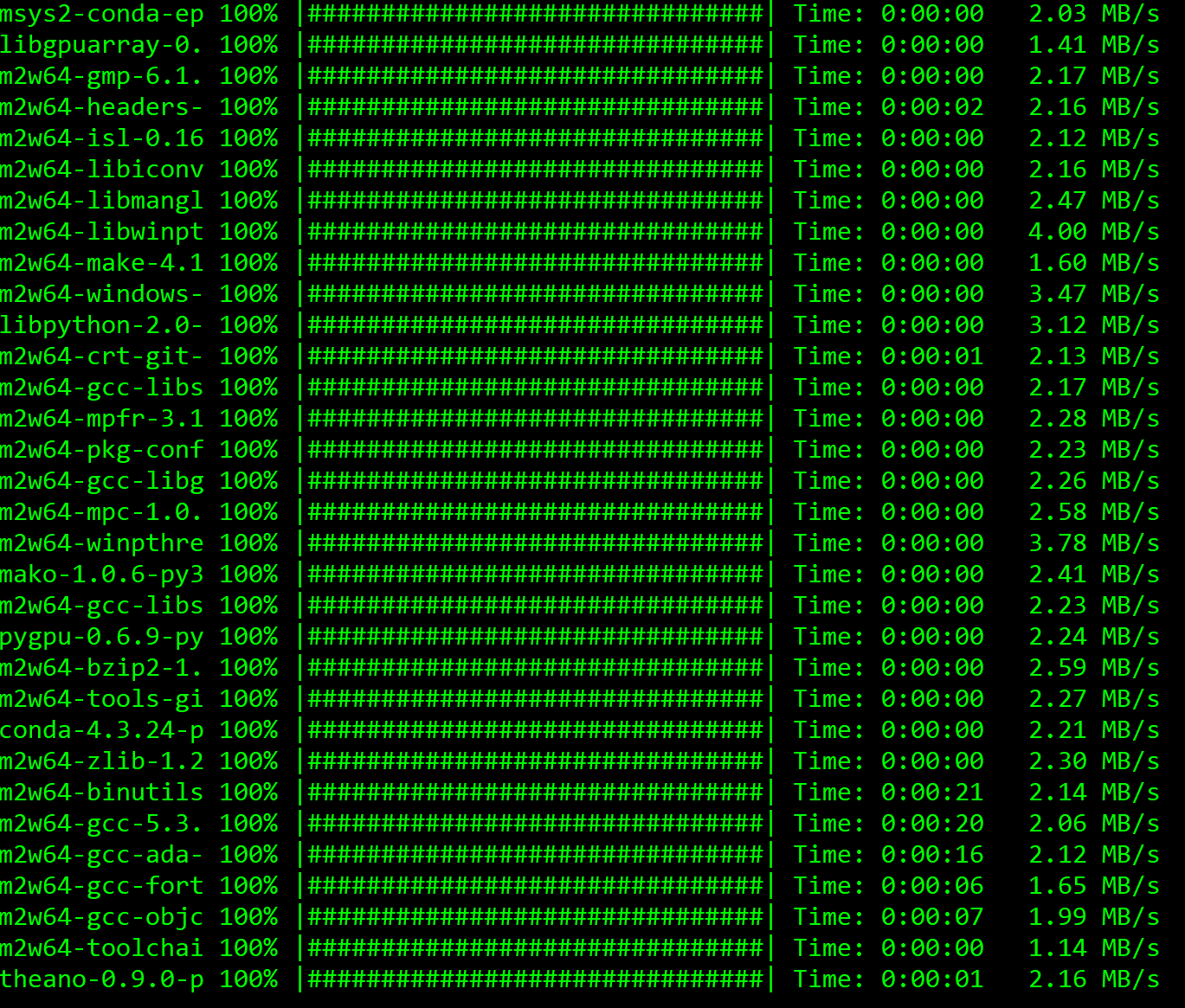
Then I tried to test the library and this happened:
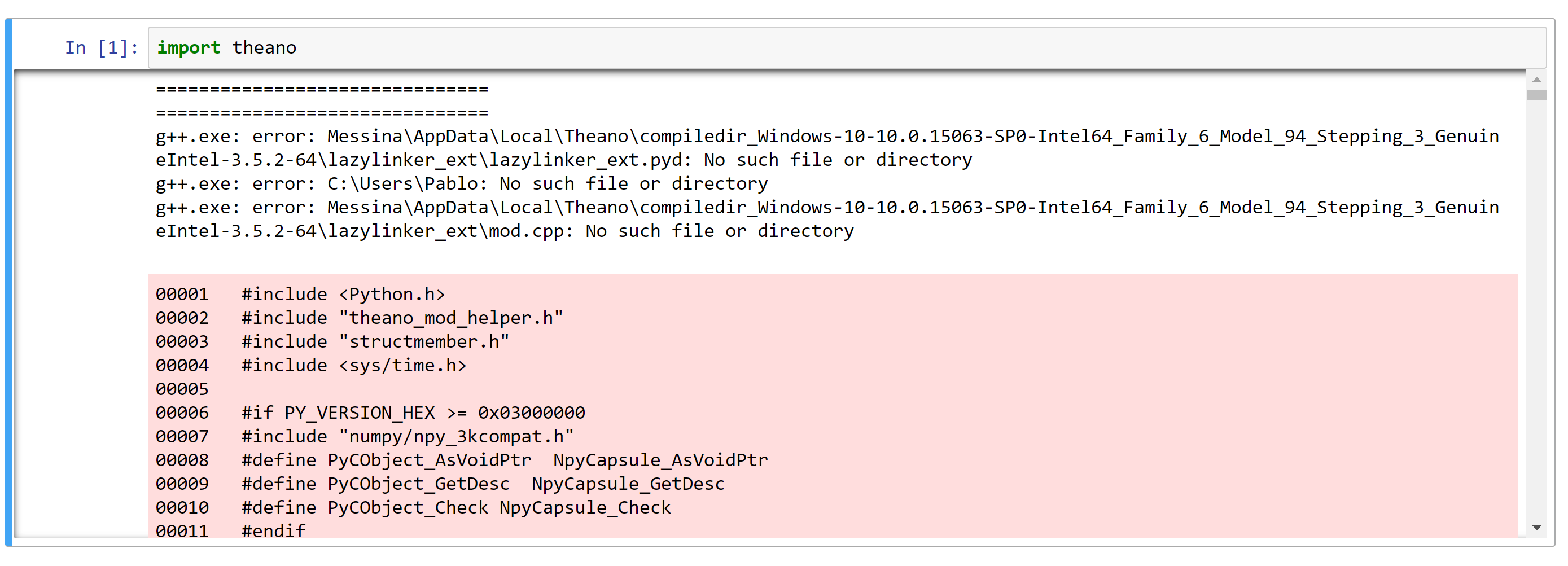
It seems to be a problem with the path, because my username is "Pablo Messina", and you can see that g++ is trying to access paths starting with Messina or ending in Pablo, so it's kind of splitting my username in two. By the way, if I try to search the lazylinker_ext.pyd file manually, I cannot find it either, check this:

As you can see, there is a __pycache__ folder, a __init__.py and a mod.cpp, but lazylinker_ext.pyd is nowhere to be found
 PabloMessina
on 21 Aug 2017
PabloMessina
on 21 Aug 2017
Pablo try this:
The fix for this issue was after Theano version 0.9.0
Conda has Theano version 0.9.0..so will not help.
Best is to install Theano from Github
Suggest you uninstall Theano ( pip/conda uninstall Theano) and then install/upgrade it from github
(pip install --upgrade --no-deps git+git://github.com/Theano/Theano.git)
It worked for me. I too have Windows 10, Python 3.5 hopefully it will work for you too
shirishr
on 21 Aug 2017
Thank you @shirishr for your help. I just removed Theano and reinstalled it using your command. Now I'm having a different error when I try to import Theano from a Jupyter Notebook:


PabloMessina
on 21 Aug 2017
@PabloMessina,
I have not experienced this specific issue but let's do this.
Navigate to C:\Users\PABLOM~1\AppData\Local\Theano
You should see a folder like compiledir_Windows-10-10.0.16251-...
This is what they call theano cache. Delete that folder completely
Now start jupyter notebook. Whichever cell in the notebook has "import theano" will cause a recompilation in C:\Users\PABLOM~1\AppData\Local\Theano
You should be good thereafter. I have read about such thing somewhere. (Look at https://github.com/Theano/Theano/issues/3818)
If you search on google you will see a command line utility being used called "theano-cache purge".
It basically deletes the compiledir_Windows-10-10.0.16251-...
shirishr
on 21 Aug 2017
@shirishr,
I tried deleting compiler_Windows-... as per your suggestion and run "import theano", but the same error occurred again. Then I tried running "theano-cache purge", but this command also failed with the following error:
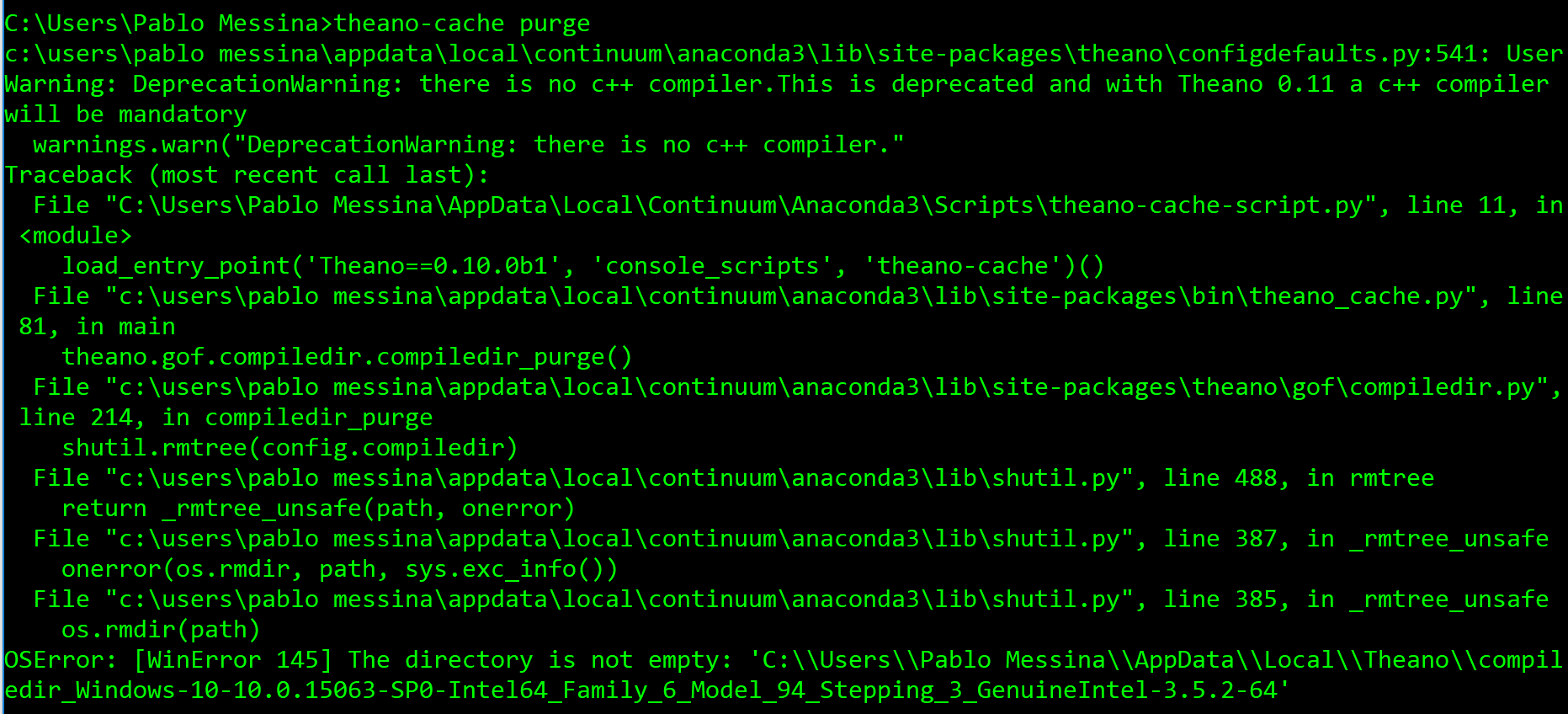
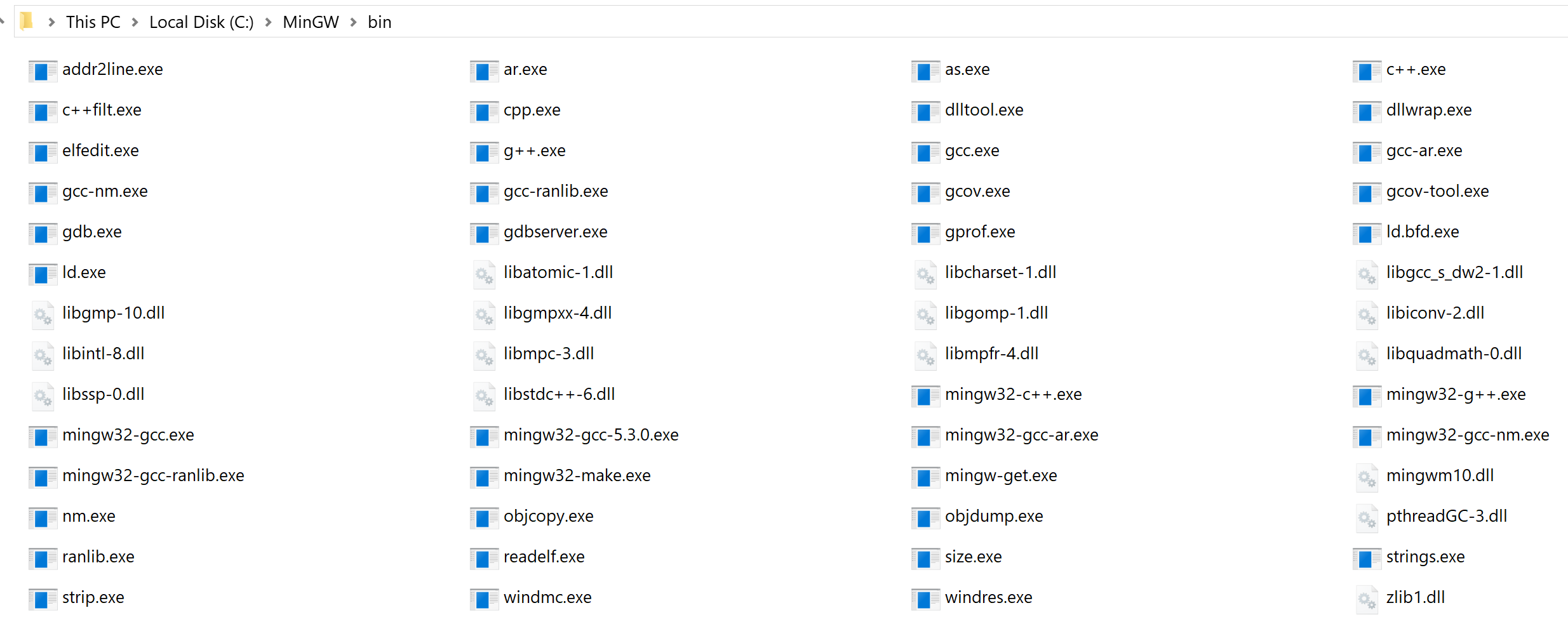
It says I have no c++ compiler. However, I have g++ installed (with the MinGW installer), as shown in the following screenshots:

PabloMessina
on 21 Aug 2017
Now on windows, we only support Theano with conda. This mean you don't need to manually install mingw yourself. You can just install the conda mingw. Did you follow the instruction at:
http://www.deeplearning.net/software/theano_versions/dev/install_windows.html#install-miniconda
nouiz
on 21 Aug 2017
@nouiz, I followed the instructions in the link provided and now I am facing again the same issue I mentioned in my first post (check my first post in this thread):
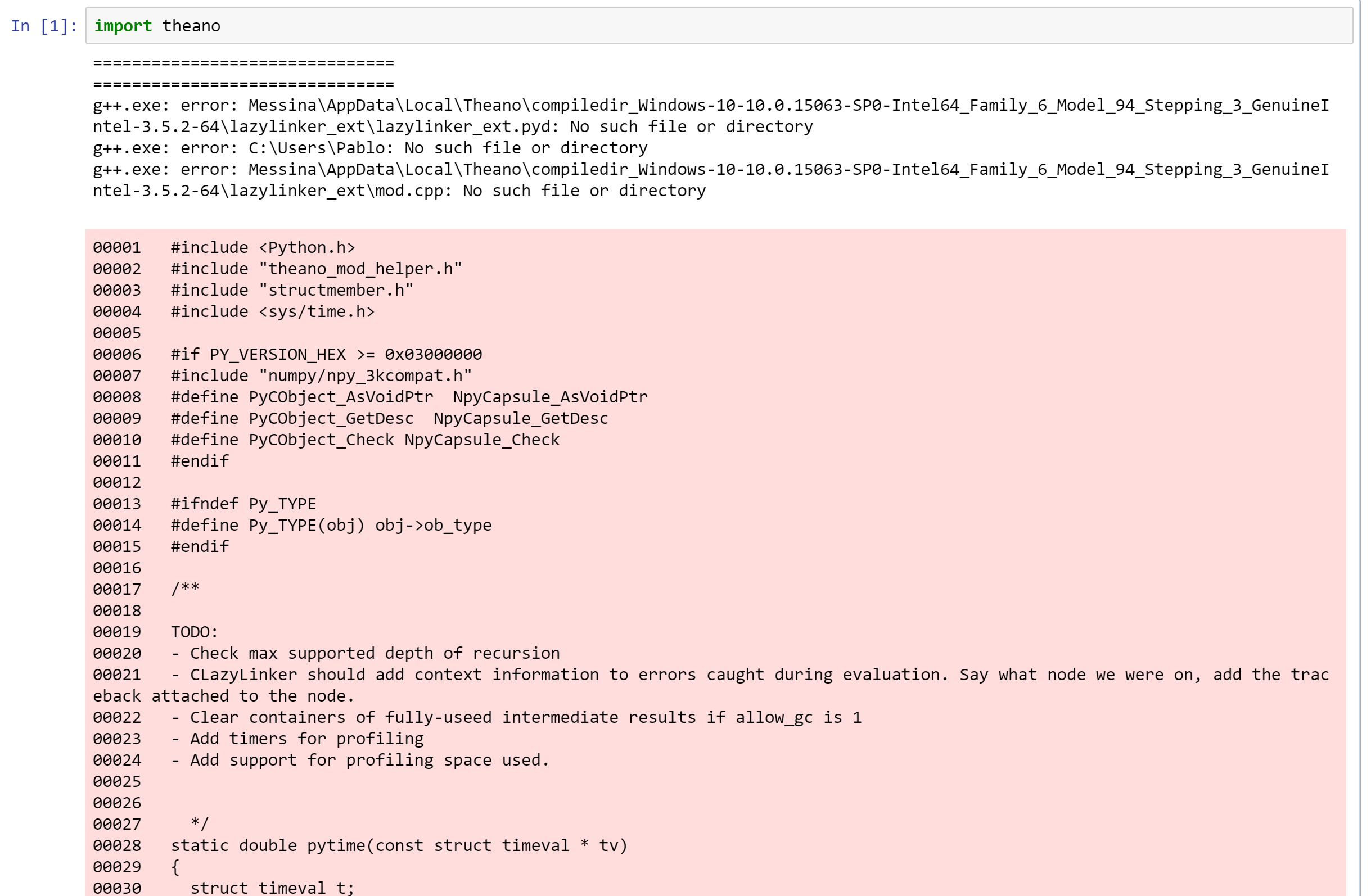
Theano is failing to handle a username with whitespaces.
PabloMessina
on 21 Aug 2017
In your C:\ProgramData\Anaconda3\Lib\site-packages\theano\gof\Cmodule.py just edit lines 2269-2284 to be exactly like below:
    ```
    # to support path that includes spaces, we need to wrap it with double quotes on Windows
    path_wrapper = "\"" if os.name == 'nt' else ""
    cmd.extend(['-I%s%s%s' % (path_wrapper, idir, path_wrapper) for idir in include_dirs])
    cmd.extend(['-L%s%s%s' % (path_wrapper, ldir, path_wrapper) for ldir in lib_dirs])
    if hide_symbols and sys.platform != 'win32':
        # This has been available since gcc 4.0 so we suppose it
        # is always available. We pass it here since it
        # significantly reduces the size of the symbol table for
        # the objects we want to share. This in turns leads to
        # improved loading times on most platforms (win32 is
        # different, as usual).
        cmd.append('-fvisibility=hidden')
    cppfilename = "\"" + cppfilename + "\""
    lib_filename_wrapped = "\"" + lib_filename + "\""
    cmd.extend(['-o', lib_filename_wrapped])
    cmd.append(cppfilename)
```
hiten247
on 21 Aug 2017
@hiten247, thank you for your suggestion, it seems to have fixed the whitespace issue. However, now I have a new problem (this is turning out to be more difficult than it probably should be):
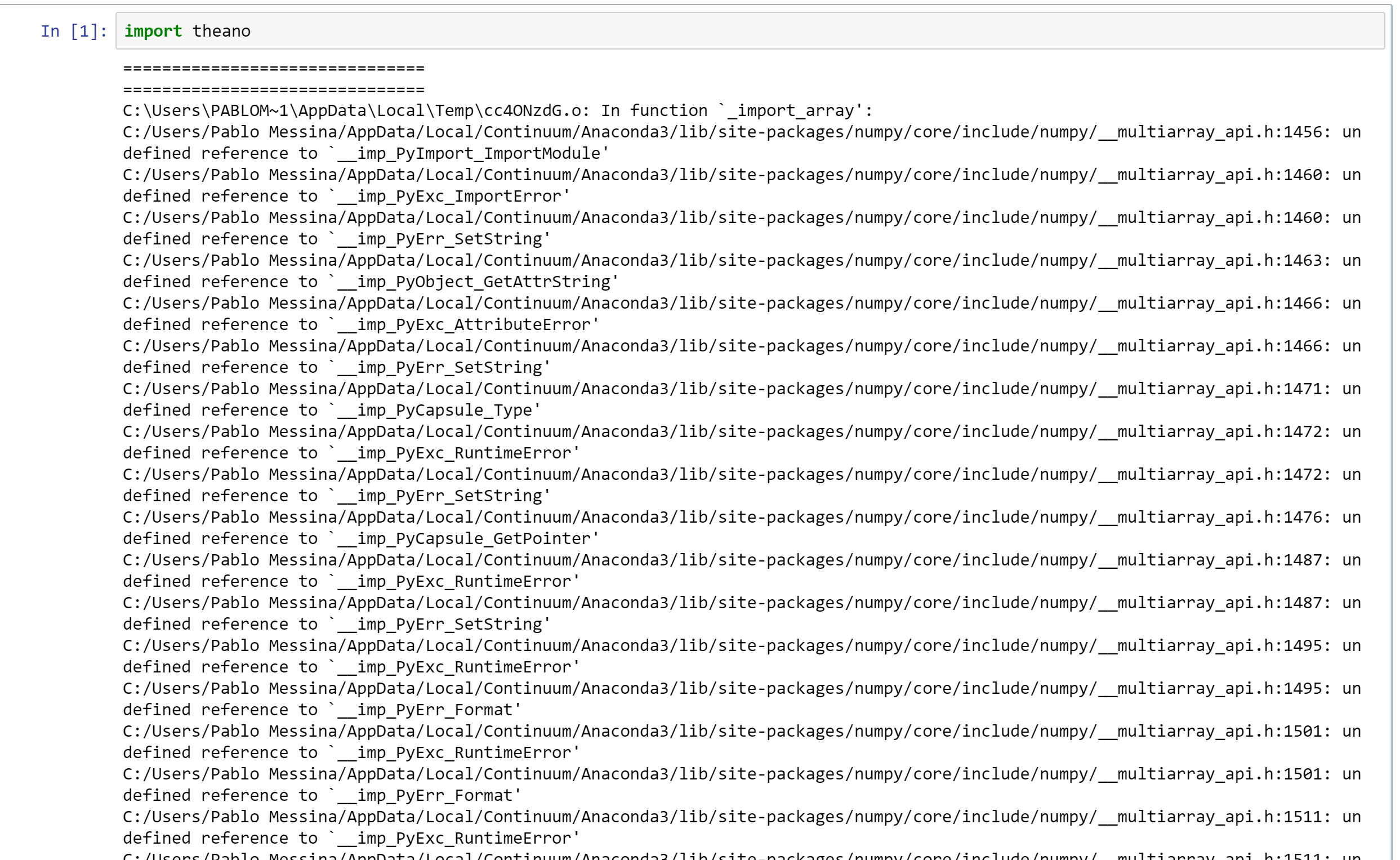
What am I doing wrong now? Any help will be deeply appreciated
PabloMessina
on 21 Aug 2017
You need to conda update the numpy pkg I think. Also any further error with
other pkgs..keep updating...had the same issue a while back. Dont worry you
are nearly there.
On Aug 22, 2017 12:50 AM, "Pablo Messina" notifications@github.com wrote:
@hiten247 https://github.com/hiten247, thank you for your suggestion,
it seems to have fixed the whitespace issue. However, now I have a new
problem (this is turning out to be more difficult than it probably should
be):[image: image]
https://user-images.githubusercontent.com/6187545/29534485-7fc03a3c-86b6-11e7-8d74-be5d66a8e710.pngWhat am I doing wrong now? Any help will be deeply appreciated
—
You are receiving this because you were mentioned.
Reply to this email directly, view it on GitHub
https://github.com/Theano/Theano/issues/5183#issuecomment-323829044, or mute
the thread
https://github.com/notifications/unsubscribe-auth/AESbj6cn6jgKU86EVwxdUe2-QyMqnrHnks5sadiUgaJpZM4Kpx21
.
hiten247
on 21 Aug 2017
@hiten247, I tried updating numpy but it was already in its latest version, so it didn't work. To make the error clearer here is the full error:
testing theano.pdf
Here are some screenshots as well:
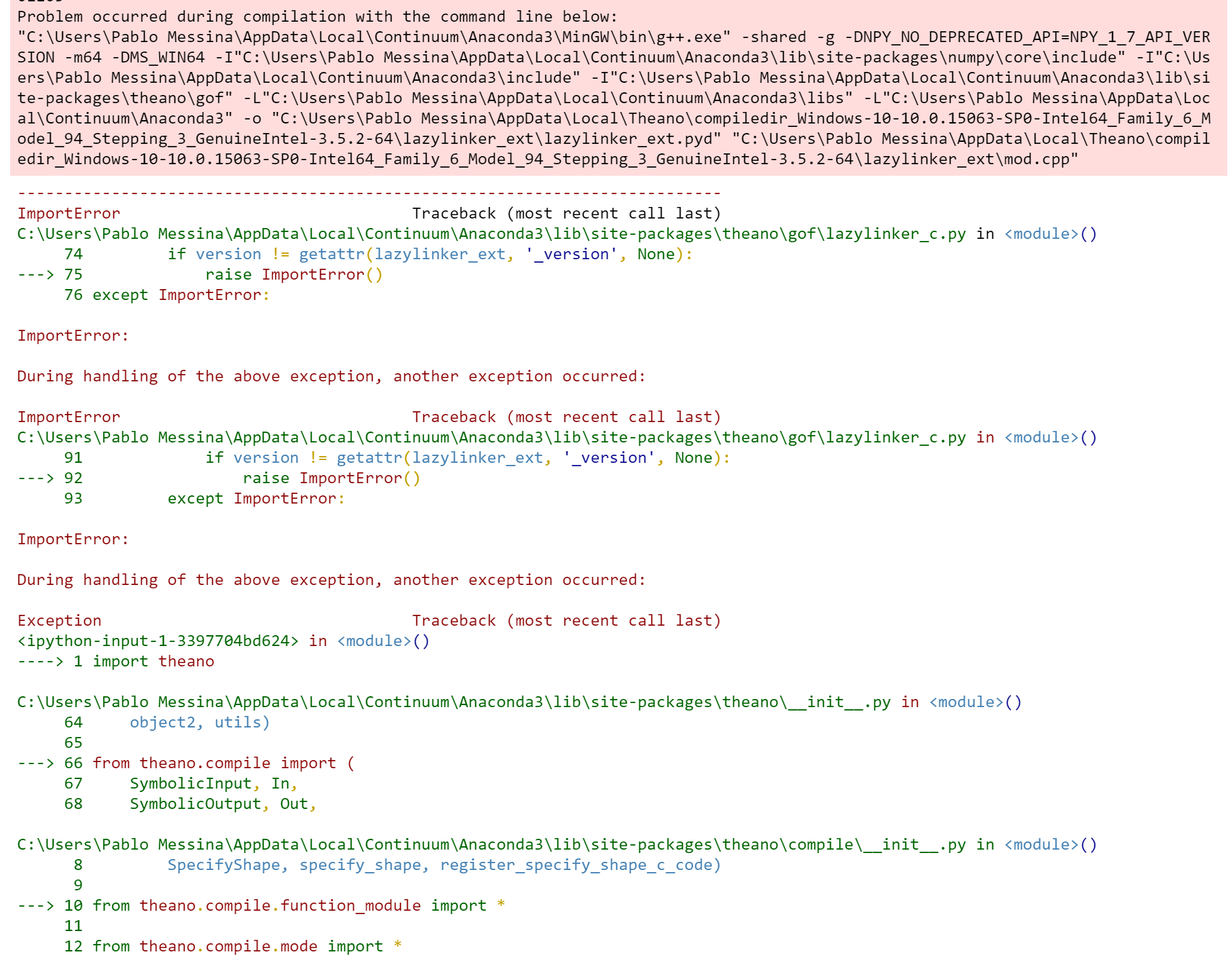
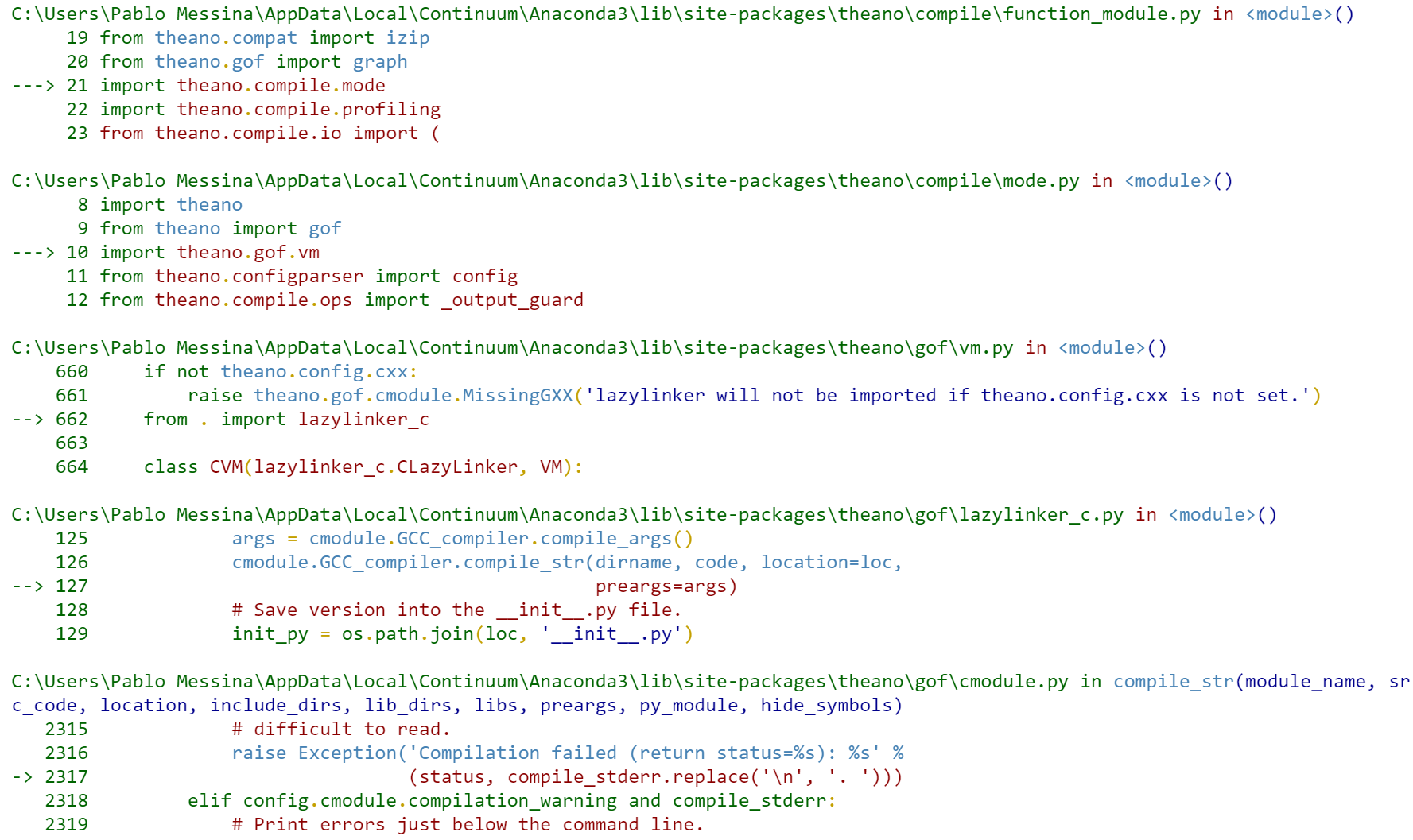
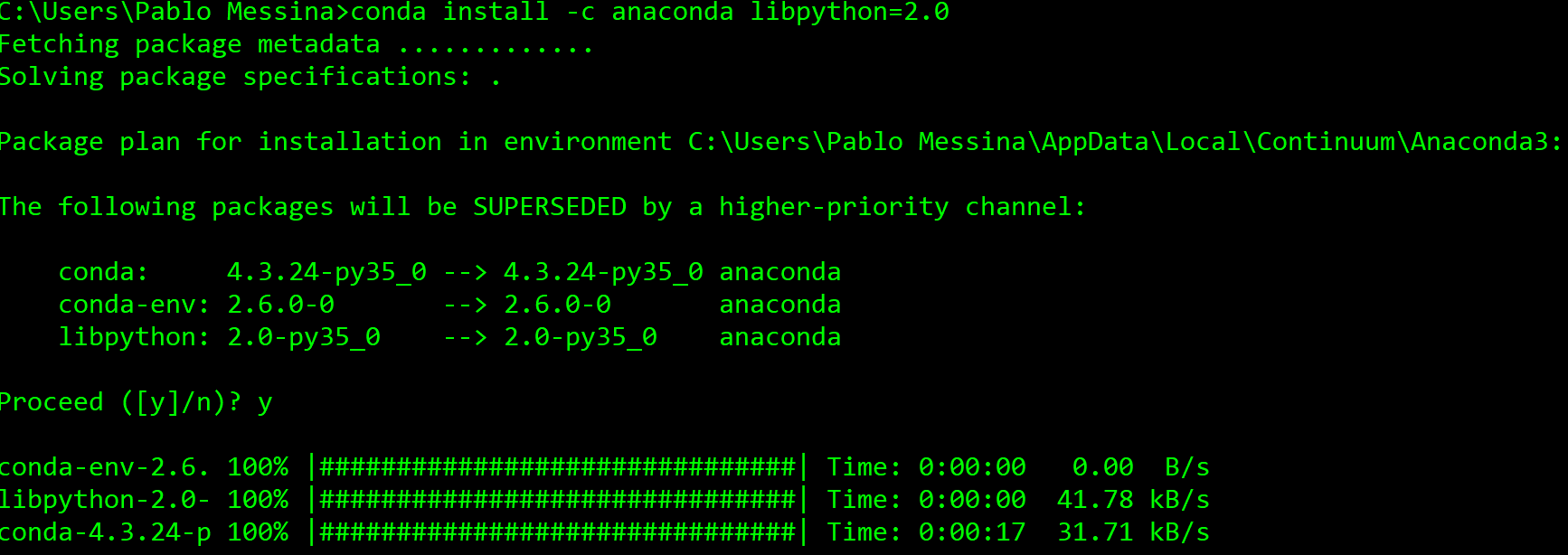
It seems to be a compilation problem, like some dependencies are not being loaded before they are referenced. I googled this and found a similar issue: https://github.com/Theano/Theano/issues/2087. In there they claim that installing libpython solves the problem. Therefore I tried this:
But again I'm still getting the same error I pasted above. I really don't know what to do :S
PabloMessina
on 21 Aug 2017
@PabloMessina I am stuck with the same problem, have you managed to solve it?
 orm225
on 10 Sep 2017
orm225
on 10 Sep 2017
@orm225 Nop, I couldn't make theano work with C++, so the workaround I used at that moment was to remove all the C++ compiler binaries from the system's path and let theano fall back to the python implementation, which works but unfortunately lacks the high performance of C++.
PabloMessina
on 10 Sep 2017
Hello @PabloMessina What is the current content of your .theanorc ? And what is the output of command conda list m2w64 ?
 notoraptor
on 11 Sep 2017
notoraptor
on 11 Sep 2017
Related issues
 junku901
·
4Comments
junku901
·
4Comments
 asimkievich
·
7Comments
asimkievich
·
7Comments
 gammaguy
·
5Comments
gammaguy
·
5Comments
 grayfall
·
3Comments
grayfall
·
3Comments
 QuantumLiu
·
4Comments
QuantumLiu
·
4Comments
Most helpful comment
I was still getting this error today when I installed Theano 0.9.0 from pip and conda, may be repositories do not have the fix yet.
Installing latest version of theano through git solved the issue.
"pip install --upgrade --no-deps git+git://github.com/Theano/Theano.git"