The-seo-framework: Placing SEO into the WP Settings submenu.
Hi
I really like the tight SEO Settings that are located on one page and with multiple tabs.
Instead of SEO having its own left sidebar area. What about having the option to place SEO into the WP Settings area? (I am likely missing something but do think that it would be nice to have the option.)
 paaljoachim
All 7 comments
Hi @paaljoachim I see you just installed the plugin, it is always nice to have fresh pair of eyes to look at things! Before you dig any deeper — I would advise you to use latest beta version, because bunch of things have changed from 2.9.4 (stable in WP plugin repository) to 3.0.0 (latest, here on github).
It is true that the plugin settings page could be tucked away under global settings. However, TSF also has extensions. These are optional, and if they are installed they nest under SEO. Here is an example:
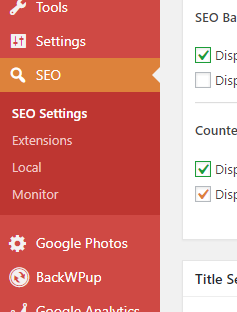
Now you might understand, why SEO is occupying a slot in main WP menu. Some design–decisions will unveil as you use the plugin bit more. There is definitively chance something was missed or could be improved, so feel free to share your thoughts if something doesn’t seem right. 👍
 LeBaux
on 17 Nov 2017
LeBaux
on 17 Nov 2017
@LeBaux is 100% correct. 😄 It's also unintuitive if we move the placement around based on there being submenus available or not.
 sybrew
on 17 Nov 2017
sybrew
on 17 Nov 2017
Gotcha! Thanks for clarifying!
A thought that came up is that extensions could have a tab inside the SEO Settings screen beside Canonical. But I have a feeling that that would not work.
paaljoachim
on 17 Nov 2017
Yea I thought about that, and that would make navigation terrible. Doing it exactly as WordPress is most intuitive for the users, due to familiarity.
sybrew
on 17 Nov 2017
I know this is closed and you have good reasons to have your menu there, but the location was also bothering me a bit (your solution is still much less intrusive than Yoast). Feel like settings is the logical place to have this next to permalinks and all, plus it cleans up the admin menu.
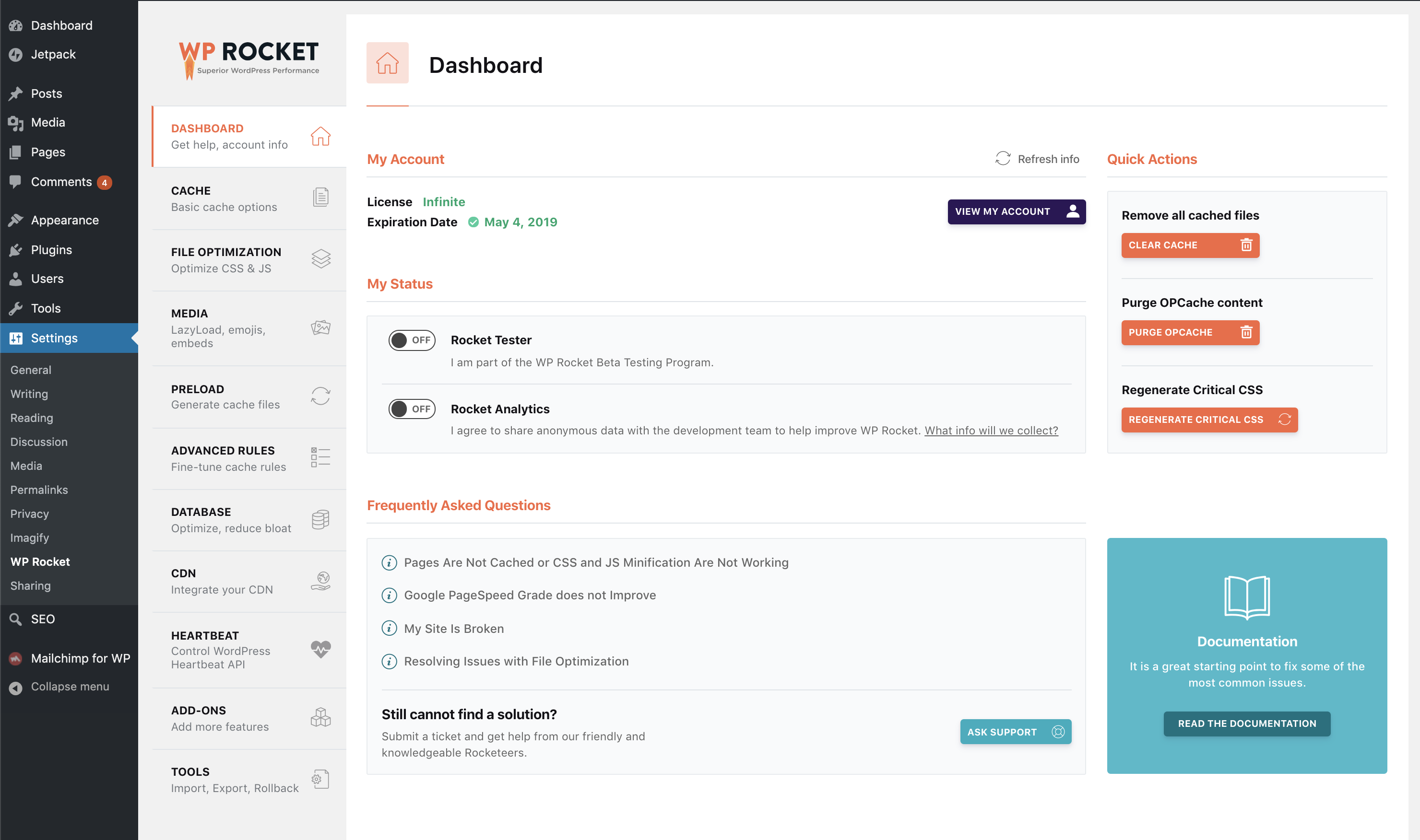
My suggestion would be to take a look at the WP Rocket settings. They have a bunch of features and extensions available and still manage to hide this under Settings. In my opinion, it's still pretty intuitive to have additional tabs on the setting page. Here is what it looks like:
 dominicht
on 3 Apr 2019
dominicht
on 3 Apr 2019
Hey! WP Rocket is great, and their settings menu makes sense. But don’t forget they offer one, monolithic premium product. We have The SEO Framework, and it could be extended with The SEO Framework Extension Manager and a number of extensions.
By itself, this does not look like a huge difference. But for TSF makes more sense to utilize the menu the current way, because of the extensions being a separate "plugins". Using the current structure allows us to do that predictably, and I believe, more naturally for the user. If you activate TSFEM, it becomes a submenu item. You go there, activate an extension, it might become another item. The core SEO settings page never changes. Again, I personally like it and I think is the best way to treat free users as first class citizens.
I’m also pretty sure we follow best practices here by not introducing 3rd. party design. Again, not that WP Rocket is doing it terribly, it makes sense for them.
I understand your point, you want the settings tucked in the settings menu. You probably set SEO settings once and you do not need to fiddle with it more. However, changing the menu the way you propose introduces additional work, and I reaaally don’t think the benefit is _that great_. Of course, if more users come and complain, we might need to rethink our approach. I humbly think TSF is one of the least annoying plugins in the plugin directory, so we at least deserve the place in the main menu :)
Just my 2 cents. Plus, what you are asking could be achieved with a simple filter. However, this might produce unpredictable issues, so I'll wait for @sybrew to reply and confirm it is a good idea.
LeBaux
on 3 Apr 2019
Here you go! I don't know if it'll cause issues in the long run; but, it definitely won't win any prizes for elegance, and the Extension Manager won't be accessible anymore.
add_action( 'the_seo_framework_after_admin_init', function() {

    $tsf = the_seo_framework();

    add_action( 'admin_menu', function() use ( $tsf ) {

        $slug = $tsf->seo_settings_page_slug;

        remove_submenu_page( $slug, $slug );
        remove_menu_page( $slug );

        //! don't scramble the order of this array.
        add_submenu_page( ...array_values( [
            'parent_slug' => 'options-general.php',
            'page_title'  => esc_html__( 'SEO Settings', 'autodescription' ),
            'menu_title'  => esc_html__( 'SEO', 'autodescription' ),
            'capability'  => $tsf->get_settings_capability(),
            'menu_slug'   => $slug,
            'function'    => [ $tsf, '_output_seo_settings_wrap' ],
        ] ) );
    } );
} );
I don't endorse this implementation, and as such, I won't consider providing backward compatibility for it during API changes. Use at your own discretion.
sybrew
on 4 Apr 2019
Related issues
 ratzrattillo
·
3Comments
LeBaux
·
6Comments
ratzrattillo
·
3Comments
LeBaux
·
6Comments
 HelaGone
·
5Comments
HelaGone
·
5Comments
 alpipego
·
4Comments
alpipego
·
4Comments
 Hube2
·
3Comments
Hube2
·
3Comments
Most helpful comment
Hi @paaljoachim I see you just installed the plugin, it is always nice to have fresh pair of eyes to look at things! Before you dig any deeper — I would advise you to use latest beta version, because bunch of things have changed from 2.9.4 (stable in WP plugin repository) to 3.0.0 (latest, here on github).
It is true that the plugin settings page could be tucked away under global settings. However, TSF also has extensions. These are optional, and if they are installed they nest under SEO. Here is an example:
Now you might understand, why SEO is occupying a slot in main WP menu. Some design–decisions will unveil as you use the plugin bit more. There is definitively chance something was missed or could be improved, so feel free to share your thoughts if something doesn’t seem right. 👍