The-seo-framework: Title & description generation syntax.
Previous: https://github.com/sybrew/the-seo-framework/issues/138#issuecomment-304469420
Add an extension that shows a list of post types (and taxonomies) where you can verbosely impact the Title output.
Also, allow such verbosity on each title input.
Examples:
[blogname]: About [title]
Topic: [title] -- [blogname] forums
Buy [title] for only [price] at [blogname]
[title] in [product:sizes sep=",,and"] | [blogname]
A scientific paper about [title]
Download PDF of [title] here
Log in at [blogname]
Why [author] loves [blogname]
[if:product:discounted title="Discounted until [product:discount-end format="dd M"] @ [price]: "][title] [sep] [blogname]
[updated-time]: [title] [sep] [blogname]
[published-time]: [title] by [author-nicename] [sep] [blogname]
This addition isn't for regular users; they should stick with the options provided in TSF.
Verbose options will be powerful, but can also vastly harm your site when used incorrectly.
It would be nice to have a predefined list like in the Permalink options. However, instead of radio fields, we'd use a select field.
It should include a warning where specific inputs would create duplicated titles.
I'm unsure as to how this will integrate with the current options.
It'll probably be a mask. Alternatively, compatibility layers require being set prior to release.
When this is implemented, it'll be easier to discuss verbose description options; they are and can be much more complicated...
 sybrew
All 18 comments
For users who want a quick remedy before this is extension released, check out the following snippet.
This snippet allows you to use [title-year] as a shortcode in the titles.
If you don't know where to place the snippet below, check out the "where to place filters" documentation.
// First, activate shortcode rendering in titles. TSF < v3.1:
add_filter( 'the_seo_framework_do_shortcodes_in_title', '__return_true' );
// TSF v3.1+
add_filter( 'the_seo_framework_title_from_custom_field', function( $title ) {
    return $title ? do_shortcode( $title ) : $title;
} );

// Register [title-year] shortcode.
add_shortcode( 'title-year', function() {
    return esc_html( date( 'Y' ) );
} );
If you see the plain shortcode with the above snippet implemented, you might wish to use the Title Fix extension.
_N.B. this filter will stop working from TSF v3.1, more details will follow in a separate announcement._
_Update: Expanded the snippet to support TSF v3.1_
sybrew
on 18 Dec 2017
Also, add an API for developers to construct their own verbose entries.
sybrew
on 4 Jan 2018
We might want to use %% instead of square brackets, as users are familiar with that.
sybrew
on 1 May 2018
the_seo_framework_do_shortcodes_in_title filter is working nice on titles.
However, the_seo_framework_do_shortcodes_in_description is outputting plain shortcodes in meta description (strangely, og:description and twitter:description are rendering well).
@sybrew any ideas?
 wassim
on 17 May 2018
wassim
on 17 May 2018
@wassim were you able to reproduce this on the latest public version (3.0.6)?
sybrew
on 18 May 2018
@sybrew yes, I'm using 3.0.6.
wassim
on 18 May 2018
@wassim please open a new issue 👍 Then I can track it and fix it.
sybrew
on 4 Jun 2018
Edit by Sybre: This is a direct reply to my response here.
Thats a shame - I think anyone migrating over form Yoast SEO knows about this functionality and its definitely a deal breaker for me if such a flexible piece of functionality is not available.
The only thing I dont agree with is when you say ' Most users are unaware that such settings impose unwanted side-effects when misused '
You better disable NOINDEX functionality :0))
Oh well - good plugin, I'll stick with Yoast for the foreseeable as I cant operate the site without that functonality.
 SarahHaruel
on 23 Jan 2019
SarahHaruel
on 23 Jan 2019
It is a shame! ☹️ I'm working on a solution, see https://github.com/sybrew/the-seo-framework/issues/58#issuecomment-456925225 (for future me: take this into account! It is a blocker.)
Off topic (click to expand)
The noindex options warn users about the repercussions (in context). Not only before using them but also thereafter in the SEO Bar:
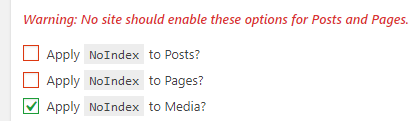
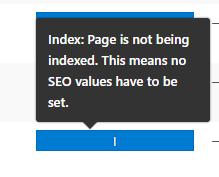
sybrew
on 23 Jan 2019
I was joking about NOINDEX - even with that in place someone will tick that box ;0))
SarahHaruel
on 23 Jan 2019
To unblock https://github.com/sybrew/the-seo-framework/issues/140#issuecomment-456930603 (comment above), we'd want to forward the input selection through the parser before it's saved, and then create a static copy. Titles shouldn't change automatically, like the year number, as this can create penalties.
How this works:
- We have two input fields: A coded one (extension), and the original one (The SEO Framework).
- The user selects dynamic title parts in the coded field, like
[category]and[year]. - When the user saves the meta, the coded field will be saved in the extension meta. Then, it's only converted once: the result of the conversion is saved into the original title field.
The "blog name additions hover" should still be effective as it is now and appear in the coded field. We might wish to create an API for this beforehand.
Usage example:
- User inputs:
The best plugins in [year] [separator] [site_title](enhanced UI via JS...) - The user saves the page.
- The extension saves the coded input in its custom field.
- The extension transforms the text above to
The best plugins in 2019 - ExampleBrand, and saves it into The SEO Framework's field.
- Fast forward to 2020, and the year is still annotated as "2019" until the user re-saves the post.
- When the user updates the post again, the text will become
The best plugins in 2020 - ExampleBrand
- All related metadata is updated, too. Like the "last updated" time in the sitemap.
This assures cross-compatibility, prevents lock-in of the extension, ensures stability, and prevents penalties from search engines.
sybrew
on 7 Feb 2019
What would the snippet be if I just want to retrieve [title]? I tried using the snippet above for [title-year] but it doesn't appear to be working.
I just moved from Yoast SEO and I have {{title}} in almost every product.
 bryandoe
on 12 Feb 2019
bryandoe
on 12 Feb 2019
@bryandoe this is a new feature discussion; everything here has yet to be implemented.
You'd want to exchange {{title}} with something useful. The snippet below might be of use, although I haven't tested it.
add_filter( 'the_seo_framework_title_from_custom_field', function( $title, $args ) {

    if ( false !== strpos( $title, '{{title}}' ) ) {
        $title = str_replace( '{{title}}', the_seo_framework()->get_raw_generated_title( $args ), $title );
    }

    return $title;
}, 10, 2 );
Note that this snippet is for transition purposes only; I can't promise forward compatibility with it. So, you'd want to exchange the {{title}} parts manually over time if you intend to stay with The SEO Framework.
sybrew
on 12 Feb 2019
Any progress on an extension or more pronounced workaround ;0)
SarahHaruel
on 27 May 2019
Ideally, I'd first like to create an HTML generator for the form fields, which would allow easy overriding of these fields as described in https://github.com/sybrew/the-seo-framework/issues/140#issuecomment-461517091, without having us rely upon browser-sided rendering. This generator will also help us migrate to a tailor-made Gutenberg interface without requiring us to change form architecture.
To get to that point, I'd like to move to PHP 5.5 first, which we finally did in the last commit (https://github.com/sybrew/the-seo-framework/commit/e5c5a023bf7425a411d897d776aa33e41cadecec). PHP 5.6 is even more preferred, but there are forward-compatible workarounds.
You'll probably see the first signs of this being worked on as early as v3.3.0. I plan to get this all implemented before the end of 2019.
sybrew
on 27 May 2019
@sybrew Hi,
I am a small Store Owner using Woocommerce and am keen to get rid of Yoast SEO Premium + Yoast SEO: WooCommerce and keen to switch to TSF.
While migrating from Yoast will be an activity which I am dreading, the below is a far more important consideration for me.
One of my websites has generic products (new / refurbished) which do not require any creative title / meta descriptions.
Current feature in Yoast suits me immensely so that I can spend more time on product procurement / pricing / marketing.
I use variables as below:
SEO Title: %%title%% %%sep%% %%sitename%%
Meta Description: Buy New / Refurbished %%sep%% %%title%% %%sep%% - my tagline
(When I create a new product, I manually edit remove New OR Refurbished as the case may be)
Is there anyway I can do the same in TSF?
It would also help if there was a dedicated page on Woocommerce in your Docs / KB section for store owners like me.
Thanks
 KoolPal
on 18 Jul 2021
KoolPal
on 18 Jul 2021
@KoolPal, simply use WordPress/WooCommerce as intended, and they, together with TSF, will take care of all the SEO. There are no docs available because those would contain just this one line: "Don't worry about it."
As for the generational syntax... that's where this issue is for: We still need to implement something like this. You can achieve what you wish with custom coding (hire someone?), or by modifying the custom meta title input field.
sybrew
on 18 Jul 2021
@sybrew Thank you for your response and the reassurance for Woocommerce. This is one the reasons I am leaning towards switching to TSF
Would you be able to share some code snippet which I can use in my functions.php alongside TSF to achieve this generational syntax? It would be a great help until you implement it within TSF.
Alternately, could you guide me on how to modify the custom meta title input field?
Thanks a lot!
KoolPal
on 19 Jul 2021
Related issues
sybrew
·
6Comments
 Ciantic
·
5Comments
Ciantic
·
5Comments
 9585999
·
5Comments
9585999
·
5Comments
 alpipego
·
4Comments
alpipego
·
4Comments
 epgunn
·
3Comments
epgunn
·
3Comments