Tfx: [Pusher][AI Platform Training & Prediction] Unexpected model deploy status
While going though your tutorial link, I have encountered following error in Kubeflow logs console:
Traceback (most recent call last):
  File "/tfx-src/tfx/orchestration/kubeflow/container_entrypoint.py", line 371, in <module>
    main()
  File "/tfx-src/tfx/orchestration/kubeflow/container_entrypoint.py", line 364, in main
    execution_info = launcher.launch()
  File "/tfx-src/tfx/orchestration/launcher/base_component_launcher.py", line 205, in launch
    execution_decision.exec_properties)
  File "/tfx-src/tfx/orchestration/launcher/in_process_component_launcher.py", line 67, in _run_executor
    executor.Do(input_dict, output_dict, exec_properties)
  File "/tfx-src/tfx/extensions/google_cloud_ai_platform/pusher/executor.py", line 91, in Do
    executor_class_path,
  File "/tfx-src/tfx/extensions/google_cloud_ai_platform/runner.py", line 253, in deploy_model_for_aip_prediction
    name='{}/versions/{}'.format(model_name, deploy_status['response']
KeyError: 'response'
AI Platform model version shows error (without any further explanation):
Create Version failed. Bad model detected with error: "Failed to load model: a bytes-like object is required, not 'str' (Error code: 0)"
I have no further possibility to debug this with above messages. Is your tutorial incomplete?
 michal-demecki-profil-software
All 10 comments
FYI @ucdmkt I hit the exact same issue a while ago.
After that, I tried to do something like gcloud ai-platform versions create $MODEL_VERSION --model=chicago_taxi --origin=$SERVING_PATH
Then I got
Create Version failed. Bad model detected with error: "Failed to load model: Loading servable: {name: default version: 1} failed: Not found: Op type not registered 'ParseExampleV2'\n\n (Error code: 0)"
 numerology
on 20 Mar 2020
numerology
on 20 Mar 2020
@michal-demecki-profil-software Thank you for reporting.
Can you provide more information about your environment? For example, tensorflow version, python version and GCP region.
FYI, if you followed the tutorial from the start it should be TF 2.1 with python 3.7.
 jiyongjung0
on 23 Mar 2020
jiyongjung0
on 23 Mar 2020
Python: 3.7.6
TF: 2.1.0
TFX: 0.21.0
KFP: 0.2.5
Region: us-central1
michal-demecki-profil-software
on 23 Mar 2020
I have the same problem. I have done some digging. It seems like there is some problems extracting the tf version. Even though the pipeline uses tf 2.1.0 the model on ai platform har runtime version 1.15 and framework version 1.15.0.
I hope this info can be of help.
 tordsae
on 24 Mar 2020
tordsae
on 24 Mar 2020
Thank you for the report.
It is expected to use 1.15 version of AI Platform runtime, because there was no TF 2 runtime at the time TFX 0.21.0 is released. (It is added recently and will be included in the next release. #1503)
Prediction service should be able to load the saved model even if it is trained in the later version, and this issue still happened when I trained a model in TF 1.15.
I'm still digging this issue and will comeback soon. Thanks!
jiyongjung0
on 25 Mar 2020
I did try to deploy 2 versions of the same model by using ai platform on google cloud console. When I used framework version 2.1.0 and runtime version 2.1 it deployed fine, but when I changed to 1.15.0 and 1.15 I got the exact same error.
tordsae
on 25 Mar 2020
@tordsae Thank you so much for sharing your experience. I did try to deploy the model with TF 2.1 and it worked! So this could be a possible work-around.
@michal-demecki-profil-software You might be able to deploy your model using GCP console Web UI by copy and pasting the model path (gs://...) and selecting TF 2.1.
But it is not clear yet why we cannot load the model in 1.15 even when we used TF 1.15 to train the model.
jiyongjung0
on 25 Mar 2020
It turns out that even if we used TF 1.15 while running TFX, the base container image which is used for training had TF2. And the model had some TF2 ops. Full error messages:
tensorflow_serving/util/retrier.cc:37] Loading servable: {name: default version: 1} failed: Not found: Op type not registered 'ParseExampleV2' in binary running on localhost. Make sure the Op and Kernel are registered in the binary running in this process. Note that if you are loading a saved graph which used ops from tf.contrib, accessing (e.g.) `tf.contrib.resampler` should be done before importing the graph, as contrib ops are lazily registered when the module is first accessed.
So there are two possible work-arounds.
- Force trainer to use TF1 (See below).
- Manually re-upload to use TF 2.1 runtime in Google Cloud Console as I explained in the above comment.
Using TF1 for training
We uses a custom container image for training. This is the image we specify in build_target_image flag and contains all model codes in it. This image is built automatically when we create or update the pipeline. Dockerfile for this image is generated in the working directory when we first create the pipeline. And you can safely modify this Dockerfile. tfx CLI doesn't touch the file if it already exists.
Open Dockerfile and add RUN pip install tensorflow==1.15 like below:
FROM tensorflow/tfx:0.21.2
WORKDIR /pipeline
COPY ./ ./
ENV PYTHONPATH="/pipeline:${PYTHONPATH}"

RUN pip install tensorflow==1.15      <<<<< Add this.
And update the pipeline and run again. If you are using a pipeline which already ran some training, Trainer will try to use cached result rather than do the training again. So it might be need to set enable_cache of Pipeline object to False in pipeline.py:173.
Debugging a model deployment
FYI, you can debug your deploy using Stream logging in Prediction service. It is not supported in TFX yet, and you should use gcloud (or REST API) in your local terminal environment to deploy your model. For example,
$ gcloud beta ai-platform models create jj --regions us-central1 --enable-console-logging
Created ml engine model [projects/jiyongjung-test/models/jj].
$ gcloud ai-platform versions create jj_v --model jj --runtime-version=1.15 --python-version=3.7 --framework 'TENSORFLOW' --origin gs://jiyongjung-test/tfx_pipeline_output/a20200324a3/Trainer/model/249/serving_model_dir/export/chicago-taxi/1585016069
Creating version (this might take a few minutes)......failed.
ERROR: (gcloud.ai-platform.versions.create) Create Version failed. Bad model detected with error:  "Failed to load model: a bytes-like object is required, not 'str' (Error code: 0)"
See also documentation in Google Cloud.
Then you can see detailed log in Google Cloud Console
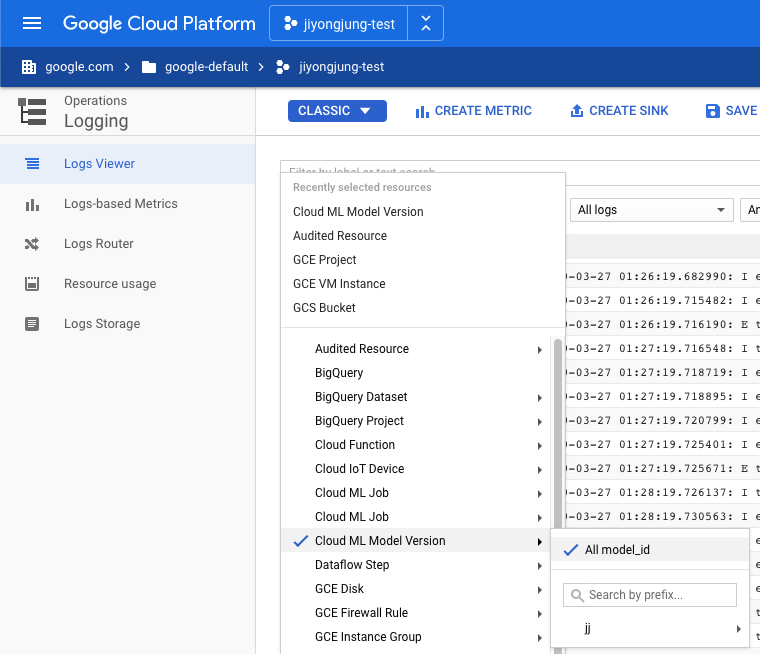
This problem will be fixed when we can use 2.1 CAIP Prediction runtime in next version of TFX.
Thank you for raising this issue.
jiyongjung0
on 27 Mar 2020
TFX 0.21.3 is released, and this should resolve your issues without above work-around.
Thanks.
jiyongjung0
on 14 Apr 2020
![tensorflow-butler[bot] picture](https://avatars.githubusercontent.com/in/43729?v=4&s=40) tensorflow-butler[bot]
tensorflow-butler[bot]
Related issues
 Malonl
·
6Comments
Malonl
·
6Comments
 casassg
·
5Comments
casassg
·
5Comments
 PunyPony
·
5Comments
PunyPony
·
5Comments
 Mageswaran1989
·
7Comments
Mageswaran1989
·
7Comments
 ntakouris
·
5Comments
ntakouris
·
5Comments
Most helpful comment
It turns out that even if we used TF 1.15 while running TFX, the base container image which is used for training had TF2. And the model had some TF2 ops. Full error messages:
So there are two possible work-arounds.
Using TF1 for training
We uses a custom container image for training. This is the image we specify in
build_target_imageflag and contains all model codes in it. This image is built automatically when we create or update the pipeline.Dockerfilefor this image is generated in the working directory when we first create the pipeline. And you can safely modify this Dockerfile.tfxCLI doesn't touch the file if it already exists.Open
Dockerfileand addRUN pip install tensorflow==1.15like below:And update the pipeline and run again. If you are using a pipeline which already ran some training, Trainer will try to use cached result rather than do the training again. So it might be need to set
enable_cacheofPipelineobject toFalsein pipeline.py:173.Debugging a model deployment
FYI, you can debug your deploy using Stream logging in Prediction service. It is not supported in TFX yet, and you should use
gcloud(or REST API) in your local terminal environment to deploy your model. For example,See also documentation in Google Cloud.

Then you can see detailed log in Google Cloud Console
This problem will be fixed when we can use 2.1 CAIP Prediction runtime in next version of TFX.
Thank you for raising this issue.