Tflearn: How to Access model history in tflearn to plot error?
i want to plot error using tflearn. I have generated same graph in keras with history but in tflearn i'm unable to do this. Kindly please help me!
 warisha
All 5 comments
What do you mean by 'error', can you be more precise please ? I think you can use Tensorboard for different types of statistics. See whtat Tensorboard is, think about your errors and came back here if you need any help on how to use Tensorboard on TFLearn. You can visulize global performance (Accuracy and Loss ), performance by layer ...
 moumine9
on 13 Jun 2017
moumine9
on 13 Jun 2017
I want to plot training and validation loss like this. I want to plot such losses using tflearn

warisha
on 13 Jun 2017
Perfect. You can use Tensorboard to that.
In order to use it, you have to manually setup in your code, which informations to be retrieved by adjusting the tensorboard_verbose variable. I recommend 3 (which makes your execution slower but gives you all the details regarding your network. For your case, tensorboard_verbose = 0 is enough. See the example below.
~~~
model = tflearn.DNN(network, checkpoint_path='/tmp/tflearn_logs/',max_checkpoints=1, tensorboard_verbose=0)
By adjusting tensorboard_variable, we tell Tflearn to save metrics that Tensorboard will master later.
model.fit(X,Y, validation_set=(Xtest,Ytest),n_epoch=10,show_metric=True, batch_size=64, snapshot_step=1, snapshot_epoch=True, run_id= 'name_model')
Remember : the run_id must be different for each execution so that you can retrieve a similar graph to what you have up'.
~~~
After the learning step has completed, you can just open a terminal and enter the command below
$ tensorboard --logdir='/tmp/tflearn_logs'
I recommend launching Tensorboard once the traning step is done, otherwise, it might make your computer a little bit slower. Also, the directory is cleaned each time the computer is rebooted. Make sure to save datas in the folder /tmp/tflearn_logs before turning it off.
moumine9
on 14 Jun 2017
Thanks,
I want to ask one more thing i am using TFLearn ResNet model for facial keypoints detection.
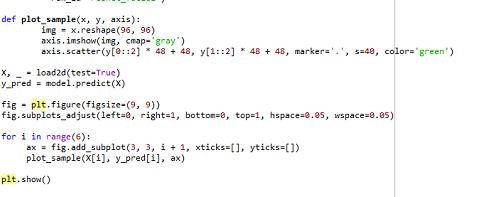
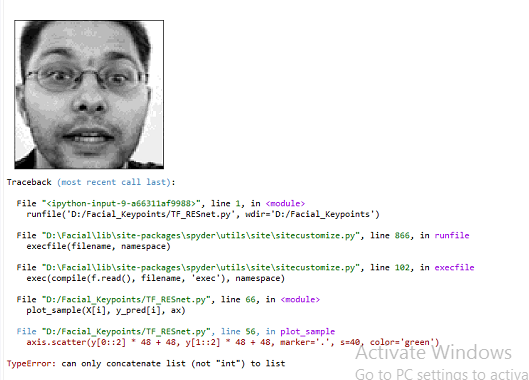
When i use this code to predict and plot 15 points on face, got this error. Can you help me to solve this problem?
warisha
on 16 Jun 2017
According to python, you have this error : TypeError : can only concatenante list (not int) to list. As I cannot see you're code, I suggest you to randomly run some print() on each variable. I suspect you did not index properly your lists.
moumine9
on 16 Jun 2017
Related issues
 shixiazuike
·
4Comments
shixiazuike
·
4Comments
 lengstrom
·
4Comments
lengstrom
·
4Comments
 benbogin
·
5Comments
benbogin
·
5Comments
 andrfgs
·
5Comments
andrfgs
·
5Comments
 mubastan
·
4Comments
mubastan
·
4Comments
Most helpful comment
Perfect. You can use Tensorboard to that.
In order to use it, you have to manually setup in your code, which informations to be retrieved by adjusting the tensorboard_verbose variable. I recommend 3 (which makes your execution slower but gives you all the details regarding your network. For your case,
tensorboard_verbose = 0is enough. See the example below.~~~
model = tflearn.DNN(network, checkpoint_path='/tmp/tflearn_logs/',max_checkpoints=1, tensorboard_verbose=0)
By adjusting tensorboard_variable, we tell Tflearn to save metrics that Tensorboard will master later.
model.fit(X,Y, validation_set=(Xtest,Ytest),n_epoch=10,show_metric=True, batch_size=64, snapshot_step=1, snapshot_epoch=True, run_id= 'name_model')
Remember : the run_id must be different for each execution so that you can retrieve a similar graph to what you have up'.
~~~
After the learning step has completed, you can just open a terminal and enter the command below
$ tensorboard --logdir='/tmp/tflearn_logs'I recommend launching Tensorboard once the traning step is done, otherwise, it might make your computer a little bit slower. Also, the directory is cleaned each time the computer is rebooted. Make sure to save datas in the folder
/tmp/tflearn_logsbefore turning it off.