Tfjs: React production build will not compile TensorFlow.js 2.0
To get help from the community, we encourage using Stack Overflow and the tensorflow.js tag.
2.0 TensorFlow.js version
Chrome Version 83.0.4103.61 (Official Build) (64-bit)
Hello, when building the react app in Development mode the tensorFlowJS 2.0 model worked just fine, but when using the built version from reactjs, I get an error related to tensorflow,
Uncaught (in promise) TypeError: Cannot call a class as a function
    at r (classCallCheck.js:3)
    at new e (tensor.ts:395)
    at e.value (engine.ts:714)
    at l (tensor_ops.ts:113)
    at c (tensor_ops.ts:59)
    at Module.d (io_utils.ts:180)
    at e.<anonymous> (graph_model.ts:128)
    at s (runtime.js:45)
    at Generator._invoke (runtime.js:274)
    at Generator.forEach.e.<computed> [as next] (runtime.js:97)
[solution] rolled back tensorFlowJS version 1.0.1 and it compiled for production. We were never able to pinpoint the problem but I thought I should flag this.
GitHub issues for this repository are tracked in the tfjs union repository.
Please file your issue there, following the guidance in that issue template.
 JoeJoeMango
All 42 comments
@JoeJoeMango can you please provide steps to reproduce the error ?
 rthadur
on 3 Jun 2020
rthadur
on 3 Jun 2020
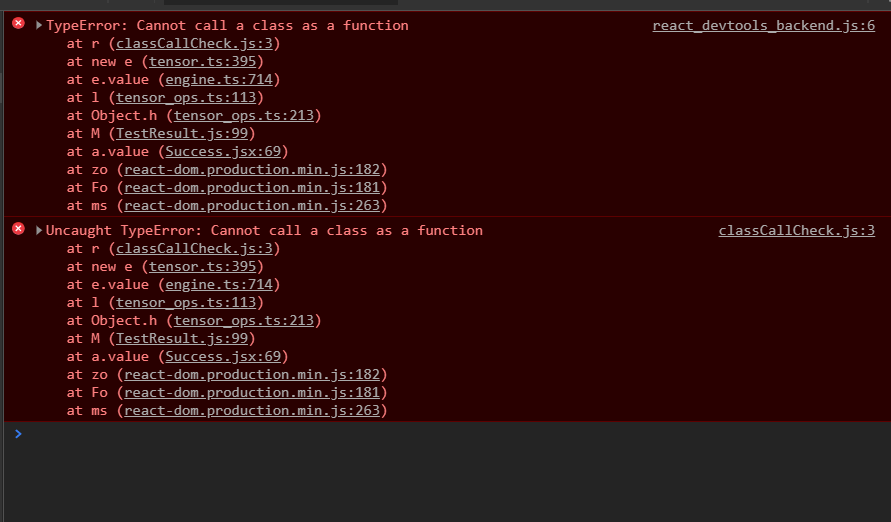
I have a similar Error when my app calls a JS Module with TF
 pablomdd
on 5 Jun 2020
pablomdd
on 5 Jun 2020
This is probably caused by an issue with babel, is your project setup to consume ES2017 code? The module entry in package.json for tensorflow 2.0 points to ES2017 modules. If you aren't setup to transpile ES2017 then you might be able to override module resolution to point to the ES5 bundle (the 'main' entry package.json should work).
What version of react are you using? Given that it works in dev but not in prod could there be a skew in babel settings between the two?
 tafsiri
on 5 Jun 2020
tafsiri
on 5 Jun 2020
Hi @tafsiri , I am having the same issue, I am using React v 16.13.1
What exactly should I change to follow your suggestion " you might be able to override module resolution to point to the ES5 bundle (the 'main' entry package.json should work)." ?
 bluebalam
on 5 Jun 2020
bluebalam
on 5 Jun 2020
It depends on your bundler, and i'm not super current on what is used in react at the moment. For example in webpack resolve.mainFields can be used. If there is a repo I can clone with a minimal reproduction that might help look into this more closely. Else I might try setting up a fresh react app to see if I can reproduce.
tafsiri
on 5 Jun 2020
I am using Ionic React for a Progressive Web App (PWA) and then also generate an Android App. Everything works fine using tfjs 2.0 for the PWA, but when I test the generated Android App in an emulator I get the "Uncaught (in promise) TypeError: Cannot call a class as a function" Exception the very first time a tensor is created.
Any attempt to create a tensor in a simple ionic react app would help to reproduce the error. The ionic react I am using is the latest available. I already setup the target compiler option to "ES2017" in the tsconfig.json but that does not solve the issue for me.
I downgraded tsfjs to 1.7.4 and with this version my app works as PWA and as Android app in an emulator using a Pixel 2 API 28. (There is some weird behavior testing the app in an oldish LG Nexus 5 android phone where tensor norms are not computed correctly :/ but that is another issue)
bluebalam
on 5 Jun 2020
I am using React 16.13.1. Downgrade TF to 1.0.1 also worked when building. During development, TF 2.0.1 worked just fined.
My babel/core is 7.9.0 and for what I can tell by using create-react-app the babel config is ES2015
pablomdd
on 6 Jun 2020
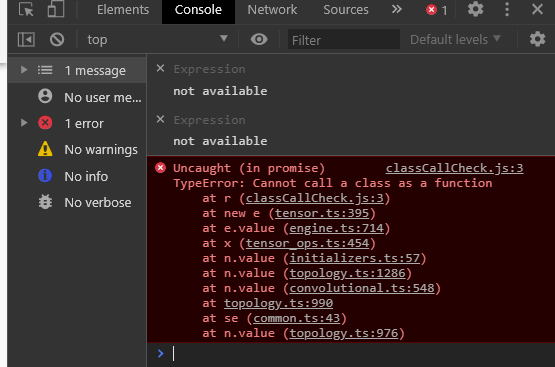
Hi i also encountered the same issue. It works fine on development mode, but stops working on production build. I'm using create-react-app.
 Enter-tainer
on 12 Jun 2020
Enter-tainer
on 12 Jun 2020
This is my repo. You can reproduce it by serving files generated from npm run build.
It is a fairly small repo and all meaningful code are located in src/App.js. Hope that helps!
Enter-tainer
on 12 Jun 2020
I've also created an example of the crash and pushed it to GitHub. You can download the example from Github. It is an empty application created with create-react-app which does nothing but initialize bodypix. To reproduce the crash, type "npm run build", and the "serve -s build/", open the page at localhost:5000.
 LunaticLabs
on 12 Jun 2020
LunaticLabs
on 12 Jun 2020
I was facing the same issue in my production build of react app where a tensorflowjs model was being loaded. I am using create-react-app v3.4.1 and @tensorflow/tfjs 2.0.0 in my project. As per @tafsiri's diagnosis
It depends on your bundler, and i'm not super current on what is used in react at the moment. For example in webpack resolve.mainFields can be used.
I was able to rebuild and run my app in production by ejecting my react-app and adding the following to my config/webpack.config.js
resolve: {
      mainFields: ['main'],
      ....
}
As far as I understand, when we do import * as tf from '@tensorflow/tfjs' import using * we need to let webpack know that the module will be found in ['main']
Ref: https://webpack.js.org/configuration/resolve/#resolvemainfields
 avroshk
on 12 Jun 2020
avroshk
on 12 Jun 2020
Thank you for this! This was exactly what I needed. In my case, I'm using react-app-rewired. Since I can already override my webpack config, here's what I did. It was easy as adding the following lines to my config-overrides.js file:
module.exports = function override(config, env) {
    if (process.env.NODE_ENV === 'production')
    {
      config.resolve.mainFields = ['main'];
    }
    return config;
}
Make tfjs external is a good approach:
- Lock dependency version in package.json:
> It's optional, just to take advantage of the TypeScript hint.
  "dependencies": {
    "@tensorflow/tfjs": "2.0.1",
    "@tensorflow/tfjs-vis": "1.4.3"
  }
- in webpack config:
{
  externals: {
    '@tensorflow/tfjs': 'window.tf',
    '@tensorflow/tfjs-vis': 'window.tfvis'
  }
}
- in HTML document:
<script src="https://cdn.jsdelivr.net/npm/@tensorflow/[email protected]/dist/tf.min.js"></script>
<script src="https://cdn.jsdelivr.net/npm/@tensorflow/[email protected]/dist/tfjs-vis.umd.min.js"></script>
 micooz
on 21 Jun 2020
micooz
on 21 Jun 2020
I developed a simple application using 'Teachable Machine' with 'create-react-app'.
I had the same problem but didn't want to change the default setting of 'create-react-app'.
So I downgraded the "@tensorflow/tfjs" module to "1.3.1". And it works fine.
I leave a comment for people like me. Hope it helps.
 sogoagain
on 22 Jun 2020
sogoagain
on 22 Jun 2020
I've got the exact same issue. I get the error => TypeError: Cannot call a class as a function
The culprit is the line const model = await tf.loadLayersModel(MODEL_URL).
I'm using -
    "@tensorflow/tfjs": "^2.0.1",
    "react": "^16.13.1",
As mentioned by @sogoagain above, downgrading to version 1.3.1 resolves the issue.
 theairbend3r
on 25 Jun 2020
theairbend3r
on 25 Jun 2020
I have the same issue when using github pages with tensorflow 2.0.1 when trying to create a tensor.
Downgrading to 1.7.4 has fixed it
 Hugo-WB
on 27 Jun 2020
Hugo-WB
on 27 Jun 2020
Same problem here
 dosomder
on 18 Jul 2020
dosomder
on 18 Jul 2020
Step by step vanilla ish quickfix if you don't want to use CRA-rewired, via craco:
npm install @craco/craco --saveMake a root file in the project,
craco.config.js, with:
module.exports = {
  webpack: {
    configure: {
      resolve: {
        mainFields: ["main"]
      }
    }
  }
};
- Change
package.jsonaccording to the docs:
"scripts": {
-   "start": "react-scripts start",
+   "start": "craco start",
-   "build": "react-scripts build",
+   "build": "craco build"
-   "test": "react-scripts test",
+   "test": "craco test"
}
Now npm run build should work!
 maxkrieger
on 21 Jul 2020
maxkrieger
on 21 Jul 2020
This issue has been automatically marked as stale because it has not had recent activity. It will be closed in 7 dyas if no further activity occurs. Thank you.
![tensorflow-butler[bot] picture](https://avatars3.githubusercontent.com/in/43729?v=4&s=40) tensorflow-butler[bot]
on 28 Jul 2020
tensorflow-butler[bot]
on 28 Jul 2020
@tafsiri did you get a chance to look more into it?
 jbis9051
on 1 Aug 2020
jbis9051
on 1 Aug 2020
@avroshk that doesn't seem to work for me because it screws up other modules
jbis9051
on 2 Aug 2020
@sogoagain Downgrading didn't seem to working for me because its not compatible with tensorflow's webgl backend
jbis9051
on 2 Aug 2020
For a temporary quick fix, I was able to change node_modules/@tensorflow/tfjs-core/package.json from:
"module": "dist/index.js",
to
"module": "dist/tf-core.node.js",
@jbis9051 No, haven't had a chance to dig further into this. But you should be able to downgrade to tfjs 1.7.4 if you are aren't able to modify the resolution of the module to use the main field. You use use the tfjs union package to avoid any incompatibilities between subpackages.
tafsiri
on 7 Aug 2020
Closing as stale. Please @mention us if this needs more attention.
tensorflow-butler[bot]
on 15 Aug 2020
@tafsiri can you reopen?
jbis9051
on 15 Aug 2020
@jbis9051 No, haven't had a chance to dig further into this. But you should be able to downgrade to tfjs 1.7.4 if you are aren't able to modify the resolution of the module to use the main field. You use use the tfjs union package to avoid any incompatibilities between subpackages.
We downgraded to 1.7.4 to make our App work but it is a pity we cannot use the latest tfjs :/
bluebalam
on 15 Aug 2020
@tafsiri could you please keep this issue open until it is resolved?
bluebalam
on 15 Aug 2020
Hi All, I've been able to pin down the source of this issue.
It basically comes down to this issue in babel https://github.com/babel/babel/issues/4452. We use Symbol.hasInstance in a few places and this will fail the classCallCheck in babel in production mode. So we probably won't be able to solve it in TensorFlow.js.
A couple of thoughts on workarounds while waiting for an upstream fix (in either CRA or babel):
- classCallCheck can be disabled in babel with loose mode (https://github.com/babel/babel/pull/4850). We do this when pre-compiling the IE11/ES5 bundle that we ship to npm . You can override your babel config by looking into
node_modules/react-scripts/scripts/build.jsas described here https://create-react-app.dev/docs/alternatives-to-ejecting (or ejecting and customizing it). - If you do not need to support IE11 and CRA could be configured to generated ES6 code then this would likely go away as you would just have native JS classes. I tried experimenting with the browserlist entry in package.json of a CRA app as a starting place but it seems to require more config.
- A number of folks have described how to customize the resolve field to use main instead of module. This will point CRA to a pre-compiled version of tfjs that already has transpiled classes away without the classCallCheck used in babel.
- @micooz suggests making tfjs external and then directly adding the tfjs bundle you want https://github.com/tensorflow/tfjs/issues/3384#issuecomment-647090336 to the page.
Minimal reproduction code for this (adapted from the CRA project linked to by @LunaticLabs):
fakeTensor.js
class FakeTensor {
  constructor(values) {
    this.values = values;
  }

  dataSync() {
    return this.values;
  }
}

Object.defineProperty(FakeTensor, Symbol.hasInstance, {
  value: (instance) => {
    return !!instance && instance.values != null;
  }
});

export function makeFakeTensor(values) {
  return new FakeTensor(values);
}
App.js
import './App.css';

import { makeFakeTensor } from './fakeTensor';
import React from 'react';

import logo from './logo.svg';

function App() {
  const tensorInstance = makeFakeTensor([5, 6, 7, 9]);
  return (
    <div className='App'>
      <header className='App-header'>
        <img src={logo} className='App-logo' alt='logo' />
        <p>
          Edit <code>src/App.js</code> and save to reload.
        </p>
        <p>
          {tensorInstance.dataSync()}
        </p>
      </header>
    </div>
  );
}

export default App;
Why is this happening now?
In TensorFlow.js 2.x and beyond we are shipping ES modules + modern JavaScript to NPM to allow downstream users to compile smaller/more efficient bundles for their programs and take advantage of bundler features like tree shaking and ship modern JavaScript to browsers who support it. Hence our module entry in our package.json files point to these new formats (our 'main' entry still works as before).
tafsiri
on 19 Aug 2020
@tafsiri Appreciate you taking the time to track down this issue!
jbis9051
on 20 Aug 2020
I am getting this same problem but with typescript compiler. Any suggestions?
 delebash
on 1 Sep 2020
delebash
on 1 Sep 2020
For a temporary quick fix, I was able to change
node_modules/@tensorflow/tfjs-core/package.jsonfrom:"module": "dist/index.js",to
"module": "dist/tf-core.node.js",
This worked for me but why does it work?
delebash
on 1 Sep 2020
@delebash see what @tafsiri said https://github.com/tensorflow/tfjs/issues/3384#issuecomment-676511180
In TensorFlow.js 2.x and beyond we are shipping ES modules + modern JavaScript to NPM to allow downstream users to compile smaller/more efficient bundles for their programs and take advantage of bundler features like tree shaking and ship modern JavaScript to browsers who support it. Hence our module entry in our package.json files point to these new formats (our 'main' entry still works as before).
jbis9051
on 3 Sep 2020
For those with webpack, you can make the default name point to the already built version, like this:
alias:{
"@tensorflow/tfjs-core": "@tensorflow/tfjs-core/dist/tf-core.js"
}
 netjerikh
on 3 Sep 2020
netjerikh
on 3 Sep 2020
https://github.com/tensorflow/tfjs/issues/3384#issuecomment-667607535 worked for me! Thanks!
 abhi211199
on 5 Sep 2020
abhi211199
on 5 Sep 2020
For a temporary quick fix, I was able to change
node_modules/@tensorflow/tfjs-core/package.jsonfrom:"module": "dist/index.js",to
"module": "dist/tf-core.node.js",
@jbis9051 Can you please suggest, how can I do this when I deploy to heroku? this solution worked in my local deploy
 KinjalShah1311
on 10 Sep 2020
KinjalShah1311
on 10 Sep 2020
Hi all, we merged a PR that should address this issue in the next release. I'll keep this issue open until then.
tafsiri
on 11 Sep 2020
@KinjalShah1311
did you ever get it deployed to heroku? I am running into the same issue trying to deploy to heroku and was wondering if you found a solution. Thanks!
 miaawong
on 15 Sep 2020
miaawong
on 15 Sep 2020
@KinjalShah1311
did you ever get it deployed to heroku? I am running into the same issue trying to deploy to heroku and was wondering if you found a solution. Thanks!
@miaawong For now, I resolved issue by using external TFJS in html file. This worked for me deploying to heroku...
KinjalShah1311
on 15 Sep 2020
New tfjs version has been released here https://github.com/tensorflow/tfjs/releases/tag/tfjs-v2.4.0 , can you please try
rthadur
on 15 Sep 2020
New tfjs version has been released here https://github.com/tensorflow/tfjs/releases/tag/tfjs-v2.4.0 , can you please try
That works for me thanks @rthadur for sharing.
 Ali-Baker
on 16 Sep 2020
Ali-Baker
on 16 Sep 2020
Excellent!
tafsiri
on 16 Sep 2020
Related issues
 weiji14
·
3Comments
weiji14
·
3Comments
 tpreusse
·
4Comments
tpreusse
·
4Comments
 pranayaryal
·
4Comments
pranayaryal
·
4Comments
 KienPM
·
3Comments
KienPM
·
3Comments
 beele
·
3Comments
beele
·
3Comments
Most helpful comment
I was facing the same issue in my production build of react app where a tensorflowjs model was being loaded. I am using create-react-app v3.4.1 and
@tensorflow/tfjs 2.0.0in my project. As per @tafsiri's diagnosisI was able to rebuild and run my app in production by ejecting my
react-appand adding the following to myconfig/webpack.config.jsAs far as I understand, when we do
import * as tf from '@tensorflow/tfjs'import using * we need to let webpack know that the module will be found in['main']Ref: https://webpack.js.org/configuration/resolve/#resolvemainfields