Tfjs: Import tfjs-react-native not working on EXPO CLI Project
Describe the problem or feature request

I'm getting this error when I try to run my React-Native program on the web or android. I followed the steps on the tfjs-react-native documentation but I'm still having issues with my program.
TensorFlow.js version
tfjs-react-native
Browser version
package.json

Code to reproduce the bug / link to feature request
This is the code causing the error

I even removed the tfjs-react native import and it compiles so I don't know what to do
If you would like to get help from the community, we encourage using Stack Overflow and the tensorflow.js tag.
GitHub issues for this repository are tracked in the tfjs union repository.
Please file your issue there, following the guidance in that issue template.
 DanielOnye123
All 19 comments
From your error it looks like you are using webpack (as opposed to metro) to bundle your app. I think you need to configure webpack to process .js files (or even that specific js file) with the JSX loader (or some transformer that can consume jsx syntax).
 tafsiri
on 25 Feb 2020
tafsiri
on 25 Feb 2020

I noticed I'm using babel.config.js rather than webpack.config.js. I've tried to look upon adding a babel-loader in this config file and I'm honestly lost on the process. Would you happen to know how to do so?
DanielOnye123
on 26 Feb 2020
It doesn't seem related to JSX syntax because other JSX components are being rendered properly. The problem occurs as soon as I import @tensorflow/tfjs-react-native.
From the Error Log, could it be related to this: https://github.com/microsoft/TypeScript/issues/30650
I am using Expo Managed app.
 muditgoel01
on 26 Feb 2020
muditgoel01
on 26 Feb 2020
@DanielOnye123 I don't know how to do this. I haven't been using webpack in concert with RN apps.
@muditgoel01 I don't think its related to typescript as the files in the package are already transpiled to JavaScript. In this case it may be that the bundler is configured to assume all components are in files with the .jsx extension. Are you able to load JSX components that are within .js files?
tafsiri
on 26 Feb 2020
I would suggest asking on Stack Overflow or the Expo forums for more info on configuration options for the setup you are using. It could be a recent change in expo.
tafsiri
on 26 Feb 2020
Could you test this by
1. removing the import of the library
2. Make a small react component in a file with a .js extension
3. import and render that component
If that works, then it helps narrow down where a configuration issue may be.
tafsiri
on 26 Feb 2020
I'm able to import and render without the tfjs-react module. I do believe this could be a configuration issue because I tested this on an Expo managed app with typescript configuration and the import worked
DanielOnye123
on 26 Feb 2020
Downgrading to "@tensorflow/tfjs-react-native": "0.1.0-alpha.2" works fine.
"@tensorflow/tfjs-react-native": "0.1.0-alpha.3" also gives same error.
muditgoel01
on 26 Feb 2020
@DanielOnye123 are you able to import a JSX component that is in a .js file?
tafsiri
on 26 Feb 2020
@tafsiri Yes. I am able to
DanielOnye123
on 26 Feb 2020
@DanielOnye123 Were you getting this unexpected token error in your project only when doing yarn web (expo start --web)? Webpack is used for running react-native apps in the browser with expo. You shouldn't be hitting this specific error when running on Android.
Try running expo customize:web in the root of the project, then select the webpack.config.js option to generate the webpack config file. Add the following to the webpack.config.js file and try re-running the app.
const createExpoWebpackConfigAsync = require('@expo/webpack-config');
const path = require('path');

module.exports = async function(env, argv) {
  const config = await createExpoWebpackConfigAsync(env, argv);

  config.module.rules.push({
    test: /\.(js|jsx)$/,
    include: [path.resolve(__dirname, "node_modules/@tensorflow/tfjs-react-native")],
    use: {
      loader: 'babel-loader',
      options: {
        presets: [
          ['@babel/env', { modules: 'commonjs' }],
        ],
      }
    }
  });
  return config;
};
I was able to get my managed Expo JS app working on the web with this.
 pvaneck
on 28 Feb 2020
pvaneck
on 28 Feb 2020
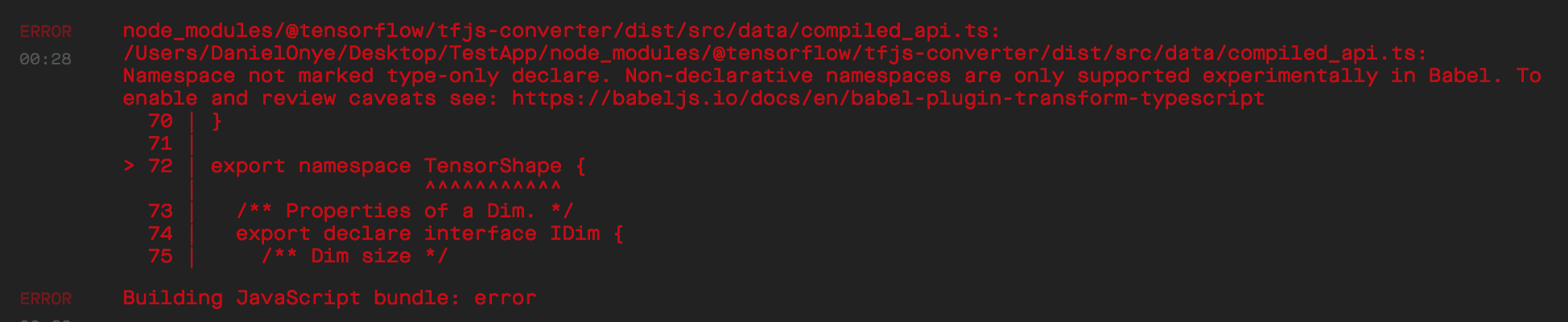
Thank you. It's working on the web, but ironically it's not working on the android. I keep getting this error above. I checked out this other documentation with a similar issue: Issue, but his solution didn't work for me as I don't have typescript config
DanielOnye123
on 28 Feb 2020
That compiled_api.ts file will be removed from the dist directory in the next tfjs release (with https://github.com/tensorflow/tfjs/commit/fb163f7f1f8cbb953a856f1621d8b1bad44afd04) as it shouldn't even be there. For a quick fix, just delete that typescript file:
rm -f node_modules/@tensorflow/tfjs-converter/dist/src/data/compiled_api.ts
Then metro should stop complaining.
pvaneck
on 28 Feb 2020
Thank you so much! It's working on both platforms. My last question is: Does the "fetch" method imported from tfjs-react native support local fetches? e.g locally fetching a picture
DanielOnye123
on 28 Feb 2020
Hi, I don't have experience with ReactNative/NodeJs and just tried everything you explained here, but still, have the same problems. Can you please, provide the example code?. I am running on MacOs, node 13, expo cli. - My hello world RN app is working, but when I add your code - I got the same errors.
 motya770
on 13 Mar 2020
motya770
on 13 Mar 2020
Doesn't seem like fetch supports local afaik. Might have to use expo-file-system to load local images for now.
@motya770 Which error are you getting? I have a barebones TF.js typescript expo managed project that can load fine for me (https://github.com/pvaneck/tfjs-react-native-app) if you want to check that out.
pvaneck
on 13 Mar 2020
@pvaneck fetch seems to be working fine in ios but fails on android
 AbdulRashidReshamwala
on 1 May 2020
AbdulRashidReshamwala
on 1 May 2020
Hi, I just switched to Flutter, much simpler, much more predictable results )
motya770
on 1 May 2020
Looks like this has been resolved. +1 to the comment on using something like expo-file-system to read local files. Feel free to leave a comment/file a new issue if this is still unresolved.
tafsiri
on 19 May 2020
Related issues
 rajeev-tbrew
·
29Comments
rajeev-tbrew
·
29Comments
 YajJackson
·
28Comments
YajJackson
·
28Comments
 Mobles
·
54Comments
Mobles
·
54Comments
 RealLankinen
·
21Comments
RealLankinen
·
21Comments
 nebrelbug
·
30Comments
nebrelbug
·
30Comments
Most helpful comment
That
compiled_api.tsfile will be removed from the dist directory in the next tfjs release (with https://github.com/tensorflow/tfjs/commit/fb163f7f1f8cbb953a856f1621d8b1bad44afd04) as it shouldn't even be there. For a quick fix, just delete that typescript file:rm -f node_modules/@tensorflow/tfjs-converter/dist/src/data/compiled_api.tsThen metro should stop complaining.