Tfjs: ChannelsFirst dataFormat in Flatten Layer Causes Different results for TFJS-Web vs Keras on same model weights and tensor
TensorFlow.js version
Browser version
chrome 70.0.3538.77 (Official Build) (64-bit)
Python: 3.6.7
keras 2.2.4
tensorflowjs convert 1.2.10.1 and 0.5.7
tensorflow-gpu 1.10.0, channel first
Describe the problem or feature request
I wanted to use a Keras-trained model in a JS application (Cordova/Ionic) so I used TensorFlow.js Python conversion however my test in a webpage shows different results from my Python predictions.
I tried a fixed input tensor by [1,1,18,5] into python and JS script to make a prediction, But I got diffent results: python 1.3110151, but for JS I've got -1.028530240058899
I've used model.getWeights()[0].print() to checkout the first and last weights in converted json model and it returns
[[ [[-0.4403104, -0.4608164, 0.0136627, ..., 0.1289152, -0.0397321, 0.3372021 ],],

       [[0.5465862 , 0.4188564 , 0.0245932, ..., 0.4540363, -0.0008038, -0.6032839],]]]
the python weights also returns
[[[[-0.44031048 -0.4608164   0.01366271     ....  0.1289152  -0.03973224  0.33720216]]
 [[ 0.54658633  0.41885644  0.0245933  ....   0.45403644 -0.00080385 -0.60328406]]]]
So they have exactly the same weigths for the first layer, except a small precision convertion problem.
I'm pretty sure that's a bug, right?
Code to reproduce the bug / link to feature request
I tried these actions below to make sure if it was caused by the error sequence of JS weights
- As I find in the last python layer is dense/bias. but in JS, last layer is a 40 nums parameter.
This picture shows the last layer in JS converted model, and the first row shows the last layer weights value, second row shows the last layer weights shape

In Python, the last layer is 'dense/bias', and I'm sure it's right. Here shows the python dense/bias layer weights value and shape.

In fact the dense/bias layer of JS appears in the model.getWeights()[6].shape;
I want to use the code to get the dense/bias parameter,but it failed with the error attached below.
I want to know does this matters? And could you tell me the right way/code to get the dense/bias layers in JS?
let t=model.getLayers('dense/bias');
print(t);

Then I use below code to get the last layer weights data and all the sequence weights shape in JS
```
model.getWeights()[8].print(); //the last layer weights data
console.log(model.getWeights()[0].shape); //first layer shape, JS and python the same
console.log(model.getWeights()[1].shape);
console.log(model.getWeights()[2].shape);
console.log(model.getWeights()[3].shape);
console.log(model.getWeights()[4].shape);
console.log(model.getWeights()[5].shape);
console.log(model.getWeights()[6].shape);
console.log(model.getWeights()[7].shape);
//last layer shape, JS and python different, 40 for JS and 1 for dense layers in Python
console.log(model.getWeights()[8].shape);
the layer weights shape sequence is


vs python layer weights shape sequence is

3. Then I checked the tfjs convert json model information, and it's right

So does this matters the predict results of keras and its converted tfjs models? Thanks
[git_issue.tar.gz](https://github.com/tensorflow/tfjs/files/3728636/git_issue.tar.gz)
 joyicejin
All 16 comments
Hello, could you leave me some comments about this issue. I'm in a hurry, thanks.
joyicejin
on 17 Oct 2019
For what it's worth, I gave this a try.
@joyicejin First off, regarding getting the layer, I just used model.summary() and then followed that trail:
console.log(model.summary());
        console.log('Dense layer?');
        let dbLayer = model.getLayer('dense');
        console.log(dbLayer);
        console.log(dbLayer.getWeights());
        console.log(dbLayer.getConfig());
That will hopefully get you what you're looking for.
At any rate, I was hoping to try both Python and JS, but had some difficulties on the Python side presumably due to only having CPU available and/or not having the loss function available. I cannot successfully call load_model and the code as supplied seems to have a channel ordering issue around average pooling that I can't seem to work around. Sorry.
On the JS side, however, I saw the following:
- WebGL backend returned nearly same results (-1.0285303592681885 mine vs. -1.028530240058899 reported )
- tf.ENV.set('WEBGL_PACK',false) returned similar results (-1.0285298824310303)
- tf.setBackend('cpu') returned -0.7186653017997742
Also, here is the output of tf.ENV for my WebGL backend:
DEBUG: false
HAS_WEBGL: true
IS_BROWSER: true
PROD: false
TENSORLIKE_CHECK_SHAPE_CONSISTENCY: true
WEBGL_CONV_IM2COL: true
WEBGL_CPU_FORWARD: false
WEBGL_DOWNLOAD_FLOAT_ENABLED: true
WEBGL_LAZILY_UNPACK: true
WEBGL_MAX_TEXTURE_SIZE: 16384
WEBGL_PACK: true
WEBGL_PACK_ARRAY_OPERATIONS: true
WEBGL_PACK_BINARY_OPERATIONS: true
WEBGL_PACK_CLIP: true
WEBGL_PACK_NORMALIZATION: true
WEBGL_RENDER_FLOAT32_ENABLED: true
WEBGL_SIZE_UPLOAD_UNIFORM: 4
WEBGL_VERSION: 2
The conversion parameters were not specified so I verified that there were e.g. no issues with quantization. I converted the model as follows: tensorflowjs_converter --input_format=keras --output_format=tfjs_layers_model fit_example6.h5 convert_vanilla. I am on tensorflowjs 1.2.10.1. The weight shard file was md5sum same as the one supplied, and using the converted model produced similar results.
I also tried converting tfjs_graph_model but ran into issues because I don't have the original loss function, similar to load_model above.
So it is still a mystery. I find it interesting that the CPU results were closer to the WebGL results than the desired answer but still off significantly. Assuming that CPU and WebGL are in accord with each other, that makes me wonder if there isn't some piece that is right on an edge of relative numerical instability such that changes in precision are hurting accuracy badly.
Thoughts from somebody who knows more? Also, @joyicejin , do you seem similarly incorrect results for all inputs? Or do some inputs work more or less as expected?
 wingman-jr-addon
on 22 Oct 2019
wingman-jr-addon
on 22 Oct 2019
Ok, many thanks for all your kind reply and providing information about this issue.
For your metioned above in reply 2 on python side, I want to say.
First, it was trained on a tensorflow-gpu machine and only gpu devices could make a prediction for my provided python predict code provided above.
Second, yes, it was trained by a self-defined loss function as code below:
def self_error(y_true, y_pred):
    return abs(y_true) * math_ops.square(y_pred - y_true)

model = ShallowConvNet(Chans=chans, Samples=samples,
                       dropoutRate=0.5)
model.compile(loss=self_error, optimizer='adam',
              metrics=['accuracy'])

checkpointer = ModelCheckpoint(filepath='./jin.h5', verbose=1, monitor='val_loss',
                               save_best_only=True)

model.fit(X0_train, Y0_train, batch_size=20, epochs=100,
          validation_data=(X0_valid, Y0_valid), shuffle=True, verbose=1, callbacks=[checkpointer])
I also used model.save function to save the trained model, but having the same problem of loading model by load_modelfunction.
I know you're not available for a gpu device, so do you mind to take a remote control of my computer to take a look at the python implementation of the prediction process?
Third, I tried to use the cpu version of tensorflow, it also occurs the channel ordering issue around average pooling.
So you may need to make a predict on a gpu device using tensorflow-gpu.
As it is channel first input format in conv layers and pooling layers.(I also mentioned it in Browser version configurations in my question).
So the input tensor shape in my model is NCHW not NHWC.
For reply 3, I'm sorry to say that I'm new to webGL. I even don't know how to make the output of tf.ENV for my WebGL backend.
I produced the same results with you in my JS cpu and webGL results.
I'm not care about the cpu results as I only want to use webGL results in production.
But as I want to use it in a Cordova/Ionic application. Could you tell me if JS predicts using the webGL results in production as a default?
But both the cpu and webGL JS results all went wrong with the python results.
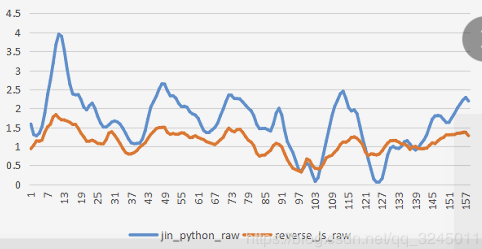
For the last question, I test a file for 160 results, they have the incorrect results for all inputs. And the differ between the designed python results and the JS webGL results is not a fixed value.
But they have the opposite trend like picture below.
The blue line indicates the python results, andthe red line is the reverse of the JS prediction results(negative value of JS prediction).
In this picture you can see the python results have the same trend with reversed JS prediction.
joyicejin
on 22 Oct 2019
@joyicejin Well, I got a chance to run this on my TX1 tonight. I ran into issues with the ordering again on the conv layers and average pooling layer, but now was able to correct them. The corrected code that ran looks like this:
def ShallowConvNet(nb_classes, Chans=64, Samples=128, dropoutRate=0.5):
    # start the model
    input_main = Input((1, Chans, Samples))
    block1 = Conv2D(40, (1, 2),
                    input_shape=(1, Chans, Samples),
                    kernel_constraint=max_norm(2., axis=(0, 1, 2)),
                    data_format='channels_first')(input_main)
    block1 = Conv2D(40, (Chans, 1), use_bias=False,
                    kernel_constraint=max_norm(2., axis=(0, 1, 2)),
                    data_format='channels_first')(block1)
    block1 = BatchNormalization(axis=1, epsilon=1e-05, momentum=0.1)(block1)
    print(block1)

    block1 = Activation('relu')(block1)  # change
    block1 = AveragePooling2D(pool_size=(1, 2), strides=(1, 1), data_format='channels_first')(
        block1)  # pool_size from(1,75) change to (1,2);strides from (1,15) change to (1,1)

    block1 = Activation('relu')(block1)  # change
    block1 = Dropout(dropoutRate)(block1)
    flatten = Flatten()(block1)
    dense = Dense(nb_classes, kernel_constraint=max_norm(0.5))(flatten)

    return Model(inputs=input_main, outputs=dense)
Note that AveragePooling2D needed to be fixed up to 'channels_first'. You had indicated earlier that you thought this should be NCHW but since that was the default I think and it failed I'm not sure what to tell you but it seems that something is mismatched.
However, after this, I get results consistent with TF.js!
2019-10-22 20:23:24.397036: I tensorflow/core/common_runtime/gpu/gpu_device.cc:1304] Created TensorFlow device (/job:localhost/replica:0/task:0/device:GPU:0 with 1210 MB memory) -> physical GPU (device: 0, name: NVIDIA Tegra X1, pci bus id: 0000:00:00.0, compute capability: 5.3)
Tensor("batch_normalization/Identity:0", shape=(None, 40, 1, 4), dtype=float32)
[-0.56249267]
(1,)
(1, 2, 1, 40)
(40,)
(18, 1, 40, 40)
(40,)
(40,)
(40,)
(40,)
(120, 1)
(1,)
2019-10-22 20:23:26.220678: I tensorflow/stream_executor/platform/default/dso_loader.cc:44] Successfully opened dynamic library libcublas.so.10.0
2019-10-22 20:23:26.804496: I tensorflow/stream_executor/platform/default/dso_loader.cc:44] Successfully opened dynamic library libcudnn.so.7
[[-1.0285305]]
So, I would argue that what is seen here is likely not directly an issue with TF.js, but rather some type of an ordering issue. I'm not that familiar with debugging this type of issue, but one thing that came to mind was that maybe it had to do with the fact that you were loading the weights into a model created by code rather than letting Keras's definition of the architecture be used instead. So, I tried load_model and specified your loss as a custom object. Code looks like this:
```import numpy as np
from tensorflow.keras.models import Model, load_model
from tensorflow.keras.layers import Dense, Activation, Dropout
from tensorflow.keras.layers import Conv2D, AveragePooling2D
from tensorflow.keras.layers import BatchNormalization
from tensorflow.keras.layers import Input, Flatten
from tensorflow.keras.constraints import max_norm
from tensorflow.python.ops import math_ops
def self_error(y_true, y_pred):
return abs(y_true) * math_ops.square(y_pred - y_true)
x = np.array([[[
[13.51, 12.45, 11.615, 11.417, 12.374],
[9.3364, 8.6628, 8.2654, 8.9702, 10.581],
[6.8941, 6.8656, 7.4509, 7.7233, 8.8388],
[2.7775, 2.9294, 3.8732, 4.0594, 5.3878],
[4.6785, 4.5278, 4.8622, 5.1711, 6.0176],
[2.8193, 2.4703, 2.9309, 3.3137, 3.45],
[6.0695, 6.0193, 6.5973, 6.5152, 7.454],
[9.2335, 8.891, 9.3503, 10.19, 10.734],
[11.569, 11.55, 11.943, 12.27, 12.656],
[15.005, 12.698, 10.949, 10.067, 10.98],
[9.1161, 8.2788, 7.8575, 8.3353, 10.161],
[7.8717, 7.5515, 7.3807, 7.6935, 8.5774],
[4.1791, 3.9123, 3.8701, 4.069, 5.0737],
[5.3257, 4.9814, 4.6648, 5.0969, 5.7942],
[2.5094, 2.1067, 2.1721, 2.377, 2.9798],
[5.4234, 4.6746, 4.8878, 5.312, 5.9993],
[8.4039, 7.8898, 8.4835, 8.9214, 9.3813],
[11.124, 11.031, 11.353, 11.483, 11.883],
]]])
model = load_model('fit_example6.h5', custom_objects={'new_error':self_error})
y_predict = model.predict(x)
print(y_predict) #1.31
Now when I run the code I get your expected answer!
2019-10-22 20:44:03.974209: I tensorflow/core/common_runtime/gpu/gpu_device.cc:1304] Created TensorFlow device (/job:localhost/replica:0/task:0/device:GPU:0 with 1416 MB memory) -> physical GPU (device: 0, name: NVIDIA Tegra X1, pci bus id: 0000:00:00.0, compute capability: 5.3)
2019-10-22 20:44:08.593185: I tensorflow/stream_executor/platform/default/dso_loader.cc:44] Successfully opened dynamic library libcublas.so.10.0
2019-10-22 20:44:09.262311: I tensorflow/stream_executor/platform/default/dso_loader.cc:44] Successfully opened dynamic library libcudnn.so.7
[[1.3110158]]
```
So it seems like it might be some sort of channel ordering issue, rather than strictly something wrong with TF.js. It is interesting that TF.js seems to be doing the same thing as Keras when the network is built by hand but on my machine.
I also tried saving the loaded model using both model.save(path) and tf.contrib.experimental.export_saved_model(model,path) and converting using tensorflowjs_converter, but both methods still arrived at the same answer as the first conversion...
Does someone on the TF.js team proper have an idea to try? I feel like this is probably something somebody has seen before and it's due to a change in architecture etc.
wingman-jr-addon
on 23 Oct 2019
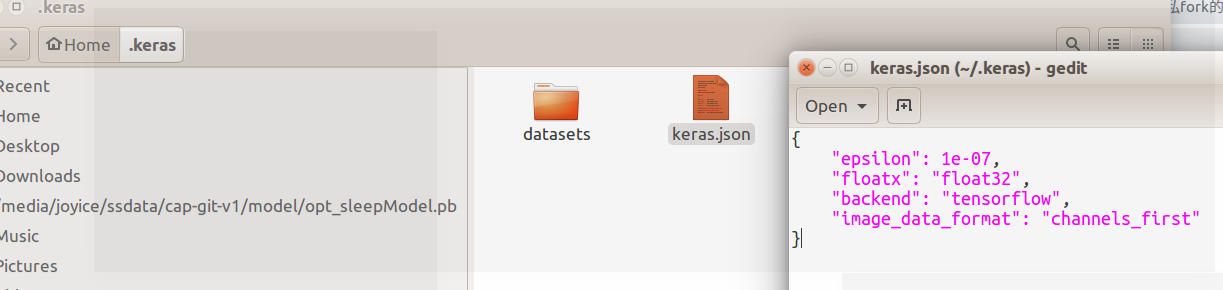
Hello, did you set the data_format of backend keras config in ~/.keras/keras.json for channels_first.
If I set the config there for channels_first, then I got 1.31 .
but if I set the data_format:channels_last in ~/.keras/keras.json, I got the same result of -1.028
So I recommand you to set the data_format:channels_first in ~/.keras/keras.json
Thank you very much
joyicejin
on 23 Oct 2019
Well, I guess what I'm trying to say is that I think we now have an idea what the underlying issue is: channel ordering. I can set the data format in keras.json but since I can already both correctly and incorrectly reproduce the results, I'm not sure quite what the next step is.
From observing both Keras's model.getConfig() and Tensorflow.js's model.json, it appears they both support channel ordering tags, so it's a bit surprising to me that this is an issue. Perhaps one clue though is that I get the same thing as Tensorflow.js when I change individual layers but NOT the global flag. Perhaps there is an unexpected ordering issue on one of the layers that I didn't change.
As a workaround, if you control the system with the GPU, have you tried switching over to channels_last instead and retraining? Or is that not an option?
wingman-jr-addon
on 23 Oct 2019
(Also, as a reference point, "channels_first" does not seem to be supported for Tensorflow, so might be out of luck if the same is true for Tensorflow.js?)
wingman-jr-addon
on 23 Oct 2019
Perhaps one clue though is that I get the same thing as Tensorflow.js when I change individual layers but NOT the global flag. Perhaps there is an unexpected ordering issue on one of the layers that I didn't change.
Yes, you're right, I checked out it's flatten layers,
flatten = Flatten(data_format='channels_first')(block1)
just adding this code, you can get 1.31, the same as the global result.
joyicejin
on 23 Oct 2019
So can I imagine that the channel first order of flatten layers in JS affects the results of -1.0285?
Because you see setting the conv, pooling,and flatten layers channel first, we can get 1.31,
But, if we only set the conv and pooling layers channel first, we can get the same result with JS -1.0285.
joyicejin
on 23 Oct 2019
Well, if you haven't got it working in Tensorflow.js yet, I have good news! I did get it working with a hack. Steps are very close to your original code.
- I create network in code, as your original code did.
- However, I add a Permute layer before the Flatten step. I do this because Flatten on the Tensorflow.js does not seem to respect data_format one way or the other. See here. This mimics the channels_first.
- Load the weights from your original network. Permute has no weights so this works?
- Save the permuted model, network architecture and weights.
- Convert using tensorflowjs_converter as normal.
Relevant code section for Permute:
    block1 = Dropout(dropoutRate)(block1)
    block1 = Permute((3,1,2))(block1)
    flatten = Flatten()(block1)
Now in JS I get 1.3110136985778809.
I have attached the model!
fit_example6_permuted.zip
@joyicejin @caisq I think perhaps the next action is to either convert this issue or create a new bug to be something like "Flatten layer should respect data_format". What do you think?
wingman-jr-addon
on 24 Oct 2019
Well, that's really a big surprise for me and thank you!
@joyicejin_ @caisq I think perhaps the next action is to either convert this issue or create a new bug to be something like "Flatten layer should respect data_format". What do you think?
Of course, if we can do something like this, it's all the better.
Thank you once again for all your given idea and support in this issue.
joyicejin
on 24 Oct 2019
@rthadur @caisq Giving this a poke since it's been over a week. The immediate support case has a workaround and can be resolved; however, this likely points to a need to do something further. I can see this being followed up on in a few ways but I'm not sure which one:
- Enter a bug like "Flatten layer should respect data_format"
- Enter a bug like "Converter should warn that Flatten does not support data_format x"
- Enter a feature request "Add data_format support for Flatten layer."
... or possibly something else. How do you think this should be dispositioned?
wingman-jr-addon
on 4 Nov 2019
@joyicejin @wingman-jr-addon I'll address the issue that TF.js' Flatten Layer doesn't respect data_format === 'channel_first' soon (before EOW), under this bug. Thank you for your patience and for your detailed analysis of this issue.
 caisq
on 7 Nov 2019
caisq
on 7 Nov 2019
@caisq @wingman-jr-addon That's my pleasure to do this. And thank all of you for the coming work soon and close support in this bug.
joyicejin
on 7 Nov 2019
Thanks @caisq for the fast turnaround!
wingman-jr-addon
on 8 Nov 2019
@wingman-jr-addon The fix will become available in the npm package when the next version of tensorflow.js is released
caisq
on 8 Nov 2019
Related issues
 tpreusse
·
4Comments
tpreusse
·
4Comments
 rlexa
·
3Comments
rlexa
·
3Comments
 nsthorat
·
3Comments
nsthorat
·
3Comments
 RELNO
·
3Comments
RELNO
·
3Comments
 Josef-Haupt
·
3Comments
Josef-Haupt
·
3Comments