Tfjs: Cannot import @tensorflow/tfjs-node-gpu on Windows
To get help from the community, we encourage using Stack Overflow and the tensorflow.js tag.
TensorFlow.js version
1.2.9
Browser version
Using NodeJS: v12.10.0
Describe the problem or feature request
Cannot import @tensorflow/tfjs-node-gpu at all, only @tensorflow/tfjs-node but I'd like to use my GPU.
Code to reproduce the bug / link to feature request
require('@tensorflow/tfjs-node-gpu');
Here is the error:
`internal/modules/cjs/loader.js:977
return process.dlopen(module, path.toNamespacedPath(filename));
^
Error: The specified module could not be found.
\?\D:\Programming\NodeJS Workdumb-doorbell\server\node_modules\@tensorflow\tfjs-node-gpu\lib\napi-v4\tfjs_binding.node
at Object.Module._extensions..node (internal/modules/cjs/loader.js:977:18)
at Module.load (internal/modules/cjs/loader.js:790:32)
at Function.Module._load (internal/modules/cjs/loader.js:703:12)
at Module.require (internal/modules/cjs/loader.js:830:19)
at require (internal/modules/cjs/helpers.js:68:18)
at Object.
at Module._compile (internal/modules/cjs/loader.js:936:30)
at Object.Module._extensions..js (internal/modules/cjs/loader.js:947:10)
at Module.load (internal/modules/cjs/loader.js:790:32)
at Function.Module._load (internal/modules/cjs/loader.js:703:12)
`
I've tried reinstalling all my modules, tried using Recommended Node version, tried rebuilding the package, idk what else to try so I'm hoping to get some way to fix this from here
 Mobles
All 54 comments
hi @Mobles, quick question: are you seeing the same issue when using @tensorflow/tfjs-node package?
 kangyizhang
on 9 Sep 2019
kangyizhang
on 9 Sep 2019
@kangyizhang Nope, that works fine, I have had that issue when using it once but I fixed it by doing
npm rebuild @tensorflow/tfjs-node --build-from-source
This doesn't fix it for tfjs-node-gpu though :/
Mobles
on 9 Sep 2019
hi @Mobles
Other users has the same issue and I'm dedicated to fixing it. However I can not reproduce it on my windows machine, I need some of your help.
Can you
- Fork the @tensorflow/tfjs repo: https://github.com/tensorflow/tfjs
- go to tfjs-node directory
- add
console.log('bindingPath: ', bindingPath);at this line: https://github.com/tensorflow/tfjs/blob/master/tfjs-node/src/index.ts#L29 - run
yarn && yarn test, this will print out the bindingPath value and start to run tests locally. You can need to wait for all the tests, fill free to Ctrl+c to terminate the tests. - paste the bindingPath value here
Thank you!
5.
kangyizhang
on 9 Sep 2019
bindingPath: D:\Programming\NodeJS Workdumb-doorbell\server\test\tfjs\tfjs-node\lib\napi-v4\tfjs_binding.node
The tests failed anyhow
Failures:
1) computation in worker (node env) test-tensorflow {} tensor in worker
  Message:
    Error: Cannot find module './dist/index.js'
Thanks a lot for the update!
The path looks fine. And if the test could start, the module could be loaded correctly. The problem should be related with the published npm package. I'll look into it.
FYI the failed test is unrelated.
kangyizhang
on 9 Sep 2019
Ah okay, thanks for the assistance !
Mobles
on 9 Sep 2019
@Mobles I can reproduce the issue. It's because of the space in your path. Space in path is not supported by the binding tool node-gyp. Please try to move it to a folder without space and let me know if the error still exist.
kangyizhang
on 9 Sep 2019
Nope, same error, no spaces in my file path
internal/modules/cjs/loader.js:977
  return process.dlopen(module, path.toNamespacedPath(filename));
                 ^

Error: The specified module could not be found.
\\?\D:\Programming\NodeJS\dumb-doorbell\server\node_modules\@tensorflow\tfjs-node-gpu\lib\napi-v4\tfjs_binding.node
    at Object.Module._extensions..node (internal/modules/cjs/loader.js:977:18)
    at Module.load (internal/modules/cjs/loader.js:790:32)
    at Function.Module._load (internal/modules/cjs/loader.js:703:12)
    at Module.require (internal/modules/cjs/loader.js:830:19)
    at require (internal/modules/cjs/helpers.js:68:18)
    at Object.<anonymous> (D:\Programming\NodeJS\dumb-doorbell\server\node_modules\@tensorflow\tfjs-node-gpu\dist\index.js:44:16)
    at Module._compile (internal/modules/cjs/loader.js:936:30)
    at Object.Module._extensions..js (internal/modules/cjs/loader.js:947:10)
    at Module.load (internal/modules/cjs/loader.js:790:32)
    at Function.Module._load (internal/modules/cjs/loader.js:703:12)
@Mobles did you delete node_module and reinstall dependencies?
kangyizhang
on 9 Sep 2019
Yup, I deleted the folder and typed
npm install
Mobles
on 9 Sep 2019
@Mobles can you try go to the @tensorflow/tfjs-node-gpu directory, like cd node_modules\@tensorflow\tfjs-node-gpu, then run node-pre-gyp rebuild (you might need to npm install -g node-pre-gyp). Then see if you can import tfjs-node-gpu?
kangyizhang
on 9 Sep 2019
@Mobles I can not reproduce the error on my machine but another user says removing - helps: https://github.com/tensorflow/tfjs/issues/1912#issuecomment-529660489
kangyizhang
on 9 Sep 2019
Hi @kangyizhang
Both the above solutions didn't work, the first one gave me this error:
D:\Programming\NodeJS\dumbdoorbell\server\node_modules\@tensorflow\tfjs-node-gpu>node-pre-gyp rebuild
node-pre-gyp info it worked if it ends with ok
node-pre-gyp info using [email protected]
node-pre-gyp info using [email protected] | win32 | x64
node-pre-gyp ERR! build error
node-pre-gyp ERR! stack Error: Failed to execute 'node-gyp.cmd clean' (Error: spawn node-gyp.cmd ENOENT)
node-pre-gyp ERR! stack     at ChildProcess.<anonymous> (C:\Users\Billy\AppData\Roaming\npm\node_modules\node-pre-gyp\lib\util\compile.js:77:29)
node-pre-gyp ERR! stack     at ChildProcess.emit (events.js:209:13)
node-pre-gyp ERR! stack     at Process.ChildProcess._handle.onexit (internal/child_process.js:270:12)
node-pre-gyp ERR! stack     at onErrorNT (internal/child_process.js:456:16)
node-pre-gyp ERR! stack     at processTicksAndRejections (internal/process/task_queues.js:80:21)
node-pre-gyp ERR! System Windows_NT 10.0.18362
node-pre-gyp ERR! command "C:\\Program Files\\nodejs\\node.exe" "C:\\Users\\Billy\\AppData\\Roaming\\npm\\node_modules\\node-pre-gyp\\bin\\node-pre-gyp" "rebuild"
node-pre-gyp ERR! cwd D:\Programming\NodeJS\dumbdoorbell\server\node_modules\@tensorflow\tfjs-node-gpu
node-pre-gyp ERR! node -v v12.10.0
node-pre-gyp ERR! node-pre-gyp -v v0.13.0
node-pre-gyp ERR! not ok
Failed to execute 'node-gyp.cmd clean' (Error: spawn node-gyp.cmd ENOENT)
and the second one the same error still persists, removing the - didn't help
Ignore the above error, fixed it by installing node-gyp globally! Didn't fix it though
Mobles
on 10 Sep 2019
@kangyizhang, I'm in the same boat.
PS C:\Users\Josh\source\repos\tfjs-training-classification> node
> const tfjs = require("@tensorflow/tfjs-node-gpu");
Thrown:
Error: The specified module could not be found.
\\?\C:\Users\Josh\source\repos\tfjs-training-classification\node_modules\@tensorflow\tfjs-node-gpu\lib\napi-v4\tfjs_binding.node
    at Object.Module._extensions..node (internal/modules/cjs/loader.js:807:18)
    at Module.load (internal/modules/cjs/loader.js:653:32)
    at tryModuleLoad (internal/modules/cjs/loader.js:593:12)
    at Function.Module._load (internal/modules/cjs/loader.js:585:3)
    at Module.require (internal/modules/cjs/loader.js:692:17)
    at require (internal/modules/cjs/helpers.js:25:18)
This is also after trying your suggestion of node-pre-gyp rebuild.
Please let me know if there's anything I can do to assist in troubleshooting.
 adwellj
on 10 Sep 2019
adwellj
on 10 Sep 2019
@Mobles I still can not reproduce this error, but I found this question. Can you follow the answer in this question and install windows-build-tools, then try again?
@adwellj can you try to 1) see if it works after remove - in the folder name 2) try the above steps?
kangyizhang
on 10 Sep 2019
@kangyizhang Nope, didn't fix it, the windows-build-tools wouldn't install for a good hour, just this message
start --quiet --includeRecommended --add Microsoft.VisualStudio.Workload.VCTools --locale en-US --activityId 4c3f742b-c601-4f20-9a79-3852c0250993] +0ms
  windows-build-tools ------------------- Python -------------------- +0ms
  windows-build-tools Python 2.7.16 is already installed, not installing again. +0ms
  windows-build-tools ---------- Visual Studio Build Tools ---------- +498ms
  windows-build-tools 2019-09-10T20:34:00 : Verbose : [InstalledProductsProviderImpl]: Stream was closed +0ms
  windows-build-tools 2019-09-10T20:34:00 : Verbose : [InstallerImpl]: Rpc connection was closed. +1ms
  windows-build-tools 2019-09-10T20:34:00 : Verbose : [InstallerImpl]: Stream was closed +0ms
  windows-build-tools 2019-09-10T20:34:00 : Verbose : Completed notifying all clients that the update is starting +0ms
  windows-build-tools 2019-09-10T20:34:00 : Verbose : Updating installer [bootstrapperArguments: /finalizeInstall install --in C:\ProgramData\Microsoft\VisualStudio\Packages\_bootstrapper\vs_setup_bootstrapper_201909102033434738.json --norestart --quiet --includeRecommended --add Microsoft.VisualStudio.Workload.VCTools --locale en-US --activityId 4c3f742b-c601-4f20-9a79-3852c0250993] +0ms
So I cancelled it, and tried again and it installed but running my program again didn't work and got the same error.
Just saw the Dependancy Walker comment, got this
Error: At least one required implicit or forwarded dependency was not found.
Error: At least one module has an unresolved import due to a missing export function in an implicitly dependent module.
Error: Modules with different CPU types were found.
Error: A circular dependency was detected.
Warning: At least one delay-load dependency module was not found.
Warning: At least one module has an unresolved import due to a missing export function in a delay-load dependent module.
Andddd I'm missing a ton of modules:
Any particular package that has all of these in?
Mobles
on 10 Sep 2019
@kangyizhang tried it in a brand new repo without any hyphens in the name. Same result.
I then realized that I forgot to add the location for cuDNN and other CUDA directories to my path. Once I included those and launch a new PowerShell window, everything seems to be working.
@Mobles for reference, I'm using CUDA toolkit 10.0.130 and cuDNN 10.0 version 7.4.2.24.
I've copied the contents of cuDNN to a directory of "C:\tools". I have the following entries in my user path variable:
- C:\tools\cuda\bin
- C:\Program Files\NVIDIA GPU Computing Toolkit\CUDA\v10.0\bin
- C:\Program Files\NVIDIA GPU Computing Toolkit\CUDA\v10.0extras\CUPTI\libx64
- C:\Program Files\NVIDIA GPU Computing Toolkit\CUDA\v10.0\include
Hopefully this will be of benefit to you :)
Creating a new project with a hyphen in the name:
PS C:\Users\Josh\source\repos\gpu-1-2-9> npm init -y
Wrote to C:\Users\Josh\source\repos\gpu-1-2-9\package.json:

{
  "name": "gpu-1-2-9",
  "version": "1.0.0",
  "description": "",
  "main": "index.js",
  "scripts": {
    "test": "echo \"Error: no test specified\" && exit 1"
  },
  "keywords": [],
  "author": "",
  "license": "ISC"
}


PS C:\Users\Josh\source\repos\gpu-1-2-9> npm i @tensorflow/tfjs-node-gpu

> @tensorflow/[email protected] install C:\Users\Josh\source\repos\gpu-1-2-9\node_modules\@tensorflow\tfjs-node-gpu
> node scripts/install.js gpu download

GPU-windows-1.2.9.zip
* Downloading libtensorflow
[==============================] 11287391/bps 100% 0.0s
[==============================] 1736527/bps 100% 0.0s
* Building TensorFlow Node.js bindings
npm notice created a lockfile as package-lock.json. You should commit this file.
npm WARN [email protected] No description
npm WARN [email protected] No repository field.

+ @tensorflow/[email protected]
added 86 packages from 84 contributors and audited 150 packages in 37.991s
found 0 vulnerabilities

PS C:\Users\Josh\source\repos\gpu-1-2-9> node
> const tf = require("@tensorflow/tfjs-node-gpu");
2019-09-11 08:05:14.734299: I tensorflow/core/platform/cpu_feature_guard.cc:142] Your CPU supports instructions that this TensorFlow binary was not compiled to use: AVX2
2019-09-11 08:05:14.741308: I tensorflow/stream_executor/platform/default/dso_loader.cc:42] Successfully opened dynamic library nvcuda.dll
2019-09-11 08:05:14.814634: I tensorflow/core/common_runtime/gpu/gpu_device.cc:1640] Found device 0 with properties:
name: GeForce GTX 1660 Ti major: 7 minor: 5 memoryClockRate(GHz): 1.845
pciBusID: 0000:01:00.0
2019-09-11 08:05:14.820344: I tensorflow/stream_executor/platform/default/dlopen_checker_stub.cc:25] GPU libraries are statically linked, skip dlopen check.
2019-09-11 08:05:14.824137: I tensorflow/core/common_runtime/gpu/gpu_device.cc:1763] Adding visible gpu devices: 0
2019-09-11 08:05:15.383664: I tensorflow/core/common_runtime/gpu/gpu_device.cc:1181] Device interconnect StreamExecutor with strength 1 edge matrix:
2019-09-11 08:05:15.387720: I tensorflow/core/common_runtime/gpu/gpu_device.cc:1187]      0
2019-09-11 08:05:15.389994: I tensorflow/core/common_runtime/gpu/gpu_device.cc:1200] 0:   N
2019-09-11 08:05:15.392695: I tensorflow/core/common_runtime/gpu/gpu_device.cc:1326] Created TensorFlow device (/job:localhost/replica:0/task:0/device:GPU:0 with 4637 MB memory) -> physical GPU (device: 0, name: GeForce GTX 1660 Ti, pci bus id: 0000:01:00.0, compute capability: 7.5)
undefined
>
Edit: Corrected cuDNN version from 7.6 to 7.4
adwellj
on 11 Sep 2019
@adwellj
I had already got those path variables,

They didn't help though, I'm going to try reinitalize my project, see what that does.
Edit: Nope, same error :/
Update:
Works on WSL lmao but just not windows in general???
> const tf = require("@tensorflow/tfjs-node-gpu");
Thrown:
Error: The specified module could not be found.
\\?\D:\Programming\NodeJS\dumbdoorbell\test\node_modules\@tensorflow\tfjs-node-gpu\lib\napi-v4\tfjs_binding.node
    at Object.Module._extensions..node (internal/modules/cjs/loader.js:977:18)
    at Module.load (internal/modules/cjs/loader.js:790:32)
    at Function.Module._load (internal/modules/cjs/loader.js:703:12)
    at Module.require (internal/modules/cjs/loader.js:830:19)
    at require (internal/modules/cjs/helpers.js:68:18)
>
@Mobles bummer :(
It worked immediately on that gpu-1-2-9 project (after restarting PowerShell), but it still failed on my original tfjs-training-classification project. For that one I did an npm uninstall @tensorflow/tfjs-node-gpu followed by an npm i @tensorflow/tfjs-node-gpu. It worked after that.
Have you tried creating a new project with only tfjs-node-gpu to isolate it down to just this package?
adwellj
on 11 Sep 2019
@adwellj
Yeah, tried it in the above bit, made it on my desktop and tried to import it and the same error :(
Mobles
on 11 Sep 2019
@Mobles unsure if this is relevant, but here are some additional things I had done previously to this new PC. They're steps that I used to have to do for version 0.3.2 when tfjs-node-gpu was using node-gyp to build on the client.
npm i -g node-gyp
Then from an elevated console (Run as Administrator) npm i -g --production windows-build-tools
Then create a copy of python.exe in C:Users\node-gyp configure --verbose would complain about not being able to find python2.
My understanding is that node-gyp is no longer needed, so this is likely not relevant, but these are some other configurations that I've made to this new machine.
adwellj
on 11 Sep 2019
@Mobles can you try with CUDA 10.0 and cuDNN >= 7.4.1? These are the official supported version: https://www.tensorflow.org/install/gpu
kangyizhang
on 11 Sep 2019
Good catch @kangyizhang! I didn't notice the 10.1 in his path variables.
FYI, cuDNN version 7.6.2.24 does not work. It will generate a 'could not create cudnn handle' exception once I try to perform some operations. I just found that out about an hour ago :smirk:
Replacing it with 7.4.2.24 resolved that issue.
adwellj
on 11 Sep 2019
Hi @kangyizhang
That unfortunately didn't help :/ Same error
D:\Programming\NodeJS\dumbdoorbell\server>node .
internal/modules/cjs/loader.js:977
  return process.dlopen(module, path.toNamespacedPath(filename));
                 ^

Error: The specified module could not be found.
\\?\D:\Programming\NodeJS\dumbdoorbell\server\node_modules\@tensorflow\tfjs-node-gpu\lib\napi-v4\tfjs_binding.node
    at Object.Module._extensions..node (internal/modules/cjs/loader.js:977:18)
    at Module.load (internal/modules/cjs/loader.js:790:32)
    at Function.Module._load (internal/modules/cjs/loader.js:703:12)
    at Module.require (internal/modules/cjs/loader.js:830:19)
    at require (internal/modules/cjs/helpers.js:68:18)
    at Object.<anonymous> (D:\Programming\NodeJS\dumbdoorbell\server\node_modules\@tensorflow\tfjs-node-gpu\dist\index.js:44:16)
    at Module._compile (internal/modules/cjs/loader.js:936:30)
    at Object.Module._extensions..js (internal/modules/cjs/loader.js:947:10)
    at Module.load (internal/modules/cjs/loader.js:790:32)
    at Function.Module._load (internal/modules/cjs/loader.js:703:12)
Right, turns out I fixed it? Some how???
Idk how I did but it had nothing to do with NodeJS? I was looking at Voice Mimicing with AI, installed some Python 3.7 libraries, one of which being Tensorflow GPU & PyTorch, now it's suddenly working
I legit have 0 clue as to what got it working :/
Mobles
on 12 Sep 2019
Glad to hear it works. I guess it may be related with CUDA driver and re-open terminal. Feel free to re-open if you see any other issue.
kangyizhang
on 14 Sep 2019
I solved the same problem appending cudnn path to PATH.
My error message was the same as the author and I spent a long time to try the wrong solutions.
I think it would be better providing the more helpful error message.
 worudso
on 16 Sep 2019
worudso
on 16 Sep 2019
Hello, I have the same issue there on Windows. Although I have set the different values in the windows PATH, it will still throw the same error as op when I just try to require('@tensorflow/tfjs-node-gpu').
internal/modules/cjs/loader.js:992
  return process.dlopen(module, path.toNamespacedPath(filename));
                 ^
Error: The specified module could not be found.
\\?\C:\Travail\tensorflow_js_test\node_modules\@tensorflow\tfjs-node-gpu\lib\napi-v4\tfjs_binding.node
    at Object.Module._extensions..node (internal/modules/cjs/loader.js:992:18)
    at Module.load (internal/modules/cjs/loader.js:798:32)
    at Function.Module._load (internal/modules/cjs/loader.js:711:12)
    at Module.require (internal/modules/cjs/loader.js:838:19)
    at require (internal/modules/cjs/helpers.js:74:18)
    at Object.<anonymous> (C:\Travail\tensorflow_js_test\node_modules\@tensorflow\tfjs-node-gpu\dist\index.js:44:16)
    at Module._compile (internal/modules/cjs/loader.js:945:30)
    at Object.Module._extensions..js (internal/modules/cjs/loader.js:962:10)
    at Module.load (internal/modules/cjs/loader.js:798:32)
    at Function.Module._load (internal/modules/cjs/loader.js:711:12)
Unlike op, I'm unable to import @tensorflow/tfjs-node as well. It will throw the same error as with @tensorflow/tfjs-node-gpu even when rebuilding with --build-from-source.
I have tried to install CudaNN 7.6, 7.5 and 7.4 for Cuda v10.0 but it won't change anything.
I have set my %PATH% variable correctly I suppose
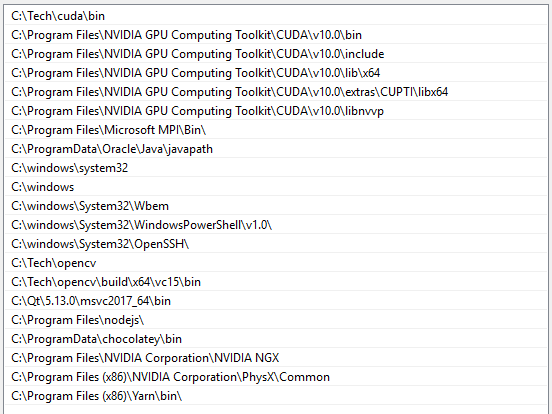
I have tried all of this with @tensorflow/[email protected]. If you have any other suggestions on how to try to fix this problem I would be glad to try them.
Thank you
 ealionel
on 25 Oct 2019
ealionel
on 25 Oct 2019
hi @ealionel
When you are installing either @tensorflow/tfjs-node or @tensorflow/tfjs-node-gpu, can you confirm what's in the folder C:\Travail\tensorflow_js_test\node_modules\@tensorflow\tfjs-node-gpu\lib\napi-v4?
You can try some actions that helped other users:
- Make sure window build tool are installed:
npm install -g --production windows-build-tools - Reopen the terminal/reboot system after you set CUDA path.
kangyizhang
on 25 Oct 2019
Hi @kangyizhang, thank you for you answer
In C:\Travail\tensorflow_js_test\node_modules\@tensorflow\tfjs-node-gpu\lib\napi-v4 I confirm that tfjs_binding.node is in that folder when installing @tensorflow/tfjs-node-gpu.
I also tried installing window-build-tool but it doesn't change anything to the error described above. CUDA's path seem to be set correctly, doesn't change anything neither, even after reopening terminal.
Isn't there anything else to add to PATH? I once had the same problem when I tried to import my own node bindings in an other project with dependencies to an external library. I didn't set my path correctly so it kept throwing the same error until I added those.
ealionel
on 28 Oct 2019
@ealionel You don't need to add anything else other than CUDA path and CUDNN.
Can you try to
1) fork this repo,
2) go to tfjs-node
3) run yarn && yarn test and paste the output here?
kangyizhang
on 28 Oct 2019
@kangyizhang thanks, here are the output of it, same error though
PS C:\Travail\iscan_project\tfjs_fork\tfjs-node> yarn
yarn install v1.19.1
warning package.json: No license field
warning @tensorflow/[email protected]: No license field
[1/5] Validating package.json...
warning @tensorflow/[email protected]: No license field
[2/5] Resolving packages...
[3/5] Fetching packages...
[4/5] Linking dependencies...
warning "@tensorflow/tfjs > @tensorflow/[email protected]" has unmet peer dependency "seedrandom@~2.4.3".
[5/5] Building fresh packages...
$ node scripts/install.js
CPU-windows-1.3.1.zip
* Downloading libtensorflow
[==============================] 15452433/bps 100% 0.0s
[==============================] 1976969/bps 100% 0.0s
* Building TensorFlow Node.js bindings
Done in 20.34s.
PS C:\Travail\iscan_project\tfjs_fork\tfjs-node> yarn test
yarn run v1.19.1
warning package.json: No license field
$ ts-node src/run_tests.ts
Error: The specified module could not be found.
\\?\C:\Travail\iscan_project\tfjs_fork\tfjs-node\lib\napi-v4\tfjs_binding.node
    at Object.Module._extensions..node (internal/modules/cjs/loader.js:992:18)
    at Module.load (internal/modules/cjs/loader.js:798:32)
    at Function.Module._load (internal/modules/cjs/loader.js:711:12)
    at Module.require (internal/modules/cjs/loader.js:838:19)
    at require (internal/modules/cjs/helpers.js:74:18)
    at Object.<anonymous> (C:\Travail\iscan_project\tfjs_fork\tfjs-node\src\index.ts:32:18)
    at Module._compile (internal/modules/cjs/loader.js:945:30)
    at Module.m._compile (C:\Travail\iscan_project\tfjs_fork\tfjs-node\node_modules\ts-node\src\index.ts:400:23)
    at Module._extensions..js (internal/modules/cjs/loader.js:962:10)
    at Object.require.extensions.<computed> [as .ts] (C:\Travail\iscan_project\tfjs_fork\tfjs-node\node_modules\ts-node\src\index.ts:403:12)
error Command failed with exit code 1.
info Visit https://yarnpkg.com/en/docs/cli/run for documentation about this command.
I confirm that lib/napi-v4/tfjs_binding.node has been built into that folder
ealionel
on 30 Oct 2019
I've also been having this problem, it seems to be related to the Node version installed. When I run yarn && yarn test under Node v12.13.0 (current LTS, in a git bash shell on Windows 10) I get this error:
$ yarn && yarn test
yarn install v1.19.1
[3/5] Fetching packages...
[4/5] Linking dependencies...
warning "@tensorflow/tfjs > @tensorflow/[email protected]" has unmet peer dependency "seedrandom@~2.4.3".
[5/5] Building fresh packages...
$ node scripts/install.js
CPU-windows-1.3.1.zip
* Downloading libtensorflow
[==============================] 4557291/bps 100% 0.0s
[==============================] 1548229/bps 100% 0.0s
* Building TensorFlow Node.js bindings
Done in 17.94s.
yarn run v1.19.1
    at Module.load (internal/modules/cjs/loader.js:812:32)
    at Function.Module._load (internal/modules/cjs/loader.js:724:14)
    at Module.require (internal/modules/cjs/loader.js:849:19)
    at require (internal/modules/cjs/helpers.js:74:18)
    at Object.<anonymous> (C:\dev\tfjs\tfjs-node\src\index.ts:32:18)
    at Module._compile (internal/modules/cjs/loader.js:956:30)
    at Module.m._compile (C:\dev\tfjs\tfjs-node\node_modules\ts-node\src\index.ts:400:23)
    at Module._extensions..js (internal/modules/cjs/loader.js:973:10)
    at Object.require.extensions.<computed> [as .ts] (C:\dev\tfjs\tfjs-node\node_modules\ts-node\src\index.ts:403:12)
error Command failed with exit code 1.
info Visit https://yarnpkg.com/en/docs/cli/run for documentation about this command.
It seems like some of the output didn't render properly (there were some blank lines) but it looks the same as @ealionel's output.
However, if I uninstall Node v12.13 and install Node v11.15 instead, it runs the tests:
$ yarn && yarn test
yarn install v1.19.1
[3/5] Fetching packages...
[4/5] Linking dependencies...
warning "@tensorflow/tfjs > @tensorflow/[email protected]" has unmet peer dependency "seedrandom@~2.4.3".
[5/5] Building fresh packages...

$ node scripts/install.js
CPU-windows-1.3.1.zip
* Downloading libtensorflow
[==============================] 4238173/bps 100% 0.0s
[==============================] 2294696/bps 100% 0.0s
* Building TensorFlow Node.js bindings
Done in 25.78s.
yarn run v1.19.1
Started
.............[snip].............

Failures:
1) computation in worker (node env) test-tensorflow {} tensor in worker
  Message:
    Error: Cannot find module './dist/index.js'
  Stack:
    error properties: Object({ code: 'MODULE_NOT_FOUND' })
        at <Jasmine>
        at Function.Module._resolveFilename (internal/modules/cjs/loader.js:668:15)
        at Function.Module._load (internal/modules/cjs/loader.js:591:27)
        at Module.require (internal/modules/cjs/loader.js:723:19)
        at require (internal/modules/cjs/helpers.js:14:16)
        at [worker eval]:4:14
        at [worker eval]:10:3
        at Script.runInThisContext (vm.js:124:20)
        at Object.runInThisContext (vm.js:314:38)
        at Object.<anonymous> ([worker eval]-wrapper:9:26)
        at Module._compile (internal/modules/cjs/loader.js:816:30)
  Message:
    Failed: Cannot find module './dist/index.js'
  Stack:
    error properties: Object({ code: 'MODULE_NOT_FOUND' })
        at <Jasmine>
        at Function.Module._resolveFilename (internal/modules/cjs/loader.js:668:15)
        at Function.Module._load (internal/modules/cjs/loader.js:591:27)
        at Module.require (internal/modules/cjs/loader.js:723:19)
        at require (internal/modules/cjs/helpers.js:14:16)
        at [worker eval]:4:14
        at [worker eval]:10:3
        at Script.runInThisContext (vm.js:124:20)
        at Object.runInThisContext (vm.js:314:38)
        at Object.<anonymous> ([worker eval]-wrapper:9:26)
        at Module._compile (internal/modules/cjs/loader.js:816:30)

Ran 3526 of 3593 specs
3526 specs, 1 failure
Finished in 5.446 seconds
error Command failed with exit code 1.
info Visit https://yarnpkg.com/en/docs/cli/run for documentation about this command.
I think that it is also broken in Node v10.
 DouglasLivingstone
on 30 Oct 2019
DouglasLivingstone
on 30 Oct 2019
hi @ealionel
I can reproduce the error on a new windows machine (though it works on the windows machine we use to develop). I'll try to figure out the reason.
kangyizhang
on 30 Oct 2019
@DouglasLivingstone do you see the same error with tfjs-node for version 1.2.9 or 1.2.10?
kangyizhang
on 30 Oct 2019
I'm having the exact same issue on a new Windows machine under Node v12.13.0. I've installed Python 2 and the dev tools with absolutely no problems. I can build the bindings and can confirm that they exist, but I get the same import error. This is with TFJS-Node version 1.3.1.
On my other system, I managed to get it to work perfectly with Node v10.16.3, TFJS v1.2.11 and TFJS-Node v1.2.9. I've no idea why this worked, and trying to update any packages results in the "module not found" issue for "tfjs_binding.node". Both of these systems are on Windows 10 1903.
 JoshNewham1
on 31 Oct 2019
JoshNewham1
on 31 Oct 2019
I too had problems running newer versions of tfjs on newer versions of Node on Windows 10.
Node v10.17.0 and tfjs 1.2.11 would produce a 'module not found' error when trying to require("@tensorflow/tfjs-node").
Node v10.16.3 and tfjs 1.2.11 will work though, as JoshNewham1 mentioned above.
adwellj
on 31 Oct 2019
I have the same error running [email protected] with node 12.13.0.
Using node 10.16.3 seems to fix it.
 thohag
on 31 Oct 2019
thohag
on 31 Oct 2019
Hi, same error here on Windows 10 as well:
internal/modules/cjs/loader.js:1025
  return process.dlopen(module, path.toNamespacedPath(filename));
                 ^

Error: The specified module could not be found.
\\?\C:\Users\madelpech\Documents\Projets\TFJS\node_modules\@tensorflow\tfjs-node\lib\napi-v4\tfjs_binding.node
    at Object.Module._extensions..node (internal/modules/cjs/loader.js:1025:18)
    at Module.load (internal/modules/cjs/loader.js:815:32)
    at Function.Module._load (internal/modules/cjs/loader.js:727:14)
    at Module.require (internal/modules/cjs/loader.js:852:19)
    at require (internal/modules/cjs/helpers.js:74:18)
    at Object.<anonymous> (C:\Users\madelpech\Documents\Projets\TFJS\node_modules\@tensorflow\tfjs-node\dist\index.js:44:16)
    at Module._compile (internal/modules/cjs/loader.js:959:30)
    at Object.Module._extensions..js (internal/modules/cjs/loader.js:995:10)
    at Module.load (internal/modules/cjs/loader.js:815:32)
    at Function.Module._load (internal/modules/cjs/loader.js:727:14)
Node version: 12.13.1
Tried with tfjs-node versions: 1.3.1, 1.3.0, 1.27
I always have the file tfjs_binding.node in the folder node_modules/tfjs-node/lib/napi-v4.
Side note: I can't install [email protected], even if I have tried installing (and reinstalling) windows-build-tools and other solutions found on this github and on the Internet.
 MarcDelp
on 26 Nov 2019
MarcDelp
on 26 Nov 2019
@MarcDelp, I'm pretty sure there's an issue with tfjs and node 12, and the latest version of node to be working is 10.16.3. Perhaps try with node 10.16.3 and see if that temporarily resolves your issue.
adwellj
on 27 Nov 2019
Yes, I got it working on node 10.16.3 with tfjs 1.3.1 but I'd really like to make it on node 12 as we are starting a new project from scratch. Do you have any idea (even if not a precise one) on when the fix may be available?
MarcDelp
on 27 Nov 2019
@MarcDelp @adwellj A PR fixing this issue has been merged and the next release (most likely after thankgiving) will support the latest version of node.
kangyizhang
on 27 Nov 2019
If this problem is still affecting anyone, I think I might've found a temporary fix. I transplanted the tensorflow.dll file from my Node v10.16.3 modules (node_modules\@tensorflow\tfjs-node\lib\napi-v4) to my Node 12 modules which didn't seem to have one. Then, I got past the "specified module could not be found" error. This is quite a bad bodge and definitely not a solution for production environments but seems to work fine for development until this issue is fixed. The DLL file is hosted here, if you can't find it.
JoshNewham1
on 21 Dec 2019
This issue should have been fixed @v1.4.0 and later. Please feel free to let me know if you are still seeing any error.
kangyizhang
on 21 Dec 2019
Yeah, sorry, it has been fixed, I was still on an old version. Thanks for the update 😁.
JoshNewham1
on 27 Dec 2019
@kangyizhang Still the same error "Error: Cannot find module '.../node_modules/@tensorflow/tfjs-node/lib/napi-v5/tfjs_binding.node'"
macOS Catalina
v10.15.03
node -v
v12.13.0
"name": "@tensorflow/tfjs-node",
"version": "1.5.2",
"name": "@tensorflow/tfjs",
"version": "1.5.2",
"name": "@tensorflow/tfjs-core",
"version": "1.5.2"
 mprinc
on 22 Feb 2020
mprinc
on 22 Feb 2020
OK, binary searching :( versions I came to the latest working solution:
node -v
v12.10.0
(the next v12.11.1 is crashing, also the same with the currently latest node v13.9.0)
"name": "@tensorflow/tfjs-node",
"version": "1.4.0",
(the next 1.5.1 is crashing)
Obviously, this is far from ideal as we need to propagate node version changes on the production servers, and as we have both frontend and backend tf, we need to reduce frontend version to not risk compatibility issues or keep them version-async
we are happy to create minimal test case and provide whatever info to be able to work with the latest versions of tf and node
mprinc
on 22 Feb 2020
It is even worse with our servers, @kangyizhang
I couldn't find any working combination and I tried with many versions of node, tensorflow, etc
Here is the server info
Linux aitool 4.15.0-88-generic #88-Ubuntu SMP Tue Feb 11 20:11:34 UTC 2020 x86_64 x86_64 x86_64 GNU/Linux
Ubuntu 18.04.4 LTS
mprinc
on 23 Feb 2020
I've recently found that starting with node 12.15, you need to be on tfjs-node-gpu 1.5.x. Below 12.15 requires 1.4.0 (or below).
Also, tfjs-node-gpu 1.5.x requires CuDNN 7.6, whereas earlier versions used 7.4.
I hope this helps you guys. The poor / incomplete documentation regarding version compatibility is frustrating.
adwellj
on 23 Feb 2020
Thanks, @adwellj, it is a regular server, without GPU server, as there is no demanding TF use case. I tried various combinations, but I couldn't find a working option, I started with the latest versions of nodes and tfjs, but then followed various suggestions with using earlier versions. With OSX it helped, but Ubuntu is even worse
EDIT: With the latest v1.7.0 Ubuntu is resolved. I get expected warning :) "Your CPU supports instructions that this TensorFlow binary was not compiled to use: AVX2 AVX512F FMA"
mprinc
on 23 Feb 2020
\?\C:Users\eddie\Documents\GitHub\Y8-Instant-io-Game\node_modules\@tensorflow\tfjs-node\lib\napi-v5tfjs_binding.node
Works fine on a clean install but on a machine that has had many versions of node, getting some extra slashes \\?\ seems incorrect.
 EddieOne
on 16 Jun 2020
EddieOne
on 16 Jun 2020
I'm having the exact same issue on a new Windows machine under Node v12.13.0. I've installed Python 2 and the dev tools with absolutely no problems. I can build the bindings and can confirm that they exist, but I get the same import error. This is with TFJS-Node version 1.3.1.
On my other system, I managed to get it to work perfectly with Node v10.16.3, TFJS v1.2.11 and TFJS-Node v1.2.9. I've no idea why this worked, and trying to update any packages results in the "module not found" issue for "tfjs_binding.node". Both of these systems are on Windows 10 1903.
Thanks @JoshNewham1, save my project =D
 andrefantinato
on 25 Jun 2020
andrefantinato
on 25 Jun 2020
I would like to underline the fact that this problem is not resolved. I've tried everything mentioned above without any success to get tjfs-node-gpu working on windows 10. It always yields UnhandledPromiseRejectionWarning: Error: The Node.js native addon module (tfjs_binding.node) can not be found at path: C:\...\node_modules\@tensorflow\tfjs-node-gpu\lib\napi-v4\tfjs_binding.node..
It feels like finding right versions of node.js + tfjs + tfjs-node-gpu is purely experimental task which is a little frustrating. Also I have to mention that tfjs works well on CPU.
UPDATE:
So it turns out adding tensorflow.dll as mentioned in comment below actually did the job:
If this problem is still affecting anyone, I think I might've found a temporary fix. I transplanted the tensorflow.dll file from my Node v10.16.3 modules (node_modules@tensorflow\tfjs-node\lib\napi-v4) to my Node 12 modules which didn't seem to have one. Then, I got past the "specified module could not be found" error. This is quite a bad bodge and definitely not a solution for production environments but seems to work fine for development until this issue is fixed. The DLL file is hosted here, if you can't find it.
The final set of configurations working for me seem to be following:
Node.js: v10.16.3
@tensorflow/tfjs: v1.2.11
@tensorflow/tfjs-node: v1.2.9
@tensorflow/tfjs-node-gpu: v1.2.9
CUDA toolkit: v10.0.0
cuDNN sdk: any version compatible with CUDA toolkit v10.0.0 - so for example v7.4.2
And don't forget adding required CUDA paths into env PATH.
 DrewJay
on 20 Sep 2020
DrewJay
on 20 Sep 2020
@Mobles can you try go to the @tensorflow/tfjs-node-gpu directory, like
cd node_modules\@tensorflow\tfjs-node-gpu, then runnode-pre-gyp rebuild(you might need tonpm install -g node-pre-gyp). Then see if you can import tfjs-node-gpu?
I had the same issue and I ran node-pre-gyp rebuild and got this output:

Along with a whole bunch of more above.
I keep getting the same error:

My path does not contain any spaces.
 EvangelosKolimitras
on 27 Nov 2020
EvangelosKolimitras
on 27 Nov 2020
Related issues
 Umar24129
·
3Comments
Umar24129
·
3Comments
 pranayaryal
·
4Comments
pranayaryal
·
4Comments
 Josef-Haupt
·
3Comments
Josef-Haupt
·
3Comments
 tpreusse
·
4Comments
tpreusse
·
4Comments
 dhrumil83
·
3Comments
dhrumil83
·
3Comments
Most helpful comment
@MarcDelp @adwellj A PR fixing this issue has been merged and the next release (most likely after thankgiving) will support the latest version of node.