Tfjs: Batch predictions are wrong on Chromebook using the WebGL backend
TensorFlow.js version
1.0.3 (latest)
Browser version
Google Chrome OS version 71.0.3578.127
Describe the problem or feature request
Batch predictions are wrong on Chromebook using the WebGL backend. In our tests, the first prediction in the batch actually match pretty closely between WebGL and CPU backends, but all the other predictions do not.
Conditions to reproduce:
- On Chromebook, running TensorFlow.js inside ChromeOS extension.
- WebGL backend only.
- Batch image predictions only (the first prediction in each batch is consistently correct).
Code to reproduce the bug / link to feature request
Demo of this bug found at the repo below. Instructions in the README.
https://github.com/ryancbarry/tensorflow-image-recognition-chrome-extension/
 Azaeres
All 20 comments
We have a similar bug that shows in FF and Chrome on different computers with different GPUs. We trained our model (based on MobileNetV2) in Python and then exported to JS via tfjs.converters.save_keras_model. The model predicts face landmarks. The first screenshot shows the model working correctly when using the CPU backend:
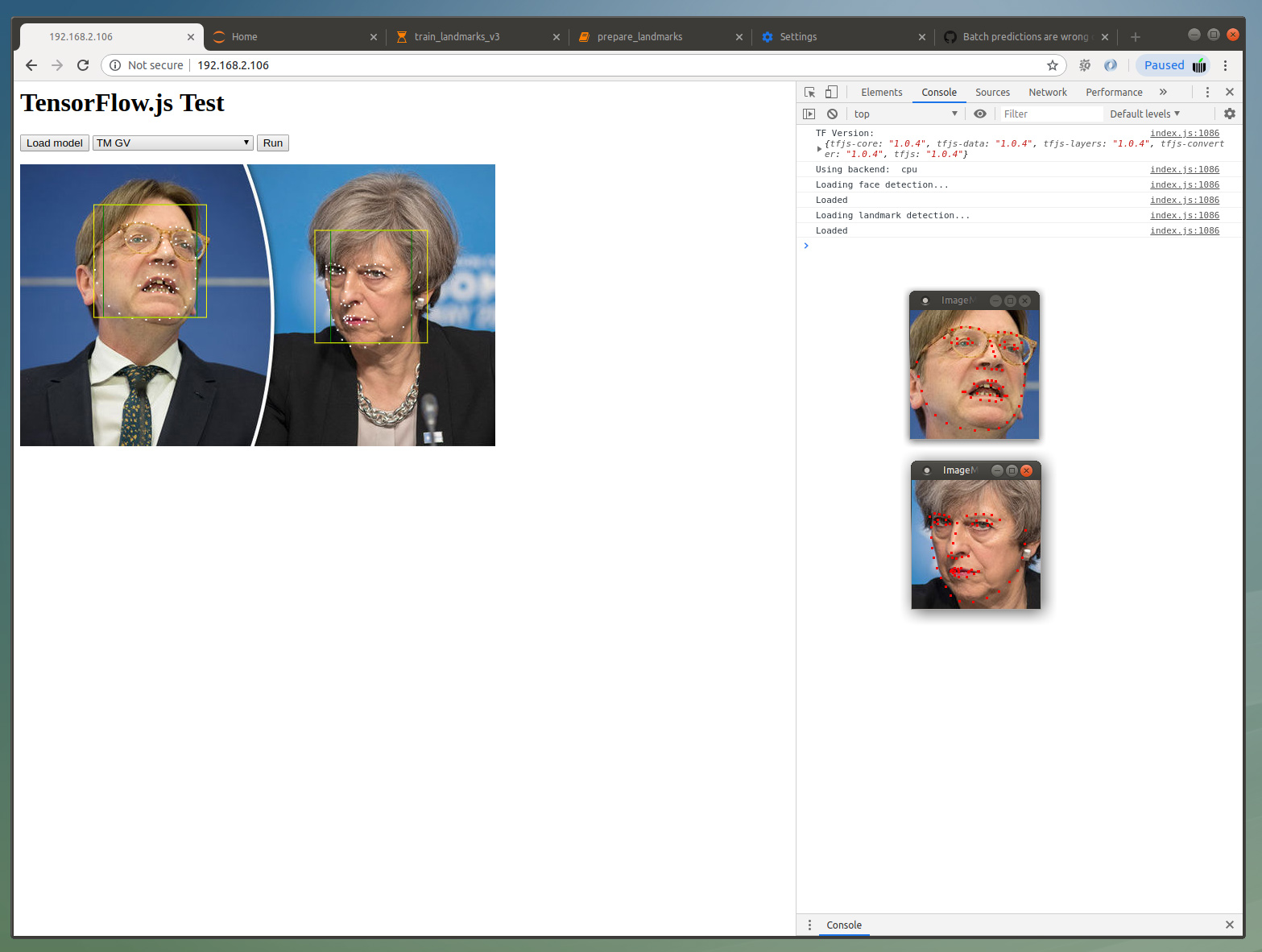
Second screenshot shows Webgl backend. As you can see the landmark coordinates are way off, roughly by a factor of 1.5:

On both screenshots the two insets show the predictions when using the original model in Python (the difference to the cpu version comes from slighly different crops).
The actual face detection (green and yellow boxes) yields identical results in both versions. This is an older model (MobileNetV2 SSD) that was converted two weeks ago which makes me think that this bug is converter related.
 AxelWolf
on 14 Apr 2019
AxelWolf
on 14 Apr 2019
Thanks for letting us know about this issue. @AxelWolf and @ryancbarry - could you try appending ?tfjsflags=WEBGL_PACK:false to the URL (or calling tf.ENV.set('WEBGL_PACK', false) right after tfjs is loaded) to see whether that changes the predictions? Let me know what you find.
 annxingyuan
on 14 Apr 2019
annxingyuan
on 14 Apr 2019
Adding tf.ENV.set('WEBGL_PACK', false) before loading the model gives correct predictions on FF and Chrome with GTX1080. Interestingly, in Chrome (73.0.3683.103) it seems snappier than before.
Update: Fix also works on a Windows 10 box with integrated Intel graphics.
AxelWolf
on 14 Apr 2019
Thanks @AxelWolf - could you call tf.ENV.set('DEBUG', true) - this will print out the architecture of your model to the console along with kernel execution times. Could you share your console output with me - you should be able to copy / paste into a spreadsheet. Thanks!
annxingyuan
on 14 Apr 2019
Attaching two files: 177.log shows output when loading the two models, I then cleared the console. 206.log shows output when doing prediction.
192.168.2.106-1555246123206.log
192.168.2.106-1555246516177.log
This is on Ubuntu 16.04 with 1080 in Chrome as above.
AxelWolf
on 14 Apr 2019
Thanks @AxelWolf - this is awesome. Could I ask you to do two more things:
- try setting
tf.ENV.set('WEBGL_PACK_DEPTHWISECONV', false') but leaving theWEBGL_PACK` flag alone - are predictions correct? - try setting
tf.ENV.set('WEBGL_CONV_IM2COL', false') but leaving theWEBGL_PACK` flag alone - are predictions correct?
Thank you for helping us debug this! Actually is your repo somewhere I can take a look? Or are your saved model assets hosted so I can just load them locally? Then I can leave you alone :)
annxingyuan
on 14 Apr 2019
Leaving WEBGL_PACK at true I will only get correct predictions with DEPTHWISECONV to false; IM2COL makes no difference.
I've prepared a zip (https://softmatic.com/f/WebGL Bug.zip) which contains the latest checkpoint and the converted model.json and shards. The model expects a (n,160,160,3) tensor and will return an array of 68 xy coordinates. I can provide additional JS code if you need it.
AxelWolf
on 14 Apr 2019
Thanks @AxelWolf - the converted outputs are what I need. I wasn't able to load the zip you provided - could you double check the link? Also if you have the JS code that makes the prediction that would be great.
annxingyuan
on 14 Apr 2019
The link was cutoff, try this one: https://softmatic.com/f/WebGL_Bug.zip
JS should look like this:
import * as tf from '@tensorflow/tfjs';
const LANDMARK_URL = './landmarks/model.json'
let landmarkPromise;
let landmark;
window.onload = () => {
landmarkPromise = tf.loadLayersModel(LANDMARK_URL);
landmark = await landmarkPromise;
await landmark.predict(tf.zeros([1,160,160,3]));
}
// this assumes a square img tag on the page with id=image with size 160,160
// prediction will usually be in an async function that is triggered by a button, like so:
const runButton = document.getElementById('run');
runButton.onclick = async () => {
var image = document.getElementById("image");
var pixels = tf.browser.fromPixels(image);
var norm = pixels.div(127.5).sub(1);
var lms = await landmark.predict(norm.reshape([1, ...norm.shape]));
var landmarks = lms.dataSync();
}
AxelWolf
on 14 Apr 2019
Perfect - thanks @AxelWolf - this should be everything I need. Thanks again for reporting this!
annxingyuan
on 14 Apr 2019
Thanks for letting us know about this issue. @AxelWolf and @ryancbarry - could you try appending ?tfjsflags=WEBGL_PACK:false to the URL (or calling
tf.ENV.set('WEBGL_PACK', false)right after tfjs is loaded) to see whether that changes the predictions? Let me know what you find.
With WEBGL_PACK set to false:
{
  "windowscreen": 0.6159740686416626,
  "windowshade": 0.26258158683776855,
  "shoji": 0.018357258290052414,
  "digitalclock": 0.018023479729890823,
  "electricfan,blower": 0.014563548378646374,
  "strainer": 0.013532050885260105,
  "spotlight,spot": 0.003762525739148259,
  "loudspeaker,speaker,speakerunit,loudspeakersystem,speakersystem": 0.002997360657900572,
  "knot": 0.0027297139167785645,
  "radiator": 0.002250275108963251
}
With WEBGL_PACK set to true:
{
  "velvet": 0.16494502127170563,
  "windowscreen": 0.09491492062807083,
  "theatercurtain,theatrecurtain": 0.05020033195614815,
  "digitalclock": 0.04693294316530228,
  "spaceheater": 0.037753134965896606,
  "windowshade": 0.03272269293665886,
  "honeycomb": 0.02653188817203045,
  "doormat,welcomemat": 0.024251466616988182,
  "strainer": 0.023848969489336014,
  "dishrag,dishcloth": 0.02221301943063736
}
This is for the image at https://r.hswstatic.com/w_907/gif/tesla-cat.jpg

Both times the backend was set to WEBGL.
Using tfjs v1.0.3
And for reference (using the CPU backend on the same image), we're looking for predictions that look like this:
{
  "Egyptiancat": 0.5521813631057739,
  "tabby,tabbycat": 0.10373528301715851,
  "tigercat": 0.07581817358732224,
  "Siamesecat,Siamese": 0.06736601144075394,
  "schipperke": 0.05536174029111862,
  "groenendael": 0.031074585393071175,
  "Bostonbull,Bostonterrier": 0.014214071445167065,
  "lynx,catamount": 0.013818344101309776,
  "Scotchterrier,Scottishterrier,Scottie": 0.006884398404508829,
  "carton": 0.006883499212563038
}
Is there any progress on this issue?
We also have to disable the WebGL component for our Cordova application. I was using today's (2019/07/01) version of TFJS.
tf.setBackend('cpu', false);
Otherwise, the results from WebGL are completely wrong. Running it on the CPU is incredible slow.
 msektrier
on 1 Jul 2019
msektrier
on 1 Jul 2019
Can you send us your model so we can take a look?
On Mon, Jul 1, 2019 at 10:47 AM msektrier notifications@github.com wrote:
Is there any progress on this issue?
We also have to disable the WebGL component for our Cordova
application. I was using today's (2019/07/01) version of TFJS
https://cdn.jsdelivr.net/npm/@tensorflow/tfjs/dist/tf.min.js%22.tf.setBackend('cpu', false);
Otherwise, the results from WebGL are completely wrong. Running it on the
CPU is incredible slow.—
You are receiving this because you are subscribed to this thread.
Reply to this email directly, view it on GitHub
https://github.com/tensorflow/tfjs/issues/1488?email_source=notifications&email_token=AAIMXTMWSKI45LR6PVGGYMTP5IKGZA5CNFSM4HDOROEKYY3PNVWWK3TUL52HS4DFVREXG43VMVBW63LNMVXHJKTDN5WW2ZLOORPWSZGODY6LS2Q#issuecomment-507296106,
or mute the thread
https://github.com/notifications/unsubscribe-auth/AAIMXTPTTFUQ7LNBBLIEUODP5IKGZANCNFSM4HDOROEA
.
 nsthorat
on 1 Jul 2019
nsthorat
on 1 Jul 2019
Can you send us your model so we can take a look?
…
On Mon, Jul 1, 2019 at 10:47 AM msektrier @.> wrote: Is there any progress on this issue? We also have to disable the *WebGL component for our Cordova application. I was using today's (2019/07/01) version of TFJS @./tfjs/dist/tf.min.js%22>. *tf.setBackend('cpu', false); Otherwise, the results from WebGL are completely wrong. Running it on the CPU is incredible slow. — You are receiving this because you are subscribed to this thread. Reply to this email directly, view it on GitHub <#1488?email_source=notifications&email_token=AAIMXTMWSKI45LR6PVGGYMTP5IKGZA5CNFSM4HDOROEKYY3PNVWWK3TUL52HS4DFVREXG43VMVBW63LNMVXHJKTDN5WW2ZLOORPWSZGODY6LS2Q#issuecomment-507296106>, or mute the thread https://github.com/notifications/unsubscribe-auth/AAIMXTPTTFUQ7LNBBLIEUODP5IKGZANCNFSM4HDOROEA .
Of course. It is a MobileNet V2 SSDLite Model.
webgl-problem-model.zip
We execute it with
const INPUT_TENSOR = 'image_tensor';
const OUTPUT_TENSOR = ['detection_boxes', 'detection_scores']
tfModelCache = await tf.loadGraphModel('./model.json');
tf.setBackend('cpu', false);

let preparedImage = preprocess(image);
let prediction = model.executeAsync( {[INPUT_TENSOR]: preparedImage}, OUTPUT_TENSOR ).then(function(result){
        console.log(result);
        return result;
});

function preprocess(img) {
    let tensor = tf.browser.fromPixels(img);
    let expanded = tensor.expandDims(0);
    return expanded;
}
If you need more information from our side please let us know.
msektrier
on 1 Jul 2019
Additionally, here a screenshot of the output tensor "detection_scores" with the same input image.
with CPU only - correct

with GPU - wrong results

msektrier
on 1 Jul 2019
@msektrier do you mind filing a separate issue about the Cordova platform?
@annxingyuan is this issue fixed with https://github.com/tensorflow/tfjs-core/pull/1796? If yes, we will close this issue.
 dsmilkov
on 2 Jul 2019
dsmilkov
on 2 Jul 2019
@dsmilkov It appears not because the results are incorrect regardless of WEBGL_PACK
EDIT: Sorry, the original issue is fixed. The Cordova issue is the one that's independent of packing.
annxingyuan
on 2 Jul 2019
Hi @msektrier - just wanted to confirm that this only happens within your Cordova application? FWIW in Chrome on my Macbook Pro and on a Chromebook I get the same values for 'detection_scores' on both WebGL/CPU.
Also would you mind sharing the image you used to obtain the output in your previous comment? I tried the black cat image from a few comments ago and got different results.
annxingyuan
on 2 Jul 2019
Hi @annxingyuan many thanks you take your time. I can share the picture. It contains a form of the German tax authority.

I can confirm that what you saw above is happening inside the Cordova application. Leaving out Cordova and hosting it on NGINX the model cannot execute on my phone running in Chrome.
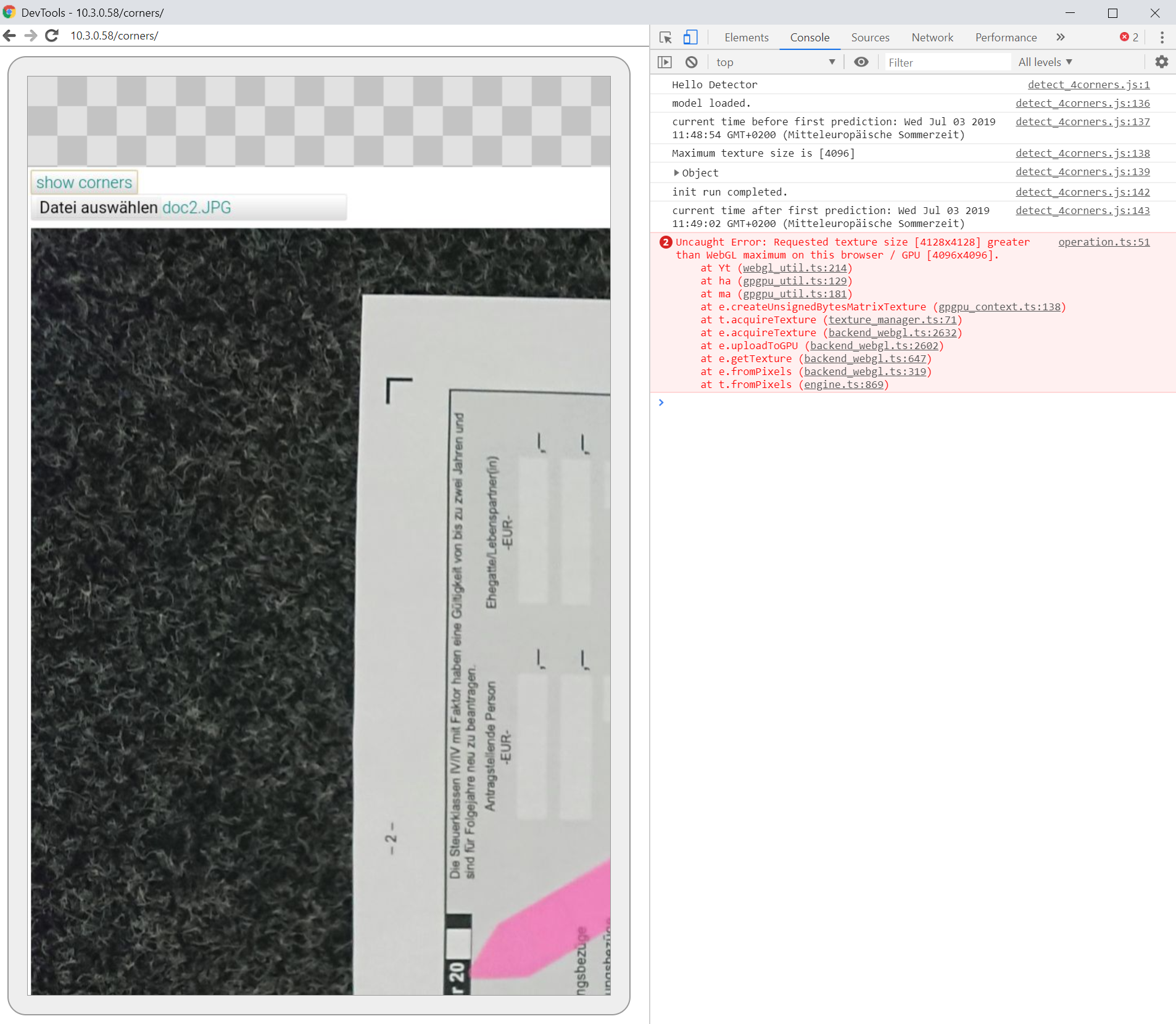
It produces the texture_size error. On my computer it is running well.
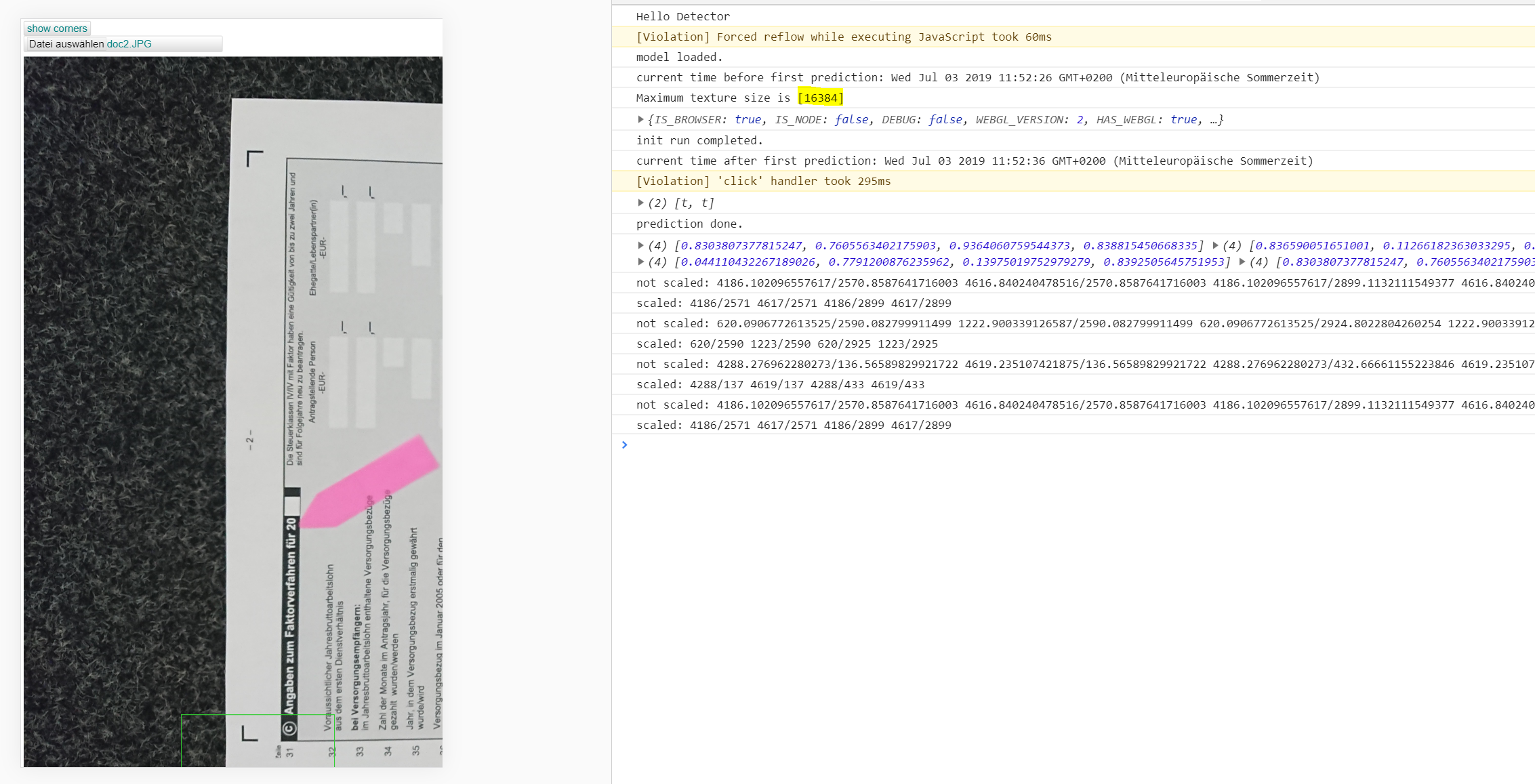
Therefore, it is rather a surprise to me it is running in Cordova since the available texture size is the same.
msektrier
on 3 Jul 2019
Hi @ryancbarry - sorry it took us a while to get to this. There's a few things going on - first of all we had a bug in our WebGL backend that caused WEBGL_PACK = true to produce different results - that's now fixed (https://github.com/tensorflow/tfjs-core/pull/1796).
Second we found that fromPixels behaves differently in WebGL / CPU for images that are resized. For what it's worth, when I tried your demo with 224x224 images the predictions matched.
We're gonna fix the WebGL / CPU discrepancy (https://github.com/tensorflow/tfjs/issues/1719) but just wanted to give you some context in the meantime.
annxingyuan
on 3 Jul 2019
Related issues
 Arturbarth
·
3Comments
Arturbarth
·
3Comments
 RELNO
·
3Comments
RELNO
·
3Comments
 Josef-Haupt
·
3Comments
Josef-Haupt
·
3Comments
 take-kuma
·
3Comments
take-kuma
·
3Comments
 kylemcdonald
·
3Comments
kylemcdonald
·
3Comments
Most helpful comment
With WEBGL_PACK set to
false:With WEBGL_PACK set to
true:This is for the image at https://r.hswstatic.com/w_907/gif/tesla-cat.jpg
Both times the backend was set to WEBGL.
Using tfjs v1.0.3
And for reference (using the CPU backend on the same image), we're looking for predictions that look like this: