Tfjs: Some androids failure to compile fragment shader
TensorFlow.js version
0.13.5
Browser version
- Android: 6.0.1
- Chrome: 70.0.3536.110
- Error Devices:
- Xperia Z3 SO-01G
- GALAXY S5 SC-04F
- AQUOS EVER SH-04G
Describe the problem or feature request
Tested tfjs-examples on mobile and some android devices failure to compile fragment shader. if the gpu spec is low, it tend to failure. All failure devices threw following error. Do you have a minimum requirement?
| Link | QR | iPhone7 Plus | Xperia XZ2 | Xperia Z3 |
|------|-----|:------:|:------:|:-----:|
| Posenet Sample |  | OK | OK | Error |
| Custom Layer |  | OK | OK | Error |
Error log
2      precision highp float;
3      precision highp int;
4      varying vec2 resultUV;
5      const vec2 halfCR = vec2(0.5, 0.5);
6
7      struct ivec5
8      {
9        int x;
10       int y;
11       int z;
Fragment shader compilation failed.
12       int w;
13       int u;
14     };
15
16     struct ivec6
17     {
18       int x;
19       int y;
20       int z;
21       int w;
22       int u;
23       int v;
24     };
25
26     bool isNaN(float val) {
27       return (val < 0.0 || 0.0 < val || val == 0.0) ? false : true;
28     }
29
30     bool hasNaN(vec4 values) {
31       vec4 v1 = values * values;
32       vec4 v2 = values * values;
33       return any(notEqual(v1, v2));
34     }
35
36     float getNaN(vec4 values) {
37       return dot(vec4(1), values);
38     }
39
40     int round(float value) {
41       return int(floor(value + 0.5));
42     }
43
44     int imod(int x, int y) {
45       return x - y * (x / y);
46     }
47
48     //Based on the work of Dave Hoskins
49     //https://www.shadertoy.com/view/4djSRW
50     #define HASHSCALE1 443.8975
51     float random(float seed){
52       vec2 p = resultUV * seed;
53       vec3 p3  = fract(vec3(p.xyx) * HASHSCALE1);
54       p3 += dot(p3, p3.yzx + 19.19);
55       return fract((p3.x + p3.y) * p3.z);
56     }
57
58
59   vec2 UVfrom1D(int texNumR, int texNumC, int index) {
60     int texR = index / texNumC;
61     int texC = index - texR * texNumC;
62     return (vec2(texC, texR) + halfCR) / vec2(texNumC, texNumR);
63   }
64
65
66   vec2 UVfrom2D(int texNumR, int texNumC, int numC, int row, int col) {
67     int index = row * numC + col;
68     int texR = index / texNumC;
69     int texC = index - texR * texNumC;
70     return (vec2(texC, texR) + halfCR) / vec2(texNumC, texNumR);
71   }
72
73
74   vec2 UVfrom3D(int texNumR, int texNumC, int stride0,
75       int stride1, int row, int col, int depth) {
76     // Explicitly use integer operations as dot() only works on floats.
77     int index = row * stride0 + col * stride1 + depth;
78     int texR = index / texNumC;
79     int texC = index - texR * texNumC;
80     return (vec2(texC, texR) + halfCR) / vec2(texNumC, texNumR);
81   }
82
83
84   vec2 UVfrom4D(int texNumR, int texNumC, int stride0,
85       int stride1, int stride2, int row, int col, int depth,
86       int depth2) {
87     // Explicitly use integer operations as dot() only works on floats.
88     int index = row * stride0 + col * stride1 + depth * stride2 + depth2;
89     int texR = index / texNumC;
90     int texC = index - texR * texNumC;
91     return (vec2(texC, texR) + halfCR) / vec2(texNumC, texNumR);
92   }
93
94
95   vec2 UVfrom5D(int texNumR, int texNumC, int stride0,
96       int stride1, int stride2, int stride3, int row, int col, int depth,
97       int depth2, int depth3) {
98     // Explicitly use integer operations as dot() only works on floats.
99     int index = row * stride0 + col * stride1 +
100                depth * stride2 + depth2 * stride3 + depth3;
101    int texR = index / texNumC;
102    int texC = index - texR * texNumC;
103    return (vec2(texC, texR) + halfCR) / vec2(texNumC, texNumR);
104  }
105
106
107  vec2 UVfrom6D(int texNumR, int texNumC, int stride0,
108      int stride1, int stride2, int stride3, int stride4,
109      int row, int col, int depth, int depth2, int depth3, int depth4) {
110    // Explicitly use integer operations as dot() only works on floats.
111    int index = row * stride0 + col * stride1 + depth * stride2 + depth2 *
112      stride3 + depth3 * stride4 + depth4;
113    int texR = index / texNumC;
114    int texC = index - texR * texNumC;
115    return (vec2(texC, texR) + halfCR) / vec2(texNumC, texNumR);
116  }
117
118
119
120    float sampleTexture(sampler2D textureSampler, vec2 uv) {
121      return texture2D(textureSampler, uv).r;
122    }
123
124
125    void setOutput(float val) {
126      gl_FragColor = vec4(val, 0, 0, 0);
127    }
128
129  uniform sampler2D A;
130
131      ivec4 getOutputCoords() {
132        ivec2 resTexRC = ivec2(resultUV.yx *
133          vec2(241, 867));
134        int index = resTexRC.x * 867 + resTexRC.y;
135
136        int r = index / 208947;
137        index -= r * 208947;
138
139        int c = index / 867;
140        index -= c * 867;
141
142        int d = index / 3;
143        int d2 = index - d * 3;
144
145        return ivec4(r, c, d, d2);
146      }
147
148
149      float getAFlat(int index) {
150        vec2 uv = UVfrom1D(500, 1800, index);
151        return sampleTexture(A, uv);
152      }
153
154
155          float getA(int row, int col, int depth) {
156            int texR = row;
157            int texC = col * 3 + depth;
158            vec2 uv = (vec2(texC, texR) + halfCR) /
159                       vec2(1800.0, 500.0);
160            return sampleTexture(A, uv);
161          }
162
163        float getA(int row, int col, int depth, int depth2) {
164          return getA(col, depth, depth2);
165        }
166
167
168        const vec2 effectiveInputOverOutputRatioRC = vec2(
169            2.074688796680498,
170            2.0761245674740483);
171        const vec2 inputShapeRC = vec2(500.0, 600.0);
172
173        void main() {
174          ivec4 coords = getOutputCoords();
175          int b = coords[0];
176          int d = coords[3];
177          ivec2 yRC = coords.yz;
178
179          // Fractional source index.
180          vec2 sourceFracIndexRC = vec2(yRC) * effectiveInputOverOutputRatioRC;
181
182          // Compute the four integer indices.
183          ivec2 sourceFloorRC = ivec2(sourceFracIndexRC);
184          ivec2 sourceCeilRC = ivec2(
185            min(inputShapeRC - 1.0, ceil(sourceFracIndexRC)));
186
187          float topLeft = getA(b, sourceFloorRC.x, sourceFloorRC.y, d);
188          float bottomLeft = getA(b, sourceCeilRC.x, sourceFloorRC.y, d);
189          float topRight = getA(b, sourceFloorRC.x, sourceCeilRC.y, d);
190          float bottomRight = getA(b, sourceCeilRC.x, sourceCeilRC.y, d);
191
192          vec2 fracRC = sourceFracIndexRC - vec2(sourceFloorRC);
193
194          float top = topLeft + (topRight - topLeft) * fracRC.y;
195          float bottom = bottomLeft + (bottomRight - bottomLeft) * fracRC.y;
196          float newValue = top + (bottom - top) * fracRC.x;
197
198          setOutput(newValue);
199        }
200
tf-core.esm.js:17 Uncaught Error: Failed to compile fragment shader.
    at createFragmentShader (tf-core.esm.js:17)
    at e.createProgram (tf-core.esm.js:17)
    at compileProgram (tf-core.esm.js:17)
    at tf-core.esm.js:17
    at e.getAndSaveBinary (tf-core.esm.js:17)
    at e.compileAndRun (tf-core.esm.js:17)
    at e.slice (tf-core.esm.js:17)
    at ENV.engine.runKernel.$x (tf-core.esm.js:17)
    at tf-core.esm.js:17
    at e.scopedRun (tf-core.esm.js:17)
createFragmentShader @ tf-core.esm.js:17
e.createProgram @ tf-core.esm.js:17
compileProgram @ tf-core.esm.js:17
(anonymous) @ tf-core.esm.js:17
e.getAndSaveBinary @ tf-core.esm.js:17
e.compileAndRun @ tf-core.esm.js:17
e.slice @ tf-core.esm.js:17
ENV.engine.runKernel.$x @ tf-core.esm.js:17
(anonymous) @ tf-core.esm.js:17
e.scopedRun @ tf-core.esm.js:17
e.runKernel @ tf-core.esm.js:17
slice_ @ tf-core.esm.js:17
slice @ tf-core.esm.js:17
e.slice @ tf-core.esm.js:17
(anonymous) @ tf-core.esm.js:17
split @ tf-core.esm.js:17
e.split @ tf-core.esm.js:17
ENV.engine.runKernel.$x @ tf-core.esm.js:17
(anonymous) @ tf-core.esm.js:17
e.scopedRun @ tf-core.esm.js:17
e.runKernel @ tf-core.esm.js:17
split_ @ tf-core.esm.js:17
slice @ tf-core.esm.js:17
customLayerDemo @ index.js:27
parcelRequire.3.babel-runtime/helpers/slicedToArray @ index.js:56
newRequire @ custom-layer.32c31cce.js:48
(anonymous) @ custom-layer.32c31cce.js:75
(anonymous) @ custom-layer.32c31cce.js:101
 asus4
asus4
All 19 comments
Since it might be interesting, someone reported the same issue at face-api.js on a SONY Xperia A4 with Android 6.0.1: https://github.com/justadudewhohacks/face-api.js/issues/151
 justadudewhohacks
on 29 Nov 2018
justadudewhohacks
on 29 Nov 2018
Also these devices had the same error on face-api.js. Simple example like mnist-core worked well.
asus4
on 30 Nov 2018
Hi @asus4 and @justadudewhohacks ,
Yes we do have minimum requirement for webgl. If it's webgl1 it needs to have this extension https://www.khronos.org/registry/webgl/extensions/OES_texture_float/
 kangyizhang
on 30 Nov 2018
kangyizhang
on 30 Nov 2018
@kangyizhang
Hi, I'm SONY Xperia A4's owner. My device had the same error.
So I checked the WebGL feature supported by the device at http://webglreport.com/?v=1 .
My device seems to support OES_texture_float...?

 wukann
on 3 Dec 2018
wukann
on 3 Dec 2018
Xperia Z3 SO-01G also supports OES_texture_float according to WebGLReport.
asus4
on 5 Dec 2018
Same issue here on an HTC One (m7)
Chrome 71.0.3578.99
Android 5.1.1
WebGLReport reports that both WebGL 1 and OES_texture_float are supported.
 nathanvogel
on 9 Jan 2019
nathanvogel
on 9 Jan 2019
Same issue here running Chrome on both the Galaxy S4 and S5. The issue has been around for at least 6 months, so I'm surprised that this doesn't have more attention.
 bryan-14four
on 30 Jan 2019
bryan-14four
on 30 Jan 2019
Has anyone resolved this yet or have any insight? I wonder if the issue is really even related to fragment shader compilation at all. I have an old project using TFJS which is working on my Galaxy S4/S5 devices. My current project is also using TFJS via faceapi.js, but it is running into the fragment shader compilation issue mentioned above on those devices. I tried taking tfjs-core from my old project (v0.12.17) and putting it into the new project, but the same error is present even using the old version.
bryan-14four
on 15 Feb 2019
I've done some additional testing of tfjs-examples on my Galaxy S5 (Chrome). I could not test some examples because they were broken for other reasons (in most cases the XHR loading data files failed because the resource no longer exists).
Hopefully this helps to better isolate the issue. I will try to build a reduced test case from it.
Here are the results:
| Example | Working? | Error Message | Notes |
| --- | --- | --- | --- |
| addition-rnn | ✅ | | |
| boston-housing | ✅ | | All three regressors work |
| cart-pole | ✅ | | |
| custom-layer | ❌ | Error: Failed to compile fragment shader. | Error shows immediately upon visiting the page |
| iris-fitDataset | ✅ | | |
| iris | ✅ | | |
| lstm-text-generation | ✅ | | |
| mnist-core | ✅ | | |
| mobilenet | ❌ | Error: Failed to compile fragment shader. | Error shows immediately upon visiting the page |
| polynomial-regression-core | ✅ | | |
| polynomial-regression | ✅ | | |
| sentiment | ✅ | | |
| translation | ✅ | | |
| tsne-mnist-canvas | ❌ | gl_util.ts:99 WebGL: INVALID_ENUM: texImage2D: invalid format
gl_util.ts:99 WebGL: INVALID_ENUM: texImage2D: invalid format
webgl_util.ts:91 ERROR: unsupported shader version
index.html:1 [.WebGL-0x9d2b8a00]GL ERROR :GL_INVALID_VALUE : glTexImage2D: invalid internal_format GL_CLOSE_PATH_NV
webgl_util.ts:92 Uncaught (in promise) Error: Failed to compile vertex shader. | Error shows when clicking "Start T-SNE" |
| webcam-transfer-learning | ❌ | Error: Failed to compile fragment shader. | Error shows upon allowing access to webcam |
bryan-14four
on 27 Feb 2019
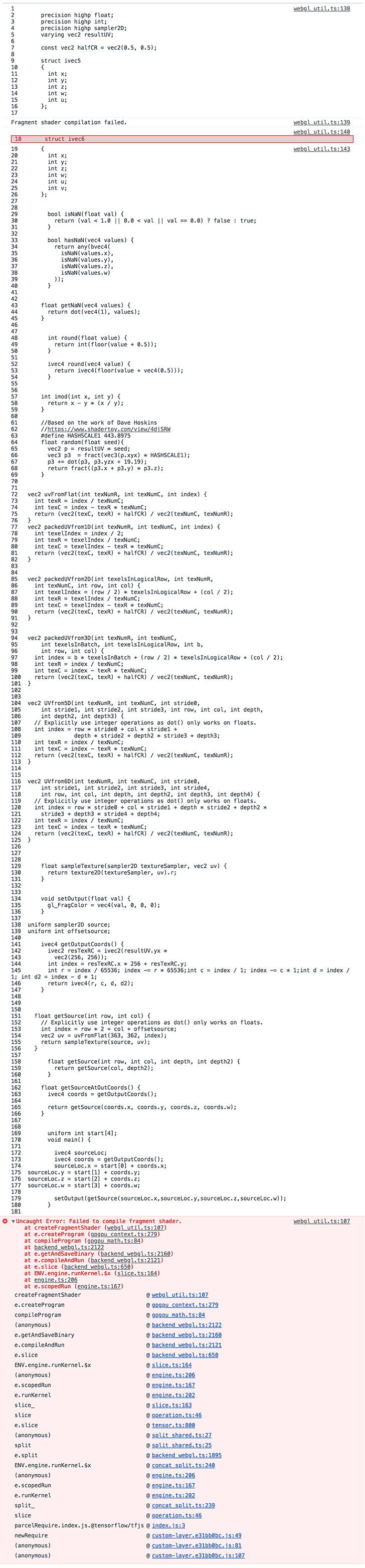
Here is a reduced test case, using Galaxy S5 running Chrome. Can anyone determine if this is either a device limitation or a bug in TFJS?
This code succeeds:
import * as tf from '@tensorflow/tfjs'

tf.split(tf.zeros([1, 65535, 1, 2]), 2, 3)
This code fails:
import * as tf from '@tensorflow/tfjs'

tf.split(tf.zeros([1, 65536, 1, 2]), 2, 3)
Full console output:
bryan-14four
on 27 Feb 2019
I have an update on this. The two code snippets above produce different shader code, where the test with the 65536 int fails on shader compilation inside of the getOutputCoords() function.
Success:
tf.split(tf.zeros([1, 65535, 1, 2]), 2, 3) ->
ivec4 getOutputCoords() {
  ...
  int r = index / 65535;
  index -= r * 65535;
  ...
}
Failure:
tf.split(tf.zeros([1, 65536, 1, 2]), 2, 3) ->
ivec4 getOutputCoords() {
  ...
  int r = index / 65536;
  index -= r * 65536;
  ...
}
I pulled these shader sources out manually and wrote some webGL code to run them. In the failing test, the shader compilation fails both on the int r = ... and index -= ... lines due to an "integer constant overflow". Interestingly, I've found a way to make the shader compile by replacing the failing function with this logically-equivalent one:
ivec4 getOutputCoords() {
  ...
  int aa = 256;
  int bb = 256;
  int r = index / (aa * bb);
  index -= r * (aa * bb);
  ...
}
I'm not sure if this code actually works as a fix, or if the integer primitive itself is limited to 16 bits on this device (a possibility is that the "aa * bb" portion is overflowing silently, whereas the constant "65536" fails with an error). I will do more testing and report back.
bryan-14four
on 28 Feb 2019
In my case, the hack I posted above seems to actually work. I replaced the "getLogicalCoordinatesFromFlatIndex" function directly in tf-core.esm.js (I'm not working from source, so I've been directly editing from node_modules package). Here is what I replaced it with:
function getLogicalCoordinatesFromFlatIndex(coords, shape, index = 'index') {
  var strides = computeStrides(shape);
  var returnVal = `int aa = 0; ${strides.map((stride, i) => {
    var quantity = Math.floor(stride / 65535);
    var remainder = stride % 65535;
    var line0 = `aa = ${quantity}; aa = aa * 65535; aa = aa + ${remainder}`;
    var line1 = `int ${coords[i]} = ${index} / aa`;
    var line2 = i === strides.length - 1 ?
        `int ${coords[i + 1]} = ${index} - ${coords[i]} * aa` :
        `index -= ${coords[i]} * aa`;
    return `${line0}; ${line1}; ${line2};`;
  })
  .join('')}`;
  return returnVal;
}
It's definitely a hack, and I'm not sure of any side-effects of doing it this way, but for my use-case it seems to work. My Galaxy S5 can now compile the shader and run predictions on the model with no issues (aside from performance).
I'm done looking into this issue, so hopefully someone can take over where I left off and make a more meaningful contribution.
bryan-14four
on 28 Feb 2019
@bryan-14four I've updated the method directly in the file that you mentioned, but no success.
Do we have to run some command to apply changes or something?
 witalobenicio
on 1 Jul 2019
witalobenicio
on 1 Jul 2019
@bryan-14four I've updated the method directly in the file that you mentioned, but no success.
Do we have to run some command to apply changes or something?
Here's what I did for my project. At the time I used face-api.js version ^0.18.0 which uses tfjs-core v0.14.2, so you'll have to set package.json deps to {"face-api.js": "^0.18.0"} (unless newer versions use the same version of tfjs). This solution uses patch-package to patch tfjs-core v0.14.2.
npm i patch-package- In package.json, add to "scripts" section:
"postinstall": "patch-package" - Create a folder called
patchesin the root dir of the app (same place as package.json). - Extract the patch file I've included below to the
patchesfolder. - Run
npm iagain and it should install the modules and apply the patch.
Patch file: @tensorflow+tfjs-core+0.14.2.patch.zip
Good luck!
bryan-14four
on 1 Jul 2019
@bryan-14four I've tried locally here, and it worked. I'll try now with a builded version. But thanks in advance.
witalobenicio
on 1 Jul 2019
$(document).ready(function(){
run()
})
async function run(){
await faceapi.loadMtcnnModel('./models');
await faceapi.loadFaceRecognitionModel('./models');
const videoEl=document.getElementById('inputVideo')
navigator.getUserMedia(
{video:{}},
stream=>videoEl.srcObject=stream,
err=>console.err(err)
)
}
async function onPlay(videoEl){
setInterval( async ()=>{console.log('it is running');

const mtcnnForwardParams = {
    maxNumScales: 10,
    scaleFactor: 0.709,
    scoreThresholds: [0.6, 0.7, 0.7],
    minFaceSize: 200
  }
  const canvas=document.getElementById('overlay')
const mtcnnResults=await faceapi.mtcnn(videoEl,mtcnnForwardParams)
canvas.getContext('2d').clearRect(0, 0, canvas.width, canvas.height)
faceapi.drawDetection(canvas, mtcnnResults.map(res => res.faceDetection), { withScore: false })
  faceapi.drawLandmarks(canvas, mtcnnResults.map(res => res.faceLandmarks), { lineWidth: 4, color: 'red' })
},1000)
}
this is my javascript code,i got this error,please help to sort out
script2.js:27 Uncaught (in promise) TypeError: faceapi.drawDetection is not a function
at script2.js:27
 thirukumars
on 2 Aug 2019
thirukumars
on 2 Aug 2019
@thirukumars please open a new isse here New Issue Template , closing this, thank you
 rthadur
on 2 Aug 2019
rthadur
on 2 Aug 2019
@bryan-14four I've updated the method directly in the file that you mentioned, but no success.
Do we have to run some command to apply changes or something?Here's what I did for my project. At the time I used face-api.js version ^0.18.0 which uses tfjs-core v0.14.2, so you'll have to set package.json deps to {"face-api.js": "^0.18.0"} (unless newer versions use the same version of tfjs). This solution uses
patch-packageto patch tfjs-core v0.14.2.
npm i patch-package- In package.json, add to "scripts" section:
"postinstall": "patch-package"- Create a folder called
patchesin the root dir of the app (same place as package.json).- Extract the patch file I've included below to the
patchesfolder.- Run
npm iagain and it should install the modules and apply the patch.Patch file: @tensorflow+tfjs-core+0.14.2.patch.zip
Good luck!
@bryan-14four Followed your instruction, I even got:
npm i
[email protected] postinstall /project
patch-packagepatch-package 6.1.2
Applying patches...
@tensorflow/[email protected] ✔
npm WARN com.[email protected] No repository field.audited 1136 packages in 2.186s
found 3 vulnerabilities (1 low, 2 high)
runnpm audit fixto fix them, ornpm auditfor details
But still when I do "cordova run android" I get the following error:
Uncaught (in promise) Error: Failed to compile fragment shader.
164 uniform sampler2D A;
165
166 ivec3 getOutputCoords() {
167 ivec2 resTexRC = ivec2(resultUV.yx *
168 vec2(416, 1248));
ERROR: 0:169: 'rAesTexRC' : undeclared identifier
169 int index = rAesTexRC.x * 1248 + resTexRC.y;
 msj121
on 31 Aug 2019
msj121
on 31 Aug 2019
Is there any reason why this patch hasn't become a pull request upstream? Wondering if there are next steps for tfjs as a whole rather than locally patching.
 lewisf
on 3 Sep 2019
lewisf
on 3 Sep 2019
Related issues
 tpreusse
·
4Comments
tpreusse
·
4Comments
 dhrumil83
·
3Comments
dhrumil83
·
3Comments
 rumschuettel
·
3Comments
rumschuettel
·
3Comments
 beele
·
3Comments
beele
·
3Comments
 take-kuma
·
3Comments
take-kuma
·
3Comments
Most helpful comment
Here is a reduced test case, using Galaxy S5 running Chrome. Can anyone determine if this is either a device limitation or a bug in TFJS?
This code succeeds:
This code fails:
Full console output:
