Tfjs: Long-running shaders result in webgl context lost
TensorFlow.js version
0.10.0
Browser version
Chrome 64.0.3282.167 (Linux)
Describe the problem or feature request
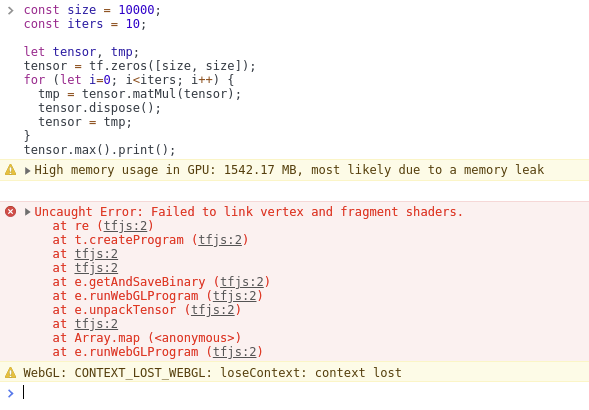
Consider the following toy example of matrix exponentiation:
const size = 10000;
const iters = 10;

let tensor, tmp;
tensor = tf.zeros([size, size]);
for (let i=0; i<iters; i++) {
  tmp = tensor.matMul(tensor);
  tensor.dispose();
  tensor = tmp;
}
tensor.max().print();
Expected:
The program should always print 0, and neither the behavior nor memory usage should vary as iters increases, since it results in multiplying the exact same matrix, and the tensor is disposed after being used.
Actual:
With iters = 5, the program behaves as expected. With iters = 10 I have seen the following three behaviors:
- Sometimes it prints NaN, and Chrome reports that "WebGL hit a snag"
- Sometimes it errors with "Couldn't compile vertex shader"
- Sometimes it errors with the long failed script compilation found [here]
Reproduction
Navigate to https://js.tensorflow.org/, open the console, and post the example script there. If it works as expected, try increasing the number of iterations and see if it breaks.
 decentralion
All 7 comments
Hey Dandelion, thanks for the detailed report! And hi again!
This is consistent with our observation of executing long-running shaders. A matmul of matrices of size 10Kx10K is ~2TFLOPS. The hypothesis is that Chrome is trying to protect itself (other tabs) by prematurely killing the WebGL context, if a single program takes more than x seconds, especially after several consecutive programs. This results in either a NaN or WebGL hit a Snag error.
The solution is non-trivial, but the idea is to use some divide and conquer where we internally divide our matmul job into several smaller matmul shader calls, each on the order GLOPS, instead of TFLOPS, which will keep Chrome and other browsers happy.
We won't be prioritizing this yet, since it hasn't come up in real use-cases (existing ML models), but happy to revisit this later, or take contributions!
 dsmilkov
on 5 May 2018
dsmilkov
on 5 May 2018
Cool, thanks for the info. Our conclusion was similar, namely that if we need to handle really big matrices, we should partition them. And :wave: back :slightly_smiling_face:
decentralion
on 5 May 2018
@decentralion please let us know if this is still an issue ?
 rthadur
on 30 Oct 2018
rthadur
on 30 Oct 2018
@rthadur here's my result from running the reproduction in the issue locally:

decentralion
on 31 Oct 2018
I was not able to reproduce the error now with latest versions, so will be closing this issue , feel free to comment so that we can reopen.Thank you.

rthadur
on 9 Oct 2019
@rthadur I'm getting a crash in Chrome 79:
Here's a demo: https://jsbin.com/jequtodute/1/edit?html,output (using latest version of tfjs) For me the crash occurs after about 1 minute.
I'm on an Ubuntu/PopOS 19.04, with a GTX 2070. As mentioned here: https://github.com/snowme34/tone-the-ear/issues/21 the CPU back-end still works fine.
Edit: Also, in case it's useful, I've pasted the error message that I get when running mobilenet + knn classifier (on thousands of images) here. The messages are different, but I imagine that they have similar causes.
 josephrocca
on 21 Jan 2020
josephrocca
on 21 Jan 2020
Thanks! We won't be able to fix this for several reasons:
- The fix for this is non-trivial and likely impossible without breaking the API since we would need to "release the GPU and the main thread", but we probably won't be able to keep the entire matmul operation synchronous (
tf.matmul().dataSync()will break). - Huge matmuls like this do not show up in practical ML models, thus making this a low priority for the time being.
dsmilkov
on 13 Feb 2020
Related issues
 RELNO
·
3Comments
RELNO
·
3Comments
 beele
·
3Comments
beele
·
3Comments
 lastnod
·
3Comments
lastnod
·
3Comments
 Umar24129
·
3Comments
Umar24129
·
3Comments
 Josef-Haupt
·
3Comments
Josef-Haupt
·
3Comments
Most helpful comment
Hey Dandelion, thanks for the detailed report! And hi again!
This is consistent with our observation of executing long-running shaders. A matmul of matrices of size 10Kx10K is ~2TFLOPS. The hypothesis is that Chrome is trying to protect itself (other tabs) by prematurely killing the WebGL context, if a single program takes more than x seconds, especially after several consecutive programs. This results in either a
NaNorWebGL hit a Snagerror.The solution is non-trivial, but the idea is to use some divide and conquer where we internally divide our matmul job into several smaller matmul shader calls, each on the order GLOPS, instead of TFLOPS, which will keep Chrome and other browsers happy.
We won't be prioritizing this yet, since it hasn't come up in real use-cases (existing ML models), but happy to revisit this later, or take contributions!