Tf-pose-estimation: get joint coordinate
how can I get the joint coordinate from a image or a video
 bianxu123
All 7 comments
yeah exactly! i need the coordinates of the joints from the web-cam video or image. @ildoonet can u please help us out here and tell the file in which these coordinates are stored during runtime.
 sprkshnarayan
on 1 Mar 2019
sprkshnarayan
on 1 Mar 2019
This code is the draw_humans part of the estimator.py.
Add 3 line.
flat = [0.0 for i in range(36)]
...
flat[i2] = center[0]
flat[i2+1] = center[1]
flat is the set of joint coordinate.
for i in range(common.CocoPart.Background.value):
if i not in human.body_parts.keys():
continue
body_part = human.body_parts[i]
#print(body_part)
center = (int(body_part.x * image_w + 0.5), int(body_part.y * image_h + 0.5))
centers[i] = center
#add x coordinate
flat[i*2] = center[0]
#add y coordinate
flat[i*2+1] = center[1]
 eehoeskrap
on 6 Mar 2019
eehoeskrap
on 6 Mar 2019
Thank you, do you know which indices belong which joint?
 DilaraAlbayrak
on 6 Mar 2019
DilaraAlbayrak
on 6 Mar 2019
here :)
tf-pose-estimation/tf_pose/common.py
class CocoPart(Enum):
Nose = 0
Neck = 1
RShoulder = 2
RElbow = 3
RWrist = 4
LShoulder = 5
LElbow = 6
LWrist = 7
RHip = 8
RKnee = 9
RAnkle = 10
LHip = 11
LKnee = 12
LAnkle = 13
REye = 14
LEye = 15
REar = 16
LEar = 17
Background = 18
eehoeskrap
on 7 Mar 2019
Thanks a lot eehoeskrap.! Right now I try to run the this in the command prompt "python run.py --model=mobilenet_thin --resize=432x368 --image=./images/p1.jpg" and then I obtain the results pose results of one image, However, I wonder how can I obtain results for several images, and save them as .jpg. Any suggestion?
 JuanPablovas89
on 8 Mar 2019
JuanPablovas89
on 8 Mar 2019
thank you @eehoeskrap
DilaraAlbayrak
on 8 Mar 2019
for human in humans:
    for i in range(common.CocoPart.Background.value):
      if i not in human.body_parts.keys():
        continue # when the i-th keypoint is not detected

      body_part = human.body_parts[i]
      center = (int(body_part.x * image_w + 0.5), int(body_part.y * image_h + 0.5))
      centers[i] = center
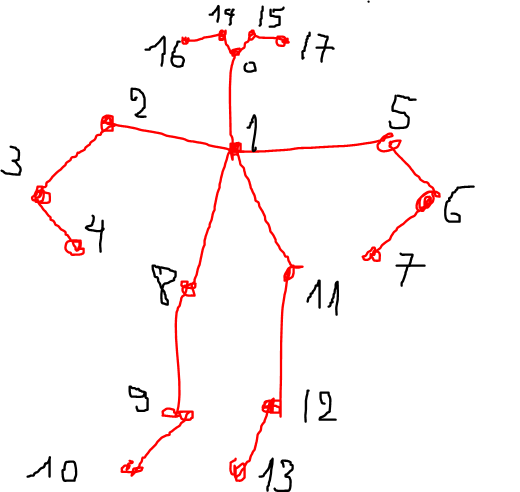
i loop from 0 to 17 as in the image below.
center[0] and center[1] is the x and y coordinate
 DungLai
on 29 Mar 2019
DungLai
on 29 Mar 2019
Related issues
 khaerulumam42
·
6Comments
khaerulumam42
·
6Comments
 gavinzhang1995
·
6Comments
gavinzhang1995
·
6Comments
 16534165
·
3Comments
16534165
·
3Comments
 juciny
·
3Comments
juciny
·
3Comments
 tomercohen11
·
6Comments
tomercohen11
·
6Comments
Most helpful comment
i loop from 0 to 17 as in the image below.
center[0]andcenter[1]is thexandycoordinate