Text: Editor takes only lower half of window for external users
Describe the bug
When opening a markdown file in the text editor as external user (through a shared link), the editor takes only the lower half of the browser window. The editor is almost unsuable that way and I would say it's a rather weird user experience.
To Reproduce
Steps to reproduce the behavior:
- Create a folder, share it with external users via link
- Create a markdown file in this shared folder
- Open the share link without being authenticated to Nextcloud
- Open the markdown file from the shared folder
- See the editor being opened only in the lower half of window
Expected behavior
The editor should take the full browser window just like it does for internal users.
Screenshots
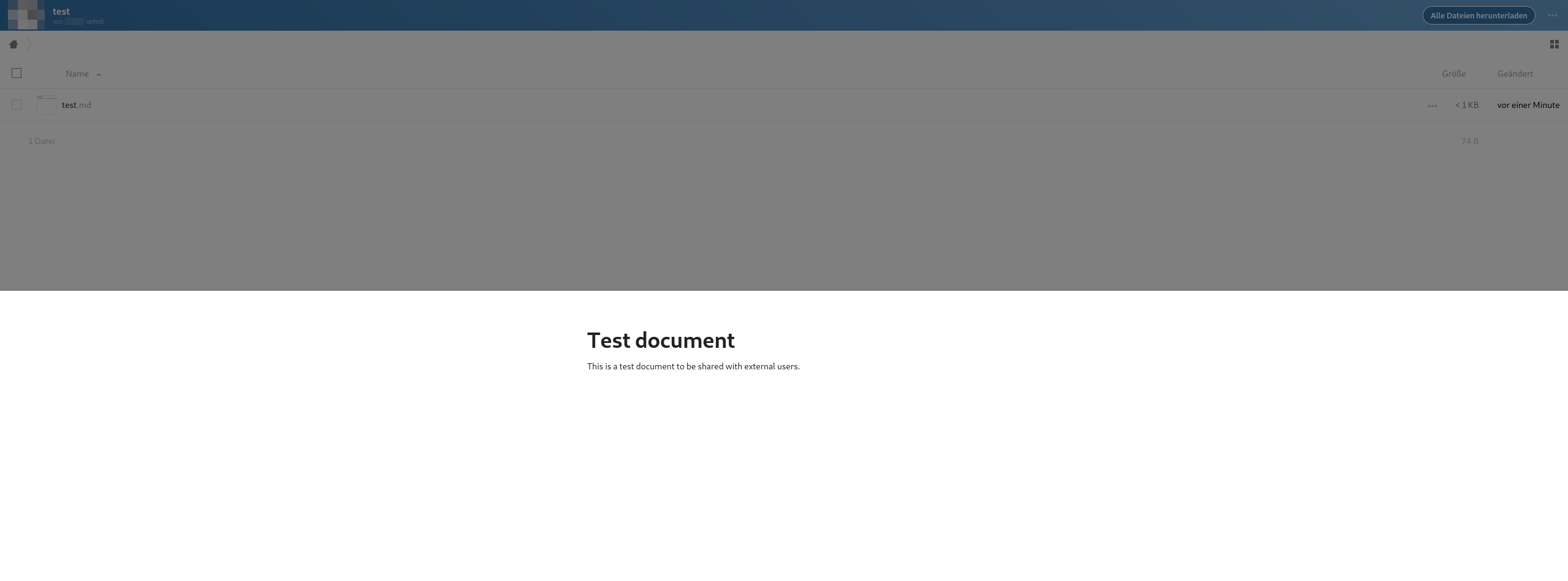
Client details:
- OS: Debian Buster
- Browser: Firefox
- Version: 72.0.2
- Device: Desktop
Server details
Text app version: 2.0.0
Operating system: Debian Buster
Web server: Apache
Database: MariaDB
PHP version: 7.3.11-1~deb10u1
Nextcloud version: 18.0.0.10
 doobry-systemli
All 3 comments
same situation here.
nextcloud 18.0.0 (Stable channel) on Ubuntu
Notes app 2.0.0
client: Firefox 72.0.2 or Chromium 79 on Ubuntu.
 novadeviator
on 12 Feb 2020
novadeviator
on 12 Feb 2020
This bug has already been fixed, you can upgrade to 18.0.1 RC2, or you can wait the official release of 18.0.1 (I think it's tomorrow) ;)
 Ecphrasis
on 12 Feb 2020
Ecphrasis
on 12 Feb 2020
Indeed, it's fixed in 18.0.1. Thanks a lot for the quick fix!
doobry-systemli
on 13 Feb 2020
Related issues
 feutl
·
3Comments
feutl
·
3Comments
 inthreedee
·
6Comments
inthreedee
·
6Comments
 severin-lemaignan
·
4Comments
severin-lemaignan
·
4Comments
 tobiasKaminsky
·
4Comments
tobiasKaminsky
·
4Comments
 andynd
·
3Comments
andynd
·
3Comments
Most helpful comment
This bug has already been fixed, you can upgrade to 18.0.1 RC2, or you can wait the official release of 18.0.1 (I think it's tomorrow) ;)