The app is downloaded and enabled in admin, but the app icon never shows up anywhere in the top menu bar or drop down menu.
To Reproduce
Download and enable the app from /settings/apps/office/text
Go to the Nextcloud root.
Expected behavior
The app should be available from the top menu bar or drop down menu.
I then figured, that maybe one should just select a file like with the text- or MarkDown editors, but that just prompts to open a local text editor.
Screenshots
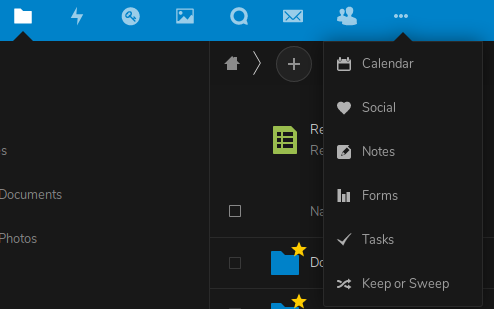
Client details:
- OS: Kubuntu 19.04
- Browser: Firefox
- Version: 68.0.1
- Device: [e.g. iPhone6, desktop]
Server details
I'm on a shared hosting, so I don't have all info
Text app version:
1.0.1
Operating system:
uname -a says: Linux ngcobalt83.example.com 4.19.46 #1 SMP Wed May 29 12:40:11 CEST 2019 x86_64 Intel(R) Core(TM) i3-7100 CPU @ 3.90GHz GenuineIntel GNU/Linux
No idea which distro.
Web server:
Some Apache version
Database:
MySQL or MariaDB. Not sure
PHP version:
7.1
Nextcloud version:
16.0.2
Logs
Nextcloud log (data/nextcloud.log)
I have no idea what to include from that file..?
Insert your Nextcloud log here
Browser log
There's really nothing here that seems relevant. Please ask specifically what to look for.
 tanghus
All 8 comments
I also followed this advice, and an app opens, but there's just a never ending spinner.
tanghus
on 2 Aug 2019
Can you check the browser logs when opening the text file?
 juliushaertl
on 5 Aug 2019
juliushaertl
on 5 Aug 2019
And as it often happens: Now it works :P
Look good - I'll do some testing. First thing I noticed, is that it can be a bit difficult to see "where you are" in Dark Mode (from Accessibility).
tanghus
on 5 Aug 2019
@juliushaertl not sure if you want me to open a new ticket or rather reopen this one.
I was also confused after installation as there was no App (still isn't).
NC 16.0.4
FF Nightly 70 (also tested stable, though)
macOS 10.14
No (relevant*) errors in the browser console.
_*CSP block some inline scripts in Nightly. No error in stable, but no icon either._
Following the link above I now finally found the one way to create a text document (Files > "+" button in the breadcrumbs list). Maybe that is something which could be added to the README maybe!? Thanks for this cool tool ;)
 scheinercc
on 18 Aug 2019
scheinercc
on 18 Aug 2019
@jancborchardt Not sure if we need to communicate a bit better that the text app is a file editor and doesn't provide its own app icon? This is probably also less relevant since it is shipped by default with 17 and not installed manually by admins though the app store.
juliushaertl
on 18 Aug 2019
This is probably also less relevant since it is shipped by default with 17 and not installed manually by admins though the app store.
@juliushaertl yes, tend to agree with this. Lots of other apps are also not necessarily showing an icon, and it would become a mess if they did. E.g. Viewer, PDF viewer, Collabora etc.
We should maybe have a good .md file in the example files starting for 17 then?
 jancborchardt
on 19 Aug 2019
jancborchardt
on 19 Aug 2019
As mentioned, if there would be a clear guide showing how to create a new file, that would be great. The entry point doesn't have to be an app icon, that was just what I was looking for as I wasn't sure in which other app and area that app could be accessed from after I installed it.
Hope that makes sense.
scheinercc
on 19 Aug 2019
Contributions to the readme file are very welcome :wink:
juliushaertl
on 20 Aug 2019
Related issues
 hoergen
·
4Comments
hoergen
·
4Comments
 feutl
·
3Comments
jancborchardt
·
6Comments
feutl
·
3Comments
jancborchardt
·
6Comments
 inthreedee
·
6Comments
inthreedee
·
6Comments
 severin-lemaignan
·
4Comments
severin-lemaignan
·
4Comments