Text: TypeError: '<' not supported between instances of 'Example' and 'Example'
Got the error when running the following code. Is there anything similar to an operator overloading for "<" needed here, or there is a go around way here?
from torchtext.data import TabularDataset
from torchtext import data
from torchtext.vocab import GloVe
from torchtext.vocab import GloVe
tv_datafields = [("id", None), # we won't be needing the id, so we pass in None as the field
("question_text", TEXT),
("target", LABEL)]
trn = TabularDataset.splits(
path="data/quora", # the root directory where the data lies
train='train.csv',
format='csv',
skip_header=True, # if your csv header has a header, make sure to pass this to ensure it doesn't get proceesed as data!
fields=tv_datafields)
TEXT.build_vocab(trn, vectors=GloVe(name='6B', dim=300))
 kidman99
All 9 comments
.splits() returns a tuple of datasets, in your case it is of length 1. So
trn = TabularDataset.splits(
...
...
...
fields=tv_datafields)[0]
should work here or you can use a regular TabularDataset constructor instead.
 tu-artem
on 15 Jan 2019
tu-artem
on 15 Jan 2019
I had the same problem with TabularDataset too
http://mlexplained.com/2018/02/08/a-comprehensive-tutorial-to-torchtext/
This tutorial was helpful.
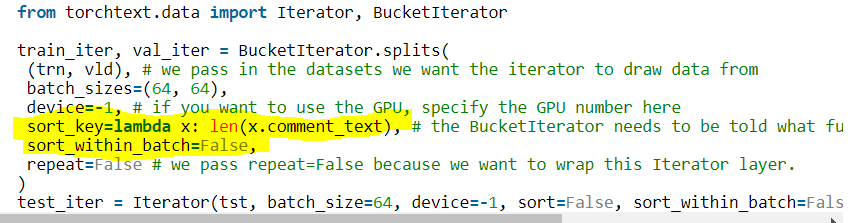
added these two lines and it worked like a charm
 cheryllwl
on 21 Jan 2019
cheryllwl
on 21 Jan 2019
thanks @cheryllwl , this should be documented properly.
 mttk
on 31 Jan 2019
mttk
on 31 Jan 2019
@tu-artem Can you please elaborate on what adding the index [0] does?
From what I gather the splits() method returns a Dataset object as a tuple containing Example objects (instances/rows)
So, if I write;
train, val = torchtext.data.TabularDataset.splits(path='./', train = "train.csv", test = "test.csv", format='csv', fields=data_fields, skip_header = True)
I will get a Dataset object which is a tuple containing all training instances in train variable and another Dataset object containing all test instances in val variable. Am I right?
In this case, please help me understand what the indexing [0] does. Thanks.
 kunjmehta
on 4 Oct 2019
kunjmehta
on 4 Oct 2019
@kunjmehta in your case you are already doing tuple unpacking via multiple assignment train, val = ..., so you don't need any further indexing
tu-artem
on 4 Oct 2019
What worked for me was to simply add sort=False, as sorting was not needed in my case.
 aaronbriel
on 25 Jan 2020
aaronbriel
on 25 Jan 2020
What worked for me was to simply add
sort=False, as sorting was not needed in my case.
This worked for me too. I added sort=False as a parameter in the BucketIterator.
 Sandesh10
on 19 Feb 2020
Sandesh10
on 19 Feb 2020
i solved this by add sort=False parameter.
device = "cuda"
train_iterator,valid_iterator,test_iterator=data.BucketIterator.splits((train,valid,test),sort=False,batch_size=32,device=device)
 Oscarjia
on 2 Nov 2020
Oscarjia
on 2 Nov 2020
@Oscarjia Thanks for helping debug.
Just FYI, Example and BucketIterator will be moved to the legacy folder and not maintained anymore. This is part of the plan for revamping torchtext library. https://github.com/pytorch/text/issues/985
 zhangguanheng66
on 2 Nov 2020
zhangguanheng66
on 2 Nov 2020
Related issues
 manuelsh
·
5Comments
manuelsh
·
5Comments
 cpuhrsch
·
5Comments
cpuhrsch
·
5Comments
 wpfnlp
·
5Comments
wpfnlp
·
5Comments
 lsh23
·
3Comments
lsh23
·
3Comments
 vince62s
·
5Comments
vince62s
·
5Comments
Most helpful comment
I had the same problem with TabularDataset too

http://mlexplained.com/2018/02/08/a-comprehensive-tutorial-to-torchtext/
This tutorial was helpful.
added these two lines and it worked like a charm