Text-mask: Question: Customize placeholderChar per position
Hi all,
I'm trying to put a custom placeholderChar for a date mask.
My mask is in this format:
[/\d/, /\d/, "-", /\d/, /\d/, "-", /\d/, /\d/, /\d/, /\d/]
And I would like to have the same functionality as with placeholderChar but with different chars per position, something like MM-DD-YYYY
Is it possible or exists any workaround to do it?
P.S.:I tried to do it with pipe, but as I'm newbie in angular 4 I didn't manage to do it
thanks in advance
 cargonsan
All 4 comments
you can just use the placeholder attribute in the input field to do so.
 adeelibr
on 6 Oct 2017
adeelibr
on 6 Oct 2017
@cargonsan were you able to find a solution? Facing the same problem. @adeelibr the placeholder attribute didn't work. Can you please provide an example? I am doing this in ReactJS
 eyanez1230
on 6 Dec 2017
eyanez1230
on 6 Dec 2017
It looks like there's already a thread around this (https://github.com/text-mask/text-mask/issues/316) and it is not currently supported. I have the same problem though, and it would be a great feature to have!
 steveharrison
on 20 Mar 2018
steveharrison
on 20 Mar 2018
One possible workaround is to maintain a placeholder element/layer absolutely positioned over the textinput, both with the same monospace font + styling. For example, when the textinput value changes, hide/show placeholder chars as appropriate.
For example:
  // initialize placeholder text
  idealAnniversaryPlaceholderText = 'mm dd yy';
  anniversaryPlaceholderText = this.idealAnniversaryPlaceholderText;

  ...

  updateAnniversary(dateString:string) {
    this.anniversaryText = dateString;
    this.anniversaryPlaceholderText = this.getDatePlaceholderText(this.idealAnniversaryPlaceholderText, '\u00A0\u00A0/\u00A0\u00A0/\u00A0\u00A0', this.anniversaryText);
  }

  getDatePlaceholderText(pristinePlaceholder:string, emptyInputText:string, inputText:string) {
    let outputText = '';
    for (let i = 0; i < inputText.length; i++) {
      outputText += (emptyInputText.charAt(i) === inputText.charAt(i)) ? pristinePlaceholder.charAt(i) : '\u00A0';
    }
    return outputText;
  }
Template:
  <div>{{ anniversaryPlaceholderText }}</div>
  <input type="text"
         [textMask]="{mask: textDateMask, guide: true, placeholderChar: '\u00A0', showMask: true, keepCharPositions: true, pipe: autoCorrectedDatePipe}"
         [ngModel]="getAnniversaryText()"
         (ngModelChange)="updateAnniversary($event)"
  />
Screenshot while editing input:
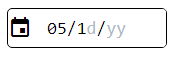
Tested in Chrome, FF, IE11
 FireCoding
on 13 May 2019
FireCoding
on 13 May 2019
Related issues
 caub
·
4Comments
caub
·
4Comments
 douglasdtc
·
3Comments
douglasdtc
·
3Comments
 badre429
·
3Comments
badre429
·
3Comments
 AliveDD
·
5Comments
AliveDD
·
5Comments
 danvc
·
5Comments
danvc
·
5Comments