Texstudio: Keyboard shortcut to swap two lines of LaTeX code
I would enjoy having a keyboard shortcut that lets me swap two lines of LaTeX code.
Environment
- TeXstudio: 2.12.6
- Qt: 5.9.5
- OS: Ubuntu 18.04.5 LTS (Bionic)
- TeX distribution: pdfTeX 3.14159265-2.6-1.40.18 (TeX Live 2017/Debian)
Expected behavior
E.g. I assigned Ctrl+Shift+↑ to swap the line where the curser currently is with the line above it.
Before (curser is in the "Ipsum" line):
\item Lorem
\item Ipsum
After:
\item Ipsum
\item Lorem
 sh-cau
All 2 comments
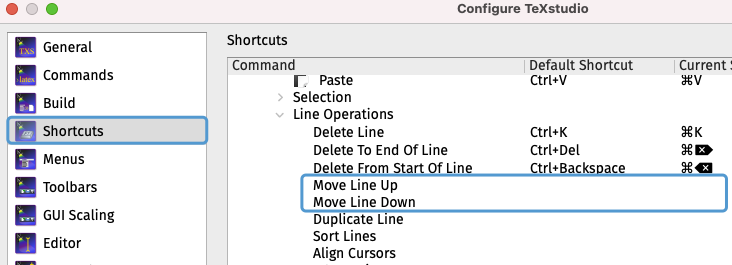
See Configure -> Shortcuts -> Menus -> Editor -> Line Operations -> Move Line Up/Down
 muzimuzhi
on 7 Jan 2021
muzimuzhi
on 7 Jan 2021
👍3
I'm so sorry. I tried to avoid this, but obviously I was not able to find this option :D Thank you.
sh-cau
on 7 Jan 2021
Was this page helpful?
0 / 5 - 0 ratings
Related issues
 juliandragon
·
6Comments
juliandragon
·
6Comments
 philippwerner
·
3Comments
philippwerner
·
3Comments
 henrikgit
·
3Comments
henrikgit
·
3Comments
 homocomputeris
·
7Comments
homocomputeris
·
7Comments
 mirsamantajbakhsh
·
8Comments
mirsamantajbakhsh
·
8Comments
Most helpful comment
See Configure -> Shortcuts -> Menus -> Editor -> Line Operations -> Move Line Up/Down
