Texstudio: Feature request: Macros saved in files inside the project
There is a feature I always missed in Texstudio, in the following context:
Someone is working in a given project, and program some macros, specially to replace commonly used symbols, which are hard to type (uC to turn into $\mu$C for example).
But the issue is that I have to program these macros on both my laptop and desktop. And everytime I format my computer, I have to reprogram all the macros, because of course one always forget to save the texstudio config files.
What if the macros were saved in the project working dir, so it could be synced (e.g. via dropbox), so that it would work in all the machines.
Also because macros are very context specific, and sometimes some old macros end up bothering you on new projects.
Another COOL feature would be tohave the possibility of adding visual shortcuts to the macros into the bookmarks on the left sidebar, with all the other shortcuts. Or maybe simply a new tab showing the macros of that project. That would help to visually remember the macros you have on that project, and re-use them more often.
I would gladly contribute if I can.
 joaofl
All 27 comments
Maybe it is a matter of making the whole configuration file to be either project specific, or global. Or a partial project specific configuration file which overlaps the coincidental parameters from the global one. Dropping some ideas only.
But it would be nice to have your opinion @sunderme
joaofl
on 8 Mar 2018
You can put scripts in the tex file:
% !TeX TXS-SCRIPT = oC
% //Trigger = oC
% editor.write("$\mu$C")
% TXS-SCRIPT-END
(file needs to be closed and reopened to activate it)
 benibela
on 8 Mar 2018
benibela
on 8 Mar 2018
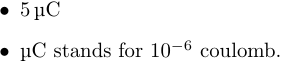
@joaofl As a side remark, you would be better to make use of the siunitx package for things like $\mu$C
\documentclass{article}
\usepackage{siunitx}
% We define a new unit: a micro coulomb
\DeclareSIUnit{\uc}{\micro\coulomb}
% We define a new command ("mec" for micro electric charge) for a physical
% quantity expressed in micro coulomb
\newcommand{\mec}[1]{\SI{#1}{\uc}} %
\begin{document}
\begin{itemize}
\item \mec{5}
\item \si{\uc} stands for \num{e-6} coulomb.
\end{itemize}
\end{document}
 dbitouze
on 8 Mar 2018
dbitouze
on 8 Mar 2018
@benibela I didnt know that. Im gonna try it now. It might do the job.
@dbitouze I've been declaring new commands every time, not with the siunitx package although. Most of the times it is just to make some keyboard shortcuts like, when I type: fiG, it turns into Figure~\ref{fig:}. And some other like those... More like a macro thing I would say...
joaofl
on 8 Mar 2018
Most of the times it is just to make some keyboard shortcuts like, when I type: fiG, it turns into Figure~\ref{fig:}.
That's not incompatible: you could create a TeXstudio macro like the following one:
Macros\0=Electric charge, \\ec{%<electric charge%>}, , eee
that is:
- Name: Electric charge
- Trigger: eee
- LaTeX content:
\ec{%<electric charge%>}
Then, just hit "eee" and that's it.
dbitouze
on 8 Mar 2018
@dbitouze
Macros\0=Electric charge, \ec{%
where should this be declared?
% !TeX TXS-SCRIPT = oC
% //Trigger = oC
% editor.write("$\mu$C")
% TXS-SCRIPT-END
I also tried to place the definition above on a tex file, but It did not execute. How should this be done?
My idea is more to make this features more accessible to the laypeople.
joaofl
on 9 Mar 2018
@joaofl It's what the TXS macro should looks like in texstudio.ini file after have been created as (not so precisely, sorry) specified: in TXS, menu Macros → Edit Macros → Add and then:
- Name: Electric charge
- Trigger: eee
- LaTeX content:
\ec{%<electric charge%>}
dbitouze
on 9 Mar 2018
@dbitouze Ok, I see. Thanks for the clarification.
So my idea was to have some sort of per-project macro list, which is some sort of macros.ini, so that we could sync it among different machines. How does that sound? I could try to implement that if it makes sense to more people other than myself.
joaofl
on 9 Mar 2018
Sounds interesting!
dbitouze
on 9 Mar 2018
I also tried to place the definition above on a tex file, but It did not execute. How should this be done?
You put it at the top of a tex file, close it, open it and write oC
benibela
on 10 Mar 2018
I started implementing this feature. It already load and save the local macros.ini file. Now I have doubt: when loading and saving the macros from/to the local and global config files, what is the best way of differentiating them?
Should I add a checkbox to the macros manager for the user to define whether he wants it as a local or global macro? Or do you have a better suggestion?
joaofl
on 12 Mar 2018
There are several things to do about macros. I don't think it's reasonable to add functionality like local macros to the current state of code. The whole system needs refactoring and adding functionality now will only make that more complicated.
- As a first step, it's reasonable to separate the global macros from texstudio.ini to a dedicated macros file.
- Then, there should be a more suited file format, probably either XML or JSON. To be discussed.
- It would be reasonable to store shortcuts with the macros. Currently, the shortcuts are bound to menu entries (and only implicitly to macros via their order in the macros menu). Ideally, one should be able to set shortcuts via the marco editor window.
- The whole macro editor window and code behind it could use a rewrite.
- There needs to be an upgrade path to migrate existing macros.
 timhoffm
on 13 Mar 2018
timhoffm
on 13 Mar 2018
@timhoffm
it's reasonable to separate the global macros from texstudio.ini to a dedicated macros file.
I also believe it makes sense. Although, would it still be part of the ConfiManager class?
In this sense, my first steps were to create the following 3 functions. One to convert from the old format to the new (XML, JSON...), one to load and populate the interface with the loaded macros, and another one to read the macros added/populated, and save them back to the file.
bool ConfigManager::convertMacros(const QString &in, const QString &out)
bool ConfigManager::readMacros(const QString &file)
bool ConfigManager::saveMacros(const QString &file)
As an argument, read and save functions get the file in which the macros are located. That is considering that it will be a separate file, which will no longer be part of the
QSettings *config = persistentConfig;
This will also make the way for having multiple macro files, including the local ones. How does it sound?
Another possibility that occurs to me is to have active Python macros... Many powerful applications have that feature, that adds great possibilities! It even open the doors for external contributions in the form of plugins. It also rises security concerns, which I believe can be addressed.
joaofl
on 13 Mar 2018
I would discourage the implementation of python as script language. We provide txs for win,OSX and linux (quite a number of different distros) and I don't like to hassle by adding more dependencies which may be difficult to fulfill (e.g. windows)
 sunderme
on 13 Mar 2018
sunderme
on 13 Mar 2018
Just adding to the conversation, I do like the idea of a revamped scripting interface for TXS (it's really one of the standout features, imo), but I am a little concerned with how conflicts in shortcuts between macros loaded from two different files would be resolved? Sorry if it's nothing constructive (I'm not knowledgeable in QT at all), but just wanted to raise potential issues and make them explicit in this discussion.
Slightly off-topic @joaofl :
Another COOL feature would be tohave the possibility of adding visual shortcuts to the macros into the bookmarks on the left sidebar, with all the other shortcuts. Or maybe simply a new tab showing the macros of that project. That would help to visually remember the macros you have on that project, and re-use them more often.
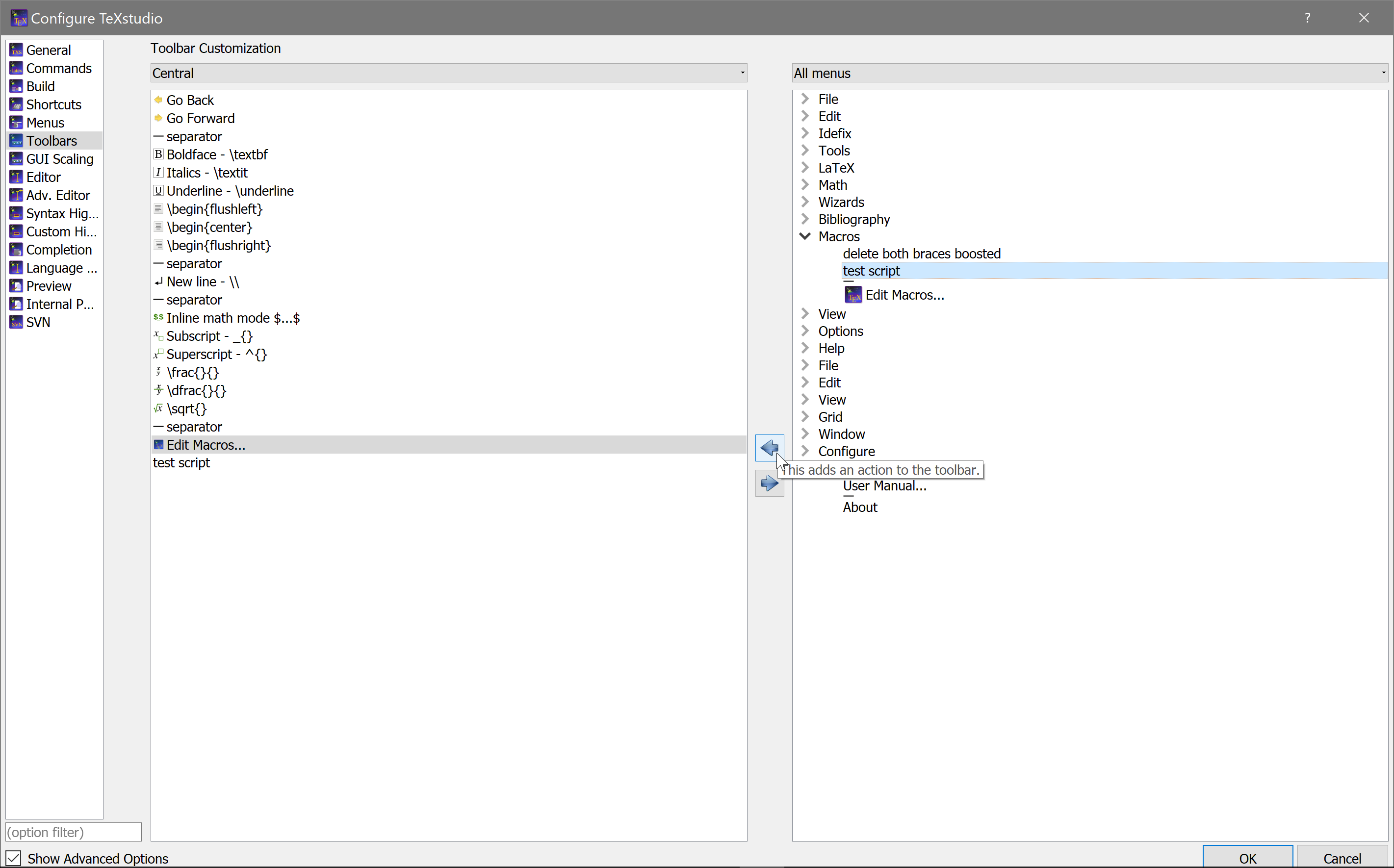
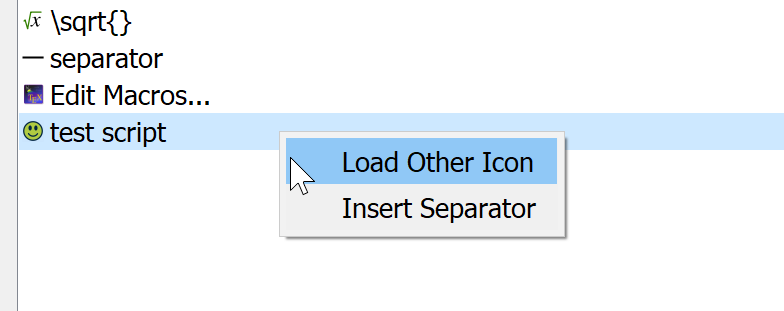
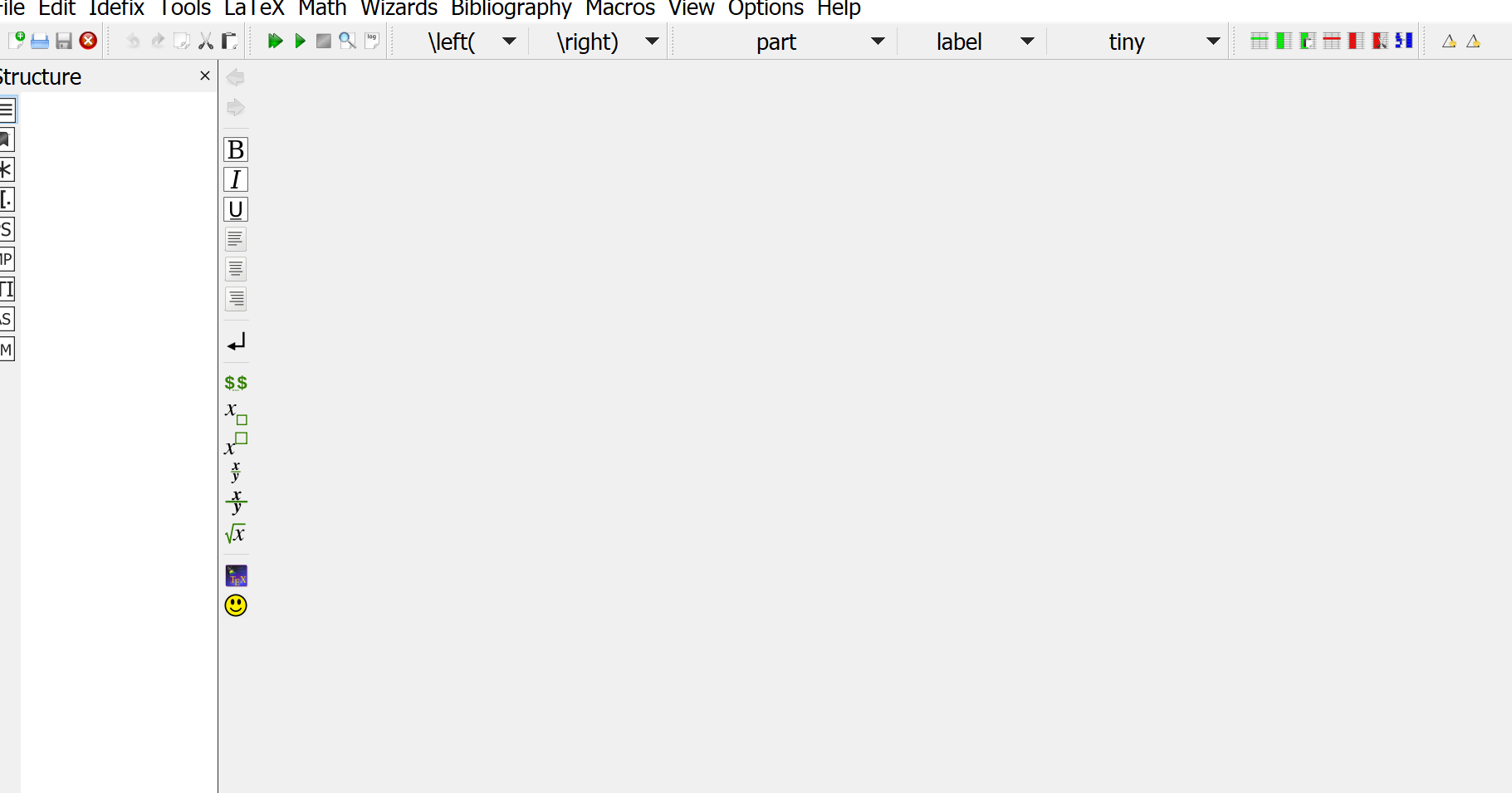
I just want to point out that it is already somewhat possible to do this (having "visual shortcuts to macros"), albeit with the "Central" Toolbar rather than the left "Structure" sidebar (where the symbols etc. are). Or realistically, with any other toolbars (e.g. custom) available to you.
Adding macros to your toolbar:
Changing default icon:
Result:
 thatlittleboy
on 14 Mar 2018
thatlittleboy
on 14 Mar 2018
@thatlittleboy
thanks for the highlight. I was not aware of that possibility actually. It is *almost how I idealized the macros menu, but not exactly. That because this requires some manual configuration to add a button to a single macro, while the menu on the left-most bar would open a panel with all the macros automatically populated. But it is nice to know!
To address the local X global macro loading issue, my idea was to add a flag to each macro, that would specify whether its local or global. And at the time it is saved, its either saved on a file inside the project my_macros.something, or on the file inside .config/texstudio/macros.something.
At the time you open texstudio, it checks for both files to populate the list of macros. Should not be that complicated.
joaofl
on 14 Mar 2018
@joaofl
Let's say I have macro1 that I created on my laptop TXS, and then I set it with a shortcut of Ctrl+Q and flagged it as global (Global = not project-specific). Then, while working on my desktop TXS, I created some other macro macro2 which I flag as local (to the project), but also assigned to the same shortcut Ctrl+Q. (Suppose the desktop TXS has no macro1.)
Now what happens if I sync up the project (and thus the accompanying project macros) to my laptop? Should TXS keep the global macro1 or local-project macro2?
That's what I meant when I mentioned about conflict in the shortcuts. Or am I misunderstanding something here?
thatlittleboy
on 14 Mar 2018
@thatlittleboy
I see your point. It makes very much sense. The conflicts are regarding the keyboard shortcuts...
I guess in this case we have to define a priority... Either hold the local or global one only. Probably the local has more importance, since it was created specifically to the project you are working on.
joaofl
on 14 Mar 2018
@joaofl Indeed. I'ld agree with that, I just wanted to raise the issue up explicitly. Thanks for working on this! :smile:
thatlittleboy
on 14 Mar 2018
@thatlittleboy but isnt it already possible to define different macros with the same shortcut? Not only the keyboard shortcut, but keywords as well. How does Texstudio handles it now? Never checked.
joaofl
on 14 Mar 2018
@joaofl Is that so? You mean keyboard shortcuts for macros? I just tried, TXS alerts me that the shortcut already exists for another command, and asks if I want to change.
Which ones point to the same shortcut? For "keywords", do you mean triggers?
thatlittleboy
on 14 Mar 2018
@thatlittleboy
For "keywords", do you mean triggers?
Exactly
joaofl
on 14 Mar 2018
@joaofl For triggers I think higher up macros have higher priority. (the ordering in the macro menu).
At least, from what I see from my 2 minutes of testing just now.
thatlittleboy
on 14 Mar 2018
@thatlittleboy yes... Just tested... In this sense, there should be means of moving them up and down, or just to make more explicitly what are the macros with higher priority.
joaofl
on 14 Mar 2018
@joaofl Excellent. I didn't realize this priority thing until you brought it up as well. 👍
thatlittleboy
on 14 Mar 2018
@thatlittleboy Actually the priorities are more like a natural consequence of how it is implemented. There is an array with all the macros/triggers loaded to it. As you type, texstudio checks that array from top to bottom, looking for any match. The first one to happen triggers the action and returns. Which seems to be ok.
joaofl
on 14 Mar 2018
probably obsolete with the new macro gui/file system
sunderme
on 18 Nov 2018
Related issues
 melsophos
·
5Comments
melsophos
·
5Comments
 muzimuzhi
·
10Comments
muzimuzhi
·
10Comments
 kckennylau
·
3Comments
kckennylau
·
3Comments
 juliandragon
·
6Comments
juliandragon
·
6Comments
 philippwerner
·
3Comments
philippwerner
·
3Comments
Most helpful comment
You can put scripts in the tex file:
(file needs to be closed and reopened to activate it)