Testfx: runsettings not applied to test discovery ?
Description
- The runsettings seems that is not being applied to the test discovery.
Steps to reproduce
- Test project (nanoFramework) with a couple of tests.
- After the build no tests are found. After hitting Run All message with "No tests found to run." shows.
- However running from the console shows the test.
vstest.console NFApp3.exe --Diag:diag.txt --Framework:".NETFramework,version=4.6.1" /TestAdapterPath:C:\Users\jassimoes\AppData\Local\Microsoft\VisualStudio\15.0_d9708c20\Extensions\0uwxjzp3.ahk /listtests
The output is:
Microsoft (R) Test Execution Command Line Tool Version 15.8.0
Copyright (c) Microsoft Corporation.  All rights reserved.

The following Tests are available:
Logging Vstest Diagnostics in file: C:\Users\jassimoes\Source\Repos\NFApp3\NFApp3\bin\Debug\diag.txt
Test run will use DLL(s) built for framework .NETFramework,Version=v4.6.1 and platform X86. Following DLL(s) do not match framework/platform settings.
NFApp3.exe is built for Framework 1.0 and Platform AnyCPU.
Go to http://go.microsoft.com/fwlink/?LinkID=236877&clcid=0x409 for more details on managing these settings.

Hello from nF DiscoverTests
Hello from nF DiscoverTests
Starting test discovery...
Starting test discovery...
Test discovery completed.
Test discovery completed.
    test name
The exe for this test project is build against a custom mscorlib and it's using it's own framework identifier. That's why the warning about the framework mismatch. That seems to be handled properly in the console, but not inside VS.
Expected behavior
The tests should be listed in the test explorer window.
Actual behavior
- No test is showing.
Environment
- VS 15.8.5
 josesimoes
All 18 comments
@josesimoes : Can you collect logs when running from VS IDE using this blog : https://github.com/Microsoft/vstest-docs/blob/master/docs/diagnose.md#collect-trace-using-config-file
In your Test output window you will see a log file path, please share that file with us.
If possible, please do share a scaled down repro project with us.
 jayaranigarg
on 28 Sep 2018
jayaranigarg
on 28 Sep 2018
Closing the thread. Please feel free to re-open the issue once you have the required logs.
jayaranigarg
on 5 Oct 2018
@jayaranigarg I'm back to this matter (apologies for the delay) so please open this issue again.
I've tried to follow your instructions and suceded on the editing vstest.console.exe.config .
I don't know how to do this: Add a variable to the build definition named System.Debug with value True...
I'm attaching a solution with the "candidate" test project, which keeps showing with no tests in VS test explorer.
NFApp3.zip
However, if I use the VS developer command prompt I do get something
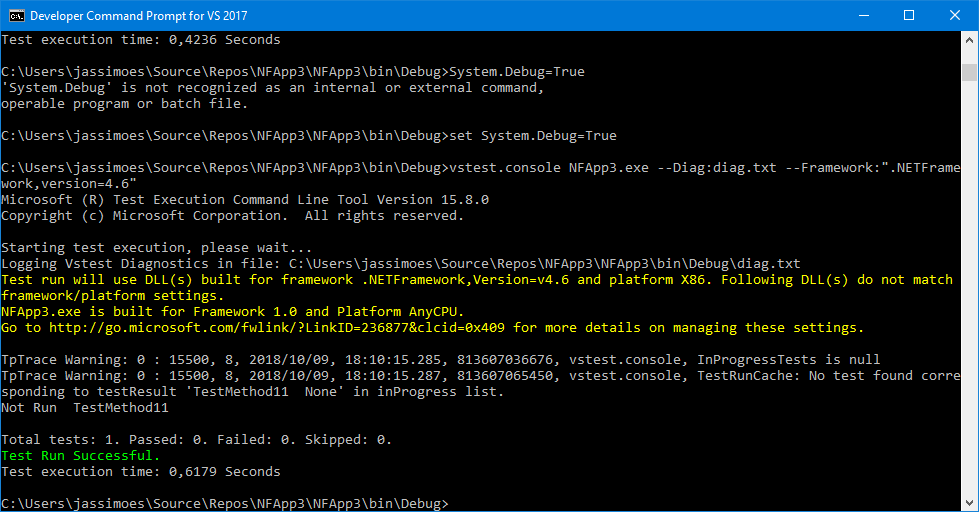
Follows the log I get when calling vstest.console from the command prompt
diag.txt
josesimoes
on 9 Oct 2018
@AbhitejJohn @genlu to look into this. The scenario is not working in IDE. No containers are being identified to perform discovery.
jayaranigarg
on 10 Oct 2018
@jayaranigarg : From the log above, isn't this busted in commandline as well? Does MSTestV2 support Framework lower than 3.5 yet?
 AbhitejJohn
on 11 Oct 2018
AbhitejJohn
on 11 Oct 2018
@AbhitejJohn the yellow part is a warning, yes, and expected - I guess - as the adapter is analysing a DLL that is on a different framework (from the documentation here I believe that's something that is possible)
The DLL, despite being C# is compiled against .NET nanoFramework v1.0.
The green line there shows that the test in the solution is discovered and executed.
This does not happen in VS test explorer. I was under the impression that the settings file was to accommodate specifics of the test context, such as the difference in the framework, and performed like an equivalent of the options that are added in the command line (when executing vstest.console). The thing is that no matter what is in the settings file, nothing seems to change.
josesimoes
on 11 Oct 2018
@josesimoes : Thanks. Looks like the project system for this project thinks it follows the new common project system(it has a CPS project capability) but services like IOutputGroupsService that the default container provider uses to determine a projects output does not exist. To get this to just work with the default implementation the project system for an nfproj would have to be updated. Just curious though, why did you need to create a new project type/project system altogether?
Also could we have built a platformservice over MSTestV2 to support nanoFramework/Adapter. MSTest V2 has been designed to make it easier to support new target platforms/frameworks out of the box.
AbhitejJohn
on 11 Oct 2018
It should suffice to add that capability? We can do that.
Answering your question: at the time we've started all this the documentation on how to extend an existing project system (that would be csproj) was none existing. So we choose to implement our own. This is to make it clear that this is not a regular csproj, because it has extra msbuild steps to compile it for MCU execution, because it uses its own debugger and to have it's own icon, resources editor, etc.
On the last part, it wasn't clear to me if you are asking about that or if you are suggesting that the test system could support this framework too. 😃
josesimoes
on 11 Oct 2018
@AbhitejJohn it looks like we are one step forward with this! 😃
I've added IOutputGroupsService and remove the _remove_ of OutputGroups capabilities.
Using the same test app I can now see two different behaviours in VS:
- Without specifying a runsettings file, after clicking Run All this is the output from tests:
[12/10/2018 09:10:25 Informational] ------ Run test started ------
[12/10/2018 09:10:27 Error] An exception occurred while invoking executor 'executor://nanoframeworktestexecutor/v1': Failed to load msdia
[12/10/2018 09:10:27 Informational] ========== Run test finished: 0 run (0:00:01,8890015) ==========
- If I specify a runsettings file with
<TargetFrameworkVersion>Framework40</TargetFrameworkVersion>(or 45), after hitting Run All this is the output from tests:
[12/10/2018 09:16:24 Informational] ------ Run test started ------
It never ends (I've try adding a timeout setting, but has no effect) I can see the progress bar moving continuously. Even after clicking Cancel it remains in that state. I have to close VS.
Next steps, please?
josesimoes
on 12 Oct 2018
@AbhitejJohn any update on this please?
josesimoes
on 16 Oct 2018
@AbhitejJohn or @jayaranigarg any update on this please? 😃
josesimoes
on 22 Oct 2018
@josesimoes : I'm sorry, I've been occupied with a few other things and github notifications seem to not reach me. For the first warning that you've mentioned it looks like the nanoframework executor is invoked in the testhost process but it fails to load because it cannot find a dependency - Diagnostic platform logs usually help here. Also for any test workflows in VS, setting logs to Diagnostic from Tools -> Options puts out additional details as well.
Also, given that this is its own custom project system, the default discoverer in VS might not just work for all the scenarios. Just wanted to put that out there. You could also explore creating your own version of a container provider that essentially provides sources with the right settings(framework, platform, debugger guids) etc for discovery. This is currently possible through the ITestContainerDiscoverer and ITestContainer interfaces that this blog talks about. That link details more on file based adapters but in your case it would be project based.
On the last part, it wasn't clear to me if you are asking about that or if you are suggesting that the test system could support this framework too.
For this I meant that we could look at ways of extending the MSTest Framework using this interface extensibility list to support nanoframework with minimal effort. Notice that it already has implementations for different .Net Frameworks. The nano framework adapter would probably ship differently given the custom framework but it can be built on top of MSTestV2 in comparison to shipping its own version of it.
AbhitejJohn
on 23 Oct 2018
@AbhitejJohn thanks again for your comments/suggestions!
I'll go and enable all those logs to see if I can find out what is missing there.
I'll look into that blog post and see what I can make out of it. 👏
On the PlatformServices.Interface, is sound good to me. I'm just not familiar with all that... Can you please provide some pointers on what I need to do to make it happen? 😊
josesimoes
on 23 Oct 2018
On 3. since this is the first time we'd had such a request @jayaranigarg would you be able to help @josesimoes with this please? I'd think this is about implementing all the APIs in IPlatformServiceProvider boundary into a nanoframework specific version of Microsoft.VisualStudio.TestPlatform.MSTestAdapter.PlatformServices and dropping this assembly into bin/debug when a project targets nanoframework. There are a few more details on the packaging of this assembly that might need to be sorted out.
AbhitejJohn
on 25 Oct 2018
Awesome! @jayaranigarg what would be the next steps?
josesimoes
on 25 Oct 2018
@josesimoes : Apologies for the delay.
To support this new platform/framework, you will need to add two projects. One for adapter logic and one for framework attributes.
- For adapter, you can create a project of this new platform type, something like PlatformService.Nano which takes a project dependency on PlatformService.Interface and implements all these interfaces. Refer how these interfaces have been implemented for Desktop(net45), Universal(UWP), .NetCore based projects. You would want to do similar implementations for this nano framework.
Note- Make sure your project has rootNamespace and assemblyName as
<RootNamespace>Microsoft.VisualStudio.TestPlatform.MSTestAdapter.PlatformServices</RootNamespace>
<AssemblyName>Microsoft.VisualStudio.TestPlatform.MSTestAdapter.PlatformServices</AssemblyName>
- If this new framework has/requires attributes specific to this project type, you can create a project for framework extension, something like Extension.Nano which takes a dependency on MSTest.Core. In this project, you can implement customized attributes you need for the nano framework based projects.
Note - Make sure your project has rootNamespace and assemblyName as
<RootNamespace>Microsoft.VisualStudio.TestTools.UnitTesting</RootNamespace>
<AssemblyName>Microsoft.VisualStudio.TestPlatform.TestFramework.Extensions</AssemblyName>
Once the above changes are done, you might want to package these dlls in nuget packages. For that you will have to change Adapter and framework nuspec files to pick these new dlls when the project framework is nano.
Note - You might need to check with nuget folks as to what keyword to use to target nano framework, if there is no keyword dedicated to it as of now.
jayaranigarg
on 12 Nov 2018
@jayaranigarg thank you for providing this information and guidance.
I'll be working on this with @MatthiasJentsch. We'll keep you updated on our progress.
josesimoes
on 15 Nov 2018
Closing the thread from our end. Please feel free to contact us if you face any issues.
jayaranigarg
on 10 Dec 2018
Related issues
 elv1s42
·
3Comments
elv1s42
·
3Comments
 mailing2pankaj
·
3Comments
mailing2pankaj
·
3Comments
 xeroxe
·
4Comments
xeroxe
·
4Comments
 Izzmo
·
6Comments
Izzmo
·
6Comments
 spottedmahn
·
5Comments
spottedmahn
·
5Comments
Most helpful comment
@josesimoes : Apologies for the delay.
To support this new platform/framework, you will need to add two projects. One for adapter logic and one for framework attributes.
Note- Make sure your project has rootNamespace and assemblyName as
<RootNamespace>Microsoft.VisualStudio.TestPlatform.MSTestAdapter.PlatformServices</RootNamespace> <AssemblyName>Microsoft.VisualStudio.TestPlatform.MSTestAdapter.PlatformServices</AssemblyName>Note - Make sure your project has rootNamespace and assemblyName as
<RootNamespace>Microsoft.VisualStudio.TestTools.UnitTesting</RootNamespace>
<AssemblyName>Microsoft.VisualStudio.TestPlatform.TestFramework.Extensions</AssemblyName>
Once the above changes are done, you might want to package these dlls in nuget packages. For that you will have to change Adapter and framework nuspec files to pick these new dlls when the project framework is nano.
Note - You might need to check with nuget folks as to what keyword to use to target nano framework, if there is no keyword dedicated to it as of now.