Testfx: No Source Available in Test Explorer
Description
In the Unit Test Explorer I can see and run a unit test, but when I select the test it displays on the bottom, "No source available"
Steps to reproduce
I created a unit test project, and converted it to use the new project file format with PackageReferences. I added two Nuget packages, MSTest.TestAdapter and MSTest.TestFramework.
Expected behavior
I should be able to double click a test to navigate to the code
Actual behavior
I see a message "No Source Available"
Environment
Visual Studio v15.3.5
MSTest.TestAdapter v1.1.18
MSTest.TestFramework v1.1.18
I may not have properly converted the project to use the new project format. Is there a sample of a Unit Test project which uses PackageReferences (as opposed to packages.config?)
 jackbond
All 12 comments
@jackbond: I guess the conversion went well because you are able to discover and run tests. There might be something else at play here. Could you turn on TestExplorer diagnostics from Tools -> Options -> Test -> Logging -> Logging Level? Set that to diagnostic and share the logs that show up in the Output->Tests pane with us please.
 AbhitejJohn
on 26 Sep 2017
AbhitejJohn
on 26 Sep 2017
How about a solution that reproduces the issue?
jackbond
on 26 Sep 2017
I've resolved the issue by adding the Microsoft.NET.Test.Sdk Nuget. I skipped adding it originally because its Nuget description reads, "The MSbuild targets and properties for building the .Net core test projects." Perhaps that description could be updated?
jackbond
on 27 Sep 2017
@jackbond: Thanks for the repro. This is a new project system based project where the pdbs generated are portable by default. That explains why the Source Information logic fails since it currently only works on full pdbs.
Adding Microsoft.Net.Test.Sdk package brought in the following
<DebugType>Full</DebugType>
ensuring that the scenario works. You could go ahead and keep that package installed(which is added in by default for Unit test templates in the project system).
/cc: @Faizan2304, @smadala for the package description change.
AbhitejJohn
on 28 Sep 2017
@AbhitejJohn
Thanks for the info. I converted a few more of our unit test projects, and one of them had an AssemblyInitialize attribute. When I ran a test, I got the error below. I haven't been able to recreate the problem in the repro project I sent you, any possible ideas? Thanks.
Method OurClassName.AssemblyInit has wrong signature. Parameter 1 should be of type Microsoft.VisualStudio.TestTools.UnitTesting.TestContext.
jackbond
on 28 Sep 2017
@jackbond: Do you have a testsettings file specified for the run? If yes, can you try removing it or replacing with a runsettings instead?
AbhitejJohn
on 29 Sep 2017
Please reactivate if this is still blocking you.
 pvlakshm
on 2 Nov 2017
pvlakshm
on 2 Nov 2017
Is there an issue tracking the fact that the test explorer doesn't work with embedded PDBs?
 johncrim
on 21 Dec 2017
johncrim
on 21 Dec 2017
@johncrim From VS 15.5 test explorer should support it, Source-Information-For-Discovered should solve the embedded PDBs issue.
 smadala
on 21 Dec 2017
smadala
on 21 Dec 2017
Thanks @smadala . I've found that VS 15.5 works with portable symbols, but not embedded. The linked document doesn't provide any additional info on support for portable vs embedded symbols.
johncrim
on 22 Dec 2017
@johncrim
From doc:
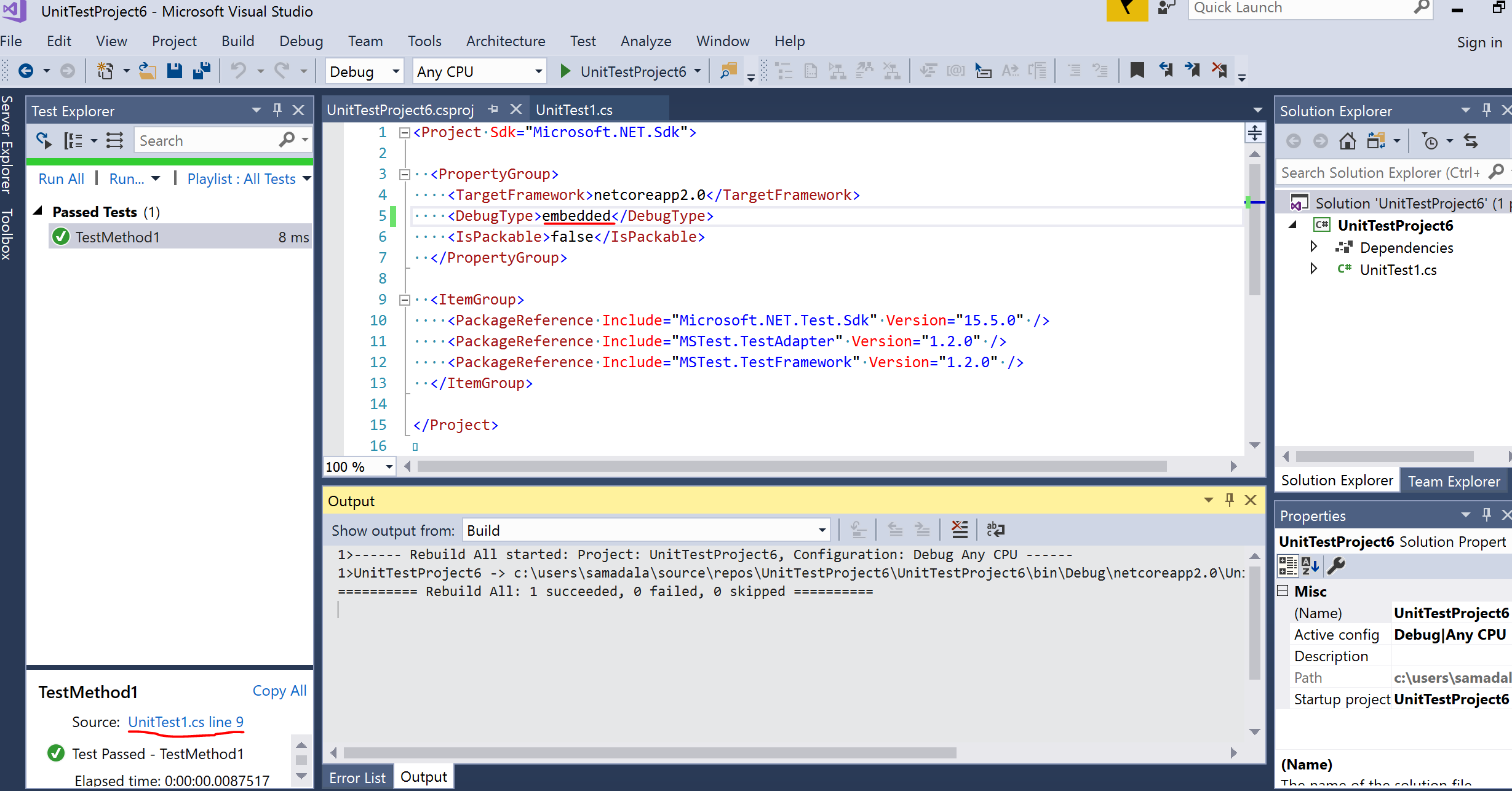
Use of better performant Roslyn APIs instead of reflection based approach on PDBs.
Indicates source info determined by Roslyn APIs, It shouldn't be matter what type the PDB is.
Debug type embedded working for me on 15.5.1. See the below image.
smadala
on 30 Dec 2017
Just FYI, I had this problem with a .NET Console App targeting full framework, referenced from unit tests. Going to settings and setting Build -> Advanced -> Debugging information to Full fixed the problem.
 lostmsu
on 12 Feb 2018
lostmsu
on 12 Feb 2018
Related issues
 mailing2pankaj
·
3Comments
mailing2pankaj
·
3Comments
 elv1s42
·
3Comments
elv1s42
·
3Comments
 xeroxe
·
4Comments
xeroxe
·
4Comments
 elgatov
·
5Comments
AbhitejJohn
·
3Comments
elgatov
·
5Comments
AbhitejJohn
·
3Comments
Most helpful comment
@johncrim
From doc:
Indicates source info determined by Roslyn APIs, It shouldn't be matter what type the PDB is.
Debug type embedded working for me on 15.5.1. See the below image.