Testcontainers-java: Docker check fails on Windows
testcontainers doesn't work smoothly on Windows.
The check that is run at the very beginning _always_ erroneously fails on the first test (failing the whole test run):
Docker environment should have more than 2GB free disk space
java.lang.AssertionError: Docker environment should have more than 2GB free disk space
The workaround is easy, jut put testcontainers.properties in resources with this:
checks.disable = true
But this is still a bug.
CC @rpliva
 sideeffffect
All 9 comments
But do you have more than 2Gb allocated to your Docker VM?
 bsideup
on 12 Jul 2019
bsideup
on 12 Jul 2019
Sorry, if I haven't explained it as clearly: yes, there is definitely more than 2 GB available
@rpliva could you please post here a screenshot?
sideeffffect
on 12 Jul 2019
@sideeffffect could you please post the output of docker run -it --rm alpine:3.6 df -h?
bsideup
on 12 Jul 2019
Docker output:
C:\Projects>docker run -it --rm alpine:3.6 df -h
Unable to find image 'alpine:3.6' locally
3.6: Pulling from library/alpine
5a3ea8efae5d: Pull complete
Digest: sha256:66790a2b79e1ea3e1dabac43990c54aca5d1ddf268d9a5a0285e4167c8b24475
Status: Downloaded newer image for alpine:3.6
Filesystem                Size      Used Available Use% Mounted on
overlay                  14.6G     13.4G    495.7M  97% /
tmpfs 64.0M 0 64.0M 0% /dev
tmpfs 1.5G 0 1.5G 0% /sys/fs/cgroup
/dev/sda1 14.6G 13.4G 495.7M 97% /etc/resolv.conf
/dev/sda1 14.6G 13.4G 495.7M 97% /etc/hostname
/dev/sda1 14.6G 13.4G 495.7M 97% /etc/hosts
shm 64.0M 0 64.0M 0% /dev/shm
tmpfs 1.5G 0 1.5G 0% /proc/acpi
tmpfs 64.0M 0 64.0M 0% /proc/kcore
tmpfs 64.0M 0 64.0M 0% /proc/keys
tmpfs 64.0M 0 64.0M 0% /proc/timer_list
tmpfs 64.0M 0 64.0M 0% /proc/sched_debug
tmpfs 1.5G 0 1.5G 0% /sys/firmware
C:\Projects>
 rpliva
on 12 Jul 2019
rpliva
on 12 Jul 2019
Filesystem                Size      Used Available Use% Mounted on
overlay                  14.6G     13.4G    495.7M  97% /
Apparently you don't have 2Gb of space in Docker's VM. Please either increase it or remove unused images or something else.
if the issue remains after the cleanup, you can reopen this issue and we will continue the investigation.
bsideup
on 12 Jul 2019
and Docker Desktop settings
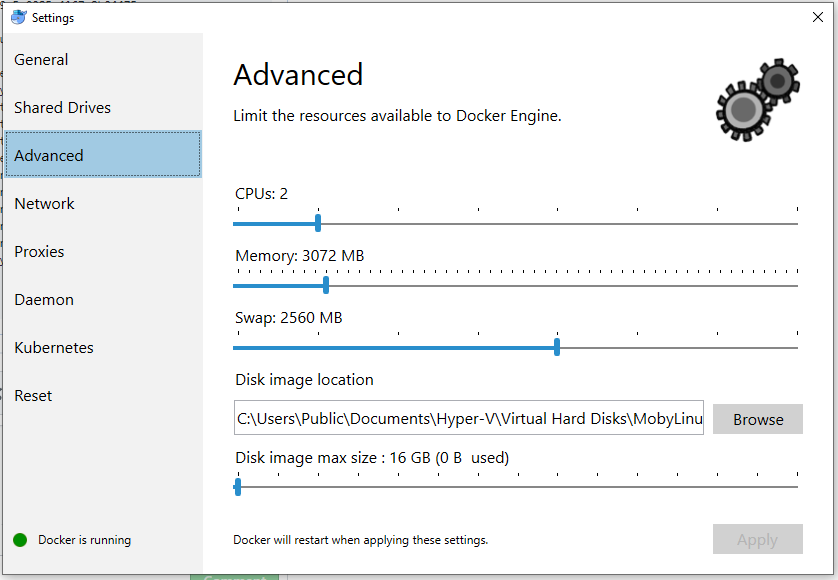
rpliva
on 12 Jul 2019
It's not a problem of the settings (0 B used display might be a bug in the Docker UI here).
You can clearly see overlay 14.6G 13.4G 495.7M 97% / in your output above.
You can cleanup by e.g. running docker system prune.
 kiview
on 12 Jul 2019
kiview
on 12 Jul 2019
Yes, docker system prune helped and now I have more than 11GB free space and everything work.
rpliva
on 12 Jul 2019
You can cleanup by e.g. running docker system prune.
For future visitors. Be careful with docker system prune. Make sure you know what you're doing.
https://docs.docker.com/v17.12/engine/reference/commandline/system_prune
 jannis-baratheon
on 12 Jul 2019
jannis-baratheon
on 12 Jul 2019
Related issues
 vmassol
·
3Comments
vmassol
·
3Comments
 denis-zhdanov
·
3Comments
denis-zhdanov
·
3Comments
 micheal-swiggs
·
4Comments
micheal-swiggs
·
4Comments
 michael-simons
·
3Comments
michael-simons
·
3Comments
 aniketbhatnagar
·
3Comments
aniketbhatnagar
·
3Comments
Most helpful comment
Apparently you don't have 2Gb of space in Docker's VM. Please either increase it or remove unused images or something else.
if the issue remains after the cleanup, you can reopen this issue and we will continue the investigation.