Testcafe: Automatic scroll doesn't work for pages with sticky overlay footer
I'm creating an automated test for multi-step wizard page with lots of inputs, and sticky overlay footer:
        footer {
            position: sticky;
            bottom: 0;
        }
What is the Current behavior?
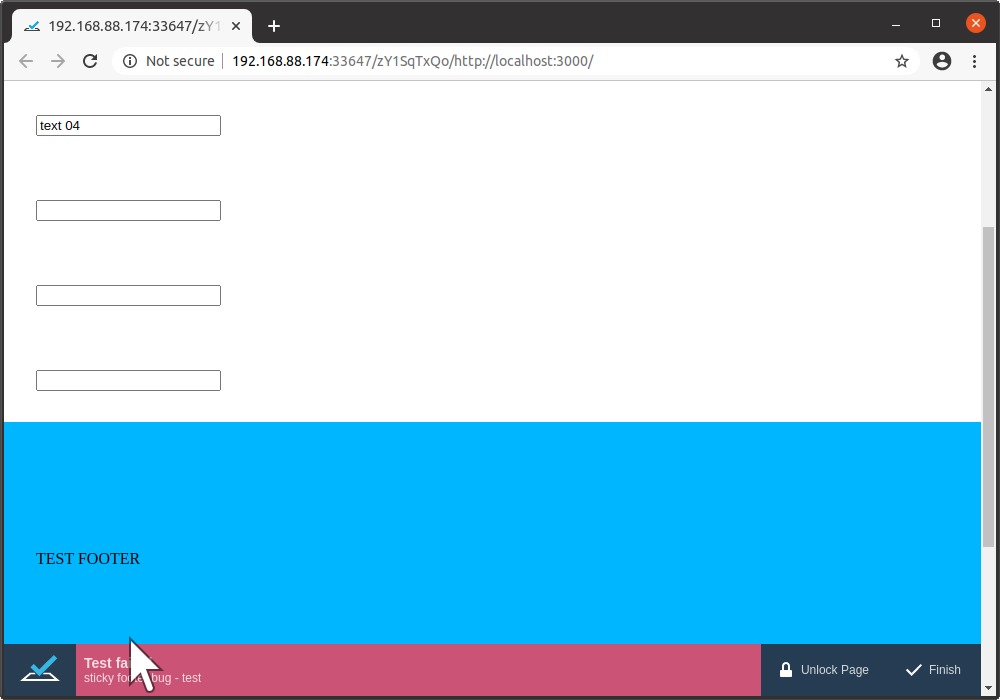
Functions typeText, click and hover do not scroll page at all, if the target element is hidden by the sticky overlay footer. But usually/sometimes, the auto-scroll functionality works correctly, if the target is not visible and neither hidden by the overlay sticky footer.
What is the Expected behavior?
Functions typeText, click and hover scroll the page in a way, which makes the target element to not be hidden by the sticky overlay footer.
What is your web application and your TestCafe test code?
Your website URL (or attach your complete example):
<!DOCTYPE html>
<html>
<head>
    <style>
        html, body {
            margin: 0;
            padding: 0;
        }
        div {
            padding: 2rem;
        }

        footer {
            padding: 8rem 2rem;
            background: #00B7FF;
            position: sticky;
            bottom: 0;
        }
    </style>
</head>
<body>
<div><input name="test01"/></div>
<div><input name="test02"/></div>
<div><input name="test03"/></div>
<div><input name="test04"/></div>
<div><input name="test05"/></div>
<div><input name="test06"/></div>
<div><input name="test07"/></div>
<div><input name="test08"/></div>
<div><input name="test09"/></div>
<div><input name="test10"/></div>
<footer>TEST FOOTER</footer>
</body>
</html>
Your complete test code (or attach your test files):
import { Selector } from "testcafe";

fixture`sticky footer bug`.page`http://localhost:3000/`;

test('test', async t => {
  await t
    .typeText(Selector('[name=test01]'), 'text 01')
    .typeText(Selector('[name=test02]'), 'text 02')
    .typeText(Selector('[name=test03]'), 'text 03')
    .typeText(Selector('[name=test04]'), 'text 04')
    .typeText(Selector('[name=test05]'), 'text 05')
    .typeText(Selector('[name=test06]'), 'text 06')
    .typeText(Selector('[name=test07]'), 'text 07')
    .typeText(Selector('[name=test08]'), 'text 08')
    .typeText(Selector('[name=test09]'), 'text 09')
    .typeText(Selector('[name=test10]'), 'text 10')
    .expect(Selector('[name=test01]').value).eql('text 01')
    .expect(Selector('[name=test02]').value).eql('text 02')
    .expect(Selector('[name=test03]').value).eql('text 03')
    .expect(Selector('[name=test04]').value).eql('text 04')
    .expect(Selector('[name=test05]').value).eql('text 05')
    .expect(Selector('[name=test06]').value).eql('text 06')
    .expect(Selector('[name=test07]').value).eql('text 07')
    .expect(Selector('[name=test08]').value).eql('text 08')
    .expect(Selector('[name=test09]').value).eql('text 09')
    .expect(Selector('[name=test10]').value).eql('text 10')
})
Your complete test report:
$ testcafe "chrome '--window-size=1000,700'" --selector-timeout 100 --debug-on-fail ./someTest.ts
Using locally installed version of TestCafe.
 Running tests in:
 - Chrome 83.0.4103.97 / Linux 0.0

 sticky footer bug
 ✖ test

   1) AssertionError: expected '' to deeply equal 'text 05'

      Browser: Chrome 83.0.4103.97 / Linux 0.0

         16 |    .typeText(Selector('[name=test10]'), 'text 10')
         17 |    .expect(Selector('[name=test01]').value).eql('text 01')
         18 |    .expect(Selector('[name=test02]').value).eql('text 02')
         19 |    .expect(Selector('[name=test03]').value).eql('text 03')
         20 |    .expect(Selector('[name=test04]').value).eql('text 04')
       > 21 |    .expect(Selector('[name=test05]').value).eql('text 05')
         22 |    .expect(Selector('[name=test06]').value).eql('text 06')
         23 |    .expect(Selector('[name=test07]').value).eql('text 07')
         24 |    .expect(Selector('[name=test08]').value).eql('text 08')
         25 |    .expect(Selector('[name=test09]').value).eql('text 09')
         26 |    .expect(Selector('[name=test10]').value).eql('text 10')

         at <anonymous> (/home/miroslav/x/y/untitled/someTest.ts:21:46)
         at <anonymous> (/home/miroslav/x/y/someTest.ts:8:71)
         at __awaiter (/home/miroslav/x/y/untitled/someTest.ts:4:12)
         at <anonymous> (/home/miroslav/x/y/untitled/someTest.ts:5:24)
         at <anonymous> (/home/miroslav/x/y/untitled/node_modules/testcafe/src/api/wrap-test-function.js:17:28)
         at TestRun._executeTestFn (/home/miroslav/x/y/untitled/node_modules/testcafe/src/test-run/index.js:296:19)
         at TestRun.start (/home/miroslav/x/y/untitled/node_modules/testcafe/src/test-run/index.js:346:24)


 1/1 failed (40s)
Screenshots:
Steps to Reproduce:
- serve the html above on
:3000(or adjust test contents) - execute:
testcafe "chrome '--window-size=1000,700'" --selector-timeout 100 --debug-on-fail ./someTest.ts
Your Environment details:
- testcafe version:
1.8.7 - node.js version:
v12.16.3 - command-line arguments:
"chrome '--window-size=1000,700'" --selector-timeout 100 --debug-on-fail - browser name and version:
Chrome Version 83.0.4103.97 (Official Build) (64-bit) - platform and version: Ubuntu 20.04 LTS (Focal Fossa)
 kravemir
All 5 comments
Hello,
Thank you for your report. I've managed to reproduce the issue on Windows.
Our team will investigate it and let you know once it's fixed.
 Ogurecher
on 30 Jun 2020
Ogurecher
on 30 Jun 2020
Hello @Ogurecher,
thank you for the analysis / reproduction. Do you have any estimate, when it will be fixed? Will it be days, or weeks, or longer?
kravemir
on 7 Jul 2020
@kravemir We cannot give any time frame as any personal estimate may be misleading. Once we get any results, we will update this thread.
 Dmitry-Ostashev
on 13 Jul 2020
Dmitry-Ostashev
on 13 Jul 2020
I am facing this exact same issue. What's worse is when I try scrolling using the code provided in https://github.com/DevExpress/testcafe-examples/tree/master/examples/scroll, the tests scroll sometimes and sometimes they don't scroll. Would really appreciate if this issue is fixed soon, or at least if testcafe could provide a method to scroll properly.
Edit:
I have found a workaround where I add a customMethod on the selectors of elements that are potentially hidden behind the sticky element and in this customMethod I force the element to scrollintoView.
interface CustomSelector extends Selector {
    scrollIntoView: (element: Element) => Promise<any>;
}


test('Test', async (t: TestController) => {
   // Do whatever
   const elementSelector = <CustomSelector>Selector('#id')
                  .addCustomMethods({ scrollIntoView: (element: Element) => element.scrollIntoView() });
   await t.hover(elementSelector);
   await elementSelector.scrollIntoView();
   await t.click(elementSelector).typeText(elementSelector, 'Text');
  // Continue testing
});
 rohanpaul11
on 22 Oct 2020
rohanpaul11
on 22 Oct 2020
@rohanpaul, thank you for your report. We will consider implementing t.scroll in future TestCafe versions. Your workaround is very good for sticky footers. However, I found that sticky headers can cause a similar issue. element.scrollIntoView can help in this case too, but some custom alignToTop, block and inline options should be used.
For the team:
It's likely that we should just check sticky elements in the same way as we check fixed elements here: /src/client/automation/scroll.js
 AndreyBelym
on 23 Oct 2020
AndreyBelym
on 23 Oct 2020
Related issues
 krzysiek-b
·
30Comments
krzysiek-b
·
30Comments
 janbaer
·
38Comments
janbaer
·
38Comments
 inikulin
·
93Comments
AndreyBelym
·
33Comments
inikulin
·
32Comments
inikulin
·
93Comments
AndreyBelym
·
33Comments
inikulin
·
32Comments