I'm hitting an issue with logging in to Paypal:
import { Selector } from 'testcafe';

fixture('This is a demo to test multi-windows').page('www.change.org');

test.only('Log in to Paypal', async t => {
  await t
    .navigateTo('/p/the-world-send-matt-damon-to-mars-to-recover-opportunity/sponsors/new')
    .expect(Selector(`a[href*="/psf/share?source_location="]`))
    .ok()
    .typeText(Selector('input[name=amount]'), '123', { replace: true, speed: 0.3 });

  const emailAddressInput = Selector('[data-testid="input_email"]').filterVisible();
  const confirmationEmailInput = Selector('[data-testid="input_confirmation_email"]').filterVisible();
  await t
    .click(Selector(`[data-testid="payment-option-button-paypal"]`))
    .expect(Selector('.iframe-form-element').exists)
    .notOk()
    .typeText(emailAddressInput, '[email protected]')
    .typeText(confirmationEmailInput, '[email protected]')
    .typeText(Selector('[data-testid="input_first_name"]'), 'Some')
    .typeText(Selector('[data-testid="input_last_name"]'), 'User');

  const payWithPaypalButton = Selector('[data-funding-source="paypal"]');
  await t
    .switchToIframe(Selector('[data-testid="paypal-button"] iframe'))
    .expect(payWithPaypalButton.with({ visibilityCheck: true }).exists)
    .ok()
    .hover(payWithPaypalButton)
    .click(payWithPaypalButton)
    .switchToMainWindow()
    .expect(Selector('.form-error').find('p').visible)
    .notOk();

  // PayPal Login Window
  await t
    .typeText(Selector('#email'), '[email protected]')
    .click(Selector('#btnNext'))
    .typeText(Selector('#password'), 'password')
    .click(Selector('#btnLogin'));
});
Resulting in:
This is a demo to test multi-windows
 ✖ Log in to Paypal (screenshots: /**/screenshots/test-1/_errors/1.png)

   1) The element that matches the specified selector is not visible.

      Browser: Chrome 81.0.4044.129 / macOS 10.15.4
      Screenshot: /**/screenshots/test-1/_errors/1.png

         31 |    .expect(Selector('.form-error').find('p').visible)
         32 |    .notOk();
         33 |
         34 |  // PayPal Login Window
         35 |  await t
       > 36 |    .typeText(Selector('#email'), '[email protected]')
         37 |    .click(Selector('#btnNext'))
         38 |    .typeText(Selector('#password'), 'password')
         39 |    .click(Selector('#btnLogin'));
         40 |});
         41 |

         at <anonymous> (/**/tests/demo/test.js:36:6)


 1/1 failed (42s)
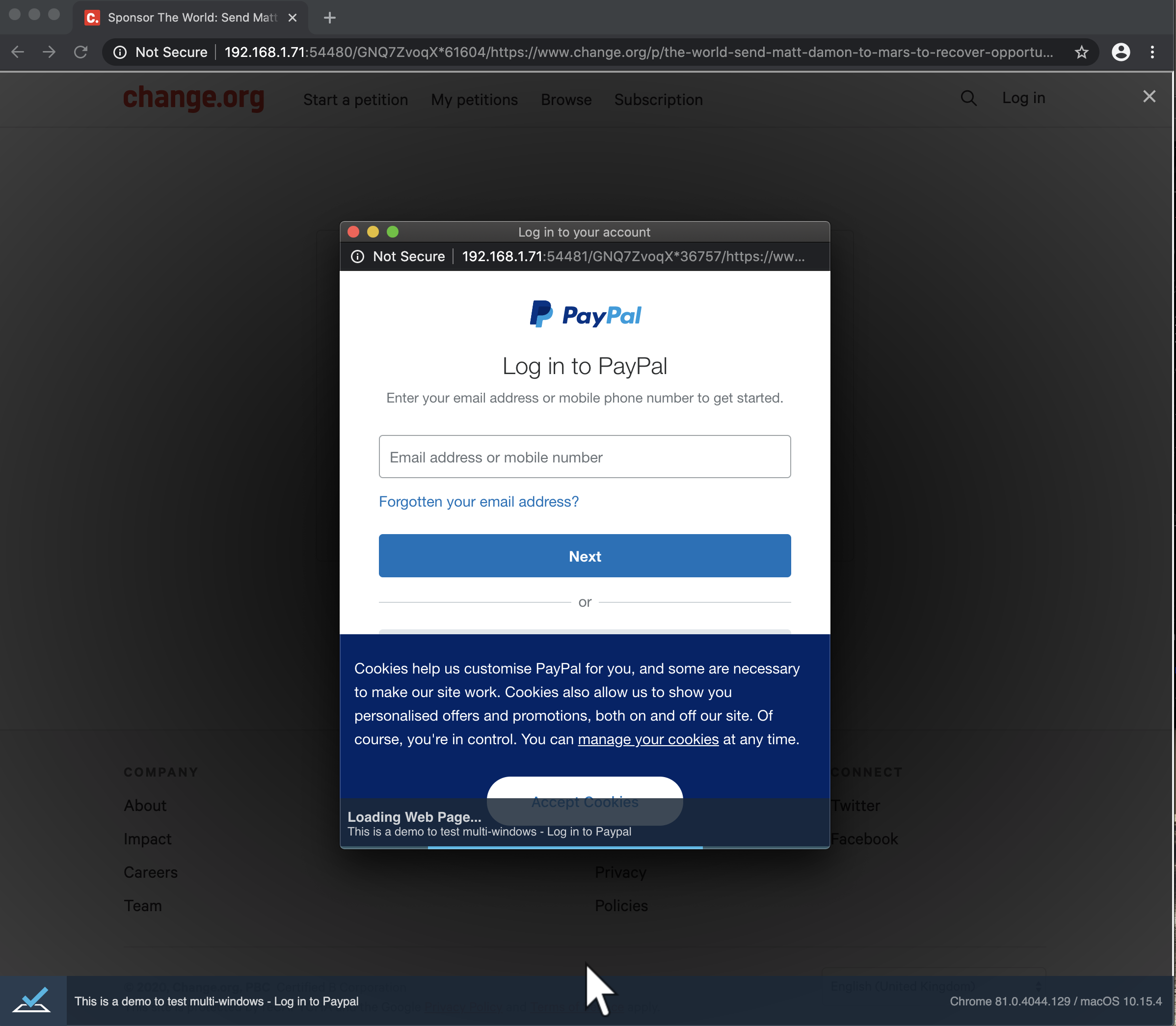
Screenshot:
UPDATE:
If I log out the current URL, it returns the URL for our Sponsor page... however when running our Facebook share tests, the Facebook URL is correctly logged out. My assumption is (and going with the screenshot provided), that the PayPal window is still loading... but never actually completes (despite waiting x mins).
_Originally posted by @rob4629 in https://github.com/DevExpress/testcafe/issues/912#issuecomment-621516177_
 miherlosev
All 17 comments
Is there any documentation for this new option (--allow-multiple-windows)? I am trying to open a few/several windows and bouncing between them. Then closing those windows to end the testing correctly.
 ambeecher
on 13 May 2020
ambeecher
on 13 May 2020
@ambeecher It's still in Alpha phase, so I imagine documentation will be updated with the release of v1.8.5.
In the meantime, you can check #912 for further information
 rob4629
on 13 May 2020
rob4629
on 13 May 2020
Hi Rob,
Thank you for your response.
I have seen #912. There are tests in the ticket but what I’m trying to do is a bit more detailed.
I need to be able to open 5 to 9 windows and change focus from one window to another.
I have tried to use browser keystrokes tried to change browser windows/tabs.
I use ‘ctrl+1’ or 2,3,4,5,6,7,8 and 9 depending which screen I need to be on.
The t.pressKey(‘ctrl+5’) command doesn’t work…which I’m trying to figure out why it fails.
Also, I want to be able to delete/exit a window when I’m done with the window… ‘ctrl+w’ actually works by hand but not when sent from t.pressKey() command.
Any insight in to how I can get many windows up and bounce from one window to another window would be appreciated?
Thank you,
Alex Beecher
From: Rob Cooper [mailto:[email protected]]
Sent: Wednesday, May 13, 2020 8:49 AM
To: DevExpress/testcafe testcafe@noreply.github.com
Cc: Beecher (US), Alex alex.beecher@boeing.com; Mention mention@noreply.github.com
Subject: Re: [DevExpress/testcafe] PayPal logging issue (#5033)
@ambeecherhttps://github.com/ambeecher It's still in Alpha phase, so I imagine documentation will be updated with the release of v1.8.5.
In the meantime, you can check #912https://github.com/DevExpress/testcafe/issues/912 for further information
—
You are receiving this because you were mentioned.
Reply to this email directly, view it on GitHubhttps://github.com/DevExpress/testcafe/issues/5033#issuecomment-628040919, or unsubscribehttps://github.com/notifications/unsubscribe-auth/AJPG4N22QFYO4WGLZ25S6TDRRKXL5ANCNFSM4MVJIVVA.
ambeecher
on 13 May 2020
I'm not sure if what you're asking for is currently available... however you might want to follow #5034 or create a new issue for t.pressKey() commands not working as expected.
I think creating a new issue detailing exactly what you want TestCafe to do, would be best (like you've done in your above reply, but as a separate issue).
rob4629
on 13 May 2020
Could this PayPal window issue be related to #5325 ?
rob4629
on 10 Aug 2020
Hi @rob4629
We cannot say something definitely because we don't know the cause of the problem. We will update this thread once we have any results.
miherlosev
on 11 Aug 2020
It looks like the windowId (_getCurrentWindowId()_) isn't being set for the child window... or, is being set to the Parent windowId, much like discussed in #5325 :
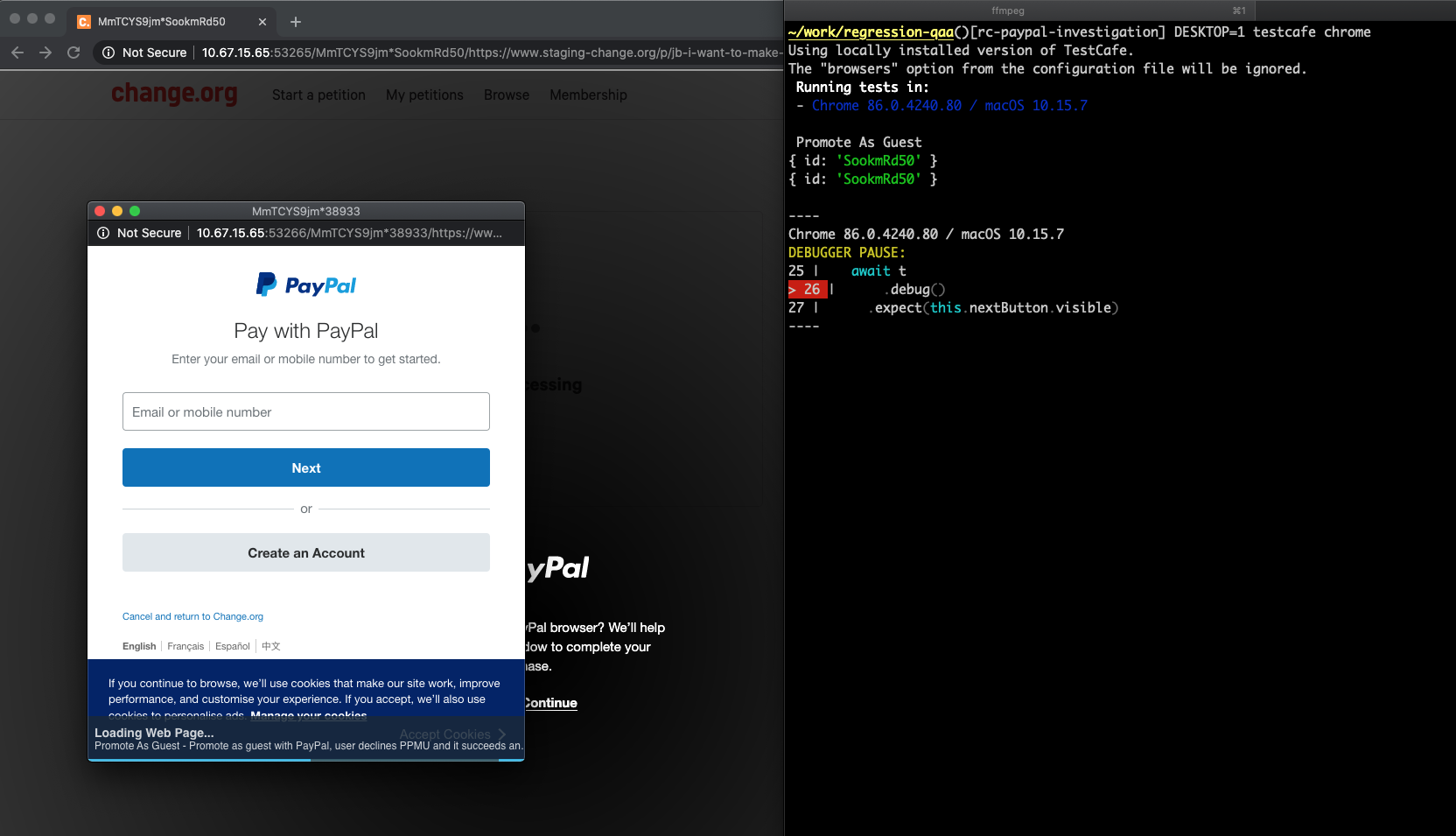
I have some time to investigate this issue... could you point me towards the code responsible for setting this, please?
rob4629
on 14 Oct 2020
Hello @rob4629 ,
Thank you for your help.
Here is the code where we process window opening and set the child window ID: https://github.com/DevExpress/testcafe-hammerhead/blob/master/src/client/sandbox/child-window/index.ts
Since we don't know for sure how PayPal opens the login window, you will need to check each of the possible approaches:
- click on a link with the
targt=blankattribute - call the
window.openmethod - submit a form to a new window
Here are links to corresponding methods for each approach:
 aleks-pro
on 20 Oct 2020
aleks-pro
on 20 Oct 2020
Hey @AlexKamaev, I see you've self assigned this. I've created a simple project to test the PayPal issue, and I'm going through the codebase. If I can help you with it, then please let me know.
I'll continue investigating it in the meantime
rob4629
on 10 Nov 2020
@rob4629 Thank you for your sample. I'm working on this issue, but it turned out to be more complex than I expected, so I cannot give any estimate at the moment. I will let you know if I need any additional information. Thank you for your input.
 AlexKamaev
on 11 Nov 2020
AlexKamaev
on 11 Nov 2020
@rob4629
I created a draft version of the PR with the fix for the described issue. Please check it: https://github.com/DevExpress/testcafe/pull/5710
The cause of the issue is that the Paypal button is in the iframe element, so a new child window with the login form is opened as a child of iframe. I could reproduce the issue in a local example, however, my local example cannot cover all possible scenarios, so additional testing on your side will be really appreciated.
Testing on my side does not work every time. It looks like that for some reason Paypal's iframe is not loaded sometimes. Moreover, in some cases, Paypal requires a captcha to continue the test.
Please share your results with us.
AlexKamaev
on 16 Nov 2020
That's great news! I'll check the PR out now, and get back to you. I have a couple of different scenarios I can test, so hopefully that will give us a good idea of whether the solution works.
rob4629
on 16 Nov 2020
Using your PR, my test scenarios are now working. I'm going to spend some time running through additional tests to verify though. Do you also want me to review the PR?
rob4629
on 16 Nov 2020
@rob4629 I'm happy to hear that in most cases the PR solves the issue. I need some additional time to make final changes and test it one more time. We will really appreciate it if you can test it too. Thank you.
If you want to review the PR, you are welcome to do so.
AlexKamaev
on 17 Nov 2020
Hello, having the same issue here, trying to access a window opened by an iframe.
How can I test #5710 locally to see if my problem resolves with that PR?
Thanks in advance!
 gabriel-godoy
on 18 Nov 2020
gabriel-godoy
on 18 Nov 2020
Steps I took:
> git clone [email protected]:AlexKamaev/testcafe.git
> cd testcafe
> npm install
> npx gulp build
> npm link
> cd <your test directory>
> npm link testcafe
> testcafe chrome <args>
Alternatively, if you have issues with com:AlexKamaev/testcafe, just checkout the DevExpress testcafe repo ([email protected]:DevExpress/testcafe.git) and manually copy the code changes over, then continue from step 3.
If you can update #5710 with your findings, that would be greatly appreciated
rob4629
on 18 Nov 2020
Yes, thanks @rob4629, with this PR #5710 the window opened by iframe is getting focus.
gabriel-godoy
on 18 Nov 2020
Related issues
 fnlctrl
·
3Comments
fnlctrl
·
3Comments
 devmondo
·
3Comments
devmondo
·
3Comments
 Lukas-Kullmann
·
3Comments
Lukas-Kullmann
·
3Comments
 multivoltage
·
3Comments
multivoltage
·
3Comments
 AndreyBelym
·
3Comments
AndreyBelym
·
3Comments
Most helpful comment
Yes, thanks @rob4629, with this PR #5710 the window opened by iframe is getting focus.