Testcafe: Native dialogue window blocks remaining tests
What is your Test Scenario?
I'm trying to test our Petition Share functionality; Facebook; Twitter and Email, on different browsers.
What is the Current behavior?
During the test run, I noticed that if pop-ups are blocked (for us, the email pop-up), then TestCafé hangs here and doesn't continue to the next test.
~Now that I know this happens, we should be able to account for it in the test, however I think this is still a behavioural issue with TestCafé~
I'm unable to close this dialog, despite numerous attempts using await t.setNativeDialogHandler
What is the Expected behavior?
I would have assumed TestCafe would reset the browser for each test, thus clearing the Safari native dialogue.
What is your web application and your TestCafe test code?
Your website URL (or attach your complete example):
https://www.change.org
Your complete test code (or attach your test files):
import { t, ClientFunction, Selector } from 'testcafe';
import Chance from 'chance';

const chance = new Chance();

async function signPetitionThenReturnToPetitionShow() {
  const firstNameInput = Selector('[name="firstName"], [name="first_name"]').filterVisible();
  const lastNameInput = Selector('[name="lastName"], [name="last_name"]').filterVisible();
  const emailInput = Selector('.js-email-sign, input[name="email"]').filterVisible();

  await t
    .navigateTo('p/testcafe-for-testcafe-to-investigate-64b3ad13-9a19-4535-8986-fdcf98fee9fc')
    .typeText(firstNameInput, chance.first())
    .typeText(lastNameInput, chance.last())
    .typeText(emailInput, chance.email())
    .click(Selector('button[type="submit"]'))
    .click(Selector('.js-skip'));
}

async function assertCurrentUrlContains(url) {
  const getCurrentUrl = ClientFunction(() => window.location.href);
  await t.expect(getCurrentUrl()).contains(url);
}

fixture('Petition Show Action Panel').page('https://www.change.org/?country_code=NZ&lang=en-AU'')

test('Can share via Email on desktop if already signed', async t => {
  await signPetitionThenReturnToPetitionShow();
  await t.click(Selector('.email-share-button'));
  // Todo: Verify default mail client opens -- will vary between users
});

test('Can share via Twitter on desktop if already signed', async t => {
  await signPetitionThenReturnToPetitionShow();
  await t.click(Selector('.js-twitter-button'));
  await assertCurrentUrlContains('twitter.com');
});
Your complete configuration file (if any):
{
  "browsers": ["chrome", "firefox, safari"],
  "src": "./tests/**/*.js",

  "assertionTimeout": 10000,
  "pageLoadTimeout": 30000,
  "selectorTimeout": 10000,

  "quarantineMode": false,
  "skipJsErrors": true,

  "disablePageCaching": true,

  "reporter": [
    {
      "name": "xunit",
      "output": "artifacts/test-results/results.xml"
    },
    {
      "name": "spec"
    }
  ],

  "screenshots": {
    "fullPage": true,
    "takeOnFails": true,
    "pathPattern": "${TEST_ID}/${RUN_ID}_${FILE_INDEX}.png",
    "path": "artifacts/screenshots"
  },

  "videoOptions": {
    "singleFile": false,
    "failedOnly": true,
    "pathPattern": "${TEST_INDEX}/${RUN_ID}_${FILE_INDEX}.mp4"
  },
  "videoPath": "artifacts/recordings"
}
Your complete test report:
testcafe 'browserstack:chrome','browserstack:safari','browserstack:firefox'
Using locally installed version of TestCafe.
The "browsers" option from the configuration file will be ignored.
 Running tests in:
 - Chrome 80.0.3987.16 / macOS 10.15.0
(https://automate.browserstack.com/builds/25cab270791d3d7d42a3438330dd3d7f81c94f31/sessions/a0a13cde38e4288e6fb74c5ffe3d8ab284aea5eb)
 - Safari 13.0.2 / macOS 10.15
(https://automate.browserstack.com/builds/25cab270791d3d7d42a3438330dd3d7f81c94f31/sessions/69c7ea15a3bd351cb4308e39f06d8b5ce74920d5)
 - Firefox 73.0 / macOS 10.15
(https://automate.browserstack.com/builds/25cab270791d3d7d42a3438330dd3d7f81c94f31/sessions/9e81377dbe7e4d691b77aaf132e41b6c2ca4ee81)

 Petition Show Action Panel
 ✓ Can share petition to Facebook on desktop if already signed
 ✓ Can share via Facebook message on desktop if already signed
 ✓ Can share via Email on desktop if already signed
ERROR The Chrome 80.0.3987.16 / macOS 10.15.0 (https://automate.browserstack.com/builds/25cab270791d3d7d42a3438330dd3d7f81c94f31/sessions/a0a13cde38e4288e6fb74c5ffe3d8ab284aea5eb) browser disconnected. This problem may appear when a browser hangs or is closed, or due to network issues.
Screenshots:
<img width="1500" alt="Screenshot 2020-02-05 at 9 25 10 AM" src="https://user-images.githubusercontent.com/37812673/73869565-6120e600-47ff-11ea-8f83-e90c33b06d35.png">
Steps to Reproduce:
- Go to my website ...
- Execute this command...
- See the error...
Your Environment details:
- testcafe version: 1.7.0
- node.js version: v10.15.3
- command-line arguments: testcafe 'browserstack:chrome','browserstack:safari','browserstack:firefox' or just testcafe safari
- browser name and version: Safari 13.0.5 / Chrome 80.0.3987.16
- platform and version: macOS 10.15.3
- other:
 rob4629
All 11 comments
I was not able to reproduce the issue. I did not get any dialog while navigating the site. Could you please make a video of the test when the dialog appears?
 AlexKamaev
on 7 Feb 2020
AlexKamaev
on 7 Feb 2020
I've sent the video recording to your support email address (since I'm unable to upload it here, for some reason).
rob4629
on 7 Feb 2020
Rob,
Thank you for providing your screencast. However, it's not clear what steps I should perform in order to see the dialog. Would you please provide a list of steps to reproduce the issue? Should I be registered on the site? Do I need to create a new petition? Should I sign a petition first? I don't see any similar links (Send an Email) in the existing petitions.
Also, please clarify what kind of dialog it is. Is it a native prompt/alert or confirm dialog?
P.S. To attach a screencast to the github thread, you need to zip it first.
 AlexSkorkin
on 10 Feb 2020
AlexSkorkin
on 10 Feb 2020
Ahh, thanks I forgot about zipping it 🤦♂. Can you try to run the above test code using this link instead, please?
.navigateTo('p/testcafe-for-testcafe-to-investigate-64b3ad13-9a19-4535-8986-fdcf98fee9fc')
After signing the petition, you should be able to see the option to Send an email to friends
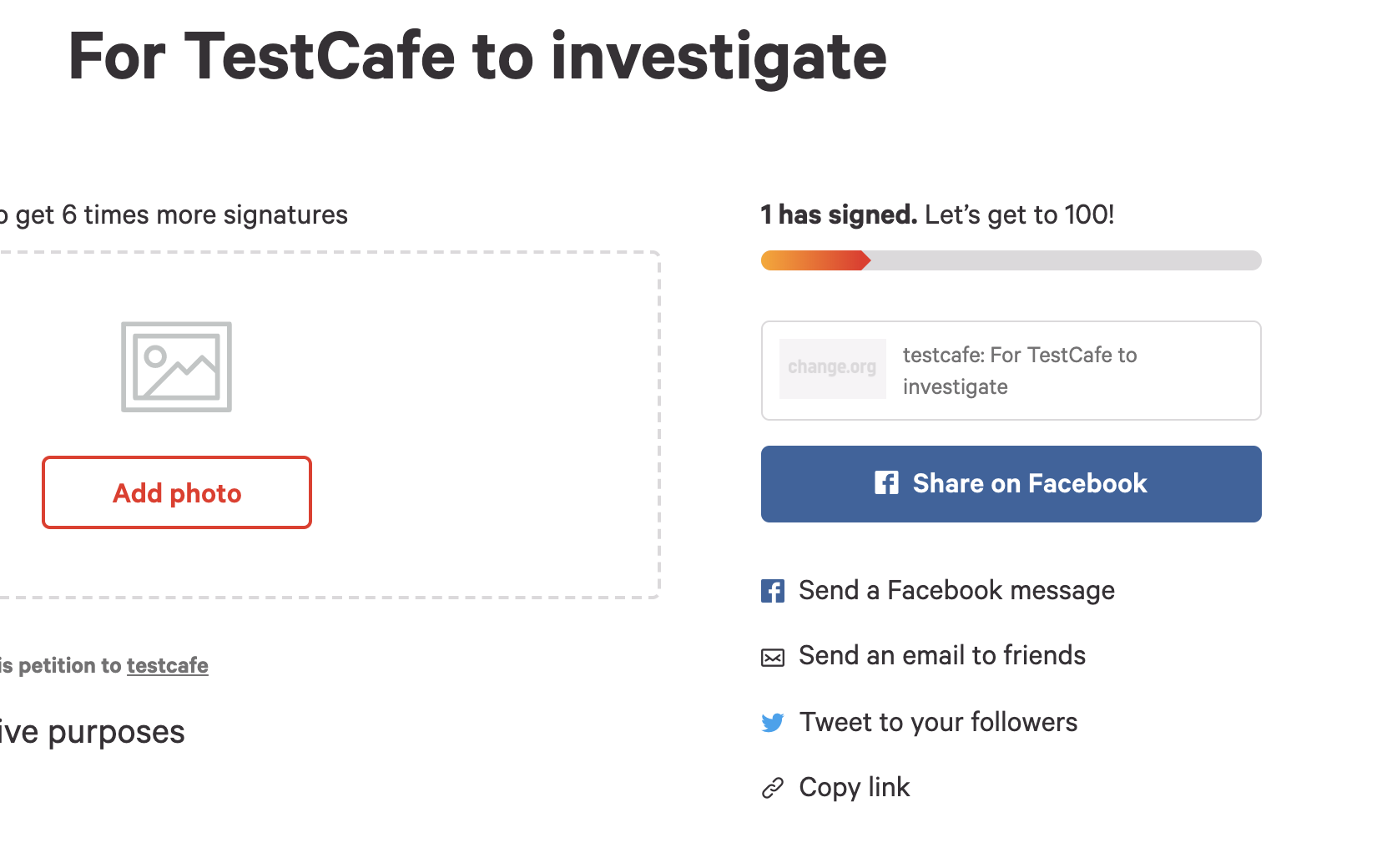
Upon clicking that link, it should open a mail client to email the petition link. It looks like the mail client is blocked in Safari (and occasionally other remote browsers) when running in TestCafe, with a native.print() object. I'm happy for this to be tracked with #2331, however the issue of this ticket is that TestCafe cannot continue when it hits this dialog, causing our regression runs to time out.
Is there a way that can reset / restart the browser if a test fails to start after x seconds?
rob4629
on 10 Feb 2020
Hello @rob4629,
I used the link but the test now fails on line .click(Selector('.js-skip')) because of the following error: There was an error submitting your signature.
 arubtsov
on 11 Feb 2020
arubtsov
on 11 Feb 2020
Sorry for the delay on this. I've updated the testcode in the original posting. I've ran this and although a slightly different route (triggers share via email from a different page), it still highlights the issue.
I confirmed the behaviour happens on Safari... you might need to block pop-ups for it to occur in Chrome
rob4629
on 11 Feb 2020
Hello @rob4629 ,
We need additional time to research this issue. Please bear with us.
 aleks-pro
on 14 Feb 2020
aleks-pro
on 14 Feb 2020
Hello @rob4629 ,
I have not managed to reproduce the issue. The test fails because of the error in a selector. Please see the attached screencast.
Could you please provide a more stable example so that we can reproduce the issue on our side?
aleks-pro
on 17 Feb 2020
I've created a quick app, with basic testcafe tests. This should at least highlight the issue I'm facing.
It is a simple webpage, which will launch the window.print method when a button is clicked.
https://github.com/rob4629/testcafe_issues
I've ran this locally, and testcafe always hangs at the first test (until I manually click cancel on the window print popup). _HOWEVER_ the remaining tests don't hang, despite being duplicates 🤷♂
rob4629
on 18 Feb 2020
Thank you for the example. I've reproduced the problematic behavior. We are going to research the problem with the print dialog in the context of this issue.
aleks-pro
on 20 Feb 2020
Closed in favor of the https://github.com/DevExpress/testcafe/issues/2331 issue
 miherlosev
on 4 Aug 2020
miherlosev
on 4 Aug 2020
Related issues
 darkowic
·
3Comments
darkowic
·
3Comments
 fnlctrl
·
3Comments
fnlctrl
·
3Comments
 AndreyBelym
·
3Comments
AndreyBelym
·
3Comments
 chebum
·
3Comments
chebum
·
3Comments
 ParachuteCat
·
3Comments
ParachuteCat
·
3Comments