Testcafe: Parallel Firefox does not work using TestCafe Docker Image
What is your Test Scenario?
Parallel Firefox does not work using TestCafe Docker Image. Tried many times with many different settings and it only works when concurrency is set to 1.
2x fixture files that go to https://www.google.com and check visibility of logo
Tried:
# Tried
docker run --rm -it -v tests/:/tests --shm-size=4g testcafe:latest '-c 2 firefox:headless' tests/**/*

# Tried
docker run --rm -it -v tests/:/tests --shm-size=4g testcafe:latest '-c 2 firefox -headless --incognito --disable-dev-shm-usage --display=:1.0 --profile="./firefox-profile" -MOZ_LOG_FILE="./asd.txt" -MOZ_LOG="timestamp,rotate:200,nsHttp:5,cache2:5,nsSocketTransport:5,nsHostResolver:5,sync"' tests/**/*

# Tried
docker run -v /app/:/app -v /tmp/.X11-unix:/tmp/.X11-unix --shm-size=4g -it --entrypoint /bin/sh testcafe/testcafe:latest
dbus-daemon --session --fork
Xvfb :1 -screen 0 "1280x720x24" >/dev/null 2>&1 &
export DISPLAY=:1.0
fluxbox >/dev/null 2>&1 &
PARALLEL=2 node ./node_modules/.bin/ts-node ./run-tests.ts
What is the Current behavior?
TestCafe runs indefinitely - does not end - or it fails with following error:
{ Error: Unable to establish one or more of the specified browser connections. This can be caused by network issues or remote device failure.
    at BrowserSet._waitConnectionsOpened (/app/e2e-tests/node_modules/testcafe/lib/runner/browser-set.js:64:30)
    at pinkie_1.default.resolve.then (/app/e2e-tests/node_modules/testcafe/lib/runner/browser-set.js:81:31)
    at invokeCallback (/app/e2e-tests/node_modules/pinkie/index.js:60:12)
    at Array.forEach (<anonymous>:null:null)
    at publish (/app/e2e-tests/node_modules/pinkie/index.js:147:32)
    at Array.publishFulfillment (/app/e2e-tests/node_modules/pinkie/index.js:152:2)
    at Immediate.asyncFlush (/app/e2e-tests/node_modules/pinkie/index.js:17:19)
    at runCallback (timers.js:706:11)
    at tryOnImmediate (timers.js:676:5)
    at processImmediate (timers.js:658:5)
    at process.topLevelDomainCallback (domain.js:120:23)
 code: 'E1004', data: [] }
What is the Expected behavior?
Firefox works properly in parallel using provided TestCafe Docker image.
Steps to Reproduce:
- Create 2 simple specs checking google.com
- Execute TestCafe using docker image with "firefox:headless"
- Check if TestCafe passes
Your Environment details:
- testcafe version: 1.5.0 + 1.4.0 + 1.2.1
- node.js version: 10.15
- command-line arguments: firefox:headless
- browser name and version: Firefox 68.0.0 / Linux 0.0.0
- platform and version: Docker TestCafe started on macOS 10.14.5
 Evilweed
All 15 comments
Thank you for your report. I was able to reproduce this issue on my side. We will research it and notify you as soon as we have any result.
 Dmitry-Ostashev
on 23 Sep 2019
Dmitry-Ostashev
on 23 Sep 2019
@Dmitry-Ostashev thank you, please let us know also if you will have any workaround 🙏
Or maybe You have any docker image that was working?
Evilweed
on 24 Sep 2019
@Evilweed
Hello,
I see the "need research" label here. If we find a workaround during our research, we will post it in this thread. Stay tuned for updates.
 Farfurix
on 25 Sep 2019
Farfurix
on 25 Sep 2019
@Farfurix or @Dmitry-Ostashev , have you found any workaround? I'm currently looking into workarounds. My initial findings seem to suggest this is reproducible through the over utilization of our server's CPU. Have there been any speculation or findings on your side?
 josephmcasey
on 7 Oct 2019
josephmcasey
on 7 Oct 2019
@josephmcasey
Unfortunately we cannot provide any workaround at this time. We haven't found any relations to the CPU utilization. However, thank you for your efforts and suggestion. We'll take them into account.
Dmitry-Ostashev
on 8 Oct 2019
Workaround:
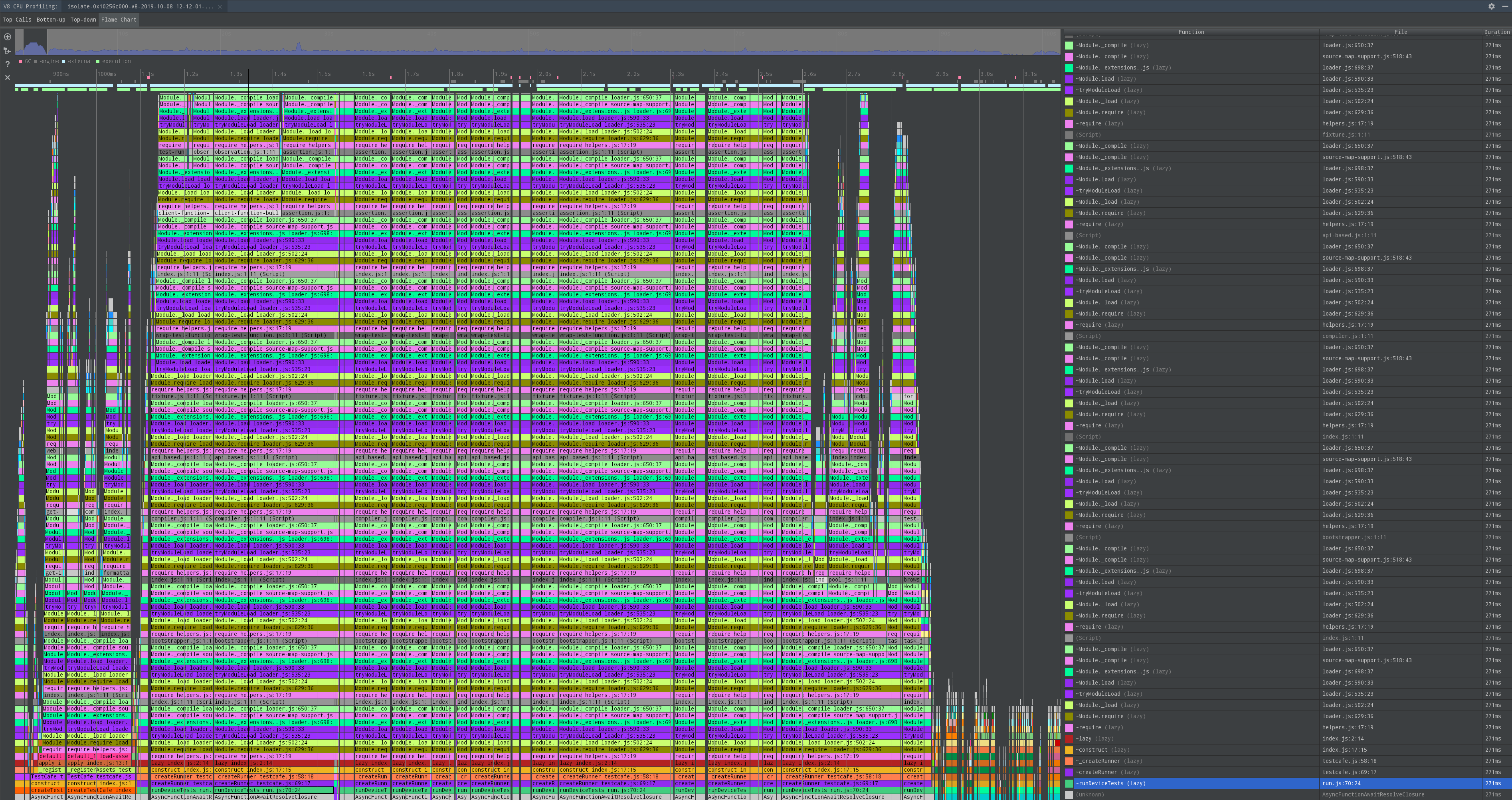
Our team created a reproducible environment by using a large number of test files that must be compiled on a docker image with limited CPU. This led us to a workaround for anyone interested or blocked by this issue. The error can be avoided by moving the iteration for each test files outside of testcafe, thereby reducing the number of files that you request testcafe to compile.
josephmcasey
on 15 Oct 2019
@josephmcasey can you show an example, because I'm not sure if I understand this correctly. You mean providing list of files spec/test1.ts spec/test2.ts... to TestCafe instead of specs/**/*.ts?
Evilweed
on 17 Oct 2019
@josephmcasey can you show an example, because I'm not sure if I understand this correctly. You mean providing list of files
spec/test1.ts spec/test2.ts...to TestCafe instead ofspecs/**/*.ts?
Correct, you have the right idea. And each time you need to run the test runner class for only a subset or one of those files. That reduces the total number of lines babel has to traverse at a single time. Here you can see what your CPU profiling will look like when starting up testcafe.
josephmcasey
on 18 Oct 2019
@josephmcasey nice! Thank You for the explanation.
By the way, I've noticed that when I try to run tests in docker with concurrency >6 most test runs don't even start. And when I run the same set of files with lower concurrency 4 or 2 all test runs start and pass. That's the same issue?
I've checked that I use only 30% of ram and my docker container is spawned with double the --shm-size than it needs, but CPU usage is at 250%-300% (checking using command docker stats).
Evilweed
on 18 Oct 2019
The particular problem seems to originate with this line of code
https://github.com/DevExpress/testcafe/blob/master/src/compiler/index.js#L93
josephmcasey
on 19 Oct 2019
Happened also while running multiple chrome instances. I have a process of promises that run testcafe instances. When many testcafe instances are created some fail randomly with this error inside my docker:
GeneralError: Unable to establish one or more of the specified browser connections. This can be caused by network issues or remote device failure.
at BrowserSet._waitConnectionsOpened (/var/lib/jenkins/workspace/XXXX/node_modules/testcafe/lib/runner/browser-set.js:63:30)
at /var/lib/jenkins/workspace/XXXX/node_modules/testcafe/lib/runner/browser-set.js:80:31
at Bootstrapper._getBrowserConnections (/var/lib/jenkins/workspace/XXXX/node_modules/testcafe/lib/runner/bootstrapper.js:62:16)
at Function.all (
at Bootstrapper._bootstrapParallel (/var/lib/jenkins/workspace/XXXX/node_modules/testcafe/lib/runner/bootstrapper.js:167:39)
at Bootstrapper.createRunnableConfiguration (/var/lib/jenkins/workspace/XXXX/node_modules/testcafe/lib/runner/bootstrapper.js:183:69)
{
code: 'E1004',
data: []
}
 franciscolosardo
on 5 Nov 2019
franciscolosardo
on 5 Nov 2019
I just want to report my findings here, maybe they help other people :) (also the other related issues are locked)
I am using Ubuntu 18.04 dockerized with Firefox 71. And it just did nothing and had disconnects a.s.o
What fixed it for me was:
- (1) removing the
-videorecording options for firefox - (2) increasing the docker
shm-sizeto 2GB
UPDATE: I got it working on local machine on MacOS but currently not on ubuntu 18.04 inside docker ce 19. Currently I am very lost why it works on docker macos and not on ubuntu, but I will further investigate.
This is what works on MacOS but not on Ubuntu: https://gist.github.com/csgruenebe/c33e01e601580175fc1e72d88f1f2aa0
USE_BROWSER=chrome docker-compose -f docker-compose.yaml up --build --abort-on-container-exit --remove-orphans
# XOR
USE_BROWSER=firefox docker-compose -f docker-compose.yaml up --build --abort-on-container-exit --remove-orphans
UPDATE 2 I put everything together so you can see for yourself. Full repo with dummy app and very simple test. Story short: ✅ It works if you do NOT use -headless for firefox together with Xvfb
 csgruenebe
on 10 Dec 2019
csgruenebe
on 10 Dec 2019
Ok will try so, though video is one of the main reasons im using xvfb on the docker .
Thanks for the tip!
franciscolosardo
on 10 Dec 2019
We have a similar issue which turns out to be the firewall issue.
Maybe you can try to disable your firewall or specific --hostname <an accessible domain or IP>
 link89
on 27 Jun 2020
link89
on 27 Jun 2020
We have a similar issue which turns out to be the firewall issue.
Maybe you can try to disable your firewall or specific--hostname <an accessible domain or IP>
Will ask automation team to try it out!
franciscolosardo
on 29 Jun 2020
Related issues
 madroneropaulo
·
3Comments
madroneropaulo
·
3Comments
 devmondo
·
3Comments
devmondo
·
3Comments
 chebum
·
3Comments
chebum
·
3Comments
 marchugon
·
4Comments
marchugon
·
4Comments
 calisven
·
3Comments
calisven
·
3Comments