Testcafe: Enable debug mode makes test path wrong
What is your Test Scenario?
Any test scenario.
I have a test file located at C:\Users\userName\Documents\Code\MyProject\tests\administration\ActivatedInsertion.ts. I'm in the folder C:\Users\userName\Documents\Code\MyProject
What is the Current behavior?
When running testcafe chrome .\tests\administration\ActivatedInsertion.ts, everything is OK.
But when I'm running testcafe chrome .\tests\administration\ActivatedInsertion.ts --debug-mode then I've got this error :
Error: ENOENT: no such file or directory, open 'C:\Users\userName\Documents\Code\tests\administration\ActivatedInsertion.ts'
I don't expect testcafe to go one directory upper. It's like is doing a ../ on the path I give.
It's also happened with the runner.
What is the Expected behavior?
What is your web application and your TestCafe test code?
Your website URL (or attach your complete example):
Your complete test code (or attach your test files):
Your complete configuration file (if any):
Your complete test report:
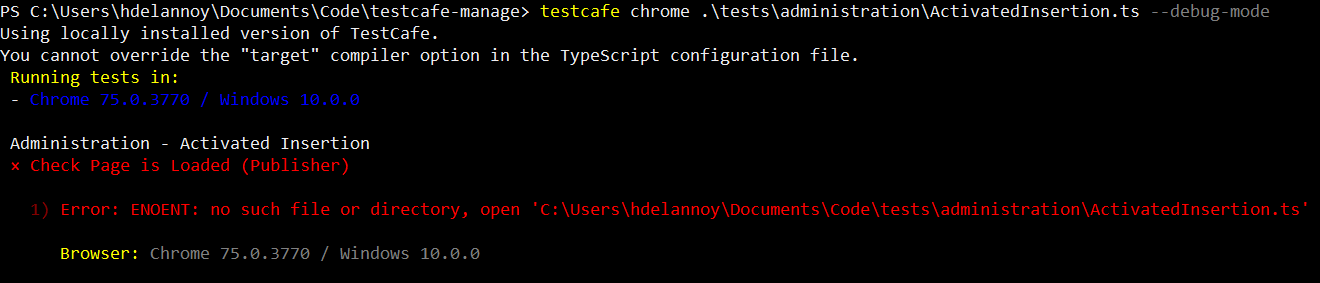
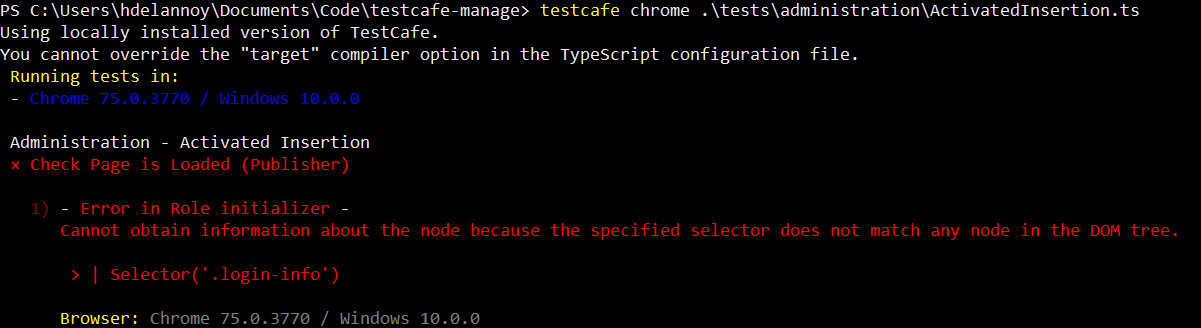
Screenshots:
Steps to Reproduce:
- Go to my website ...
- Execute this command...
- See the error...
Your Environment details:
- testcafe version: 1.3.2
- node.js version: 10.15.3
- command-line arguments:
testcafe chrome .\test\administration\ActivatedInsertion.ts --debug-mode - browser name and version:
- platform and version: W10
- other:
 HugoDel
All 27 comments
Hello @HugoDel ,
I've not managed to reproduce the issue. But the absolute path you've mentioned (C:\Users\userName\Documents\Code\MyProject\tests\administration\ActivatedInsertion.ts) is slightly different than the path in the command you tried to use (testcafe chrome .\test\administration\ActivatedInsertion.ts --debug-mode). The 's' letter is missing at the end of the 'test'. Could it be that this is the cause of the problematic behavior?
 aleks-pro
on 18 Jul 2019
aleks-pro
on 18 Jul 2019
Yes, you right but I handwrite the command and I forget the "S" but I can confirm that I've got the error. I add two screenshots to add information.
HugoDel
on 19 Jul 2019
I cannot reproduce the problem with the latest TestCafe version (1.3.3).
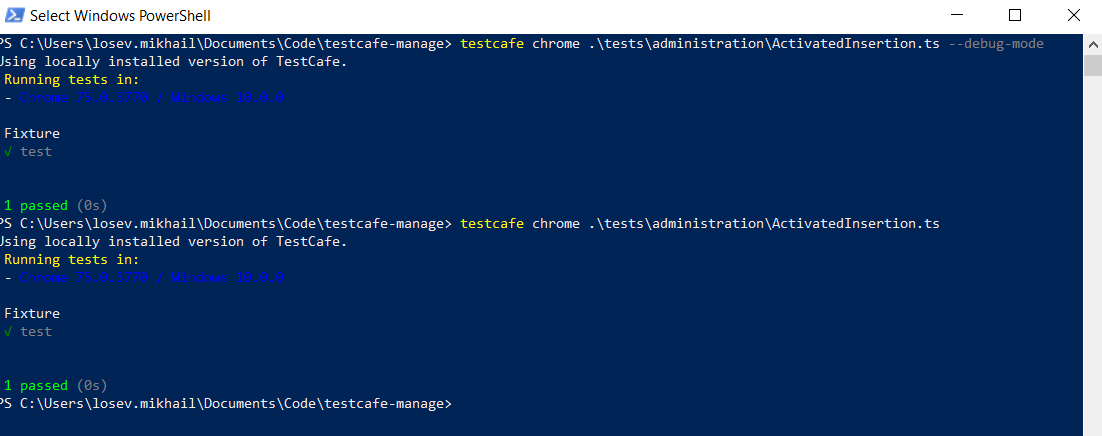
Try to run your tests with this version. If the problem still persists, open the node_modules/testcafe/lib/utils/handle-errors.js and patch formatError function as follows:
function formatError(ErrorCtor, error) {
    console.log(error.message);
    console.log(error.stack);
    if (ErrorCtor === test_run_1.UncaughtExceptionError)
After that please run your tests again and send us the test execution report.
 miherlosev
on 19 Jul 2019
miherlosev
on 19 Jul 2019
Hello, I'm sorry but it seems to print nothing more.
Strangely, Testcafe can get the Fixture and the test names that are defined in the same file it says it can find.
HugoDel
on 22 Jul 2019
Could you please provide us with a reproducible test file and folder structure example for this case? Also it would be useful if you send us a link to your test page.
 Dmitry-Ostashev
on 23 Jul 2019
Dmitry-Ostashev
on 23 Jul 2019
This issue has been automatically closed because there has been no response to our request for more information from the original author. With only the information that is currently in the issue, we don't have enough information to take action. Please reach out if you have or find the answers we need so that we can investigate further.
![no-response[bot] picture](https://avatars2.githubusercontent.com/u/26350515?v=4&s=40) no-response[bot]
on 2 Aug 2019
no-response[bot]
on 2 Aug 2019
I think that the problem came when Testcafé tries to display the content of the file where the stop point is in debug mode.
If I put an await t.debug() in the middle of my code, Testcafé will execute everything before the await t.debug() and will fail at the exact line where I put it.
HugoDel
on 7 Aug 2019
I cannot reproduce the problem. Could you please send us a video with step-by-step instructions on how to reproduce the problem. You can use the free Jing tool for it.
miherlosev
on 8 Aug 2019
Hello, I'm having the same exact issue, it's missing the project folder name on error path.
1) Error: ENOENT: no such file or directory, open '/home/x/y/repos/automated_tests/gitlab/tests/specs/personal_area/account/access_data.spec.ts'
should be
'/home/x/y/repos/automated_tests/gitlab/project_name/tests/specs/personal_area/account/access_data.spec.ts'
folder structure:
project_name > tests > specs > personal_area > account > access_data.spec.ts
testcafe v1.4.1
 ampc
on 19 Aug 2019
ampc
on 19 Aug 2019
This issue has been automatically closed because there has been no response to our request for more information from the original author. With only the information that is currently in the issue, we don't have enough information to take action. Please reach out if you have or find the answers we need so that we can investigate further.
no-response[bot]
on 19 Aug 2019
Can you re-open this issue?
ampc
on 19 Aug 2019
@ampc Thank you for your report, but we can't reproduce the issue. Could you provide an example, please?
 AndreyBelym
on 19 Aug 2019
AndreyBelym
on 19 Aug 2019
@AndreyBelym
https://github.com/ampc/testcafe_error
testcafe chrome tests/specs/example/example.spec.ts
ampc
on 19 Aug 2019
@ampc
Hello,
If I understand you correctly, your environment is Ubuntu / TestCafe, and you run your tests locally in Ubuntu: testcafe chrome tests/specs/example/example.spec.ts.
I wasn't able to reproduce the issue under Ubuntu / TestCafe v1.4.1 using your repository:
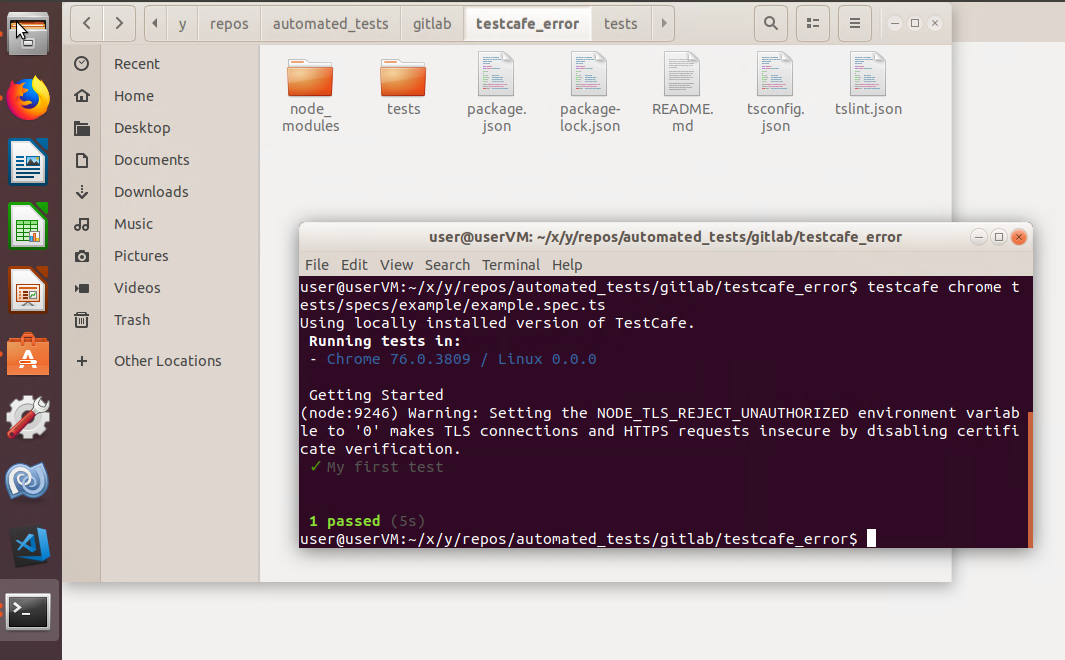
Could you please clarify all steps to reproduce it on our side?
 Farfurix
on 20 Aug 2019
Farfurix
on 20 Aug 2019
Tested again and somehow now it repeats the last previous directory
(tests/specs is repeated)
with debug:
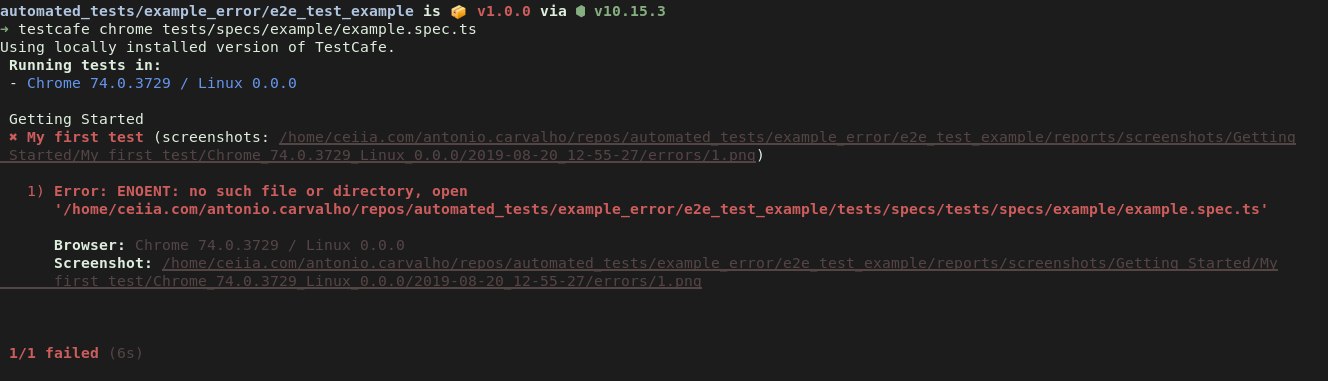
without debug:

ampc
on 20 Aug 2019
@ampc
I've prepared this TestCafe build: npm install https://git.io/fjbOV. Please use it and share with us the result log (both the "debug" and "no debug" cases).
In the build, I added these lines to display the unexpected "ENOENT" error in your test scenario:
src/utils/handle-errors.js
function handleUnexpectedError (ErrorCtor, error) {
+    console.log('!!! handleUnexpectedError');
+    console.log(error.message);
+    console.log(error.stack);

    try {
        handleError(ErrorCtor, formatError(ErrorCtor, error));
    }
    catch (e) {
        printErrorMessagesAndTerminate(error, e);
    }
}
DEBUG ON:
automated_tests/example_error/e2e_test_example is 📦 v1.0.0 via ⬢ v10.15.3 took 2s
➜ npx testcafe chrome tests/specs/example/example.spec.ts
Running tests in:
- Chrome 74.0.3729 / Linux 0.0.0
Getting Started
✖ My first test (screenshots: /home/ceiia.com/antonio.carvalho/repos/automated_tests/example_error/e2e_test_example/reports/screenshots/Getting Started/My first
test/Chrome_74.0.3729_Linux_0.0.0/2019-08-20_15-13-51/errors/1.png)
1) Error: ENOENT: no such file or directory, open '/home/ceiia.com/antonio.carvalho/repos/automated_tests/example_error/e2e_test_example/tests/specs/tests/specs/example/example.spec.ts'
  Browser: Chrome 74.0.3729 / Linux 0.0.0
  Screenshot: /home/ceiia.com/antonio.carvalho/repos/automated_tests/example_error/e2e_test_example/reports/screenshots/Getting Started/My first
  test/Chrome_74.0.3729_Linux_0.0.0/2019-08-20_15-13-51/errors/1.png
1/1 failed (4s)
#
DEBUG OFF:
automated_tests/example_error/e2e_test_example is 📦 v1.0.0 via ⬢ v10.15.3 took 1m 30s
➜ npx testcafe chrome tests/specs/example/example.spec.ts
Running tests in:
- Chrome 74.0.3729 / Linux 0.0.0
Getting Started
✓ My first test
1 passed (3s)
ampc
on 20 Aug 2019
@ampc
Thank you for your cooperation.
I've prepared the second build to research the issue:
npm install https://git.io/fjbXn
Could you please try it and share the full resulting log (both the "debug" and "no debug" cases) with us?
I suggest you follow these steps (please use the default bash shell):
- Edit your repository "package.json" file with the following lines:
"testcafe": "https://git.io/fjbXn"
- Run
npm iin your repository. - Run your tests:
npx testcafe chrome tests/specs/example/example.spec.ts.
Farfurix
on 21 Aug 2019
Hi @Farfurix , using bash and the new build I got this:
 npx testcafe chrome  tests/specs/example/example.spec.ts
!log-error-2!
 Running tests in:
 - Chrome 74.0.3729 / Linux 0.0.0

 Getting Started
!!! wrapTestFunction
err = { Error: ENOENT: no such file or directory, open '/home/ceiia.com/antonio.carvalho/repos/automated_tests/example_error/e2e_test_example/tests/specs/tests/specs/example/example.spec.ts'
    at Object.openSync (fs.js:443:3)
    at Object.readFileSync (fs.js:343:35)
    at CallsiteRecord.renderSync (/home/ceiia.com/antonio.carvalho/repos/automated_tests/example_error/e2e_test_example/node_modules/callsite-record/lib/index.js:218:26)
    at Object.showBreakpoint (/home/ceiia.com/antonio.carvalho/repos/automated_tests/example_error/e2e_test_example/node_modules/testcafe/src/notifications/debug-logger.js:66:52)
    at TestRun._enqueueSetBreakpointCommand (/home/ceiia.com/antonio.carvalho/repos/automated_tests/example_error/e2e_test_example/node_modules/testcafe/src/test-run/index.js:447:21)
    at TestRun.executeCommand (/home/ceiia.com/antonio.carvalho/repos/automated_tests/example_error/e2e_test_example/node_modules/testcafe/src/test-run/index.js:637:31)
  errno: -2,
  syscall: 'open',
  code: 'ENOENT',
  path:
   '/home/ceiia.com/antonio.carvalho/repos/automated_tests/example_error/e2e_test_example/tests/specs/tests/specs/example/example.spec.ts' }
err.message = ENOENT: no such file or directory, open '/home/ceiia.com/antonio.carvalho/repos/automated_tests/example_error/e2e_test_example/tests/specs/tests/specs/example/example.spec.ts'
err.stack = Error: ENOENT: no such file or directory, open '/home/ceiia.com/antonio.carvalho/repos/automated_tests/example_error/e2e_test_example/tests/specs/tests/specs/example/example.spec.ts'
    at Object.openSync (fs.js:443:3)
    at Object.readFileSync (fs.js:343:35)
    at CallsiteRecord.renderSync (/home/ceiia.com/antonio.carvalho/repos/automated_tests/example_error/e2e_test_example/node_modules/callsite-record/lib/index.js:218:26)
    at Object.showBreakpoint (/home/ceiia.com/antonio.carvalho/repos/automated_tests/example_error/e2e_test_example/node_modules/testcafe/src/notifications/debug-logger.js:66:52)
    at TestRun._enqueueSetBreakpointCommand (/home/ceiia.com/antonio.carvalho/repos/automated_tests/example_error/e2e_test_example/node_modules/testcafe/src/test-run/index.js:447:21)
    at TestRun.executeCommand (/home/ceiia.com/antonio.carvalho/repos/automated_tests/example_error/e2e_test_example/node_modules/testcafe/src/test-run/index.js:637:31)
!!! _executeTestFn
err = TestCafeErrorList {
  items:
   [ UncaughtErrorInTestCode {
       code: 'E2',
       isTestCafeError: true,
       callsite: [CallsiteRecord],
       errMsg:
        'Error: ENOENT: no such file or directory, open \'/home/ceiia.com/antonio.carvalho/repos/automated_tests/example_error/e2e_test_example/tests/specs/tests/specs/example/example.spec.ts\'',
       originError: [Error] } ] }
err.message = undefined
err.stack = undefined
 ✖ My first test (screenshots: /home/ceiia.com/antonio.carvalho/repos/automated_tests/example_error/e2e_test_example/reports/screenshots/Getting Started/My first
 test/Chrome_74.0.3729_Linux_0.0.0/2019-08-21_14-05-58/errors/1.png)

   1) Error: ENOENT: no such file or directory, open '/home/ceiia.com/antonio.carvalho/repos/automated_tests/example_error/e2e_test_example/tests/specs/tests/specs/example/example.spec.ts'

      Browser: Chrome 74.0.3729 / Linux 0.0.0
      Screenshot: /home/ceiia.com/antonio.carvalho/repos/automated_tests/example_error/e2e_test_example/reports/screenshots/Getting Started/My first
      test/Chrome_74.0.3729_Linux_0.0.0/2019-08-21_14-05-58/errors/1.png


 1/1 failed (4s)
Thank you for the provided information. Stack traces indicates that this issue can be similar to https://github.com/inikulin/callsite-record/issues/2 and https://github.com/tj/callsite/issues/3, but we still need additional information. If you don't mind, I will create a new debug build and ask you to install it and share its output. I will post a message with a link to the debug build when I make the required changes. Thank you for your patience and support.
AndreyBelym
on 22 Aug 2019
Hello @AndreyBelym, do you have a new debug build ready? Thank you.
ampc
on 30 Aug 2019
This issue has been automatically closed because there has been no response to our request for more information from the original author. With only the information that is currently in the issue, we don't have enough information to take action. Please reach out if you have or find the answers we need so that we can investigate further.
no-response[bot]
on 31 Aug 2019
Hi @ampc, @AndreyBelym is out of the office at the moment. He'll be back in a week and will contact you promptly. Sorry for the inconvenience.
 alexey-lin
on 2 Sep 2019
alexey-lin
on 2 Sep 2019
No problem :+1:
ampc
on 2 Sep 2019
Guys
We've fixed a very similar problem in this https://github.com/DevExpress/testcafe/commit/fc6c05b0aab0e7cb224e4a9bc1cf3c25ebef17e0.
Try to run your tests with [email protected] and feel free to reopen this issue if the problem persists.
miherlosev
on 16 Sep 2019
Working now :+1:
ampc
on 16 Sep 2019
This thread has been automatically locked since it is closed and there has not been any recent activity. Please open a new issue for related bugs or feature requests. We recommend you ask TestCafe API, usage and configuration inquiries on StackOverflow.
![lock[bot] picture](https://avatars1.githubusercontent.com/in/6672?v=4&s=40) lock[bot]
on 26 Sep 2019
lock[bot]
on 26 Sep 2019
Related issues
 KaneMorgan
·
3Comments
KaneMorgan
·
3Comments
 fnlctrl
·
3Comments
fnlctrl
·
3Comments
 Lukas-Kullmann
·
3Comments
Lukas-Kullmann
·
3Comments
 chebum
·
3Comments
chebum
·
3Comments
 multivoltage
·
3Comments
multivoltage
·
3Comments
Most helpful comment
Thank you for the provided information. Stack traces indicates that this issue can be similar to https://github.com/inikulin/callsite-record/issues/2 and https://github.com/tj/callsite/issues/3, but we still need additional information. If you don't mind, I will create a new debug build and ask you to install it and share its output. I will post a message with a link to the debug build when I make the required changes. Thank you for your patience and support.