Testcafe: Content of the iframe did not load
I see that there are some bug reports, that describe similar (or the same) issue, e.g. # 2406, however they have been closed for inactivity or other reasons, and I still don't see a solution. Hopefully, my feedback could help identify the issue.
What is your Test Scenario?
I am trying a very simple test - verifying that some text, for example "Host Status", exists on a page.
What is the Current behavior?
I see the following error:
1) Content of the iframe in which the test is currently operating did not load.
when using testcafe ver. 1.2.1. In addition to this, I see:
(node:1842) Warning: Setting the NODE_TLS_REJECT_UNAUTHORIZED environment variable to '0' makes TLS connections and HTTPS requests insecure by disabling certificate verification.
None of these errors were present in testcafe ver. 0.20.0.
Here's the entire output:
```# testcafe -c 1 firefox:headless host_status.js --baseurl='http://nagiosxi.demos.nagios.com/nagiosxi' -e
Running tests in:
- Firefox 67.0.0 / Ubuntu 0.0.0
Nagios XI Tests
(node:1842) Warning: Setting the NODE_TLS_REJECT_UNAUTHORIZED environment variable to '0' makes TLS connections and HTTPS requests insecure by disabling certificate verification.
✖ Host Status
1) Content of the iframe in which the test is currently operating did not load.
  Browser: Firefox 67.0.0 / Ubuntu 0.0.0

     30 |  await t
     31 |    .useRole(admin)
     32 |    .click( Selector('a').withText('Home') )
     33 |    .click( Selector('a').withText('Host Status') )
     34 |    .switchToIframe( '#maincontentframe' )
   > 35 |    .expect( Selector('h1').withText('Host Status').exists ).ok()
     36 |    .expect( Selector('.hoststatustar_').withText('All hosts').exists ).ok()
     37 |    .expect( Selector('.xi-table-recordcount').withText('Showing').exists ).ok()
     38 |});
     39 |

     at ok (/home/ludmil/testcafe/XI/Home/Left Menu/Details/host_status.js:35:62)
     at <anonymous> (/home/ludmil/testcafe/XI/Home/Left Menu/Details/host_status.js:29:1)
     at <anonymous> (/usr/lib/node_modules/testcafe/src/api/wrap-test-function.js:17:28)
     at TestRun._executeTestFn (/usr/lib/node_modules/testcafe/src/test-run/index.js:243:19)
     at TestRun.start (/usr/lib/node_modules/testcafe/src/test-run/index.js:292:24)
1/1 failed (38s)
### What is the Expected behavior?
I expect my test to succeed as it used to in testcafe ver. 0.20.0.

Example:
```testcafe -c 1 firefox:headless host_status.js --baseurl='http://nagiosxi.demos.nagios.com/nagiosxi' -e
 Running tests in:
 - Firefox 61.0.0 / Ubuntu 0.0.0

 Nagios XI Tests
 ✓ Host Status


 1 passed (29s)
What is your web application and your TestCafe test code?
Public link: http://nagiosxi.demos.nagios.com/nagiosxi
host_status.js
```import { Selector } from 'testcafe';
import { Role } from 'testcafe';
import minimist from 'minimist';
const args = minimist(process.argv.slice(2));
const baseurl = args.baseurl;
fixture ('Nagios XI Tests')
.page( baseurl )
// Roles
const admin = Role(baseurl, async t => {
await t
.typeText('#usernameBox', 'nagiosadmin')
.typeText('#passwordBox', 'nagiosadmin')
.click('#loginButton')
});
// Tests
/* Template
test('Test Name', async t => {
await t
.useRole(admin)
});
*/
test('Host Status', async t => {
await t
.useRole(admin)
.click( Selector('a').withText('Home') )
.click( Selector('a').withText('Host Status') )
.switchToIframe( '#maincontentframe' )
.expect( Selector('h1').withText('Host Status').exists ).ok()
.expect( Selector('.hoststatustar_').withText('All hosts').exists ).ok()
.expect( Selector('.xi-table-recordcount').withText('Showing').exists ).ok()
});
```
Your Environment details:
testcafe version: 1.2.1
node.js version: v12.4.0
command-line arguments: testcafe -c 1 firefox:headless host_status.js --baseurl='http://nagiosxi.demos.nagios.com/nagiosxi' -e
browser name and version: Firefox Quantum 67.0.2 (64-bit)
platform and version: Ubuntu 18.04.2 LTS
 ludmilmm
All 54 comments
Hi @ludmilmm
Thank you for the provided detail. I've reproduced the problem.
 miherlosev
on 18 Jun 2019
miherlosev
on 18 Jun 2019
This is still happening for us as of version 1.5.0.
The iframe issue is a roadblock for our site's implementation. Would love to see this get fixed.
 aderpherpderp
on 17 Sep 2019
aderpherpderp
on 17 Sep 2019
Any traction on this? I've seen it get assigned and unassigned several times now.
aderpherpderp
on 3 Oct 2019
Any personal estimate may be misleading, so I cannot currently tell you the precise date. Once we get any results, I assure you that we will notify you.
 LavrovArtem
on 4 Oct 2019
LavrovArtem
on 4 Oct 2019
I'm having a similar issue with TestCafe 1.5, 'Content of the iframe in which the test is currently operating did not load.' Thought we don't have any issue with Node TLS, so this may not be the same issue.
This is blocking a number of our teams from moving to TestCafe. Code to repro:
fixture`Iframe issue`
  .page`https://mswailes.instructure.com/courses/540592/external_tools/10621`;

test('iframe test', async (t) => {
  const teacherLogin = '[email protected]';
  const teacherPassword = 'password';

  await t.typeText('#pseudonym_session_unique_id', teacherLogin);
  await t.typeText('#pseudonym_session_password', teacherPassword);
  await t.click('.Button--login');

  await t.switchToIframe('#tool_content');
  await t.expect(Selector('main').visible).ok();
});
 mswailes-inst
on 9 Oct 2019
mswailes-inst
on 9 Oct 2019
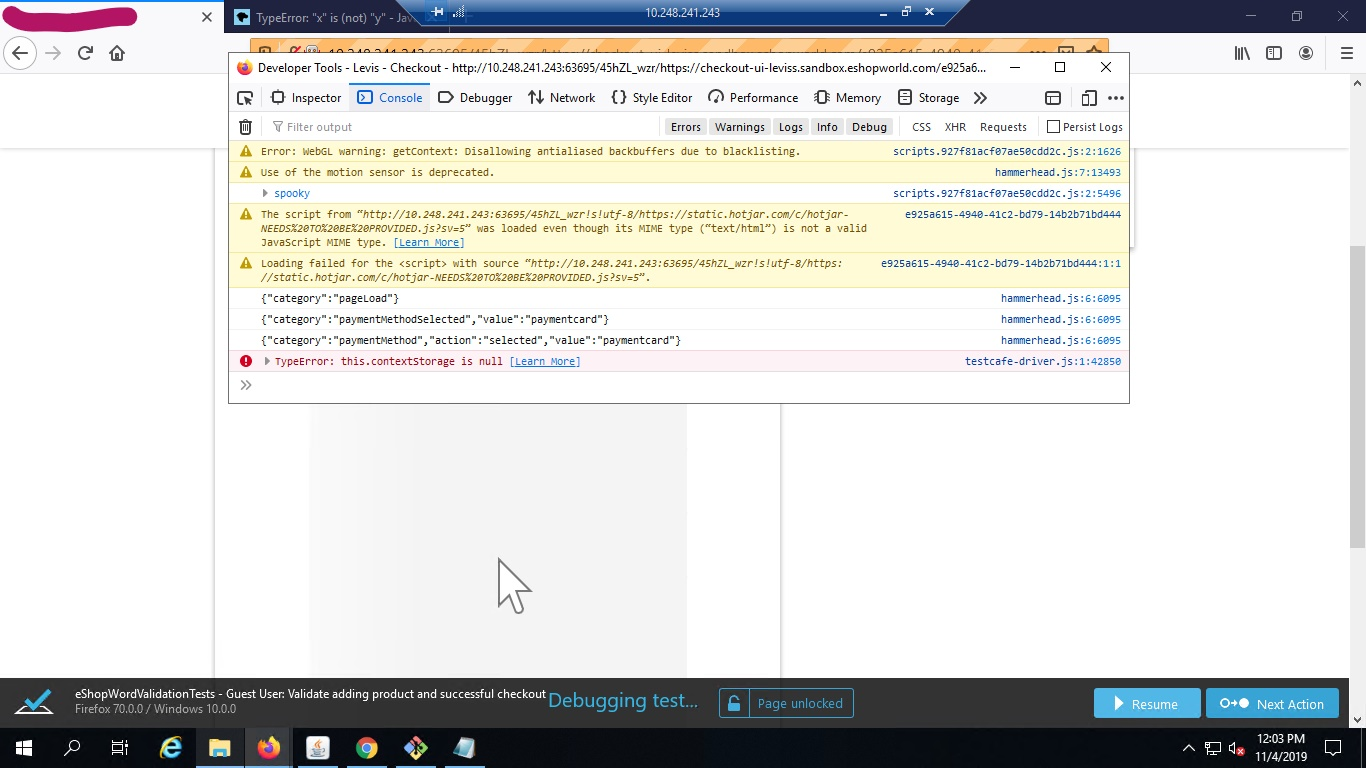
I am also having same issue with testcafe 1.6.0 version. The iframe section is not loading even if i give some wait time. In console i am getting this error "TypeError: this.contextStorage is null" in testcafe-driver.js file. Not sure why it coming previously it was not there. Here is my code
try {
await t
.switchToIframe(element)
console.log("switched to iframe" + element);
}
catch (err) {
console.log("unable switched to iframe" + element);
throw err;
}
Please look into this issue as i am trying to resolve this issue for several days but not succeed yet.
 mintugorai
on 4 Nov 2019
mintugorai
on 4 Nov 2019
Hi guys. My tests also affected by this issue, but I wanted to provide example of working test with an iframe:
import { Selector } from 'testcafe';

fixture`Iframe issue`
  .page`https://the-internet.herokuapp.com/iframe`;

test('iframe test', async (t) => {
  await t.switchToIframe('#mce_0_ifr');
  await t.expect(Selector('body').visible).ok();
});
will that help @Farfurix @LavrovArtem @miherlosev ?
 alex-popov-tech
on 24 Dec 2019
alex-popov-tech
on 24 Dec 2019
@alex-popov-tech
Hello,
Thank you for sharing your experience with us. I checked the original "http://nagiosxi.demos.nagios.com/nagiosxi" case and, unfortunately, got the same issue.
 Farfurix
on 26 Dec 2019
Farfurix
on 26 Dec 2019
@Farfurix yes, i thought that working example with an iframe could help figure out where the problem located
alex-popov-tech
on 27 Dec 2019
@alex-popov-tech
We will check it in the context of this issue. Thank you again for your example.
Farfurix
on 30 Dec 2019
We are in the same situation, we are using the hack as of now. We are not able to switch to iframe.
We get this error. We are using 1.8.2
1) Content of the iframe in which the test is currently operating did not load.
Is there an ETA for this fix?
 karankumar7
on 21 Feb 2020
karankumar7
on 21 Feb 2020
Any personal estimate may be misleading, we cannot currently tell you the precise date. Once we get any results, I assure you that we will notify you.
 AlexSkorkin
on 24 Feb 2020
AlexSkorkin
on 24 Feb 2020
Is there a plan to fix it anytime soon? It's blocking us.
In our case, all test work properly locally, this error occurs only when we run tests on a cluster with a docker image.
 dariadomagala
on 24 Mar 2020
dariadomagala
on 24 Mar 2020
@dariadomagala
Hello,
We have plans to fix it, but I cannot give you any estimate now. Please stay tuned to our updates in this thread.
Farfurix
on 25 Mar 2020
I run into the same issue with [email protected]
my testcafe.json file
{
  "browsers": "chrome",
  "speed": 0.3,
  "qrCode": true,
  "skipJsErrors": false,
  "pageLoadTimeout": 1000,
  "port1": "4001",
  "port2": "4002"
}
my local page was served at port 3000 and create an iframe use script
      const WVJBIframe = document.createElement('iframe');
      WVJBIframe.style.display = 'none';
      WVJBIframe.src = 'https://__bridge_loaded__';
      document.documentElement.appendChild(WVJBIframe);
the page was loaded, but iframe is not, the errors are blew
[Error] Failed to load resource: the server responded with a status of 500 (Internal Server Error) (__bridge_loaded__, line 0)
[Error] Blocked a frame with origin "http://172.16.50.108:4001" from accessing a frame with origin "http://172.16.50.108:4002". Protocols, domains, and ports must match.

what happened to this iframe and Counld you please help me handle this?
I want load this iframe directly use "https://__bridge_loaded__"
 nelhu
on 31 Mar 2020
nelhu
on 31 Mar 2020
In our case, it was a problem with CPU usage. When we increased the CPU limit in the test container, the problem disappeared.
EDIT: or added a retry function, but a very simple test lasts 20-30 seconds now.
dariadomagala
on 1 Apr 2020
Hello @nelhu ,
I suggest you update the testcafe version to the latest build. If the problem persists, please create a separate issue for your scenario because it looks different than the problem described in this thread.
 aleks-pro
on 2 Apr 2020
aleks-pro
on 2 Apr 2020
Hello @nelhu ,
I suggest you update the testcafe version to the latest build. If the problem persists, please create a separate issue for your scenario because it looks different than the problem described in this thread.
Thanks, I upgrade testcafe version to 1.8.3(latest), and the problem persists.this is my origin issue
thanks for your help if you have time
All I want is access my src directly
nelhu
on 8 Apr 2020
Hello @nelhu,
Thank you for the clarification. Please stay tuned, we'll update this thread once we have any results.
 alexey-lin
on 9 Apr 2020
alexey-lin
on 9 Apr 2020
Hi Guys any progress on this problem. I am creating POC for my company and this defect is stopping us from creating POC .
 VladimirCacicArapovic
on 17 Apr 2020
VladimirCacicArapovic
on 17 Apr 2020
Hi @VladimirCacicArapovic,
The PR https://github.com/DevExpress/testcafe-hammerhead/pull/2290 solves this issue, so the fix will be available in the next release.
alexey-lin
on 17 Apr 2020
Closed by #4975.
 AndreyBelym
on 27 Apr 2020
AndreyBelym
on 27 Apr 2020
@AndreyBelym Good to see it's solved. When can we expect it to be released? As @dariadomagala said, this bug is blocking us pretty hard :)
1.8.5-alpha.2 doesn't fix the problem in case it should.
 parostatkiem
on 28 Apr 2020
parostatkiem
on 28 Apr 2020
Or maybe there is any way to programmatically check if the iframe content did load? That would let us create some workaround of the problem...
parostatkiem
on 28 Apr 2020
@parostatkiem
In version 1.8.5-alpha.2 this problem is fixed. I checked that with the examples given above. If the fix does not help in your case, this means that your site has some specifics that is not related to the current issue. We would love to research your scenario if you send us an example or a public url to your site and your test code.
Or maybe there is any way to programmatically check if the iframe content did load?
It's hard to say anything about a workaround since the cause of the issue is unclear.
 AlexKamaev
on 29 Apr 2020
AlexKamaev
on 29 Apr 2020
@AlexKamaev I am having the same issue with the site we are testing. Once the tests logs into the application the iframe is blank unless i go to another page and then go back to the home page. We have updated the testcafe version yet the problem is still the same. Please advise
 justin-wingo
on 18 May 2020
justin-wingo
on 18 May 2020
@justin-wingo Could you please specify what exact version of testcafe are you using now? (You can run testcafe -v in the command line.)
alexey-lin
on 18 May 2020
@alexey-lin i am currently running 1.8.5-alpha.3
justin-wingo
on 18 May 2020
@justin-wingo Thank you for the clarification. It seems you are facing the same behavior for another reason. Could you send us your test code and a sample project or a public URL of your site? We need to understand why the fix didn't help in your case.
alexey-lin
on 18 May 2020
@alexey-lin is it possible to reach out to you directly?
justin-wingo
on 18 May 2020
@justin-wingo Of course. You can write us at [email protected].
alexey-lin
on 18 May 2020
@alexey-lin Thanks I will send an email now.
justin-wingo
on 18 May 2020
@alexey-lin i sent an email but i haven't heard anything yet about our issue
justin-wingo
on 19 May 2020
@justin-wingo,
What's the subject of your email?
AlexSkorkin
on 20 May 2020
@AlexSkorkin "Content of the iframe did not load"
justin-wingo
on 20 May 2020
We haven't received such an email. Would you please resend it? Thank you in advance.
AlexSkorkin
on 20 May 2020
Sent again Thanks
On Wed, May 20, 2020 at 9:19 AM Alex Skorkin notifications@github.com
wrote:
We haven't received such an email. Would you please resend it? Thank you
in advance.—
You are receiving this because you were mentioned.
Reply to this email directly, view it on GitHub
https://github.com/DevExpress/testcafe/issues/3904#issuecomment-631468731,
or unsubscribe
https://github.com/notifications/unsubscribe-auth/AMAWSPYRJJTU76GA46YFLL3RSPKHPANCNFSM4HY2DMIQ
.
justin-wingo
on 20 May 2020
Thank you. We received it and will look into it.
AlexSkorkin
on 21 May 2020
@AlexSkorkin any update?
justin-wingo
on 22 May 2020
@justin-wingo I created a sample account (the username is testcafe_team) for testing your site, but the site requires confirmation of my phone number on every test run.
Could you please create a separate account (without confirmation) for the testcafe team to research the issue? You can send it to [email protected].
AlexKamaev
on 25 May 2020
@AlexKamaev it seems that the email address you used to set up this account has a domain that is known to be used in spam. Is it possible you could use a more reputable domain?
justin-wingo
on 26 May 2020
@justin-wingo
Thank you for the clarification. I created a new account using my gmail, but it still required verification via email. I do not think that it's a problem, since I can unlock the page and enter the verification code manually.
Unfortunately, I was not able to reproduce the issue. I successfully passed authentication, then I navigated to the target page using the link in navbar. After that, the verification method worked as expected and test passed.
I could not find any call to switchToIframeMethod in the test. Is the test correct?
I can see some iframes on the page but they seem to be invisible or empty.
Could you please clarify in which iframe I should switch the test to reproduce the issue. We would appreciate it if you share details of this test with us. You can send it at [email protected] like before.
AlexKamaev
on 27 May 2020
@AlexKamaev. Thats the problem if we use testcafe the homepage is blank but
if we just log in without testcafe the page loads.
On Wed, May 27, 2020, 4:03 AM AlexKamaev notifications@github.com wrote:
@justin-wingo https://github.com/justin-wingo
Thank you for the clarification. I created a new account using my gmail,
but it still required verification via email. I do not think that it's a
problem, since I can unlock the page and enter the verification code
manually.Unfortunately, I was not able to reproduce the issue. I successfully
passed authentication, then I navigated to the target page using the link
in navbar. After that, the verification method worked as expected and test
passed.
I could not find any call to switchToIframeMethod in the test. Is the
test correct?
I can see some iframes on the page but they seem to be invisible or empty.Could you please clarify in which iframe I should switch the test to
reproduce the issue. We would appreciate it if you share details of this
test with us. You can send it at [email protected] like before.—
You are receiving this because you were mentioned.
Reply to this email directly, view it on GitHub
https://github.com/DevExpress/testcafe/issues/3904#issuecomment-634498025,
or unsubscribe
https://github.com/notifications/unsubscribe-auth/AMAWSP3XTKA2WC4ZZTOXX53RTTCMDANCNFSM4HY2DMIQ
.
justin-wingo
on 27 May 2020
@justin-wingo
I couldn't reproduce the issue, but I changed your test to make it work.
- I executed the
maximizeWindowaction because I see a mobile version by default. Is this expected? - I fixed the
verifyAudiencePagemethod as follows:.expect(this.viewContactsBtn.visible).ok()
After these changes, the test passes as expected. Could you please share a video that demonstrates the blank iframe?
LavrovArtem
on 28 May 2020
Please take a look at the video attached. While you watching the video you
will see after the user logs into the app the home page is blank. That
shouldnt happen. When we inspect the page during debugging the iframe is
blank. But if we are not using testcafe the homepage loads with no issues.
On Thu, May 28, 2020 at 8:42 AM Artem Lavrov notifications@github.com
wrote:
@justin-wingo https://github.com/justin-wingo
I couldn't reproduce the issue, but I changed your test to make it work.
- I executed the maximizeWindow action because I see a mobile version
by default. Is this expected?- I fixed the verifyAudiencePage method as follows:
.expect(this.viewContactsBtn.visible).ok()After these changes, the test passes as expected. Could you please share a
video that demonstrates the blank iframe?—
You are receiving this because you were mentioned.
Reply to this email directly, view it on GitHub
https://github.com/DevExpress/testcafe/issues/3904#issuecomment-635325758,
or unsubscribe
https://github.com/notifications/unsubscribe-auth/AMAWSP5MGGUF2EVKV3PSCJTRTZLZTANCNFSM4HY2DMIQ
.
justin-wingo
on 28 May 2020
It appears that you didn't attach your video. Please re-attach it (you need to zip it first).
AlexSkorkin
on 29 May 2020
I have attached a zip file
On Fri, May 29, 2020 at 3:09 AM Alex Skorkin notifications@github.com
wrote:
It appears that you didn't attach your video. Please re-attach it (you
need to zip it first).—
You are receiving this because you were mentioned.
Reply to this email directly, view it on GitHub
https://github.com/DevExpress/testcafe/issues/3904#issuecomment-635802328,
or unsubscribe
https://github.com/notifications/unsubscribe-auth/AMAWSP5PBENUO4PWSVMPVR3RT5NT5ANCNFSM4HY2DMIQ
.
justin-wingo
on 29 May 2020
Would you please clarify where you attached it? This is what I see:
AlexSkorkin
on 1 Jun 2020
@AlexKamaev here is the file that you need 1.mp4.zip
justin-wingo
on 1 Jun 2020
@AlexKamaev is there any update?
justin-wingo
on 2 Jun 2020
I was able to reproduce following behavior. Application's home page is really blank when testcafe test logs into it. When I log in using a browser, the home page is shown successfully. But I noticed that its content renders inside the main page and does not belongs to any iframe. So I think that it is a different problem not related to the current thread. We can determine the exact case of this issue after investigation.
 SergeyShurygin
on 2 Jun 2020
SergeyShurygin
on 2 Jun 2020
@SergeyShurygin I was wondering if there are any updates at this time?
justin-wingo
on 4 Jun 2020
Hello @justin-wingo ,
I've created a separate issue for your scenario because it looks different than the problem described in this thread. This will help us to process your inquiry more efficiently. Please follow the issue to stay informed about our progress.
aleks-pro
on 5 Jun 2020
This thread has been automatically locked since it is closed and there has not been any recent activity. Please open a new issue for related bugs or feature requests. We recommend you ask TestCafe API, usage and configuration inquiries on StackOverflow.
![lock[bot] picture](https://avatars1.githubusercontent.com/in/6672?v=4&s=40) lock[bot]
on 24 Jun 2020
lock[bot]
on 24 Jun 2020
Related issues
 jvanoostveen
·
4Comments
jvanoostveen
·
4Comments
 devmondo
·
3Comments
devmondo
·
3Comments
 fnlctrl
·
3Comments
fnlctrl
·
3Comments
 madroneropaulo
·
3Comments
madroneropaulo
·
3Comments
 ParachuteCat
·
3Comments
ParachuteCat
·
3Comments
Most helpful comment
This is still happening for us as of version 1.5.0.
The iframe issue is a roadblock for our site's implementation. Would love to see this get fixed.