Testcafe: HTTP header size can grow beyond max of 8 KB with lots of cookies, Testcafe hangs
DUPLICATE OF DevExpress/testcafe-hammerhead#1885
We are using Testcafe to test a site with lots of external advertising scripts, and have been experiencing a problem where our test suite would hang sporadically after a while when executing the tests.
When opening the web inspector in the test browser during the hang, we noticed that most requests to the test proxy (testcafe-hammerhead) had failed with an HTTP 400 Bad Request response, however with no error message whatsoever, and the test suite would just sit there for a while before failing the test run.
After lots of debugging we found out that the requests to testcafe-hammerhead fail with an HPE_HEADER_OVERFLOW code, meaning that Node's http module rejects the request because it sent more than 8 KB of header payload. This was discovered by adding a clientError event handler in testcafe-hammerhead.
I assume that the error happens because all cookie data is collected in the browser under the domain of the test proxy, and if the size of that data grows beyond 8K it cannot get sent to the proxy anymore? Which options do we have to reduce the size of the cookie payload in the browser? Is it something that could/should be solved in Testcafe?
By the way we are using Node 10 LTS so we cannot use the new max-http-header-size argument yet. For now we have been working around the issue through request mocks (to block most of the external scripts) which works well, but still wanted to report this issue.
Possibly related: https://github.com/DevExpress/testcafe-hammerhead/issues/1885
Thanks for maintaining!
Environment details:
- testcafe version: 1.0
- node.js version: 10.14.2
- browser name and version: Chrome 72
- platform and version: macOS 10.12, 10.14
 mkai
mkai
All 14 comments
Thank you for providing this information. However, it is not sufficient to find the cause of the issue and provide a solution. There can be different causes and without having access to your page or code, I cannot give you any advice. If possible, please provide us with access to your web site, so we can diagnose the issue.
 LavrovArtem
on 13 Feb 2019
LavrovArtem
on 13 Feb 2019
I am working with mkai on this.
A general example would be
fixtureTest`.page('https://nypost.com/');
test(test1, async t => {
await t.wait(15000);
});
test(test2, async t => {
await t.wait(15000);
});`
see https://github.com/DevExpress/testcafe-hammerhead/issues/1885
If you start the tests and open the network tab you can see the hammerhead.js failing. There are several thousand requests made until testcafe gives up and the browser disconnects. This happens with any kind of test.
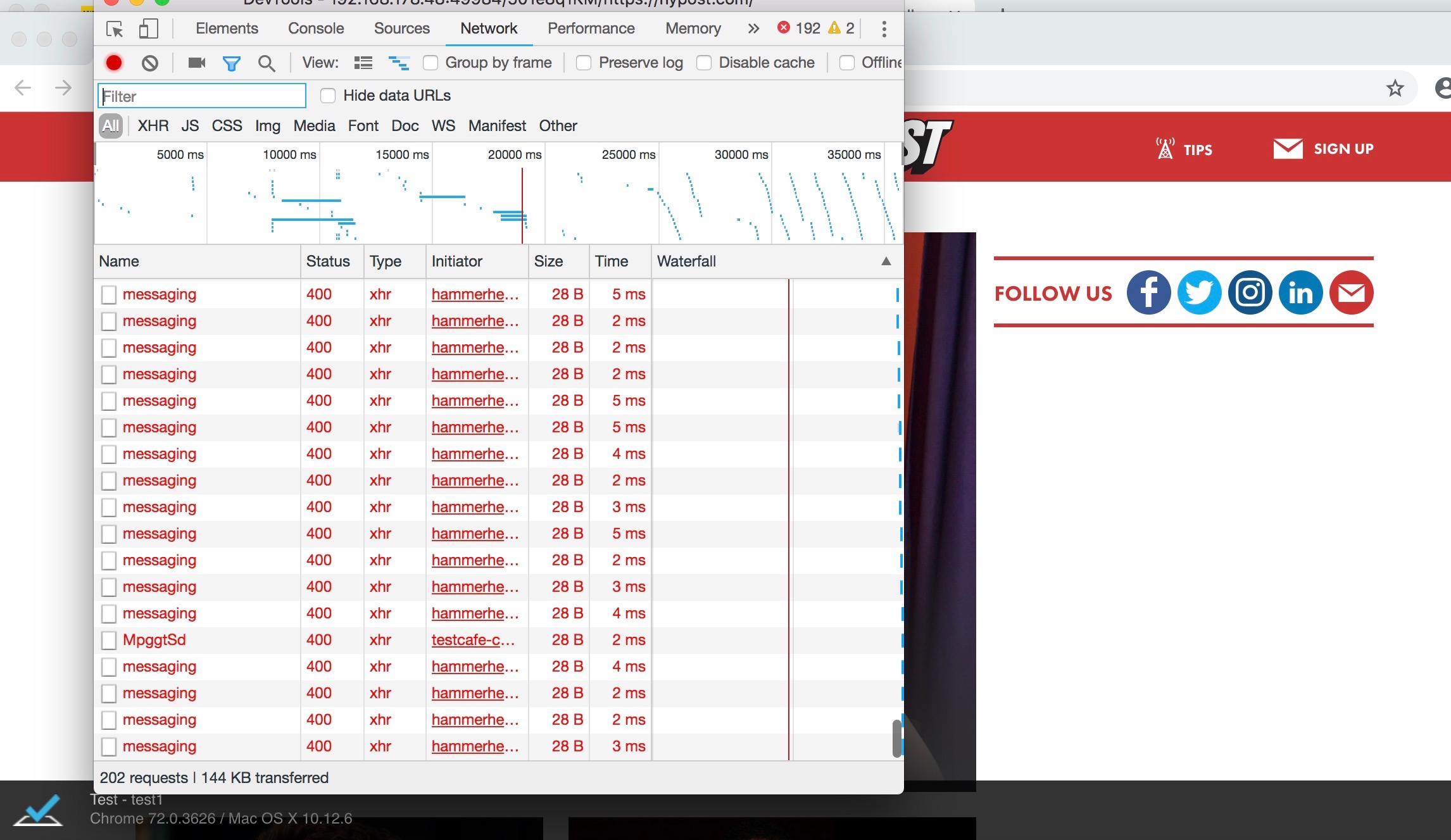
As already pointed out this is because the request headers are bigger than 8kb and therefore rejected by node's http module. As far as we know Node introduced this feature recently, see https://nodejs.org/api/errors.html#errors_hpe_header_overflow
We made it work by customizing the requests and limiting them to only the scripts and domains we need for testing. Without these custom requests testcafe is not usable.
As this seems to be a rather significant issue that is likely to cause more problems in the future we would like to know if this is something you guys are aware of and might be able to fix.
 sophieSpring
on 15 Feb 2019
sophieSpring
on 15 Feb 2019
@mkai
Thank you for your inquiry. You are right, the cause of the issue is in https://github.com/DevExpress/testcafe-hammerhead/issues/1885
Please track the progress in that ticket.
At the moment, your workaround with request mocking is the best option.
 AlexKamaev
on 22 Feb 2019
AlexKamaev
on 22 Feb 2019
Thanks for looking into it.
Also, --max-http-header-size has been backported to Node 10.15, so using it to raise the limit to something higher than 8k would be another workaround.
https://github.com/nodejs/node/blob/master/doc/changelogs/CHANGELOG_V10.md#2018-12-26-version-10150-dubnium-lts-mylesborins
mkai
on 22 Feb 2019
Does anyone have a working workaround that I can use against a production site?
Sophie said:
We made it work by customizing the requests and limiting them to only the scripts and domains we need for testing. Without these custom requests testcafe is not usable.
Is there some way I can tell Testcafe to ignore/redirect calls to certain urls when hitting a production site? I need to test a deployed site.
 jcollum-nike
on 1 Mar 2019
jcollum-nike
on 1 Mar 2019
My simple workaround: nvm install 8.13
Apparently this was introduced in 8.14. This workaround will probably work fine for a while but a better fix will need to be sorted out.
jcollum-nike
on 1 Mar 2019
Also added a script for checking the version as a pretest script:
const engines = require('./package.json').engines;
const semver = require('semver');
const version = engines.node;
if (!semver.satisfies(process.version, version)) {
console.log(
`Required node version ${version} not satisfied with current version ${
process.version
}. No really, the tests will not run correctly in versions after 8.13. See https://github.com/DevExpress/testcafe/issues/3438`
);
process.exit(1);
}
Also @AlexKamaev do you have an older docker image for TC that uses Node <8.14? That would be super helpful. I can make one of course, if needed.
jcollum-nike
on 1 Mar 2019
@jcollum-nike
Is there some way I can tell Testcafe to ignore/redirect calls to certain urls when hitting a production site? I need to test a deployed site.
Yes. Please refer to the following article: https://devexpress.github.io/testcafe/documentation/test-api/intercepting-http-requests/mocking-http-requests.html
Also @AlexKamaev do you have an older docker image for TC that uses Node <8.14? That would be super helpful. I can make one of course, if needed.
At this moment, we do not provide docker images with different versions on NodeJS and this topic is under discussion. You can create your own docker image based on our approach https://github.com/DevExpress/testcafe/tree/master/docker` and public it on dockerhub under your account.
In addition, I want to mention that the https://github.com/DevExpress/testcafe-hammerhead/issues/1885 issue has high priority and we'll try to fix it soon.
AlexKamaev
on 1 Mar 2019
Excellent thanks @AlexKamaev
jcollum-nike
on 1 Mar 2019
For the google searchers: I fixed this by doing this:
  fixture`${fixtureName}`.page`${baseUrl}/${setting.country}/help`;

  const mock = RequestMock()
    .onRequestTo(/.*facebook.*/)
    .respond('', 200, { 'access-control-allow-origin': '*' })

    .onRequestTo(/.*google.*/)
    .respond('', 200, { 'access-control-allow-origin': '*' })

    .onRequestTo(/.*fullstory.*/)
    .respond('', 200, { 'access-control-allow-origin': '*' })

    .onRequestTo(/.*neo.js/)
    .respond('', 200, { 'access-control-allow-origin': '*' });

  setting.slugs.forEach(slug => {
    const articleUrl = `${baseUrl}/${setting.country}/help/a/${slug}`;

    test.requestHooks(mock).page(`${articleUrl}`)(`Slug: ${slug}`, async t => {
Hi folks, how exactly would I go about implementing --max-http-header-size ? I've tried appending it to the scripts in the package.json in multiple ways as below, and by passing it into my command line as npm test --max-http-header-size=20480 but neither solved the issue, so I assume I'm using the flag wrong. I've also tried with significantly larger numbers to the same effect.
"scripts": {
    "test": "testcafe chrome --max-http-header-size=20480 tests/"
  }
"scripts": {
    "test": "testcafe chrome tests/ --max-http-header-size=20480"
  }
 jcreek
on 12 Mar 2019
jcreek
on 12 Mar 2019
@jcreek
--max-http-header-size is a nodejs option. So you need to use it as an argument of the node command.
For example, you can start TestCafe tests via this command:
node <path>\bin\testcafe chrome test.js
where <path> is a path to your TestCafe module. It depends on how TestCafe is installed locally or globally. I recommend you refer to the following StackOveflow question: https://stackoverflow.com/questions/5926672/where-does-npm-install-packages
I have TestCafe installed globally so my command will be:
node --max-http-header-size=9999999 C:\Users\AlexKamaev\AppData\Roaming\npm\node_modules\testcafe\bin\testcafe chrome test.js
I would also recommend the approach with Request Hooks @jcollum-nike described. The simplest implementation can be the following:
import { RequestMock } from 'testcafe';

const mock = RequestMock()
    .onRequestTo(req => {
        return req.url.indexOf('rapidonline') === -1;
    })
    .respond(null, 200);

fixture `Layout tests`
    .page('https://www.rapidonline.com')
    .requestHooks(mock);
Here I ignore all requests to other sites (adv, analytics and so on), which lead to DevExpress/testcafe-hammerhead#1885
AlexKamaev
on 12 Mar 2019
Thank you all for using TestCafe and posting your comments. Since this issue is a duplicate of DevExpress/testcafe-hammerhead#1885, please use it to share your feedback.
 AndreyBelym
on 12 Mar 2019
AndreyBelym
on 12 Mar 2019
Related issues
 darkowic
·
3Comments
darkowic
·
3Comments
 hinok
·
3Comments
hinok
·
3Comments
 ParachuteCat
·
3Comments
ParachuteCat
·
3Comments
 Lukas-Kullmann
·
3Comments
Lukas-Kullmann
·
3Comments
 marchugon
·
4Comments
marchugon
·
4Comments
Most helpful comment
For the google searchers: I fixed this by doing this: