Testcafe: Selector() not consistently finding DOM elements
Are you requesting a feature or reporting a bug?
Reporting a bug
What is the current behavior?
Given this HTML on the page:
<div class="dxb" id="LoginButton_CD">
    <input name="LoginButton" class="dxb-hb" id="LoginButton_I" type="submit" value="Log In" />
    <span class="dx-vam">Log In</span>
</div>
None of the following work and the page just says "Waiting for an element to appear" and times out:
await t.click("#LoginButton_I");
await t.click(Selector("input[value='Log In']"));
await t.click(Selector("input").withAttribute("name", "LoginButton"));
await t.click(Selector("input").withAttribute("value", "Log In"));
But the following does work:
await t.click(Selector("span").withText("Log In"));
What is the expected behavior?
All of the above should work. Running the above through equivalent jQuery selectors on the page returns the objects as expected.
### How would you reproduce the current behavior (if this is a bug)?
-
Provide the test code and the tested page URL (if applicable)
Tested page URL: -
Test code: included above
Specify your
- operating system: Windows 10
- testcafe version: latest release
- node.js version: latest release
 nkamenar
All 13 comments
Hi @nkamenar,
I've created a simple example based on your description and it works properly on my side:
import { Selector } from 'testcafe';

fixture`gh-2059`
    .page`https://jsfiddle.net/o0wb7e90/`;

test('test', async t => {
    await t.switchToIframe(Selector('iframe').withAttribute('name', 'result'));

    await t.click("#LoginButton_I");
    await t.click(Selector("input[value='Log In']"));
    await t.click(Selector("input").withAttribute("name", "LoginButton"));
    await t.click(Selector("input").withAttribute("value", "Log In"));
});
Please take a look at this.
You can run tests with the --debug-on-fail to ensure whether the target button is visible on the page when the test fails in your case.
 AlexanderMoskovkin
on 23 Jan 2018
AlexanderMoskovkin
on 23 Jan 2018
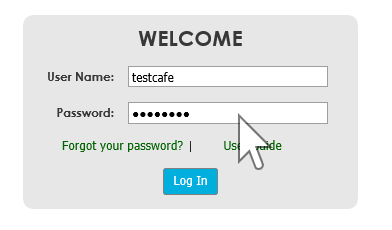
As you can see above the button is on the page. Additionally debugging the page after fail I can see the following if I inspect element:

And running jQuery in the console to try and select it works:
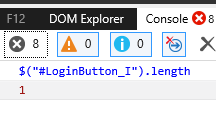
So I am really just at a loss for why the selector on the span works but the selector for the input refuses to.
nkamenar
on 23 Jan 2018
To be honest I don't see any reason why it can't be found. Could you please provide us with the url of your page to check the issue on our side? If it contains any sensitive data you can send it privately to the email from my Github profile.
AlexanderMoskovkin
on 23 Jan 2018
Unfortunately it's an intranet site so I can't provide a link. I am going to keep experimenting and if I find anything I will post it here. Thanks for the assistance.
nkamenar
on 23 Jan 2018
@nkamenar Could you please clarify what the exactly error TestCafe throws when the test fails?
AlexanderMoskovkin
on 24 Jan 2018
The error is "The element that matches the specified selector is not visible." but I have shown you the html and there isn't anything there that should be "hiding" it as far as I can tell.
nkamenar
on 25 Jan 2018
@nkamenar Thanks a lot for you clarification. TestCafe founds the element but consider it invisible for some reason. I guess it can be related to the element styles.
We will appreciate it quite a lot if you help us reproduce the issue.
Could you please create an example (on the jsfiddle for example) with the same markup and css styles as in your site? For example you can just add css styles to my example.
AlexanderMoskovkin
on 26 Jan 2018
I have updated the fiddle attaching the styles relevant to those tags. Here is the updated fiddle
nkamenar
on 26 Jan 2018
Thanks for the example! I see that the button has width=0 and height=0. So in fact the button is not visible. That's why TestCafe can't find it. It seems it's a part of the DevExpress button implementation. I guess when you click on the Log In span DevExpress scripts triggers click on the button.
So the best solution for an E2E test here is to click on the span.
AlexanderMoskovkin
on 26 Jan 2018
Alright, thank you very much for the support!
nkamenar
on 26 Jan 2018
I am trying testCafe and I am not able to select elements. What am I doing wrong? Here you have the example:
The Code:
import { Selector} from 'testcafe';
const testing = Selector('input').withAttribute('title','Search');
fixture `My own Training`
.page `www.google.com`;
test('My first test', async t => {
await t.typeText(testing, "hello word");
});
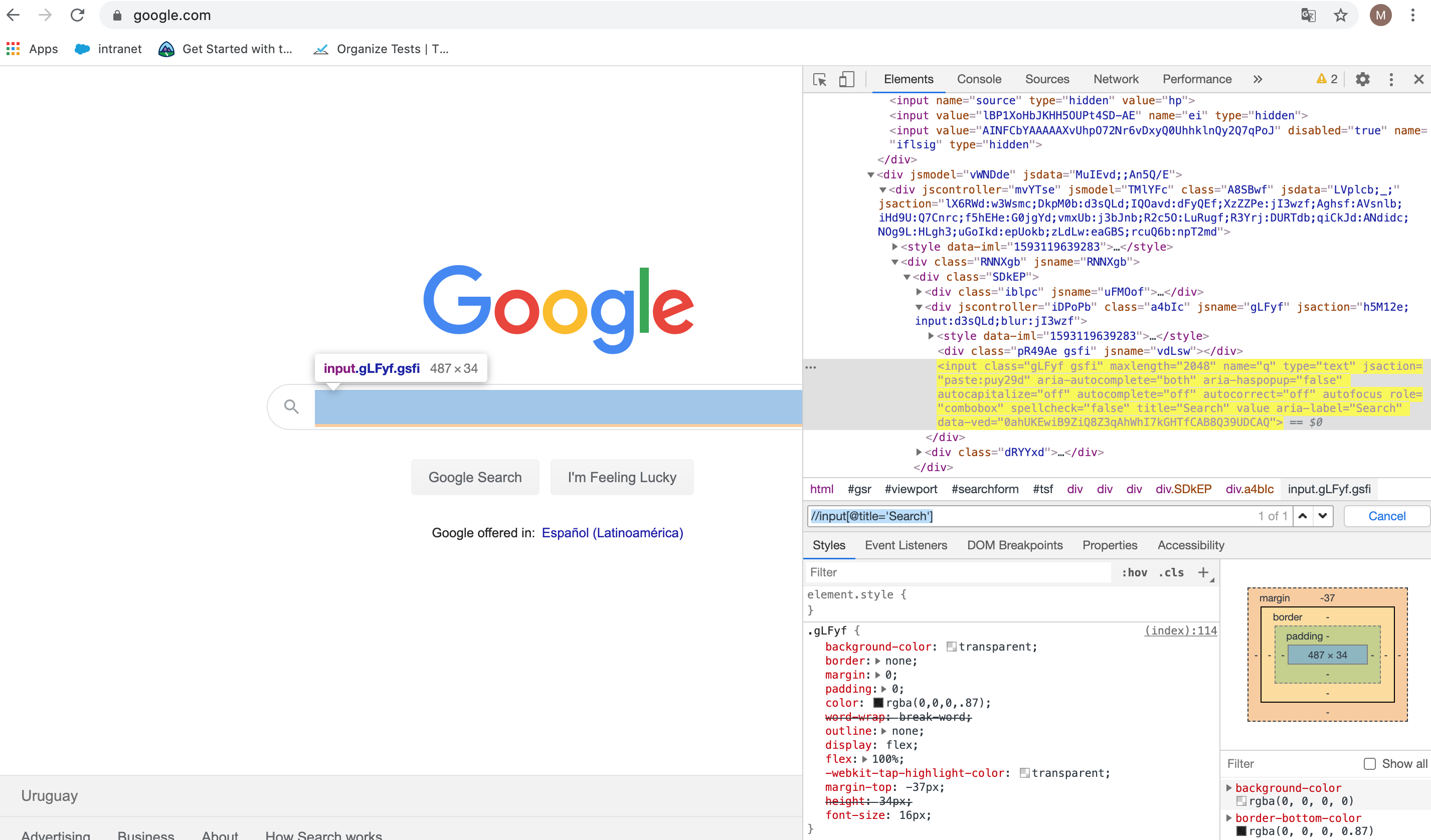
The page:
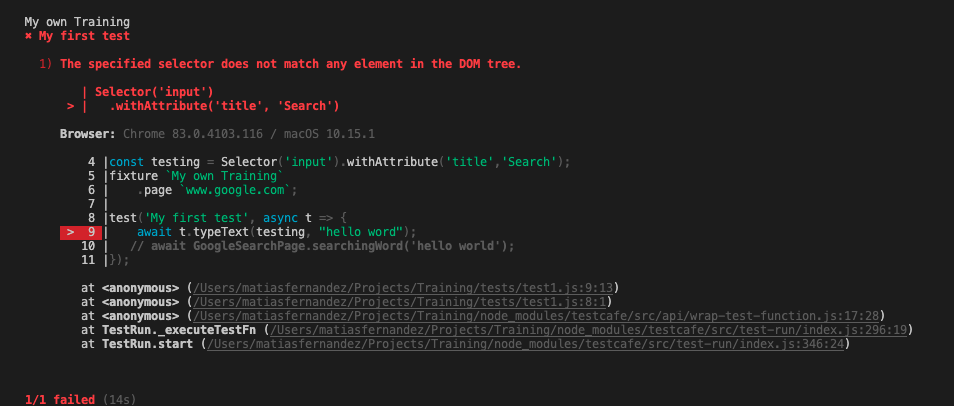
The result:
 MatiasFB
on 26 Jun 2020
MatiasFB
on 26 Jun 2020
I am experiencing the same issue when I try to use selector Selector('input').withAttribute('title','Search');
 lpelypenko
on 26 Jun 2020
lpelypenko
on 26 Jun 2020
TestCafe launches a browser with a clean profile (you can change that by using User Profiles) and, because of that, Google will redirect you to the internationalized version of the site based on your location. The "title" attribute of the search input will use a localized word too. I assume that Google shows you "Buscar" instead of "Search".
Use the Debug Mode to search the attribute value. The following article may be helpful: How to Debug Tests in TestCafe: Quick Guide.
 wentwrong
on 26 Jun 2020
wentwrong
on 26 Jun 2020
Related issues
 chadmyers
·
38Comments
chadmyers
·
38Comments
 inikulin
·
93Comments
inikulin
·
93Comments
 florentpeyrard
·
32Comments
florentpeyrard
·
32Comments
 dzannotti
·
56Comments
AlexanderMoskovkin
·
32Comments
dzannotti
·
56Comments
AlexanderMoskovkin
·
32Comments