Testcafe: Allow to customize conditions in the page automatic waiting
Are you requesting a feature or reporting a bug?
Feature
It's hard for browser test frameworks to know when a page has fully loaded. Therefore developers of the tests should define this case.
If I have a test like this:
test('example', async t => {
    await t.navigateTo('http://example.com');
   // Page should be ready here
});
I would like to let TestCafe know when my page is ready. So far, as a hack, I was thinking of hooking into the beforeEach callback, overwriting the test.navigateTo method, and ensuring the page is ready before test execution continues.
Instead, do you have any better ideas? I'm trying to avoid doing this:
test('example', async t => {
   await t.navigateTo('http://example.com');
   await pageToBeReady();
});
Because I'd have to repeat that in each test. Ideally, I'd only have to define a page load strategy once.
 umaar
umaar
All 49 comments
Hi Umar,
TestCafe starts executing test actions after DOMContentLoaded event fired, all initial XHRs completed and dynamically inserted scripts executed. Is there any cases there this wait mechanism is insufficient?
 inikulin
on 30 Jan 2017
inikulin
on 30 Jan 2017
One site I am testing is dynamically downloading web fonts using delayed scripts. Watching the test run in real time, I see the simulated mouse icon hover over the intended element in preparation for a click. After this, the web fonts finish downloading causing a minor shift in text coordinates. The click then executes, but because the geometry of the page has changed, the click occurs on the wrong element.
umaar
on 30 Jan 2017
I would say there are many custom use cases people will have to wait for what they consider to be a page load. Allowing the developer to specify this page load criteria in a programmatic way and a simple way is the cleanest approach.
umaar
on 30 Jan 2017
This can be solved like this:
fixture `Example`.beforeEach(async t => {
    await ourCustomPageLoad();
});
test.page `example.com`('Example test', async t => {
 // test code here
});
Previously I was using navigateTo to select the starting page. When you use this method, the beforeEach will trigger _before_ the navigateTo meaning you can't add custom waiting logic (which is entirely correct from TestCafe's point of view). Using test.page allows the beforeEach to trigger _after_ the page has been navigated to.
umaar
on 31 Jan 2017
Hmm, I guess we should revisit autowait tuning options that we've discussed before. How I see it: we add options to test and fixture with which you can adjust what events testcafe should wait for before starting action execution, e.g.:
test.setLoadAutoWait({
     dom: true,
     scripts: true,
     images: true,
     fonts: false,
     ...
}) ('Some test', async t => {
});
I wonder if these settings should be adjustable during the test run, e.g. via t.setLoadAutoWait. \cc @AlexanderMoskovkin
inikulin
on 31 Jan 2017
So those things, like dom, scripts, image, etc. I guess are defined internally. But it would be nice to define custom ones like:
test.setLoadAutoWait({
     dom: true,
     scripts: true,
     images: true,
     fonts: false,
     chartsVisualisation: true
     ...
}) ('Some test', async t => {
});
Imagine you are working on a visualisation dashboard, maybe you want tests to begin once such charts have initialised, or by some other custom criteria.
umaar
on 31 Jan 2017
But how you'll define this custom load handlers? Function that returns Promise? E.g.:
test.addCustomLoadBarrier(() => { /* your logic here */});
Yes exactly:
test.addCustomLoadBarrier('chartsVisualisation', () => {
  return new Promise(async (resolve, reject) => {
    try {
      await myCustomVisualisation();
      resolve();
    } catch(e)
      reject(e)
    }
  });
});
test.setLoadAutoWait({
     chartsVisualisation: true
}) ('Some test', async t => {
});
Just an idea, what do you think?
umaar
on 31 Jan 2017
@umaar I like it and it shouldn't be hard to implement. BTW, is load barrier handler should be a client function and be executed entirely on client side?
inikulin
on 31 Jan 2017
Good question. For my use case, I need it only on the client side, but someone else might not. So maybe it is safer to allow the developer to create their own clientFunction(() => ...); in the addCustomLoadBarrier if they need to.
umaar
on 31 Jan 2017
I propose to add the onEachPage method.
fixture `f`
  .page `http://example.com`
  .onEachPage(async t => {
    // will be executed on each page loading
    await t.expect(/* some condition */).ok()
  })

test
  .onEachPage(async t => { /*override fixture's on each page*/ })
  ('test', async t => { /* test code */ })
 AlexanderMoskovkin
on 3 Feb 2017
AlexanderMoskovkin
on 3 Feb 2017
OK, after some thinking I guess we can come up with the following API:
test.onEachPage(t => {})
fixture.onEachPage(t => {})
t.onEachPage(t => {})
We basically add hooks that are executed every time page loaded. You can use it to execute any actions on page or wait for something to load before proceeding with test actions.
In addition I guess we should add t.waitFor(selector|selector-string|client-function-predicate|predicate, timeout) and t.waitForVisible(selector|selector-string), so you can do:
test.onEachPage(async t => await t.waitFor('#my-element'));
Also, I guess we should deprecate selector visibilityCheck option, because seems it's not quite clear for users.
inikulin
on 3 Feb 2017
@AlexanderMoskovkin you faster, than me =)
inikulin
on 3 Feb 2017
@umaar Will proposed approach work for you?
inikulin
on 8 Feb 2017
That looks great! Thanks for considering that 👍 Solves the problem nicely
umaar
on 8 Feb 2017
Hi Ivan,
Is your description of the API you came up with, you talk about that the new hooks are executed every time the page is loaded. Does "every time the page is loaded" really mean the page loading as in the URL changing?
Or does it also take into account Ajax-based apps where for example after a click of a button there is communication with the server to signal the button was clicked, after which there is chatter back and forth between the client and server to retrieve new content and update the client?
To me this feature would look like something I could use with the framework I'm using, as the framework provides API to check if it's still busy (re)rendering, but this doesn't just happen on pageLoad (URL change), but also when communicating with the server in Ajax-manner after an even occurred in the client.
I hope this new API can handle both
The additional API you're suggesting (t.waitFor(selector|selector-string|client-function-predicate|predicate, timeout)) seems to also allow me to do this (with the client-function-predicate argument), but I rather hook in my logic on a lower level so I don't have to clutter my test with waitfor's that could be handled on a more generic level
 p-bakker
on 15 Feb 2017
p-bakker
on 15 Feb 2017
Hi Paul.
At current moment TestCafe already has the mechanism, which is called "request barrier". It waits after each action until xhr requests are completed, and only then allows to perform next action (click, hover etc)
 georgiy-abbasov
on 16 Feb 2017
georgiy-abbasov
on 16 Feb 2017
I know it does, but that is not sufficient apparently, at least not in my case. I think what is happening in my case is that an xhr request is send and a response is received and processes and then on a timer new xhr requests are started. Not 100% sure as it's the framework I'm using.
All I notice if that I have to write specific logic to wait for certain state in the UI to be achieved, before continuing with the test, otherwise the test bombs out because TestCafe continues prematurely (at least prematurely in my case). And I know that my framework has hooks to ask it if it's still busy doing stuff.
So, I'm hoping this feature will allow me to hook in my framework's busy checks on a low(er) level
p-bakker
on 16 Feb 2017
Additionally, the mechanism works for XHR requests, but when you use TestCafe on a page that uses WebSockets of HTTP/2 as communication protocol with the server, where messages can be send back and forth in async manner (so no request/response model), I think the request barrier isn't enough anymore
p-bakker
on 20 Feb 2017
I suppose, the onEachPage hook should be executed on the page load (when the DomContentLoaded event is raised).
Or does it also take into account Ajax-based apps where for example after a click of a button there is communication with the server to signal the button was clicked, after which there is chatter back and forth between the client and server to retrieve new content and update the client?
It's too hard to determine this case. We don't know what does response from the server contain (it's maybe markup that should be rendered, or it's maybe just some service data).
All I notice if that I have to write specific logic to wait for certain state in the UI to be achieved, before continuing with the test
What about something like beforeEachAction or beforeAction hook, that will be executed before the next test action? /cc @p-bakker @inikulin
AlexanderMoskovkin
on 22 Feb 2017
What about something like beforeEachAction or beforeAction hook, that will be executed before the next test action? /cc @p-bakker @inikulin
What should we do if beforeEachAction contains... an action?
inikulin
on 27 Feb 2017
Somehow a beforeEachAction feels like going down a rabbitshole...
What about adding a customizing hook into just Selectors and maybe asserts?
Both these have a mechanism to be smart, but they can only be smart up to a certain point. What if we have a mechanism to extend their smartness with some custom logic, which in my case would be a check with my framework of choice to see if the framework is done?
p-bakker
on 27 Feb 2017
@p-bakker Selectors already can accept function that is executed on client and it can return Promise which resolves to element (see: https://devexpress.github.io/testcafe/documentation/test-api/selecting-page-elements/selectors.html#selector-initializers). Thus, you can specify when your selector should be resolved with element. Is this suitable solution for you?
inikulin
on 27 Feb 2017
I have a question - what we should do with iframes ? I see three variants:
- We execute
onEachPageby default in the main window and also have an option for iframe selector
fixture.onEachPage(hookFn)           // main window
fixture.onEachPage(hookFn, selector) // `selector` is string or `Selector` object
- We run hook in the window, where last command was executed
Just:
fixture.onEachPage(hookFn)
- Mixed variant - second variant by default, and option for main window or selector
fixture.onEachPage(hookFn)                                              // last execution context
fixture.onEachPage(hookFn, { switchToIFrame: false })                   // main window context
fixture.onEachPage(hookFn, { switchToIFrame: true, selector:selector }) // selector context
For me last variant is little complicated. I faced with situations, where most of actions are executing in iframe (portable device emulators). Currently client driver fixes active window and send the command from server to it, so i prefer second variant, cause it's easier to realize.
What do you think /cc @inikulin, @umaar, @p-bakker ?
georgiy-abbasov
on 10 Mar 2017
We have context window/frame concept, frames are switched using switchToIframe and switchToMainWindow. Hook works in current context.
inikulin
on 10 Mar 2017
@umaar, @p-bakker, we have faced with some ambiguity during implementation of this feature, so i would clarify some information about it.
- Shall we restart hook function or throw an error, if reload has occurred during hook execution ?
- Also content of hook function is under question - do we really need to have an ability to run actions like click and server-side expressions inside this hook, or it's enough only to run
ClientFunctionor\and perform waiting for specified selectors ? In last case it would be like:
test.waitOnEachPage(condition)
where condition variable may be array which contains Selector objects, ClientFunction and String objects, or just an object of one of types above
test.waitOnEachPage([Selector('#target1'), Selector('#target2')])
test.waitOnEachPage(ClientFunction() => {/*some code*/});
```
georgiy-abbasov
on 22 Mar 2017
Just to bump this issue again, it seems like a rather knotted problem.
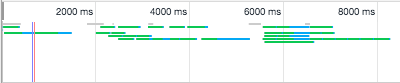
I'm testing some custom UI we have developed on top of Salesforce. Now Salesforce has two UI experiences and you don't know which one you are dealing with until you fully login.
The Classic UI works fine with TestCafe. The new Lightning UI however... I have added the Chrome DevTools Network log in the image above. The Blue vertical line shows when DOMContentLoaded triggers and the red vertical line when window.load triggered.
It seems like the DOM loads, gets to a steady state, waits 500ms and starts firing off the async requests to _actually_ load the elements to render the page.
When using a normal browser this fully loads. When using TestCafe I can't figure out how to make it not pause the browser on the DOMContentLoaded event. The tests are executing to early.
I tried:
- Exponential backoff attempting Selector multiple times
setPageLoadTimeoutClientFunctionto set a clientside timeout the fixture should wait for
It seems like TestCafe locks the loading and doesn't let the rest of the page events finish their jobs in the 2-8 second range of the timeline I posted.
Or if TestCafe has the right feature I haven't tried yet then I'd appreciate the documentation link. :)
 neozenith
on 13 Feb 2018
neozenith
on 13 Feb 2018
Hi @neozenith,
Am I understand right, when you open the page without TestCafe there is no long time interval between DOMContentLoaded and real page loading with UI?
Could you please provide us with the link to your page if it's possible? If it contains any sensitive data you can do it privately by sending email me to the address from my GitHub profile. Then we can check it on our side.
Anyway what type of errors do you see in the report?
For example, if your test looks like:
test('my test', async t => {
    await t.click('.some-element');
})
then it should work in the following manner:
- testcafe opens the page and waits for the window.load event;
- testcafe tries to click on the '.some-element';
- if the UI is not loaded yet testcafe waits for '.some-element' to appear for 10 seconds;
- after 5-8 seconds the UI should be rendered;
- testcafe clicks on the '.some-element'
@AlexanderMoskovkin
Test Code
https://github.com/neozenith/testcafe-sfdc-poc/tree/4d03d6d3d8606adec8edcdb011ade5fa246bfdec
Here is some poc code I'm working through that replicates it. I have added instructions to the README.md on how to create a free SFDC dev org for testing purposes.
There is a good chance I am not understanding TestCafe or that Salesforce is just doing something bad as far as webapps go.
Current Results
From what I can tell TestCafe should be able to handle this situation despite the definition of when a page has fully loaded being subjective at times.
- As a human loading either the Classic UI or the Lightning UI the page loads into my home dashboard.
- In TestCafe with Chrome and Firefox, using Classic UI the test finds the header element and passes.
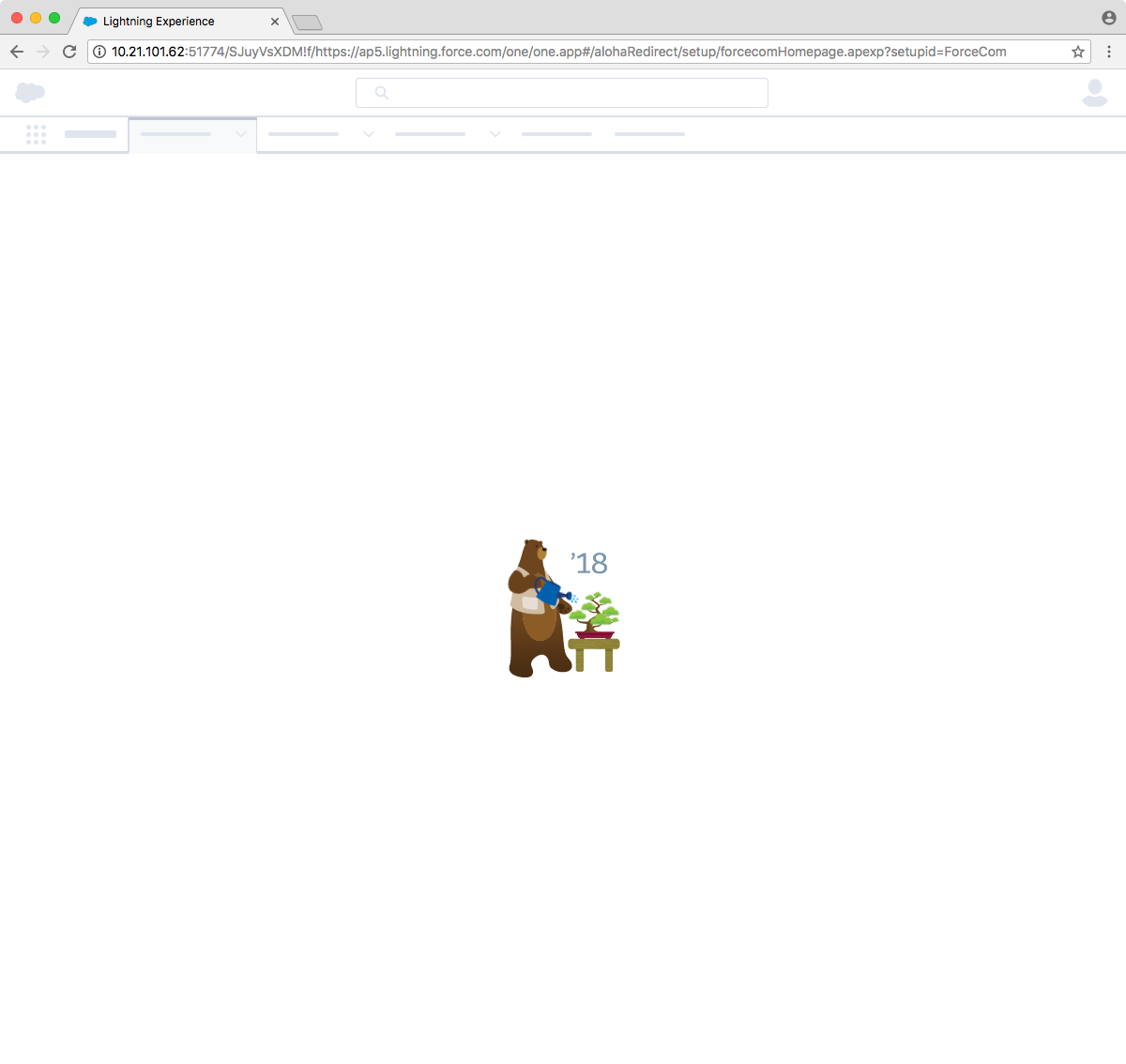
- In TestCafe / Chrome / LightningUI I get to the Logo of the Bear watering a bonsai tree which is the logo for their Spring'18 release and no further.
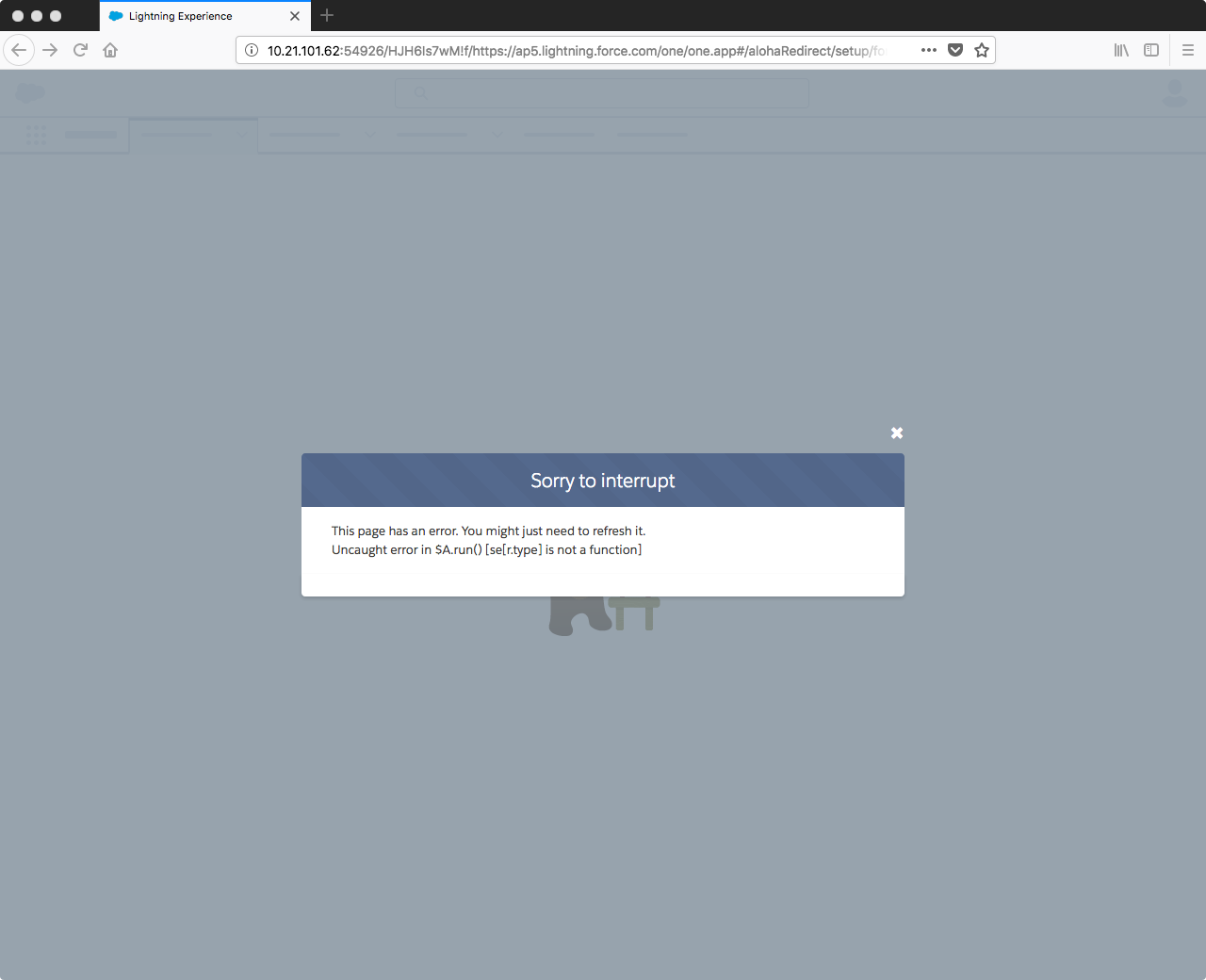
- In TestCafe / Firefox / LightningUI gives a Javascript error.
neozenith
on 16 Feb 2018
@neozenith Thanks for provided details, we'll take a look at this
AlexanderMoskovkin
on 16 Feb 2018
Hi @neozenith,
I've fixed your problem in our proxy server. We will let you know when we release a version with the fix.
 LavrovArtem
on 27 Feb 2018
LavrovArtem
on 27 Feb 2018
@neozenith The fix is published in [email protected]
LavrovArtem
on 7 Mar 2018
@LavrovArtem Awesome! Can confirm that has fixed the issue atleast for my instance of TestCafe vs SFDC.
In hindsight I should have raised my issue as a separate issue to keep it distinct from the Feature request proposed about _when is the page fully loaded notification strategies_.
Thanks for address this issue though.
neozenith
on 7 Mar 2018
I don't know if this is the right place to request further information on this... but I was wondering if TestCafe had the ability to do something similar to Puppeteer's { waitUntil: networkIdle0 } waiting mechanism?
I have a page that fires the DOMContentLoaded event... but then continues to load a payment form. Using Puppeteer I'm able to handle this by navigating to the page and passing the above argument:
await page.gotTo("http://some.url", {waitUntil: "networkidle0"})

OR

await page.gotTo("http://some.url", {waitUntil: ["domcontentloaded", "networkidle2"]})
The payment form changes depending on user state / scenario, so I can't easily add expect(Selector("somePaymentFormSelector").visible).ok()
 rob4629
on 6 May 2019
rob4629
on 6 May 2019
@rob4629 TestCafe waits for an XHR request completion after a page is loaded but only if it takes no longer than 3 seconds to complete. Currently, this timeout value is hardcoded. I think we can make it configurable.
 AndreyBelym
on 7 May 2019
AndreyBelym
on 7 May 2019
Does Testcafe wait for DOMContentLoaded event fired, all initial XHRs completed and dynamically inserted scripts executed after navigateTo() is called with a url or only at the beginning of the test?
Currently in my usecase, the page loaded shows a modal if certain storage variables arent set. But somehow Testcafe isnt waiting for the modal load always, which is part of page load.
 noamaankhan
on 23 May 2019
noamaankhan
on 23 May 2019
@noamaankhan
TestCafe waits for the completion of all described events.
To say something definite, I need to look at your tests and application. Could you please create a separate issue and provide all the necessary information to reproduce the problematic behavior?
 miherlosev
on 24 May 2019
miherlosev
on 24 May 2019
@rob4629 TestCafe waits for an XHR request completion after a page is loaded but only if it takes no longer than 3 seconds to complete. Currently, this timeout value is hardcoded. I think we can make it configurable.
By "can make it configurable", do you mean the 3s timeout value, or that we can add in our own definition of a page load? I think it would be useful for a number of users to be able to define/configure their own definition of when a page is ready / loaded.
rob4629
on 14 Aug 2019
Of course, the best way is enabling custom predicates for page load detection. But it is the hard way since we need to discuss API extensions and modify the browser driver heavily. Allowing to tweak the timeout value won't give such flexibility, but it is a fast and easy approach.
AndreyBelym
on 15 Aug 2019
It would be really helpful for me (and probably others) to have something in place sooner rather than later. We have a couple of pages which render, then load additional content (or re-renders). This is causing me to either experience flakes, or to have an arbitrary wait after navigating to a page.
Can we raise a proposal for the API modifications (or put it on the RoadMap), but implement the timeout tweaks so that we have a potential workaround until that's implemented?
rob4629
on 16 Aug 2019
@rob4629
Hello,
It will be great to see your API detailed vision.
We examined the "timeout" potential workaround in greater detail and need to ensure that the "timeout tweak" works in your real-life project. Could you please change the "BARRIER_TIMEOUT" value and clarify that your tests are stable and are passed successfully with your TestCafe build?
 Farfurix
on 16 Aug 2019
Farfurix
on 16 Aug 2019
Hey sorry for the late response. I'm don't see that file in my testcafe node_modules. I've copied request_barrier.js in directly (amending the timeout value), but not seeing a difference in behaviour. Would you mind contacting me privately to talk through the best way to test this on my end?
rob4629
on 16 Aug 2019
Please follow to the next folder: .\node_modules\testcafe\lib\client\core\.
This folder contains the following files:
index.min.js- is using by defaultindex.js- is using in development mode
You need to find the BARRIER_TIMEOUT variable and tweak it.
LavrovArtem
on 19 Aug 2019
Any news on this? I suspect the script and XHR barriers are the reason why it's impossible to write certain category of tests, for example:
- Leave screen when specific requests start (lazy component JS loading), check no JS component lifecycle errors are thrown.
- Go to a different screen, check that global loading indicator is shown (lazy route JS loading). The actual check happens after all data has already loaded and indicator is no longer visible.
 Klaster1
on 18 Dec 2019
Klaster1
on 18 Dec 2019
Currently, we cannot give you any news regarding this feature.
Could you please describe your requirements in greater detail or provide us a test example illustrating your scenario?
 Dmitry-Ostashev
on 19 Dec 2019
Dmitry-Ostashev
on 19 Dec 2019
@Dmitry-Ostashev I wanted to open a separate bug but first lets discuss here since I think it is similar issue to mine.
Chrome 83.0.4103.61 OR Microsoft Edge 83.0.478.37 / macOS 10.15.4 / TestCafe 1.8.0
Command line: testcafe chrome tests/test.js
test.js file (placed in tests folder)
import helpers from '../commons/helpers';
import { Selector } from 'testcafe';

const logger = helpers.logger('https://can_share_in_pm', 'post');

fixture `Test fixture`
.requestHooks(logger)
.beforeEach(async (t) => {
    await t
      .maximizeWindow()
      .navigateTo('https://can_share_in_pm')
  });

test('My test', async (t) => {
    await t
        .click(Selector('._17dZy8').nth(2))
        .wait(10000)
});
helpers file (placed in commons folder)
import { ClientFunction, RequestLogger } from 'testcafe';


class Helpers {
  constructor () {
    this.logger = (url, method = 'get') => {
      return RequestLogger((request) => {
        return request.url === url &&
          request.method === method
      });
    }
    }
}

export default new Helpers()
What happens for me is that click() is happening before page is completely loaded. TC Loading Web Page... tag disappears before browser throbber animation is done.
This is a huge problem because modal which is popping up on click in my case disappears once page is really loaded.
Let me know how I can reach you - will share page I am testing on so you can easily reproduce. This might be a bug. I can add a ticket. Kind of a big blocker for me.
FYI Works like a charm on FF and Safari. TC Loading Web Page... tag does not disappear before browser throbber animation is done.
 bartzielonka
on 23 May 2020
bartzielonka
on 23 May 2020
@bartzielonka I wrote to you at https://github.com/DevExpress/testcafe/issues/5042#issuecomment-633571678
I think it's still better to create a separate ticket.
 AlexKamaev
on 25 May 2020
AlexKamaev
on 25 May 2020
So far in this conversation you have proposed only wait mechanism that kicks in during new page load.
I want to propose creating auto wait mechanism that will pause executing test script and start counting time till timeout, defined in config, if when specific element on page is detected (and selectors to find this element/elements are defined in config) at any moment/or between any step during test execution.
What is your Test Scenario?
test("can design in 3D Editor", async t => {
    await productPage.load();
    await t.click(productPage.designIn3dEditorButton);
    // Currently here there is "soft" redirect to new page (SPA app)
    // and timeout for next action
    // 1. For 10 seconds we still see old page
    // 2. For 10 seconds we see blank page
    // 3. For 15 seconds we see "Loading..." element on page
    //     \________ this is where I would like the new mechanism to kick in
    //               and start counting new timeout until this element disappears
    // 4. "Loading..." element disappears
    // 5. Now i want the test to resume
    await t.click(editor3dPage.addPhotoButton);
    await uploadPhoto();
    // 1. For 5 seconds we see "Loading..." element on page
    //     \________ this is where I would like the new mechanism to kick in
    //               and start counting new timeout until this element disappears
    await t.click(editor3dPage.addToCartButton);
});
What are you suggesting?
{
    "specs": "/Users/mastah/programowanie/packhelp/packhelp/e2e-tests/helpers/../specs"
    "runnerSettings": {
        "cssSelectorsForAutoWait": ['[data-test-id="loading-spinner"]', '[data-test-id="loading-text"]'],
        "autoWaitSelectorsTimeout": 30000,
        "amountOfAutoWaitTriggersInARow": 3,
    }
}
What alternatives have you considered?
I had this system implemented in Protractor and it was blessing! In Testcafe I am currently using obscene big timeouts in custom places adding:
t.hover(someElement).with({timeout: 120*1000});
But whenever someone changes code and there is new place that has long soft page loads (in SPA), then test fails on CI and we have to manually update this place to use extremely long timeout :(
 Evilweed
on 10 Aug 2020
Evilweed
on 10 Aug 2020
Hi, @Evilweed,
Thank you for sharing the detailed description. In your case, you may find the workaround given here suitable. With the help of it you can wait until the "Loading..." element disappears.
 wentwrong
on 11 Aug 2020
wentwrong
on 11 Aug 2020
Related issues
inikulin
·
3Comments
 devmondo
·
3Comments
devmondo
·
3Comments
 madroneropaulo
·
3Comments
madroneropaulo
·
3Comments
 hinok
·
3Comments
hinok
·
3Comments
 ParachuteCat
·
3Comments
ParachuteCat
·
3Comments
Most helpful comment
I would say there are many custom use cases people will have to wait for what they consider to be a page load. Allowing the developer to specify this page load criteria in a programmatic way and a simple way is the cleanest approach.