Tesseract: Windows (x64) compiled executable (tesseract.exe) doesn't work in any other windows machine (x64)
Environment
- Tesseract Version: tesseract 5.0.0-alpha-375-g179c8
- Platform: Windows Server 2008 R2, 64bit
Current Behavior:
I built tesseract executable from source using following this instruction
- git clone https://github.com/tesseract-ocr/tesseract tesseract
- Modify source code (this is to suit our application's purpose, certain that this is NOT the root cause of issue)
- cd tesseract
- cppan
- mkdir build && cd build
- cmake ..
- cmake --build . --config Release
After step 6, I see tesseract.exe under "tesseract\build\bin\Release" directory, and executing it without any issue (working perfectly fine).
However, if once I copy entire \Release directory to another Windows with x64 platform (Windows Server 2008, 2016, etc..) It doesn't work anywhere else. (see screenshots below)
I have installed "Microsoft Visual C++ 2015-2019 Redistributable (x64)", so dependency does not look like issue here.
Screenshot 1 (Installed runtime libraries)

Screenshot 2 (Message box pop-up on different Windows machine)

Screenshot 3 (Windows Event Viewer)

Screenshot 4 (Windows Event Viewer) - FYI, disk is not on network, it's under C:
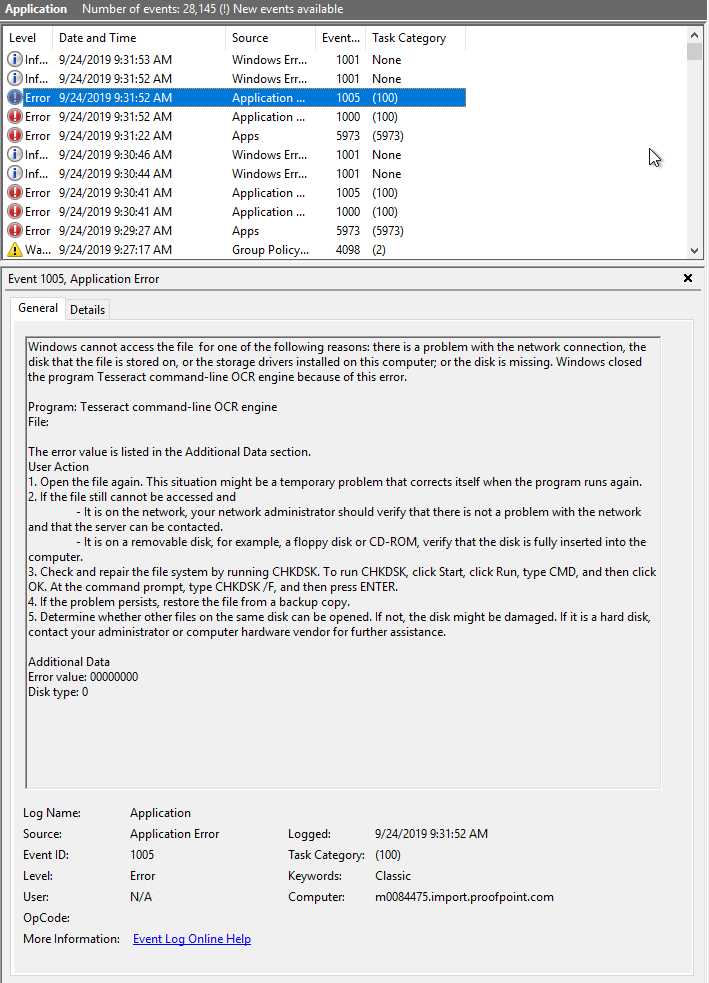
Can anyone suggest me with a fix? is there anything I'm missing during compilation procedure?
Suggested Fix:
 jkang-eng
All 14 comments
CMake builds are currently optimized for the build host architecture. So if you build on a PC with AVX2 hardware, the resulting binaries won't work (= will crash) on a PC without AVX2.
Either fix cmake/OptimizeForArchitecture.cmake or remove it from CMakeLists.txt.
 stweil
on 24 Sep 2019
stweil
on 24 Sep 2019
Builds using autoconf will work.
stweil
on 24 Sep 2019
@stweil Thanks for your suggestions.
Regarding your recommendation CMakeLists.txt, I'm compiling without following section in CMakeLists.txt and it seems to work on other Windows machine.
# auto optimize
# include(OptimizeForArchitecture)
#AutodetectHostArchitecture()
# OptimizeForArchitecture()
#foreach(flag ${Vc_ARCHITECTURE_FLAGS})
#     set(CMAKE_CXX_FLAGS "${CMAKE_CXX_FLAGS} ${flag}")
# endforeach()
When you mentioned build using autoconf, can you instruct me how to do this? I couldn't find autoconf usage under HowToBuild (Windows) instruction page.
jkang-eng
on 24 Sep 2019
With disabling optimization OCR process will be slow.
Autotools macros are common for linux and using them on Windows is very difficult.
Other option is to use cross-compiled windows build, but IMO it is not suitable for using tesseract API (library) on windows (VS Studio).
 zdenop
on 25 Sep 2019
zdenop
on 25 Sep 2019
With disabling optimization OCR process will be slow.
Autotools macros are common for linux and using them on Windows is very difficult.
Other option is to use cross-compiled windows build, but IMO it is not suitable for using tesseract API (library) on windows (VS Studio).
Do you have any guess on what performance degradation would be without optimization ? (I will need to test performance anyways but was just curious if you can make any rough guess here)
Using cross-compiled windows build would be a problem for me, because I needed to changed the source code.
jkang-eng
on 25 Sep 2019
With image from issue 263 I got this results (tesseract 5.0.0-alpha-447-g52cf, Intel Core i7-6600U 2,60GHz 2.8 GHz; 8 GB ram; Windows 64 bit) - 5 runs:
With autooptimization: 26.177767169865813
Without autooptimization: 50.47452997387488
Update: I posted more details in #263
zdenop
on 26 Sep 2019
Now you can turn off cmake autooptimization with:
cmake .. -DAUTO_OPTIMIZE=OFF
zdenop
on 28 Sep 2019
@zdenop, did you specify CMAKE_BUILD_TYPE for your builds?
If not: please try latest Git master. It should be significantly faster.
stweil
on 29 Sep 2019
@stweil: I used cmake&ninja&clang and this combinations needs to specify CMAKE_BUILD_TYPE. So yes, I specify it (to Release).
zdenop
on 29 Sep 2019
@zdenop Hi, thanks for testing the performance with optimization on/off.
Update: I posted more details in #263
In your post, you mentioned
- tessdata_best
- tessdata_fast
- tessdata
Does this mean if I use eng.traineddata from each git, OCR engine will perform differently based on trained data file? In other words, if I swap exsiting eng.traineddata with the one from "tessdata_fast", would it increase performance?
After reading some doc, it looks like eng.traineddata has effect when using LSTM engine. I don't explicitly specify engine mode when executing. is LSTM used by default?
jkang-eng
on 30 Sep 2019
if I swap existing eng.traineddata with the one from "tessdata_fast", would it increase performance?
I am not sure how do you measure performance, but tessdata_fast model is faster version of tessdata_best. It has some limitations (e.g. you can do training only from best model, and best model provide better OCR result - at least in some cases).
is LSTM used by default?
>tesseract --help-oem
OCR Engine modes:
  0    Legacy engine only.
  1    Neural nets LSTM engine only.
  2    Legacy + LSTM engines.
  3    Default, based on what is available.
what is available => tessdata_best and tessdata_fast have only LSTM models (you will get error if you will use --oem 0: Failed loading language 'eng' Tesseract couldn't load any languages! Could not initialize tesseract), tessdata has also legacy model.
zdenop
on 30 Sep 2019
@zdenop Thanks, that makes sense.
Quick question regarding compilation (will create a new ticket if needed)
I'm using cmake to compile (shown below), which generate 64-bit executable. Is there any way to build 32-bit env executable?
:: Compile Tesseract
cd build\tesseract_src
cppan

cd ..
cmake tesseract_src
cmake --build . --config Release
Can I achieve all the same behavior above by using msbuild ? (Visual Studio compilation)
jkang-eng
on 7 Oct 2019
- IMO original topic is solved, so I will close this issue.
- Issue tracker is for bug and not for support. Please use forum or better - read cppan doc. It is external project.
zdenop
on 7 Oct 2019
Got it. Thanks for the help.
jkang-eng
on 7 Oct 2019
Related issues
 clarkk
·
3Comments
clarkk
·
3Comments
 YeisonVelez11
·
5Comments
YeisonVelez11
·
5Comments
 Shreeshrii
·
4Comments
Shreeshrii
·
4Comments
 johnthagen
·
6Comments
clarkk
·
6Comments
johnthagen
·
6Comments
clarkk
·
6Comments
Most helpful comment
CMake builds are currently optimized for the build host architecture. So if you build on a PC with AVX2 hardware, the resulting binaries won't work (= will crash) on a PC without AVX2.
Either fix
cmake/OptimizeForArchitecture.cmakeor remove it fromCMakeLists.txt.