Tesseract: Text in tables ignored
Hello,
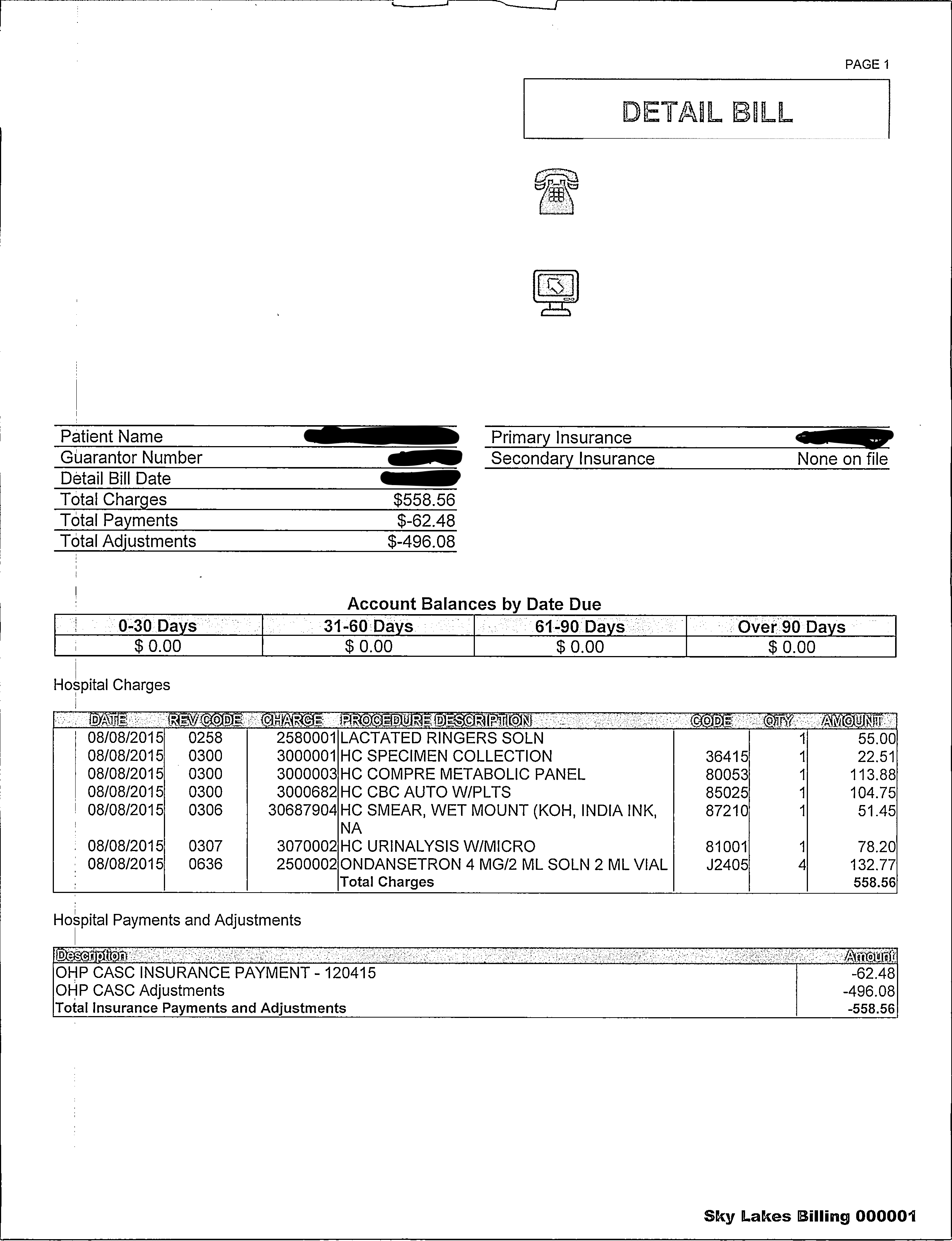
When I try to OCR the attached image, digits and text inside table is ignored. This happens more when image contains multiple tables. Tests are done in MacOS and Ami Linux with the latest tesseract version.
Thanks in advance.
 mariopinderist
All 13 comments
Ooooh yeah!) Best part in tesseract !))
I wasted year for this problem !)
 EynsherKiel
on 14 Oct 2018
EynsherKiel
on 14 Oct 2018
Similar issue here.
Using Tesseract v4.0.0-rc3-3-g68a9 with Leptonica.
tesseract 4.0.0-rc3-3-g68a9
 leptonica-1.77.0
  libjpeg 8d (libjpeg-turbo 1.5.0) : libpng 1.6.25 : libtiff 4.0.6 : zlib 1.2.8
 Found AVX2
 Found AVX
 Found SSE
I believe this to be the latest build as I did a pull and built both Tesseract and Leptonica from scratch.
My issue is that the engine is not recognising text within the boxes (see attached image). This also happened for me with v4.0.0Alpha with Leptonica.
The command I am using is tesseract BoxValues.jpg output --oem 1 --psm 1 --tessdata-dir /home/osboxes/build/tesseract/tessdata
I am getting the following text returned.
Previous Payments & New Total Balance
Balance Credits Charges Balance Due
If I run with tesseract BoxValues.jpg output --oem 0 --psm 3 --tessdata-dir /home/osboxes/build/tesseract/tessdata I get the same results.
FYI I am using the best engine as located here : https://github.com/tesseract-ocr/tessdata_best/blob/master/eng.traineddata
I also get the same issue with the standard engine located here : https://github.com/tesseract-ocr/tessdata/blob/master/eng.traineddata
Also I am using osd.traineddata from here https://github.com/tesseract-ocr/tessdata/blob/master/osd.traineddata
I also get the same issue when I use color images of the same layout. I have also seen issues similar to mariopinderist is experiencing, where a value is either missed, or returns garbage... in this instance if I chop the text out, and OCR it, its fine.
Any ideas why this issue is occurring?

If I use the debugger tool, and I can see that only the hatching box is detected. I would expect all boxes to at least be detected.

P.S. I don't expect it to get the value in the hatching, but I do expect the values in the boxes to be captured.
 nusynergi
on 15 Oct 2018
nusynergi
on 15 Oct 2018
I have the same problem with words in boxes. @EynsherKiel did you solve the problem?
 ricardomga
on 22 Oct 2018
ricardomga
on 22 Oct 2018
I did a rebuild today with the following updated version of Tesseract.
tesseract 4.0.0-1-g2a2b
 leptonica-1.77.0
  libjpeg 8d (libjpeg-turbo 1.5.0) : libpng 1.6.25 : libtiff 4.0.6 : zlib 1.2.8
 Found AVX2
 Found AVX
 Found SSE
I did a rebuild of Leptonica too and noted updates (among others) to these files
prog/boxa1_reg.c | 6 +-
prog/boxa2_reg.c | 5 +-
prog/boxa3_reg.c | 138 +++++++++++++
prog/boxap1.ba | 129 ++++++++++++
prog/boxap2.ba | 303 ++++++++++++++++++++++++++++
prog/boxap3.ba | 15 ++
prog/boxap4.ba | 53 +++++
prog/boxap5.ba | 553 +++++++++++++++++++++++++++++++++++++++++++++++++++
prog/displayboxa.c | 17 +-
I was hopeful they may be the culprit but I noted no change in the results documented above.
What do we need to do to get this issue looked at by some from the development group? Does anyone know a workaround?
nusynergi
on 29 Oct 2018
Can a contributor please comment on here? This was posted 26 days ago. Sorry to tag but not sure what else to do.
@stweil
nusynergi
on 6 Nov 2018
I am not aware of recent or planned activities to improve such layout detection issues.
 stweil
on 6 Nov 2018
stweil
on 6 Nov 2018
Thanks @stweil . I think the box detection issue is one problem. But completely missing the text in the boxes is another. Would you class this as a bug/accuracy issue. Can anyone else comment please.
nusynergi
on 7 Nov 2018
Sure, nobody wants to miss relevant text. I already added the accuracy label.
stweil
on 7 Nov 2018
I've done one test with a simple table, synthetical generated "scan":
out.pdf, 600dpi, b/w (PS: Recognition done from 600dpi TIF, but can't upload this)
Generated from this pdf:
ocr-zahlen.pdf
A few figures are added/changed, and some columns are sometimes missing.
When using 300 dpi gray image, there are a few less/other errors.
Kind regards, Jochen
output (wdiff style)
Artikel-Nr. [-| Warengruppe|-]→→{+Warengruppe+}→Menge [-Einzelpreis| MwSt%-]→{+Einzelpreis→MwSt→%+}→Gesamtpreis
88.193.554→6→16→168,75→19→3.213,00
46.923.325→1→75→873,01→7→70.059,05
16.636.042→7→2→5,30→19→12,61
71.574.789→1→1→248,47→19→295,68
29.695.829→10→45→13,18→{+7+}→634,62
66.618.400→2→6→146,71→{+7+}→941,88
32.142.244→3→21→3,27→19→81,72
66.467.954→1 [-361,48-]→{+1→561,48+}→7→600,78
24.910.833 [-9-]→{+5+}→3→441,24→19→1.575,23
5.790.076→1→83→3,27→19→322,98
92.072.281→1→1→313,34→7→335,27
95.057.999→1→1→660,13→19 [-785,955-]→{+785,55+}
9.587.128→1→65→972,43→19→75.217,46
2.434.509→1→41→95,50→19→4.659,45
33.372.869→6→83→113,21→{+7+}→10.054,18
77.627.319→1→1→29,79→{+7+}→31,88
85.263.688→1→22→392,84→19→10.284,55
75.611.213→6→21→722,22→19→18.048,28
[-83.332.602-]
{+83.532.602+}→3→{+4+}→10,00→{+7+}→42,80
2.165.747→7→{+8+}→10,20→{+7+}→87,31
90.935.780→1→12→65,37→19→933,48
36.701.968→1→15→47,33→7→759,65
61.464.130→4→35→307,26→19→12.797,38
73.425.868→1→41 [-534,45-]→{+54,45→7+}→2.388,72
45.817.013→4→{+6+}→247,20→{+7+}→1.587,02
20.734.360→4→{+5+}→747,85→19→4.449,71
72.963.876→3→85→175,59→7→15.969,91
38.652.314→1→18 [-383,45-]→{+583,45+}→19→12.497,50
[-33.950.746-]
{+53.950.746+}→3→45→436,37→7→21.011,22
76.379.939→6→1→729,72→19→868,37
63.663.123→3→17→3,06→7 [-35,66-]→{+55,66+}
43.290.183→1→76→13,75→19→1.243,55
62.285.481→9→1→502,80→7 [-338,00-]→{+538,00+}
17.941.150→3→41→0,55→19→26,83
19.994.659→1→1→723,46→19→860,92
50.350.515→6→19→670,41→19→15.157,97
Summe→288.430,17
 jbarth-ubhd
on 31 Jul 2019
jbarth-ubhd
on 31 Jul 2019
DPI is missing from this image. I tried using a config file with DPI override parameter and I saw a lot more text come out: "user_defined_dpi 200"
Hello,
When I try to OCR the attached image, digits and text inside table is ignored. This happens more when image contains multiple tables. Tests are done in MacOS and Ami Linux with the latest tesseract version.
Thanks in advance.
 tenatus
on 24 Oct 2019
tenatus
on 24 Oct 2019
+1 on this problem
 khokho
on 15 Jul 2020
khokho
on 15 Jul 2020
i wrote this to remove the vertical lines from a table
import cv2
import sys

def main(img_n):
    img = cv2.imread(img_n,0)
    fld = cv2.ximgproc.createFastLineDetector(20,5,300,450,3,1)
    lines = fld.detect(img)

    img = cv2.imread(img_n,cv2.IMREAD_COLOR)

    for line in lines:
        x1, y1, x2, y2 = line[0]
        if abs(y1 - y2) > 150:
            cv2.line(img, (x1, y1), (x2, y2), (255, 255, 255), 40)
    cv2.imwrite(img_n, img)

img_n = sys.argv[1]
print(img_n)
main(img_n)
 nicman23
on 26 Jul 2020
nicman23
on 26 Jul 2020
I usually use https://scandocflow.com for tables and invoice like docs data extraction
 ocr-avenger
on 25 Aug 2020
ocr-avenger
on 25 Aug 2020
Related issues
 spajak
·
4Comments
spajak
·
4Comments
 dthrock
·
5Comments
dthrock
·
5Comments
 lqhart
·
4Comments
lqhart
·
4Comments
 YeisonVelez11
·
5Comments
YeisonVelez11
·
5Comments
 ivder
·
7Comments
ivder
·
7Comments
Most helpful comment
Sure, nobody wants to miss relevant text. I already added the accuracy label.