Teslamate: Teslamate is unable to login: Timeout (even after 1.21.5 & 1.21.6 upgrade)
Describe the bug
Teslamate timeout when trying to login. Even after update. Changed my IP to see if it was blocked but it did not help. Created an second tesla account with the same result. Also updated to edge but did not help.
Expected behavior
Able to login to tesla API to track data.
How to reproduce it (as minimally and precisely as possible):
- Go to Settings
- Click on Sign out and try to login again
- See error in Unraid docker log:
-->
2021-03-03 15:41:28.310 [error] GET https://auth.tesla.com/oauth2/v3/authorize -> error: "timeout" (5010.060 ms)
2021-03-03 15:41:28.310 [error] GET https://auth.tesla.com/oauth2/v3/authorize -> error: "timeout" (5010.060 ms)
2021-03-03 15:41:47.164 [error] GET https://auth.tesla.com/oauth2/v3/authorize -> error: "timeout" (5016.514 ms)
also:
2021-03-03 11:13:41.268 [error] GET https://owner-api.teslamotors.com/api/1/vehicles/***-> error: "timeout" (5003.063 ms)
2021-03-03 11:13:41.268 [warn] TeslaApi.Error / timeout
2021-03-03 11:13:41.268 car_id=1 [error] Error / :unknown
Environment
- Version | 1.21.5
- Type of installation: Docker
- OS TeslaMate is installed on: Unraid (Linux)
- User OS & Browser: Win10 & Firefox/Edge/Chrome
 dasolid
All 44 comments
Works for me. Who knows what Tesla is doing right now. Give it another try later.
 adriankumpf
on 3 Mar 2021
adriankumpf
on 3 Mar 2021
Same problem here.
teslamate_1 | 2021-03-03 14:27:55.109 [warn] Token refresh failed: %TeslaApi.Error{
teslamate_1 | 2021-03-03 14:27:55.713 [error] Error / unauthorized
teslamate_1 | 2021-03-03 15:04:24.067 [info] GET https://auth.tesla.com/oauth2/v3/authorize -> 200 (357.065 ms)
teslamate_1 | 2021-03-03 15:04:24.481 [error] POST https://auth.tesla.com/oauth2/v3/authorize -> 401 (408.528 ms)
teslamate_1 | 2021-03-03 15:04:41.549 [info] GET https://auth.tesla.com/oauth2/v3/authorize -> 200 (345.842 ms)
teslamate_1 | 2021-03-03 15:04:41.983 [error] POST https://auth.tesla.com/oauth2/v3/authorize -> 401 (428.255 ms)
teslamate_1 | 2021-03-03 15:04:46.071 [info] GET https://auth.tesla.com/oauth2/v3/authorize -> 200 (291.243 ms)
teslamate_1 | 2021-03-03 15:04:46.528 [error] POST https://auth.tesla.com/oauth2/v3/authorize -> 401 (450.408 ms)
 HakKil
on 4 Mar 2021
HakKil
on 4 Mar 2021
Works for me. Who knows what Tesla is doing right now. Give it another try later.
Have this Problem for +-14days already.
If you need more information I'm really happy to help.
dasolid
on 4 Mar 2021
Interestingly, Teslamate works for me flawlessly, but a few days ago I played around with TeslaJS and had timeouts in two different tesla auth services.
Did the following changes which solved my problem: https://github.com/mseminatore/TeslaJS/commit/2e89bc3b6399a066e42e5d7c52fa09e8951a74e6
Especially the OPs timeout (!) problem sounds veeery similar so I thought I'd let you know, maybe saves someone some time :)
 naxan6
on 4 Mar 2021
naxan6
on 4 Mar 2021
Same issue on version 1.21.5 using Docker on Unraid
2021-03-07 13:13:14.202 [info] GET /sign_in
2021-03-07 13:13:14.210 [info] Sent 200 in 8ms
2021-03-07 13:13:29.845 [error] GET https://auth.tesla.com/oauth2/v3/authorize -> error: "timeout" (5056.822 ms)
 NickLisa
on 7 Mar 2021
NickLisa
on 7 Mar 2021
Same issue on version 1.21.5 using Docker on Unraid
2021-03-07 13:13:14.202 [info] GET /sign_in
2021-03-07 13:13:14.210 [info] Sent 200 in 8ms
2021-03-07 13:13:29.845 [error] GET https://auth.tesla.com/oauth2/v3/authorize -> error: "timeout" (5056.822 ms)
@dasolid
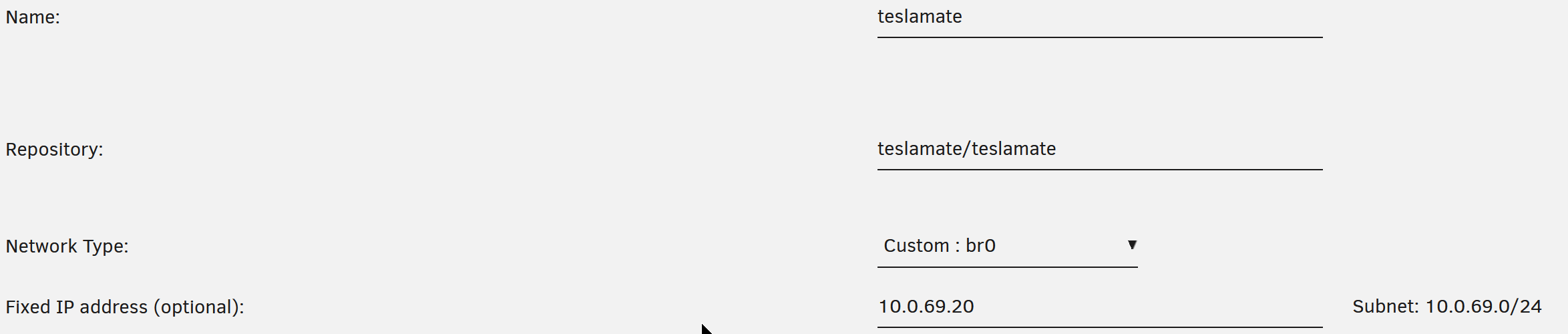
Solved by using custom bridge interface for each container so they got their own IP address instead of using default "bridge"
NickLisa
on 7 Mar 2021
Same issue on version 1.21.5 using Docker on Unraid
2021-03-07 13:13:14.202 [info] GET /sign_in
2021-03-07 13:13:14.210 [info] Sent 200 in 8ms
2021-03-07 13:13:29.845 [error] GET https://auth.tesla.com/oauth2/v3/authorize -> error: "timeout" (5056.822 ms)@dasolid
Solved by using custom bridge interface for each container so they got their own IP address instead of using default "bridge"
Sadly, did not resolve my problem. Tryed your method and also the host config with no avail. Same error messages (token timeouts)
It would also be strange that it had something to do with that, internet connectivity is not the problem it seems even while in bridge mode.
Just out of curiosity: All other services provide a 2FA option. Could it be that people not having trouble have 2FA disabled on the tesla side?
dasolid
on 7 Mar 2021
Just out of curiosity: All other services provide a 2FA option. Could it be that people not having trouble have 2FA disabled on the tesla side?
It works for me and I have 2FA disabled.
Never enabled it because of fear that something with Teslamate (or other apps i stumble upon) could break 😋
Disclaimer: you should always enable 2FA ASAP 😅
naxan6
on 9 Mar 2021
Add me to the list of people who cannot log in with 1.21.5
 steve28
on 10 Mar 2021
steve28
on 10 Mar 2021
Alright, something funky is going on. I've tried on 4 devices now to do a fresh install of TeslaMate and every time I get a timeout when trying to authenticate.
[error] GET https://auth.tesla.com/oauth2/v3/authorize -> error: "timeout" (60051.189 ms)
 wooter
on 10 Mar 2021
wooter
on 10 Mar 2021
I've tried on 4 devices now to do a fresh install of TeslaMate and every time I get a timeout when trying to authenticate.
I should point out that my timeout is on a fresh install as well
steve28
on 10 Mar 2021
Just chiming in - same problem, also on a fresh install.
Few notes:
- I do not have 2FA on (I know... I should)
- Other integrations (teslafi, tezlab) do successfully auth
 hillsalex
on 10 Mar 2021
hillsalex
on 10 Mar 2021
I was able to get in by directly entering my tokens. Here are the steps I did:
- Obtain new tokens. I did this by using the Auth for Tesla app on iOS, which seems to exist just for this purpose.
- Used the instructions starting with
spawn a shell in database dockerfrom this post
when I restarted the teslamate stack I was logged in.
steve28
on 10 Mar 2021
@steve28 unfortunately, do not have iOS, and all the other token-retrieval methods seem to have been broken by tesla within the past few days.
I can get a refresh token, but no access token. I'm sure it's trivial to get one from the refresh token, but that's beyond my current knowledge.
hillsalex
on 10 Mar 2021
I've released v1.21.6 which attempts to make the Tesla WAF happy again by changing the HTTP headers. This should fix the timeouts. Please update.
adriankumpf
on 10 Mar 2021
That seems to do it.
Don't forget to update the edge build too.
wooter
on 10 Mar 2021
Still getting timeout with 1.21.6, on fresh install
Not able to put tokens in manually either, cant enter to database getting "psql: error: FATAL: role "teslamate" does not exist"
 bloody2k
on 10 Mar 2021
bloody2k
on 10 Mar 2021
That did the trick for me - 1.21.6 is happy.
hillsalex
on 10 Mar 2021
Tried adding tokens manualy (with adminer) and iOS app but did not help.
Updated to 1.26.6 but still get timeouts :(
dasolid
on 11 Mar 2021
I am also getting a timeout when trying to log in on a fresh install with version 1.26.6
 freinbichler
on 11 Mar 2021
freinbichler
on 11 Mar 2021
Update to 1.21.6 fixed it for me as well, thanks! In case it is relevant, I had previously disabled 2FA while trying to fix this issue - i.e. it worked with 1.21.6 with 2FA disabled on the Tesla account.
 landler
on 11 Mar 2021
landler
on 11 Mar 2021
Update to 1.21.6 fixed it for me as well, thanks! In case it is relevant, I had previously disabled 2FA while trying to fix this issue - i.e. it worked with 1.21.6 with 2FA disabled on the Tesla account.
Did you have a fresh install?
bloody2k
on 11 Mar 2021
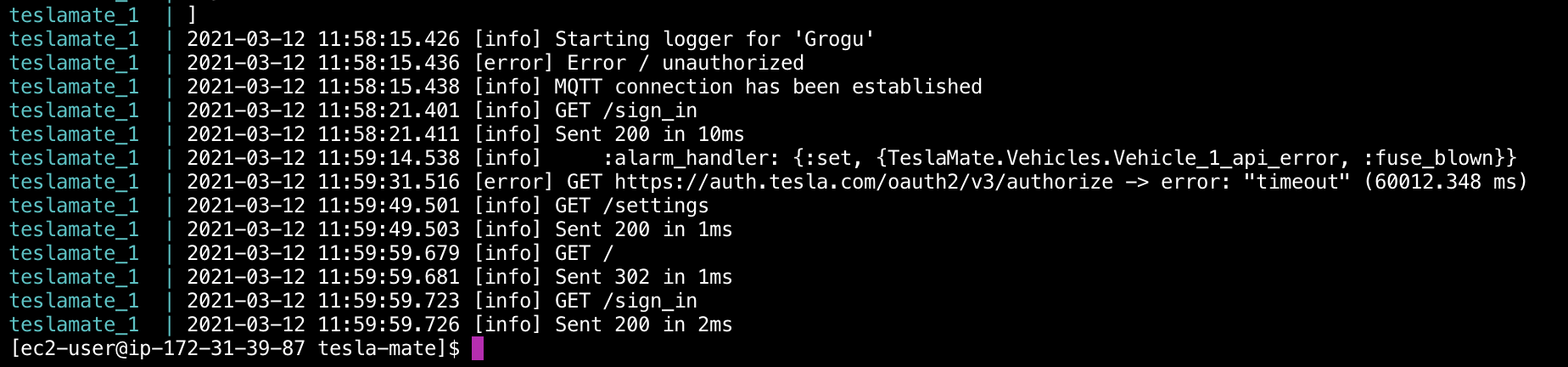
We are having the same problem:
 jonatannietoa
on 12 Mar 2021
jonatannietoa
on 12 Mar 2021
Update to 1.21.6 fixed it for me as well, thanks! In case it is relevant, I had previously disabled 2FA while trying to fix this issue - i.e. it worked with 1.21.6 with 2FA disabled on the Tesla account.
Did you have a fresh install?
Not a fresh install in the sense that I've been running Teslamate since v1.20.1 I think. After updating the docker image to 1.21.5 it was working great on the old token, but after I clicked sign out as per the release notes of v1.21.2 that's when the timeout issues started.
landler
on 12 Mar 2021
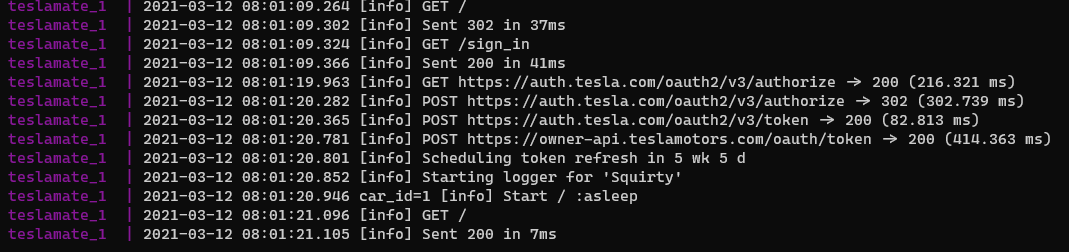
I had the same problem as others, but after getting the latest version and updating the container, I can log back in. This was across two different instances on two different machines (one on a Snyology NAS, and another on a Raspberry Pi). Sharing more as a data point for others.
 bahree
on 12 Mar 2021
bahree
on 12 Mar 2021
It seems that people who had earlier version running and was facing the problem, solves by upgrading to 21.6. But us ‘first time’ users still got timeout.
With absolutely no knowledge to the code, could it be connected to getting the refresh token? Existing users won’t be getting this, would they?
bloody2k
on 12 Mar 2021
It does not matter if it is a fresh installation or not; the code is the same. It is more likely due to the combination of IP address and HTTP headers that cause some requests to timeout. In the end, it is a problem on Tesla's side. If someone who gets a timeout could test other HTTP headers (e.g. the user-agent), that would be very helpful. For me, everything works reliably so far.
adriankumpf
on 12 Mar 2021
It works again after changing the WAN connection's IP address.
 erning
on 14 Mar 2021
erning
on 14 Mar 2021
Just chiming in, that I'm also getting the timeout on a fresh install done yesterday by following the https://docs.teslamate.org/docs/guides/traefik guide.
2021-03-14 09:46:05.688 [info] GET /sign_in
2021-03-14 09:46:05.690 [info] Sent 200 in 2ms
2021-03-14 09:47:14.359 [error] GET https://auth.tesla.com/oauth2/v3/authorize -> error: "timeout" (60076.158 ms)
2021-03-14 10:43:02.579 [error] GET https://auth.tesla.com/oauth2/v3/authorize -> error: "timeout" (60065.467 ms)
Anyone got a fresh install working?
 miklen
on 14 Mar 2021
miklen
on 14 Mar 2021
I got it working by manually adding the tokens to the DB as described here: https://github.com/adriankumpf/teslamate/issues/1412#issuecomment-795598049
@adriankumpf maybe you could add the option to manually add the tokens through the UI?
freinbichler
on 14 Mar 2021
After updating to version 1.21.6 my teslamate does not get any data after the car is starting to sleep. It is getting data while the car is awake.
teslamate_1 | 2021-03-15 00:07:40.282 [info] Migrations already up
teslamate_1 | 2021-03-15 00:07:44.604 [info] Version: 1.21.6
teslamate_1 | 2021-03-15 00:07:47.808 [info] tzdata release in place is from a file last modified Tue, 22 Dec 2020 23:35:21 GMT. Release file on server was last modified Sun, 24 Jan 2021 19:35:23 GMT.
teslamate_1 | 2021-03-15 00:07:49.318 [info] Tzdata has updated the release from 2020e to 2021a
teslamate_1 | 2021-03-15 00:08:45.033 [error] POST https://auth.tesla.com/oauth2/v3/token -> error: "timeout" (60215.121 ms)
teslamate_1 | 2021-03-15 00:08:45.034 [warn] Token refresh failed: %TeslaApi.Error{env: nil, message: "timeout", reason: :token_refresh}
teslamate_1 | 2021-03-15 00:08:45.034 [info] Scheduling token refresh in 1 h
HakKil
on 15 Mar 2021
I've tried getting the token using the same method as freinbichler did but I receive a failure:
_{"response":null,"error":"Endpoint deprecated: Please update your App.","error_description":""}_
 cyberlauncher
on 15 Mar 2021
cyberlauncher
on 15 Mar 2021
New installation for a friend, https:// tesla site login works fine, teslamate times out.
Log is very much the same as posted here many times.
Hope you find a solution, if i can do anything to help? Can give access if needed
 josok64
on 15 Mar 2021
josok64
on 15 Mar 2021
According to timdorr/tesla-api#339 traffic from AWS (and probably other cloud providers) seems to get blocked.
adriankumpf
on 16 Mar 2021
That's what I assumed. I am hosting on DigitalOcean (Frankfurt Region) which seems to be blocked as well.
That's why a UI to add/update the tokens manually on the login screen would make it a lot easier for people hosting on these providers.
freinbichler
on 16 Mar 2021
This teslamate is being set up at Hetzner cloud, Helsinki
On 16.3.2021 12.49, Adrian Kumpf wrote:
>
According to timdorr/tesla-api#339
https://github.com/timdorr/tesla-api/discussions/339 traffic from
AWS (and probably other cloud providers) seems to get blocked.—
You are receiving this because you commented.
Reply to this email directly, view it on GitHub
https://github.com/adriankumpf/teslamate/issues/1412#issuecomment-800154342,
or unsubscribe
https://github.com/notifications/unsubscribe-auth/AJIJ722A7J2677YR4CTAIHTTD4ZTRANCNFSM4YRMLQEA.
josok64
on 16 Mar 2021
Well, I'm hosting on my server at home.
Will try with a new IP address and let you know if that changes anything.
dasolid
on 16 Mar 2021
Sorry for missing this thread on the other one.
Well i got a bit further, tried the token method using the iOS app, but for some reason my teslamate-config page seems to not work anymore. Only gives me bad gateway or 404 after i manually inserted the token into the db. Any ideas?
EDIT: Also hosting on digitalocean in FRA, but shouldn't matter since i made the new token myself at home, right?
 iSuchtel
on 16 Mar 2021
iSuchtel
on 16 Mar 2021
I implemented user agent randomization. You can try out the changes with the latest teslamate/teslamate:edge release. However, I expect this to be blocked by Tesla soon. So if you're using one of the affected cloud providers, routing the network traffic through a VPN or hosting elsewhere is probably a more effective long-term solution.
adriankumpf
on 16 Mar 2021
1.22.0-dev, Tesla login succeeded. Thank you!
josok64
on 16 Mar 2021
1.22.0-dev THANK YOU for integrating 2FA and Token. Works
PS: For all UNRAID users, you need to configure a new docker net. With default bridge or host I could not get it to work still.
I also deleted my token in the DB manually. Perhaps this little info could also help.
dasolid
on 17 Mar 2021
Thank you for teslamate/teslamate:edge 1.22 Fingers crossed not blocked by Tesla, as routing via VPN not hosted by a cloud provider isn't an option here!
 cavit99
on 17 Mar 2021
cavit99
on 17 Mar 2021
Thanks for the feedback! I hope this will work for some time🤞
I guess this one can be closed then since v1.22.0 contains the workaround.
adriankumpf
on 17 Mar 2021
Hi @adriankumpf quick question - are we supposed to use edge instead of latest going forward? ty
looks like the data stopped on Feb for me. is there a way to get email notification when login fails?
 Rathna-K
on 4 May 2021
Rathna-K
on 4 May 2021
Related issues
 netkruzer
·
6Comments
netkruzer
·
6Comments
 kongomongo
·
5Comments
kongomongo
·
5Comments
 Highlander1694
·
3Comments
Highlander1694
·
3Comments
 DrMichael
·
4Comments
DrMichael
·
4Comments
 detritu5
·
4Comments
detritu5
·
4Comments
Most helpful comment
I've released v1.21.6 which attempts to make the Tesla WAF happy again by changing the HTTP headers. This should fix the timeouts. Please update.