Teslamate: Drives: How to add odometer to dashboard?
It would be great to have the possibility to view odo_start and odo_end in the drives dashboard:
This information is needed for the kilometer administration for the Dutch tax return ;-)
Any help to add odo_start and odo_end in the JSON panel is greatly appreciated.
 Eriktesla
All 15 comments
I think it used to be on the Drives dashboard, but to reduce the horizontal scrolling on the dashboard it was removed. I think it makes more sense on the Drive Details, under the smaller blocks in my opinion.

 cwanja
on 8 Oct 2020
cwanja
on 8 Oct 2020
The tax authorities impose the following requirements on the kilometer administration:
Drive date, drive ID, the start and end position of the odometer and the departure and arrival address.
The only items what I miss in the Drives dashboard is odometer start and odometer end.
If those items are available then it is a peace of cake to export all car trips (each trip is a row) to csv format.
Eriktesla
on 8 Oct 2020
The fields start_km and end_km are available in the table drives.
I'd have to look into the source to see how to integrate a new query and JSON in the necessary Drives dashboard, but basically you need to
- add "start_km, end_km," in both select queries.
- add 2 Column styles, one for start_km and the other for end_km
 wooter
on 8 Oct 2020
wooter
on 8 Oct 2020
I'm on it. Are above columns all you need?
Then I would suggest to build a new dashboard soley for the purpose of "Tax reporting" - what do you think?
 roadrash2108
on 9 Oct 2020
roadrash2108
on 9 Oct 2020
Yeah, I made it myself already; copying the Drives dashboard into a separate dashboard, and modifying the columns.
I can do a push request, but it's already a crowded table.
wooter
on 9 Oct 2020
This would be my proposal for the table:

roadrash2108
on 9 Oct 2020
Wow I am impressed! That is exact the information what is needed.
Maybe it is possible to add the column with the end date/time of the ride and a column with the duration of the ride.
That makes it complete.
Eriktesla
on 9 Oct 2020
New version:

Does that fit, @Eriktesla ?
roadrash2108
on 10 Oct 2020
@adriankumpf I'm sorry for my lack of knowledge, but can you give me some hints how to deliver this? (just create a new file in the repo with the JSON-model that I copy/paste out of my Grafana? If yes, I would suggest to deliver such "special reports" in a separate folder - simply create it or does it have to be created via Grafana?) Many thanks for guidance!
roadrash2108
on 10 Oct 2020
@roadrash2108 , super, thanks a lot!
Eriktesla
on 10 Oct 2020
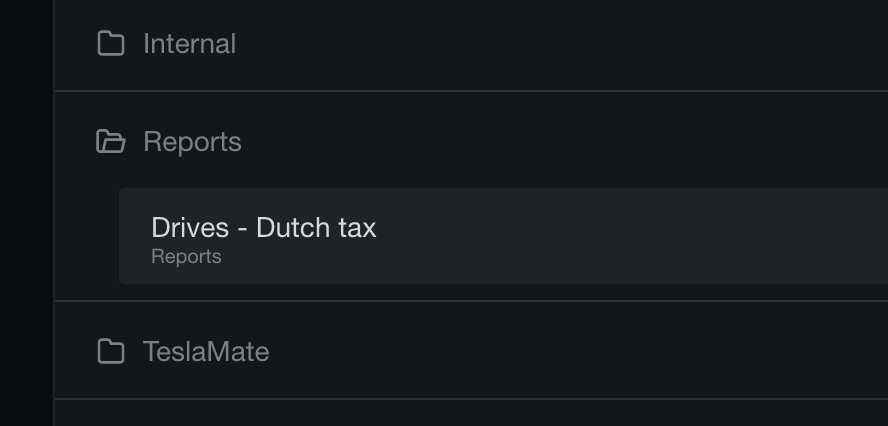
Will this end up showing up for everyone as "Dutch tax" dashboard if using the Docker image?
cwanja
on 13 Oct 2020
It'll show up in a separate folder:
 adriankumpf
on 13 Oct 2020
adriankumpf
on 13 Oct 2020
@Eriktesla can you please clarify if it is required to have the full address for start/end or is it suitable to have the name of the geofence/location in the report? many thanks!
roadrash2108
on 13 Oct 2020
@Eriktesla can you please clarify if it is required to have the full address for start/end or is it suitable to have the name of the geofence/location in the report? many thanks!
The geofence _should_ work. It is just a wrapper around the physical address. Now for the tax authorities purposes, maybe they need the address as opposed to ‘Grandma’s house’. Maybe there is a way the dashboard can ignore geofences.
cwanja
on 14 Oct 2020
@Eriktesla can you please clarify if it is required to have the full address for start/end or is it suitable to have the name of the geofence/location in the report? many thanks!
The full address for start/end is needed. Geofence addresses like home, work or mother's house are unfortunately not allowed be the Tax authority.
Eriktesla
on 14 Oct 2020
Related issues
 Try2Fly
·
5Comments
Try2Fly
·
5Comments
 phantom1584
·
4Comments
phantom1584
·
4Comments
 bahree
·
5Comments
bahree
·
5Comments
 olivercho
·
4Comments
olivercho
·
4Comments
 natrlhy
·
6Comments
natrlhy
·
6Comments
Most helpful comment
I'm on it. Are above columns all you need?
Then I would suggest to build a new dashboard soley for the purpose of "Tax reporting" - what do you think?