Teslamate: Updates Dashboard only showing last 4 updates
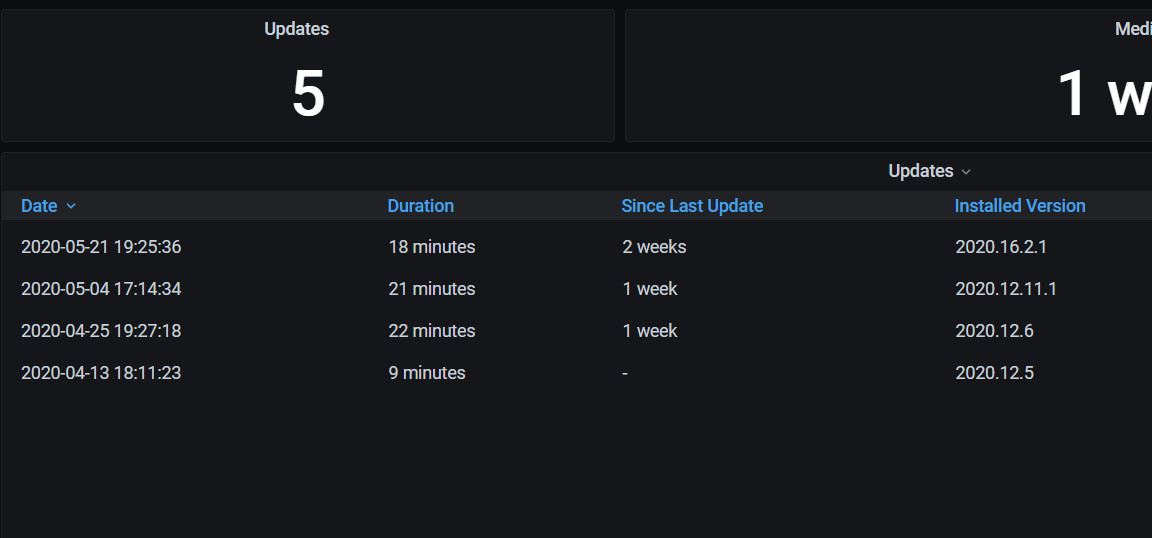
The recently updated "Updates" dashboard shows that I have had 5 updates since I installed and started using TeslaMate, which is correct. However only 4 are shown in the details below it.
 3rdStng
All 10 comments
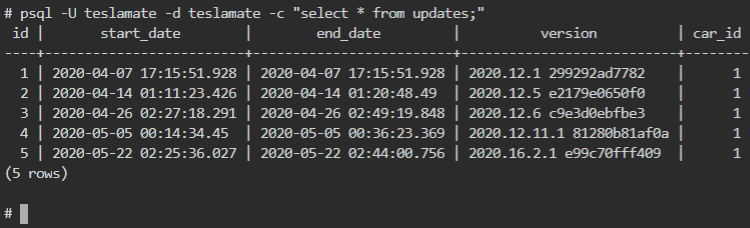
Could you run in the directory with your docker-compose.yml the follwing:
docker-compose exec database psql -U teslamate -d teslamate -c "select * from updates;"
And post the result?
 DrMichael
on 24 May 2020
DrMichael
on 24 May 2020
I didn't ever setup the docker-compose.yml file. I built individual dockers on my unRAID server and then pointed the settings to their respective locations. Everything appears to be working, but I feel like I missed a big step. None of my dashboards auto update like a friends does.
Should the YML file be on my main TeslaMate docker?
Regardless, here is the output from that psql command.
3rdStng
on 26 May 2020
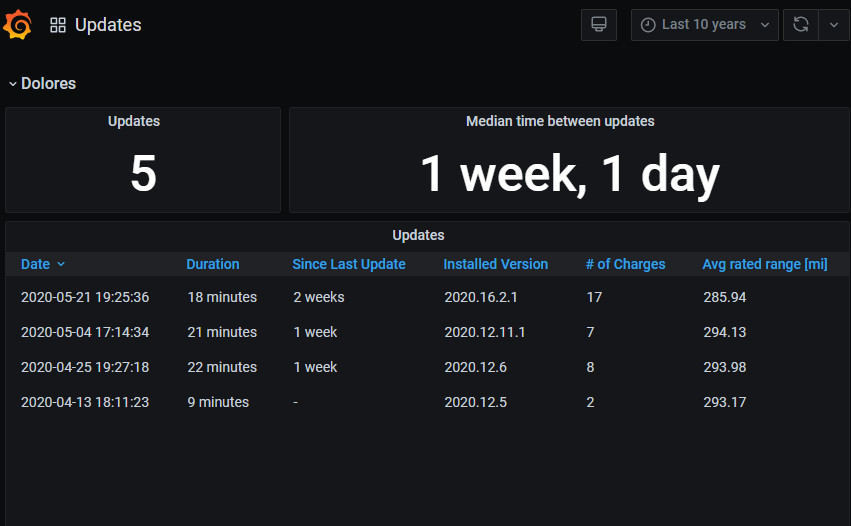
- Are you sure, that the upper right says "Last 10 years"?
- The missing update has a zero duration... Should not be an issue though.
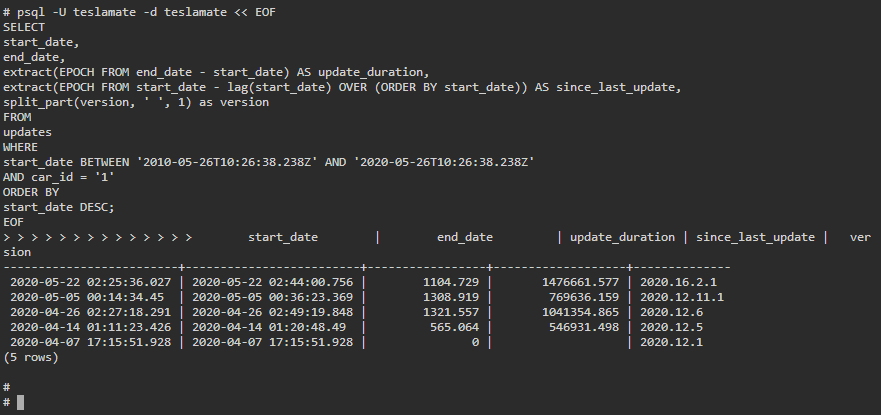
Could you please run:
docker-compose exec database psql -U teslamate -d teslamate << EOF
SELECT
    start_date,
    end_date,
    extract(EPOCH FROM end_date - start_date) AS update_duration,
    extract(EPOCH FROM start_date - lag(start_date) OVER (ORDER BY start_date)) AS since_last_update,
    split_part(version, ' ', 1) as version
FROM
  updates
WHERE
    start_date BETWEEN '2010-05-26T10:26:38.238Z' AND '2020-05-26T10:26:38.238Z'
    AND car_id = '1'
ORDER BY
  start_date DESC;
EOF
Yes. The last 10 years was the option set. However if I change this, the number of updates and what is displayed doesn't match. Within the last 7 days, I received 2020.16.2.1 and the dashboard show 1 update, but no details.
I don't believe this is a DB issue. This started after I manually updated the "Updates" dashboard in Grafana. However the output from your commands are below.
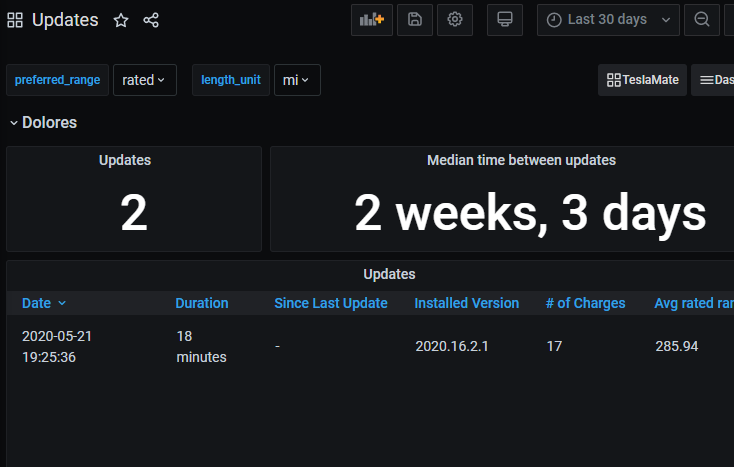
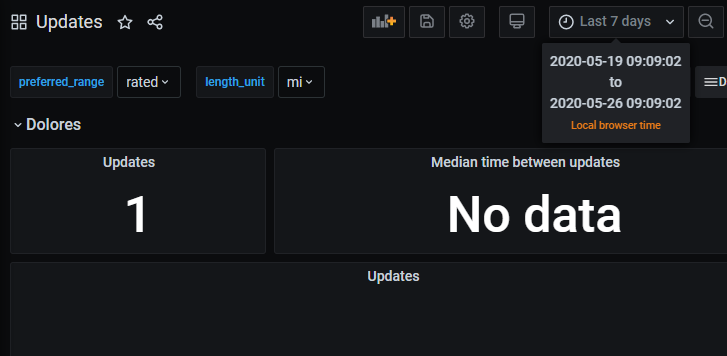
3rdStng
on 26 May 2020
Ah, you're using the latest updates.json from github... The SQL statement in there does not hit all updates. (Far too complex for my SQL knowledge...)
@Dulanic Could you have a look at the SQL statement?
DrMichael
on 27 May 2020
I'll put in a PR, it's because I mistakenly uses JOIN vs left join. It doesn't show because he had no charges or drives between 2 versions.
 Dulanic
on 27 May 2020
Dulanic
on 27 May 2020
Great!
DrMichael
on 27 May 2020
I say mistakenly, but I should have said I never imagined a scenario where someone would have - charges or drives between 2 updates :) That's poor insight on my behalf.
Dulanic
on 27 May 2020
Fixed with #762. Thanks @Dulanic!
 adriankumpf
on 27 May 2020
adriankumpf
on 27 May 2020
My Updates dashboard shows all my updates again. Thank you!
3rdStng
on 27 May 2020
Related issues
DrMichael
·
4Comments
 bahree
·
5Comments
bahree
·
5Comments
 netkruzer
·
6Comments
netkruzer
·
6Comments
 natrlhy
·
6Comments
natrlhy
·
6Comments
 olivercho
·
4Comments
olivercho
·
4Comments