Teslamate: WebSocket problem? in advance apache config can't make changes
I have problem with a TeslaMate with Apache as reverse proxy running on a Ubuntu 18.04. When I login to the page and want to make changes at the settings page, like change time for sleep mode or set the url to Grafana or web app. All I get is a "spinning beach ball". I have tried Safari, Firefox and Chrome on a Mac and IE edge and Chrome on a Win10
It looks like the whole website is refreshing all the time so that seems to cause that I can’t edit anything. I can’t even see the map on the first page, It’s just white there.
I'm not sure what log files I can provide you with and I'm not so good with docker, so not sure how to mount docker image and get logfiles from the image.
Please let me now what more info you need
 DariBer
All 24 comments
I had the same issues when I messed up the websocket portion of the reverse proxy config. Are you sure you got that right? You should check your apache logs to see if there are any errors.
I believe if you used the config suggested, they're at /var/log/apache2/access.teslamate.log
 tacotran
on 10 Apr 2020
tacotran
on 10 Apr 2020
Would it be too much to ask for if you can share your teslamate.conf config and of course change to teslamate.domain.com and grafana.domain.com and mask other sensitive config settings?
I looked into error.log and access.teslamate.log. I can’t see any error messages, just that I have accessed the page.
Do you remember what apache2 mod you have activated?
DariBer
on 10 Apr 2020
Eh, yes, mod_proxy_wstunnel has to be enabled also. Added to the doc.
 DrMichael
on 10 Apr 2020
DrMichael
on 10 Apr 2020
Hmmm, probably it needs also mod_auth_basic. Could you try it without?
DrMichael
on 10 Apr 2020
This is how my teslamate.conf (in /etc/apache2/sites-enabled) looks like for the teslamate reverse proxy. Grafana is working so I left that part out. after I did the confirmation I did do a a2ensite teslamate.
Define MYDOMAIN mydomain.com
Define LOG access.teslamate.log
<VirtualHost *:80>
ProxyPreserveHost On
ServerName teslamate.${MYDOMAIN}
CustomLog /var/log/apache2/${LOG} combined
RewriteEngine on
RewriteCond %{SERVER_NAME} =teslamate.${MYDOMAIN}
RewriteRule ^ https://%{SERVER_NAME}%{REQUEST_URI} [END,NE,R=permanent]
</VirtualHost>
<IfModule mod_ssl.c>
<VirtualHost *:443>
ProxyPreserveHost On
ServerName teslamate.${MYDOMAIN}
ProxyPass /live/websocket ws://127.0.0.1:4000/live/websocket
ProxyPassReverse /live/websocket ws://127.0.0.1:4000/live/websocket
ProxyPass / http://127.0.0.1:4000/
ProxyPassReverse / http://127.0.0.1:4000/
CustomLog /var/log/apache2/${LOG} combined
<Proxy *>
Authtype Basic
Authname "Password Required"
AuthUserFile /etc/apache2/.htpasswd
Require valid-user
</Proxy>
SSLCertificateFile /etc/apache2/cert/teslamate.${MYDOMAIN}/teslamate.${MYDOMAIN}.pem
SSLCertificateKeyFile /etc/apache2/cert/teslamate.${MYDOMAIN}/teslamate.${MYDOMAIN}.key
</VirtualHost>
</IfModule>
DariBer
on 10 Apr 2020
these are the apache2 mods I have that's enabled
/etc/apache2/mods-enabled$ ls
access_compat.load
auth_basic.load
authz_core.load
autoindex.conf
deflate.load
env.load
mime.load
negotiation.conf
proxy.load
reqtimeout.conf
setenvif.conf
ssl.conf
status.load
alias.conf
authn_core.load
authz_host.load
autoindex.load
dir.conf
filter.load
mpm_event.conf
negotiation.load
proxy_http.load
reqtimeout.load
setenvif.load
ssl.load
alias.load
authn_file.load
authz_user.load
deflate.conf
dir.load
mime.conf
mpm_event.load
proxy.conf
proxy_wstunnel.load
rewrite.load
socache_shmcb.load
status.conf
DariBer
on 10 Apr 2020
Eh, yes, mod_proxy_wstunnel has to be enabled also. Added to the doc.
I have that enabled, but still same problem
DariBer
on 10 Apr 2020
these are the apache2 mods I have that's enabled
poxy_http missing? auth_basic?
DrMichael
on 10 Apr 2020
proxy_http.load and auth_basic.load is in the list
DariBer
on 10 Apr 2020
Have you set the check origin to all the hosts you use to reach the Teslamate interface? From the environment variables page in the docs for the variable CHECK ORIGIN:
Configures whether to check the origin header or not. May be true (recommended), false (default) or a comma-separated list of hosts that are allowed (e.g. https://example.com,//another.com:8080). Hosts also support wildcards. If true, it will check against the host value in VIRTUAL_HOST
When adding more hosts through a reverse proxy you need to add them to the conf of Teslamate. For me im now running something like this:
CHECK_ORIGIN="//localhost,//192.168.1.11,https://teslamate.example.com"
This allows connection locally in the instance running Teslamate, locally in my network without having to bother with basic auth and then finally from the internet with SSL and authentication.
 SigLinJo
on 11 Apr 2020
SigLinJo
on 11 Apr 2020
@SigLinJo Sounds like a good idea.
do you have the same problem as I do. You can access the teslamate site, but you can't make any changes?
Do I put the "CHECK_ORIGIN=" in docker-compose.yml or in .env file?
My problem isn't the authentication problem, my problem is that I can't make any changes. or see the map where the car is. I would be able to use the iPhone bluetooth wake up or what the thing is cal, so that I don't miss any part of the trip
DariBer
on 11 Apr 2020
Yes I had the same problem as you, almost everything loaded but the important parts where grayed out and had a spinner on top when I hovered over them.
I'm running a manual install so I do the setup a little different. You could try to do the change in docker-compose.yml, in the first part of the config:
services:
teslamate:
environment:
- CHECK_ORIGIN=true
Change true to a list of the hosts you want to access Teslamate through.
But it should work if you have defined the same adress in .env: FQDN_TM=teslamate.example.com
and in the apache conf file teslamate.conf
I have run into this problem several times when I have done changes to my configs, but good to have secure settings :)
I saw in an other place that you have a self signed certificate, that could maybe also cause problems. I would strongly recommend you to look into Let's Encrypt. It is super easy to set up and takes away all warnings about unsecure connections in your web browsers...
SigLinJo
on 11 Apr 2020
If it's something I now, then it's certificate, I know the cert and my PKI solution is working, there's no problem with the encryption, I think more of that the reverse proxy can't handle javascript or something like that. I have seen this problem before when using ssl portals.
I'm about to try to see if I get same problem using Nginx
DariBer
on 11 Apr 2020
OK that's good to hear. I have it working with apache24 so it is possible. If you can get in to the Teslamate log you can check if it is the CHECK ORIGIN parameter that is the problem. When I had that problem I got a lot of: this in my log:
[error] Could not check origin for Phoenix.Socket transport.

Origin of the request: http://192.168.1.11

This happens when you are attempting a socket connection to
a different host than the one configured in your config/
files. For example, in development the host is configured
to "localhost" but you may be trying to access it from
"127.0.0.1". To fix this issue, you may either:

  1. update [url: [host: ...]] to your actual host in the
     config file for your current environment (recommended)

  2. pass the :check_origin option when configuring your
     endpoint or when configuring the transport in your
     UserSocket module, explicitly outlining which origins
     are allowed:

        check_origin: ["https://example.com",
                       "//another.com:888", "//other.com"]
and this is my reverse proxy conf with certificate handled by mod_md in apache. I have also implemented some header hardening:
</VirtualHost>

 MDomain teslamate.example.com
<VirtualHost *:443>
    Protocols h2 http/1.1
    ServerName teslamate.example.com
    ServerAlias www.teslamate.example.com
     <Proxy *>
         Authtype Basic
         Authname "Password Required"
         AuthUserFile /usr/local/etc/apache24/htpasswd/.htpasswd
         Require valid-user
     </Proxy>
    SSLEngine On
    SSLProxyEngine On
    ProxyRequests Off
    ProxyPreserveHost On
    ProxyHTMLInterp On
    ProxyHTMLExtended On
    ProxyHTMLURLMap (.*)192.168.1.11(.*) https://teslamate.example.com$2 [Rin]
    ProxyPass / http://192.168.1.11/

    RewriteEngine On
     RewriteCond %{HTTP:Upgrade} =websocket [NC]
     RewriteRule /(.*)           ws://192.168.1.11:80/$1 [P,L]
     RewriteCond %{HTTP:Upgrade} !=websocket [NC]
     RewriteRule /(.*)           http://192.168.1.11:80/$1 [P,L]


    ProxyPassReverse / http://192.168.1.11/

BrowserMatch "MSIE [2-5]" \
         nokeepalive ssl-unclean-shutdown \
         downgrade-1.0 force-response-1.0

    <IfModule mod_headers.c>
      Header always set Strict-Transport-Security "max-age=15768000; includeSubDomains; preload"
      Header always set Referrer-Policy "no referrer"
      Header always set Referrer-Policy "strict-origin"
      Header set X-Content-Type-Options "nosniff"
      Header always append X-Frame-Options DENY
      Header set X-XSS-Protection "1; mode=block"
      Header set Content-Security-Policy "frame-ancestors 'none'"
    </IfModule>
<Directory />
    AllowOverride none
    Require all denied
</Directory>
<Files ".ht*">
    Require all denied
</Files>

</VirtualHost>
I had a look into the WebSocket config, and it seems there's a problem with it.
I used wscat to see if I get any awnser. This is what I got
wscat --connect ws://localhost:4000
error: Error: unexpected server response (200)
wscat --connect ws://localhost:4000
error: Error: unexpected server response (200)
wscat --connect ws://localhost
error: Error: unexpected server response (302)
wscat --connect ws://localhost:4000/live/websocket
error: Error: unexpected server response (403)
wscat --connect ws://localhost:4000/websocket
error: Error: unexpected server response (404)
wscat --connect ws://localhost:4000
error: Error: unexpected server response (200)
wscat --connect ws://127.0.0.1:4000/live/websocket
error: Error: unexpected server response (403)
wscat --connect ws://127.0.0.1:4000
error: Error: unexpected server response (200)
This is what I got when I installed a test WebSocket server
wscat --connect ws://127.0.0.1:8010
Connected (press CTRL+C to quit)
I did change the - CHECK_ORIGIN= from true to false and I changed so that everyone can connect to the teslamate, by changing from - 127.0.0.1:4000:4000 (and all the other ports, 3000 and 1883) to only - 4000:4000 (same for the other ports).
so it seems at least in my installation that there is a WebSocket problem. can another confirm if it's working for them with WebSocket or not?
thanx in advance
DariBer
on 11 Apr 2020
I put some more time into this, I installed 1.19.0-dev manual and docker version and both 1.19.0-dev versions work with Apache2 as reverse proxy.
Not sure what's different between 1.18.2(latest release) and 1.19.0-dev when it comes to websocket and reverse proxy.
@adriankumpf is there any different that you know that makes it logical why 1.18.0 doesn't work and 1.19.0-dev does?
DariBer
on 12 Apr 2020
I used wscat to see if I get any awnser. This is what I got
wscat --connect ws://localhost:4000
error: Error: unexpected server response (200)
wscat --connect ws://localhost:4000
error: Error: unexpected server response (200)
wscat --connect ws://localhost
error: Error: unexpected server response (302)
That is to expect, no websockets there...
wscat --connect ws://localhost:4000/live/websocket
error: Error: unexpected server response (403)
wscat --connect ws://localhost:4000/websocket
error: Error: unexpected server response (404)
wscat --connect ws://127.0.0.1:4000/live/websocket
error: Error: unexpected server response (403)
403 is forbidden, so, you have an access problem.
404 is not found, probably no websocket there.
DrMichael
on 12 Apr 2020
OK, not sure how to change the access rights, or what config it is, will see what it could be. but then it's working with same config with 1.19-dev.
DariBer
on 12 Apr 2020
I have the same issue with 1.19.1.
I set up the environment first with docker-compose.yml standard setup. Then I migrated to the advanced setup with Apache2 but forgot to enable proxy_wstunnel. So I had mod_auth set up but not proxy_wstunnel. After enabling proxy_wstunnel I noticed that normal https requests were authenticated with my user, but wss requests were not.
I disabled the auth_basic part out of Apache and restarted apache, and both https and wss requests work.
I've reset the password in the generated .htaccess file to no avail. In the access log I see numerous wss requests without an user, interwoven with https requests with an user submitted.
I've implemented a less secure workaround by excluding the /live/websocket path from authentication:
       <Proxy *>
            Authtype Basic
            Authname "Password Required"
            AuthUserFile /etc/apache2/.htpasswd
            <RequireAny>
                <RequireAll>
                        Require expr %{REQUEST_URI} =~ m#^/live/websocket.*#
                </RequireAll>
            Require valid-user
            </RequireAny>
        </Proxy>
 wooter
on 23 Apr 2020
wooter
on 23 Apr 2020
@wooter are you using Safari? There's another bug here that discusses that
https://github.com/adriankumpf/teslamate/issues/415#issuecomment-587158745
tacotran
on 24 Apr 2020
@wooter are you using Safari? There's another bug here that discusses that
I'm using Safari but had similar results on Chrome on MacOS. Thanks for the tip!
wooter
on 24 Apr 2020
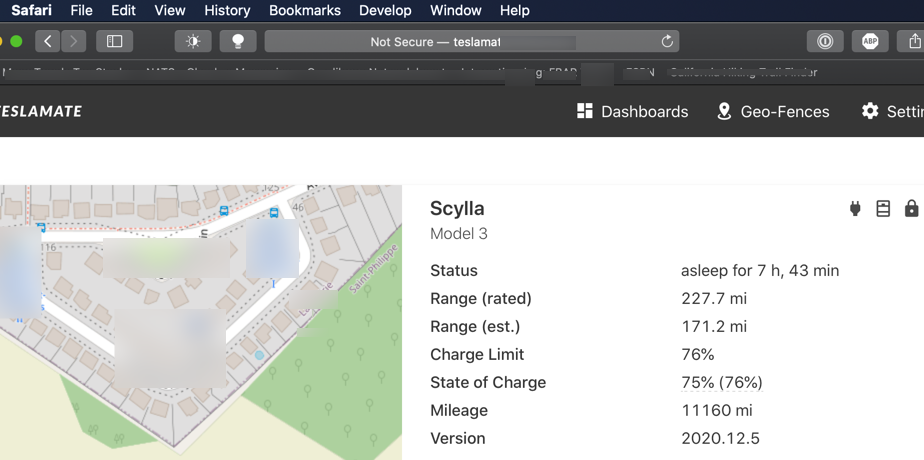
Safari bug seems gone in version 13.1.1
 baylanger
on 26 Apr 2020
baylanger
on 26 Apr 2020
are you using advance mode installation, reverse proxy, seems like you're not using HTTPS, as it say 'Not Secure'.?
DariBer
on 26 Apr 2020
You are right. I didn't realize my Safari "history" default to http. I was so happy it was finally working, back to using Firefox for Teslamate.
baylanger
on 26 Apr 2020
Related issues
 bahree
·
3Comments
bahree
·
3Comments
 spacecosmos
·
5Comments
spacecosmos
·
5Comments
 natrlhy
·
6Comments
natrlhy
·
6Comments
 detritu5
·
4Comments
bahree
·
5Comments
detritu5
·
4Comments
bahree
·
5Comments