Teslamate: Regularly repeating Online and Asleep
Hi
I found the car was repeating online and asleep constantly and regularly. My setting of 'Time to Try Sleeping' is 21mins and 'Idle Time Before Trying to Sleep' is 15mins, which add up 36mins. The car will keep online for exact 36mins and then sleep for an hour(accurately 52mins). How this happened?

 edward4hgl
All 34 comments
I had this issue until I disabled cabin overheat protection.
 lapean111
on 8 Apr 2020
lapean111
on 8 Apr 2020
I had this issue until I disabled cabin overheat protection.
In my case, it keeps online after disable cabin overheat protection, never sleep. Tested for 24hrs +. LOL
version: 2020.12.5 e2179e0650f0
X60D with MCU1+AP2.0
edward4hgl
on 9 Apr 2020
Reposting a comment of mine with general tips:
- Try disabling the Tesla App widget from your phone. When the widget it viewed it makes a connection the car which can prevent the car from sleeping or wake it up.
- Force close the Tesla App on your phone. Some android users have found that the Tesla App may be running in the background and keeping the vehicle awake for a period of time until the app shuts down.
- Make sure no other third-party loggers/services are connected to your account. Turn off any other monitoring app or site and change your Tesla.com password to invalidate your token used to obtain data from your vehicle. If any other sites or apps are also monitoring the data from your vehicle it may be trying to obtain data while TeslaMate is trying to allow the vehicle to sleep and preventing the car from sleeping.
- Make sure no key fobs or other bluetooth keys are near the vehicle. This may prevent the car from sleeping.
- Try restarting the onboard computer in the vehicle by holding down both scroll wheels on the steering wheel until the main screen restarts.
- Check your wifi connection to the vehicle. If the vehicle has a weak wifi signal it may be disconnecting and connecting to the wifi network repeatedly and preventing the vehicle from sleeping. If you think you may have a weak wifi signal try turning off wifi all together to test if things change.
- If you have a Model S or X built prior to March 2018 make sure 'Always Connected' is turned off and 'Energy Savings' is turned on in the vehicle.
- Disable Summon Standby-Mode: Found in the vehicle in Autopilot settings. Summon Standbye-Mode will keep the sensors, camera, and computers powered to reduce the amount of time required to begin Summon. This feature can be disabled all together or for Home, Work or Favorite Locations.
- Try disabling 'Cabin Overheat Protection' in the vehicle. This may keep the vehicles systems awake to monitor the inside temperature of the cabin on hot days and prevent it from sleeping.
 adriankumpf
on 10 Apr 2020
adriankumpf
on 10 Apr 2020
My Tesla does this from time to time, seems to wake up for 45 minutes, sleep for 45 minutes and back and forth until it is in a deep sleep.
Though two days ago, my Tesla has not been able to go to sleep at all after sleeping for roughly three days just fine. TeslaMate keeps ‘trying to fall asleep’. Do not think it is related to TeslaMate at all.
 cwanja
on 10 Apr 2020
cwanja
on 10 Apr 2020
@cwanja Yes, agree.
I tried for another day after executed every tips from @adriankumpf . It seems works at the beginning, for a whole night, the car was asleep since 11pm until 8:52am, but it back online likes a human being needs to work, LOL. I left the car in my garage for the rest of day, and it gone back to sleep in 1pm, for an 1hr nap, interesting.
edward4hgl
on 11 Apr 2020
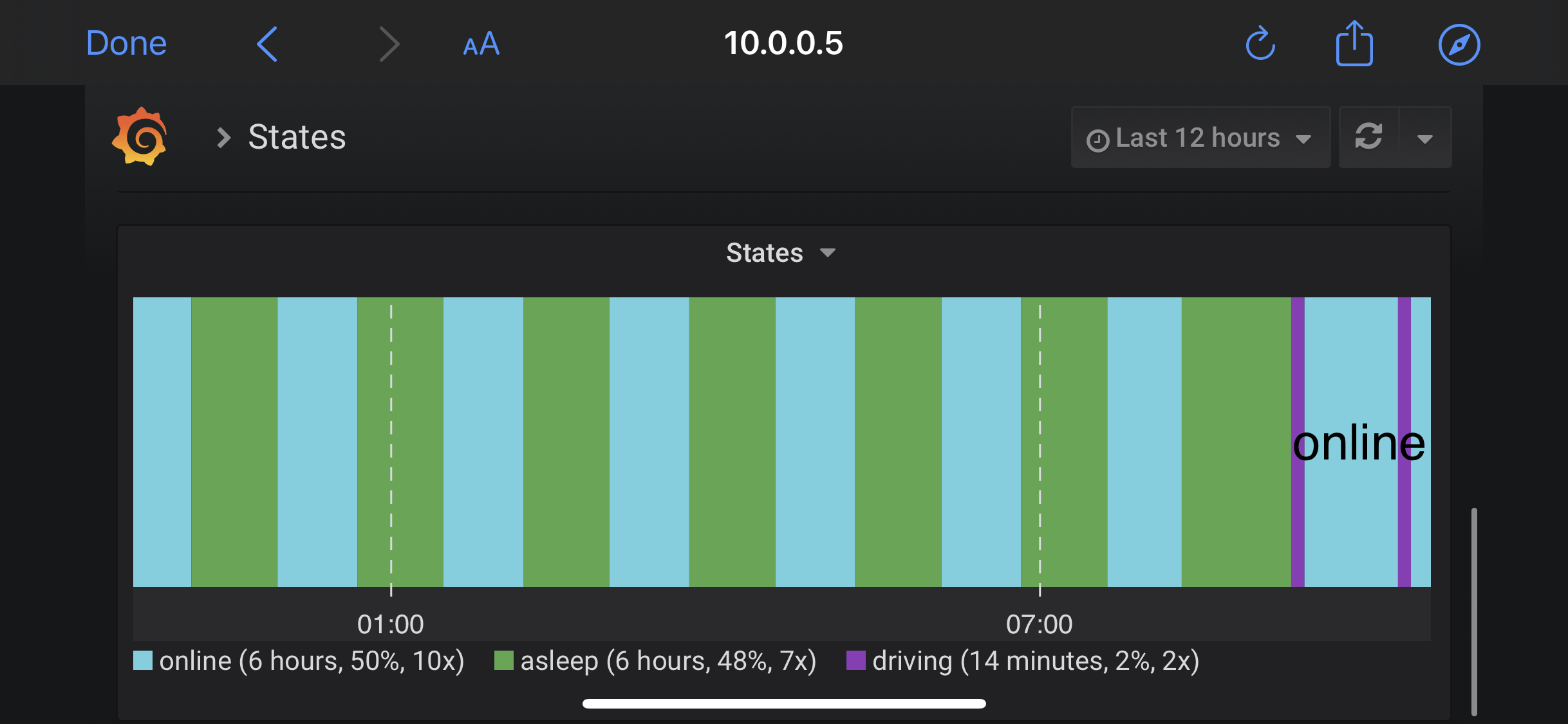
Seems my lack of sleeping was focused around the car looking for a key fob. When I got in to drive, with my key fob, it said it could not drive due to the key being in there. But as soon as I pressed the brake it worked. And after that drive, slept fine.
But I still see the same sleep pattern you do.
cwanja
on 11 Apr 2020
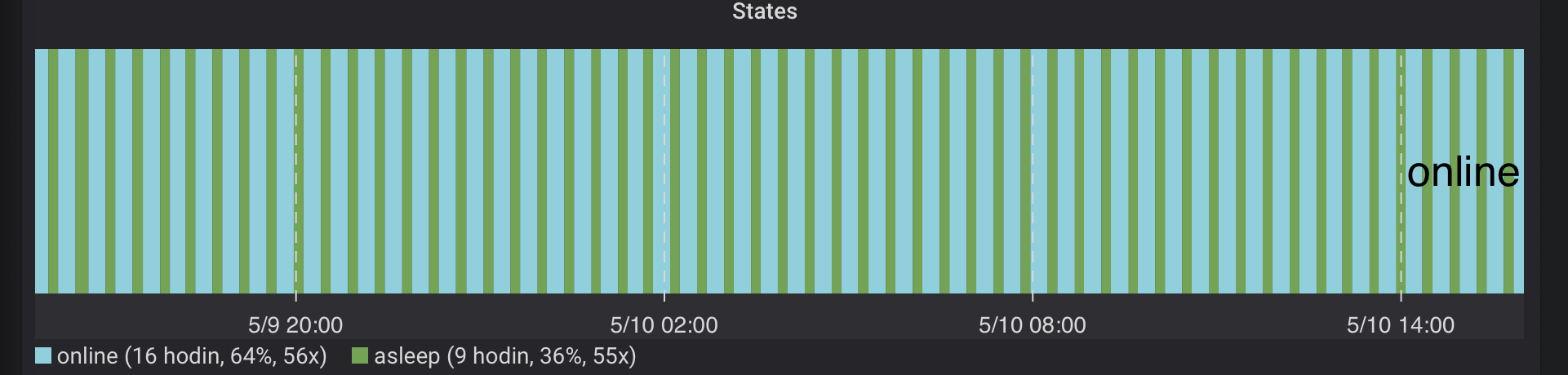
I have a very similar issue with a month old Model 3. I have been using TeslaMate 1.19.2 to monitor the car. Tesla was running on 2020.12.5, now is on 2020.12.11.2 and while parked it just cycles in an infinite loop 9 minutes of sleep and 17 minutes of on-line state. It never goes fully asleep for more than 9 minutes. Therefore the vampire drain is very high between 70-120W/h (12-20km/24h) even though I have everything possible switched off (sentry, alarm, ventilation, wifi, ...). Of course, I went through the check list @adriankumpf posted here with no luck to sort it out.
Do you have any ideas what could be the cause? Could be a problem in the streaming API preventing the car to fall in a deep sleep? Or if it is in the car, what could keep waking it up?
You can see a random day (24h interval) of States switching online and asleep here:
 petariga
on 11 May 2020
petariga
on 11 May 2020
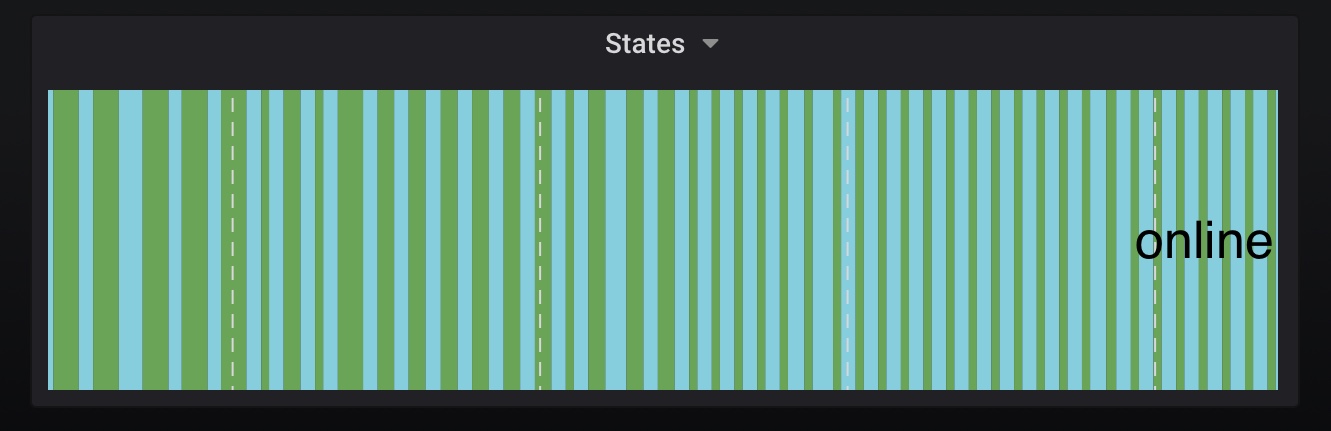
@petariga i have the same issue you describe, model 3 with latest firmware and latest version of teslamate. I see approximately 65W average drain, which is about twice what I see when I disable logging. Approximately same pattern as you, 10 mins asleep, 15 mins awake, although this can vary occasionally, but mostly the car is locked in this pattern.
 fzahle
on 11 May 2020
fzahle
on 11 May 2020
Thank you @fzahle , good to know that I am not the only one in this situation ;-). I've tried some experiments to get a little bit deeper into the issue and it seems that when the TeslaMate is not running, the car spends much shorter time on-line to fall asleep again (only 4 mins instead of 17 mins, however it still stays only 9 mins asleep. In this case I use ping to the car through wifi to recognise on-line & asleep states). So it seems that using streaming API has some negative influence on extending the on-line periods and keeping the car awakened, i.e. causing higher stand-by power drain. I wonder whether the values "Time to Try Sleeping" and "Idle Time Before Trying to Sleep", which can be set in the TeslaMate configuration (if the streaming API is switched off), can have any influence on this behaviour even while using the streaming API?
I contacted the local Tesla service centre, they just asked to stop using any 3rd party monitoring software, other than that they seem to be quite clueless what could be the cause.
petariga
on 19 May 2020
It is not normal for the car to never go to deep sleep and wake up every 10 minutes. I found a similar discussion on Teslafi's forum, where someone suggested that it was the 12V battery that was causing a wake-up to get recharged (which it clearly shouldn't do so often). I will also try to contact Tesla and see if I can get a more useful response.
fzahle
on 19 May 2020
It's not normal, but Tesla's answer has always been to disable 3rd party tools.
I've had experience with a Model X not going to sleep, which is because of 2 3rd party dash cams draining the 12V battery. What also seems to influence sleep is whether the car is connected to a charger or not.
 wooter
on 20 May 2020
wooter
on 20 May 2020
Thank you for pointing out a possible cause. My car is 2 months old, so there should not be issues with 12V battery, however, you can be never sure with Tesla ;-). I am considering another test - is it safe to connect Tesla's 12V battery to a standard 12V car charger and let the charger keep the 12V battery at the maximum level for about 10-20 hours or so - i.e. to do not provoke the wake up call due to low voltage?
petariga
on 20 May 2020
I've tried some experiments to get a little bit deeper into the issue and it seems that when the TeslaMate is not running, the car spends much shorter time on-line to fall asleep again (only 4 mins instead of 17 mins, however it still stays only 9 mins asleep. In this case I use ping to the car through wifi to recognise on-line & asleep states). So it seems that using streaming API has some negative influence on extending the on-line periods and keeping the car awakened, i.e. causing higher stand-by power drain.
When TeslaMate is running, it should usually take the aforementioned 15 minutes for the vehicle to fall asleep. When the vehicle wakes up, TeslaMate will poll it for 3 minutes via the API. After 3 minutes of idling, polling is halted and the vehicle falls asleep, which takes about 12 minutes. Here it does not matter if streaming is enabled or not. The 4 minutes you have seen may be explained by the fact that no polling has taken place before.
adriankumpf
on 22 May 2020
So I tried to connect my 12V battery to a charger for 24h. The voltage changed from 13,8V to 14,8V during the charging, there seem to be no issue with the 12V battery, it looks stable and fully charged. When the frunk was opened it wasn't able to fall asleep, however once I managed to get charging cables through a gap and closed the frunk, the Model 3 returned to its previous behaviour - still waking up after 9-10 minutes of being asleep.
I have a service centre appointment scheduled in 2 weeks, so will see then...
petariga
on 2 Jun 2020
There is a small progress with my online/asleep cycling issue or to be precise a possible workaround. I found out that when there is a mobile key (paired mobile phone) in the car or near to it, the switching of states stops and after about 15 mins the car can finally sleep continuously. The stand-by power consumption gets to normal 0,5% or 2,5km a day (average about 15-20W/h drain). Unfortunately, you need a spare phone or bluetooth beacon and it is probably not safe, because the car can be unlocked anytime. Would this help to stop the cycling pattern in your case @fzahle too? In a way it is similar to the observation of @cwanja - it seems that the car is looking for a key fob in an infinite loop.
petariga
on 8 Jun 2020
@petariga interesting observation. However, I park on the street, so wouldn’t really work for me. So it needs to be fixed, just haven’t gotten around to booking service yet.
fzahle
on 12 Jun 2020
@petariga I now tested this by leaving my phone in the locked car, and indeed my car has now slept like a baby three hours straight, nice work! Really good to know, and something to tell the service technicians.
fzahle
on 13 Jun 2020
Post-2020.20, the car essentially never wants to go back to sleep. 7+ hours last night. Going on 3+ this morning. Tried a reboot. Never used the mobile key yesterday, but did use it to start climate, open the trunk and unlock the doors. But used my fob after that. Still monitoring to try and identify the root cause. Had no issues pre-2020.20.
Edit: not sure what it is about the few hours and days post an update, but it seems back to normal. Sleeping fine.
cwanja
on 13 Jun 2020
I have just updated to 2020.20.12 and from my point of view it seems that this update has finally allowed my car to fall asleep continuously regardless the mobile key is present around the car or not. Tesla has hopefully fixed this glitch after 3 months. I will continue to monitor the car’s behavior more thoroughly in the coming days.
petariga
on 14 Jun 2020
Interesting @petariga, mine seems to be the opposite. Regressed with the latest update. Prior to 2020.20, it would go to sleep rather quickly and cycle through sleep / wake / sleep. Now, it seems to last 12 hours (watched it twice over two days) then go immediately into a deep sleep - no cycle.
2020.16
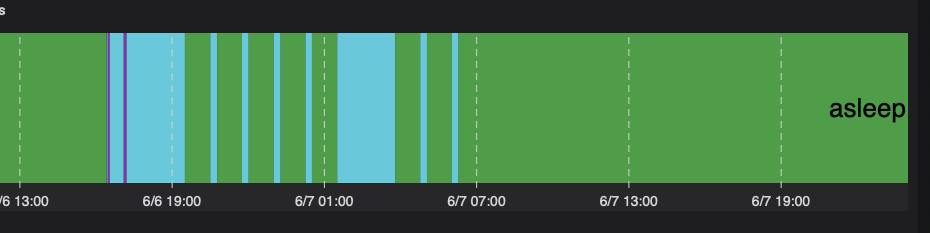
2020.20

cwanja
on 15 Jun 2020
@cwanja , it looks like they corrected the wrong "cycling on-line/asleep" behaviour for some cars and at the same time they ruined it for some others :-( . My car finally sleeps perfectly with the 2020.20.12. See the comparison of the previous switching of states and the last 2 days:


I assume the only thing what you can do about it is to repeatedly complain at the local Tesla service centre. I have had 4 visits in the last 2 months, my car spent almost two weeks there for monitoring and it seems that at the end, somebody noticed this software issue and Tesla was able to fix it. However, I have to admit that sometimes it was really hard to persuade technicians to pay attention to it.
petariga
on 16 Jun 2020
Seems like the issue is now also fixed for me after installing 2020.20.12. Finally I can start leaving TeslaMate on permanently!
fzahle
on 16 Jun 2020
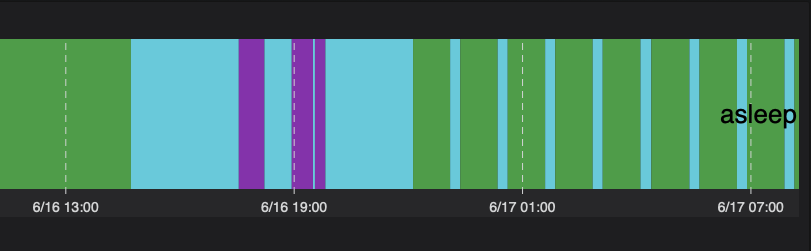
And then this happens. Who knows. 🤷🏽♂️ back to falling asleep quickly and cycling through. I imagine it will fall into a deep sleep in about an hour or so.
cwanja
on 17 Jun 2020
@cwanja does the presence of the mobile key in the vicinity of the car influence this behaviour anyhow? I can see from the beginning of this graph that it can fall asleep continuously (at least for about 2 hours or more). I would try to search, if there is anything what could change this cycling pattern into continuous sleeping - this always helps to persuade technicians in Tesla service centre that the problem is in the car and not somewhere else.
petariga
on 17 Jun 2020
@petariga I have an S, so no "official" mobile key. The newer behavior was when I did not use the Tesla app to perform any controls (unlock, mobile key, trunk, etc.). My previous post that shows long periods of online then solid sleep, I know at least one instance where I used the Tesla app to perform controls. More things to test and look into.
cwanja
on 17 Jun 2020
@cwanja sorry, I did not realize that you have the S. That might mean that they fixed it for 3, but ruined it for S... I would try to test the sleeping behaviour when the key fob is in the vicinity of the car, of course on some safe place.
petariga
on 17 Jun 2020
Any interesting update to this. Took the car out for a drive and was wrapping up the night when I walked past it (without a key) and hear the low humming. Grabbed my phone and check TeslaMate to see it was "falling asleep for 1 hour" (probably closer to two). So I tried something - cancelled the sleep attempt, waited for it to say online and then tried to sleep. Within less than an hour, TeslaMate was reporting it was asleep.
Am I wrong in thinking that in the previous Tesla software updates there is something that is not telling the car to go to sleep? Or is TeslaMate not allowing the car to go to sleep automatically, however if I tell it attempt to sleep it works? What I believe are the relevant logs from the last 10 hours pasted below - removing some "sensitive" items. Can paste them or send them directly to someone. @adriankumpf
Edit: one thing I am noticing is that it will go into the sleep / awake / sleep / awake cycle after “manually” putting it to sleep. Versus going into a deep sleep, but after being online for six to 12 hours.
[36mteslamate_1 |[0m 14:36:37.951 car_id=1 [info] Fetching vehicle state ...
[36mteslamate_1 |[0m 14:36:38.696 car_id=1 [info] Start / :asleep
[36mteslamate_1 |[0m 14:36:38.708 car_id=1 [info] Disconnecting ...
[36mteslamate_1 |[0m 15:16:05.476 [info] GET /
[36mteslamate_1 |[0m 15:16:05.498 [info] Sent 200 in 21ms
[36mteslamate_1 |[0m 15:16:22.849 [info] GET /
[36mteslamate_1 |[0m 15:16:22.872 [info] Sent 200 in 22ms
[36mteslamate_1 |[0m 15:16:46.652 [info] GET /settings
[36mteslamate_1 |[0m 15:16:46.690 [info] Sent 200 in 38ms
[36mteslamate_1 |[0m 15:17:01.206 [info] GET /
[36mteslamate_1 |[0m 15:17:01.230 [info] Sent 200 in 23ms
[36mteslamate_1 |[0m 18:47:23.058 car_id=1 [info] Start / :online
[36mteslamate_1 |[0m 18:47:23.104 car_id=1 [info] Connecting ...
[36mteslamate_1 |[0m 18:47:38.810 car_id=1 [info] Driving / Start
[36mteslamate_1 |[0m 18:48:22.533 car_id=1 [info] Driving / Ended / 0 km – 1 min
[36mteslamate_1 |[0m 18:48:22.535 car_id=1 [info] Start / :online
[36mteslamate_1 |[0m 18:49:03.755 car_id=1 [info] Driving / Start
[36mteslamate_1 |[0m 19:01:08.169 car_id=1 [info] Driving / Ended / 4 km – 12 min
[36mteslamate_1 |[0m 19:01:08.169 car_id=1 [info] Start / :online
[36mteslamate_1 |[0m 19:02:14.725 car_id=1 [info] Received stream data: :inactive
[36mteslamate_1 |[0m 19:02:45.174 [info] Stream.Timeout / 5
[36mteslamate_1 |[0m 19:03:15.683 [info] Stream.Timeout / 6
[36mteslamate_1 |[0m 19:05:59.223 car_id=1 [info] Suspending logging
[36mteslamate_1 |[0m 19:06:01.663 car_id=1 [info] Fetching vehicle state ...
[36mteslamate_1 |[0m 19:06:43.530 [info] Stream.Timeout / 5
[36mteslamate_1 |[0m 19:07:26.444 [info] Stream.Timeout / 6
[36mteslamate_1 |[0m 19:08:09.255 [info] Stream.Timeout / 7
[36mteslamate_1 |[0m 19:08:53.107 [info] Stream.Timeout / 8
[36mteslamate_1 |[0m 19:09:37.927 [info] Stream.Timeout / 9
[36mteslamate_1 |[0m 19:10:08.366 [info] Stream.Timeout / 10
[36mteslamate_1 |[0m 19:10:54.169 [info] Stream.Timeout / 11
[36mteslamate_1 |[0m 19:11:41.073 [info] Stream.Timeout / 12
[36mteslamate_1 |[0m 19:12:11.522 [info] Stream.Timeout / 13
[36mteslamate_1 |[0m 19:12:42.013 [info] Stream.Timeout / 14
[36mteslamate_1 |[0m 19:12:42.013 car_id=1 [info] Fetching vehicle state ...
[36mteslamate_1 |[0m 19:13:12.418 [info] Stream.Timeout / 15
[36mteslamate_1 |[0m 19:13:42.909 [info] Stream.Timeout / 16
[36mteslamate_1 |[0m 19:14:13.366 [info] Stream.Timeout / 17
[36mteslamate_1 |[0m 19:15:02.239 [info] Stream.Timeout / 18
[36mteslamate_1 |[0m 19:15:51.088 [info] Stream.Timeout / 19
[36mteslamate_1 |[0m 19:16:21.554 [info] Stream.Timeout / 20
[36mteslamate_1 |[0m 19:16:52.012 [info] Stream.Timeout / 21
[36mteslamate_1 |[0m 19:17:22.486 [info] Stream.Timeout / 22
[36mteslamate_1 |[0m 19:17:52.928 [info] Stream.Timeout / 23
[36mteslamate_1 |[0m 19:18:23.439 [info] Stream.Timeout / 24
[36mteslamate_1 |[0m 19:18:23.440 car_id=1 [info] Fetching vehicle state ...
[36mteslamate_1 |[0m 19:19:12.300 [info] Stream.Timeout / 25
[36mteslamate_1 |[0m 19:19:42.769 [info] Stream.Timeout / 26
[36mteslamate_1 |[0m 19:20:31.663 [info] Stream.Timeout / 27
[36mteslamate_1 |[0m 19:21:20.621 [info] Stream.Timeout / 28
[36mteslamate_1 |[0m 19:21:51.054 [info] Stream.Timeout / 29
[36mteslamate_1 |[0m 19:22:21.552 [info] Stream.Timeout / 30
[36mteslamate_1 |[0m 19:22:52.000 [info] Stream.Timeout / 31
[36mteslamate_1 |[0m 19:23:22.446 [info] Stream.Timeout / 32
[36mteslamate_1 |[0m 19:24:11.366 [info] Stream.Timeout / 33
[36mteslamate_1 |[0m 19:25:00.251 [info] Stream.Timeout / 34
[36mteslamate_1 |[0m 19:25:00.251 car_id=1 [info] Fetching vehicle state ...
[36mteslamate_1 |[0m 19:25:30.685 [info] Stream.Timeout / 35
[36mteslamate_1 |[0m 19:26:19.621 [info] Stream.Timeout / 36
[36mteslamate_1 |[0m 19:27:08.458 [info] Stream.Timeout / 37
[36mteslamate_1 |[0m 19:27:57.414 [info] Stream.Timeout / 38
[36mteslamate_1 |[0m 19:28:46.238 [info] Stream.Timeout / 39
[36mteslamate_1 |[0m 19:29:35.081 [info] Stream.Timeout / 40
[36mteslamate_1 |[0m 19:30:23.939 [info] Stream.Timeout / 41
[36mteslamate_1 |[0m 19:31:12.789 [info] Stream.Timeout / 42
[36mteslamate_1 |[0m 19:32:01.635 [info] Stream.Timeout / 43
[36mteslamate_1 |[0m 19:32:50.479 [info] Stream.Timeout / 44
[36mteslamate_1 |[0m 19:32:50.480 car_id=1 [info] Fetching vehicle state ...
[36mteslamate_1 |[0m 19:33:39.241 [info] Stream.Timeout / 45
[36mteslamate_1 |[0m 19:34:28.069 [info] Stream.Timeout / 46
[36mteslamate_1 |[0m 19:35:16.939 [info] Stream.Timeout / 47
[36mteslamate_1 |[0m 19:36:05.867 [info] Stream.Timeout / 48
[36mteslamate_1 |[0m 19:36:54.701 [info] Stream.Timeout / 49
[36mteslamate_1 |[0m 19:37:25.202 [info] Stream.Timeout / 50
[36mteslamate_1 |[0m 19:38:14.016 [info] Stream.Timeout / 51
[36mteslamate_1 |[0m 19:39:02.906 [info] Stream.Timeout / 52
[36mteslamate_1 |[0m 19:39:51.746 [info] Stream.Timeout / 53
[36mteslamate_1 |[0m 19:40:40.696 [info] Stream.Timeout / 54
[36mteslamate_1 |[0m 19:40:40.696 car_id=1 [info] Fetching vehicle state ...
[36mteslamate_1 |[0m 19:41:29.569 [info] Stream.Timeout / 55
[36mteslamate_1 |[0m 19:42:18.490 [info] Stream.Timeout / 56
[36mteslamate_1 |[0m 19:42:48.911 [info] Stream.Timeout / 57
[36mteslamate_1 |[0m 19:43:37.744 [info] Stream.Timeout / 58
[36mteslamate_1 |[0m 19:44:26.592 [info] Stream.Timeout / 59
[36mteslamate_1 |[0m 19:45:15.444 [info] Stream.Timeout / 60
[36mteslamate_1 |[0m 19:46:04.314 [info] Stream.Timeout / 61
[36mteslamate_1 |[0m 19:46:34.788 [info] Stream.Timeout / 62
[36mteslamate_1 |[0m 19:47:05.230 [info] Stream.Timeout / 63
[36mteslamate_1 |[0m 19:48:12.600 [info] Stream.Timeout / 64
[36mteslamate_1 |[0m 19:48:12.600 car_id=1 [info] Fetching vehicle state ...
[36mteslamate_1 |[0m 19:49:01.441 [info] Stream.Timeout / 65
[36mteslamate_1 |[0m 19:49:50.296 [info] Stream.Timeout / 66
[36mteslamate_1 |[0m 19:50:39.228 [info] Stream.Timeout / 67
[36mteslamate_1 |[0m 19:51:28.070 [info] Stream.Timeout / 68
[36mteslamate_1 |[0m 19:51:58.547 [info] Stream.Timeout / 69
[36mteslamate_1 |[0m 19:52:47.431 [info] Stream.Timeout / 70
[36mteslamate_1 |[0m 19:53:17.887 [info] Stream.Timeout / 71
[36mteslamate_1 |[0m 19:54:06.746 [info] Stream.Timeout / 72
[36mteslamate_1 |[0m 19:54:58.865 [info] Stream.Timeout / 73
[36mteslamate_1 |[0m 19:55:29.295 [info] Stream.Timeout / 74
[36mteslamate_1 |[0m 19:55:29.295 car_id=1 [info] Fetching vehicle state ...
[36mteslamate_1 |[0m 19:56:18.173 [info] Stream.Timeout / 75
[36mteslamate_1 |[0m 19:57:07.017 [info] Stream.Timeout / 76
[36mteslamate_1 |[0m 19:57:55.870 [info] Stream.Timeout / 77
[36mteslamate_1 |[0m 19:58:44.701 [info] Stream.Timeout / 78
[36mteslamate_1 |[0m 19:59:15.192 [info] Stream.Timeout / 79
[36mteslamate_1 |[0m 20:00:04.067 [info] Stream.Timeout / 80
[36mteslamate_1 |[0m 20:00:52.916 [info] Stream.Timeout / 81
[36mteslamate_1 |[0m 20:01:23.371 [info] Stream.Timeout / 82
[36mteslamate_1 |[0m 20:01:53.855 [info] Stream.Timeout / 83
[36mteslamate_1 |[0m 20:02:42.643 [info] Stream.Timeout / 84
[36mteslamate_1 |[0m 20:02:42.643 car_id=1 [info] Fetching vehicle state ...
[36mteslamate_1 |[0m 20:03:31.532 [info] Stream.Timeout / 85
[36mteslamate_1 |[0m 20:04:01.978 [info] Stream.Timeout / 86
[36mteslamate_1 |[0m 20:04:50.894 [info] Stream.Timeout / 87
[36mteslamate_1 |[0m 20:05:39.741 [info] Stream.Timeout / 88
[36mteslamate_1 |[0m 20:06:10.225 [info] Stream.Timeout / 89
[36mteslamate_1 |[0m 20:06:59.196 [info] Stream.Timeout / 90
[36mteslamate_1 |[0m 20:07:48.161 [info] Stream.Timeout / 91
[36mteslamate_1 |[0m 20:08:37.001 [info] Stream.Timeout / 92
[36mteslamate_1 |[0m 20:09:26.006 [info] Stream.Timeout / 93
[36mteslamate_1 |[0m 20:10:14.879 [info] Stream.Timeout / 94
[36mteslamate_1 |[0m 20:10:14.879 car_id=1 [info] Fetching vehicle state ...
[36mteslamate_1 |[0m 20:11:03.797 [info] Stream.Timeout / 95
[36mteslamate_1 |[0m 20:11:52.670 [info] Stream.Timeout / 96
[36mteslamate_1 |[0m 20:12:41.518 [info] Stream.Timeout / 97
[36mteslamate_1 |[0m 20:13:11.930 [info] Stream.Timeout / 98
[36mteslamate_1 |[0m 20:13:42.436 [info] Stream.Timeout / 99
[36mteslamate_1 |[0m 20:14:12.921 [info] Stream.Timeout / 100
[36mteslamate_1 |[0m 20:14:43.419 [info] Stream.Timeout / 101
[36mteslamate_1 |[0m 20:15:32.219 [info] Stream.Timeout / 102
[36mteslamate_1 |[0m 20:16:21.066 [info] Stream.Timeout / 103
[36mteslamate_1 |[0m 20:17:09.921 [info] Stream.Timeout / 104
[36mteslamate_1 |[0m 20:17:09.922 car_id=1 [info] Fetching vehicle state ...
[36mteslamate_1 |[0m 20:17:58.761 [info] Stream.Timeout / 105
[36mteslamate_1 |[0m 20:18:29.166 [info] Stream.Timeout / 106
[36mteslamate_1 |[0m 20:19:18.105 [info] Stream.Timeout / 107
[36mteslamate_1 |[0m 20:20:07.142 [info] Stream.Timeout / 108
[36mteslamate_1 |[0m 20:20:56.061 [info] Stream.Timeout / 109
[36mteslamate_1 |[0m 20:21:44.857 [info] Stream.Timeout / 110
[36mteslamate_1 |[0m 20:22:33.828 [info] Stream.Timeout / 111
[36mteslamate_1 |[0m 20:23:22.642 [info] Stream.Timeout / 112
[36mteslamate_1 |[0m 20:23:53.055 [info] Stream.Timeout / 113
[36mteslamate_1 |[0m 20:24:23.503 [info] Stream.Timeout / 114
[36mteslamate_1 |[0m 20:24:23.503 car_id=1 [info] Fetching vehicle state ...
[36mteslamate_1 |[0m 20:25:12.304 [info] Stream.Timeout / 115
[36mteslamate_1 |[0m 20:25:42.759 [info] Stream.Timeout / 116
[36mteslamate_1 |[0m 20:26:13.248 [info] Stream.Timeout / 117
[36mteslamate_1 |[0m 20:27:02.184 [info] Stream.Timeout / 118
[36mteslamate_1 |[0m 20:27:32.652 [info] Stream.Timeout / 119
[36mteslamate_1 |[0m 20:28:21.488 [info] Stream.Timeout / 120
[36mteslamate_1 |[0m 20:29:10.321 [info] Stream.Timeout / 121
[36mteslamate_1 |[0m 20:29:59.142 [info] Stream.Timeout / 122
[36mteslamate_1 |[0m 20:30:48.005 [info] Stream.Timeout / 123
[36mteslamate_1 |[0m 20:31:36.803 [info] Stream.Timeout / 124
[36mteslamate_1 |[0m 20:31:36.803 car_id=1 [info] Fetching vehicle state ...
[36mteslamate_1 |[0m 20:32:25.598 [info] Stream.Timeout / 125
[36mteslamate_1 |[0m 20:32:56.031 [info] Stream.Timeout / 126
[36mteslamate_1 |[0m 20:33:45.394 [info] Stream.Timeout / 127
[36mteslamate_1 |[0m 20:34:34.275 [info] Stream.Timeout / 128
[36mteslamate_1 |[0m 20:35:04.760 [info] Stream.Timeout / 129
[36mteslamate_1 |[0m 20:35:35.189 [info] Stream.Timeout / 130
[36mteslamate_1 |[0m 20:36:05.660 [info] Stream.Timeout / 131
[36mteslamate_1 |[0m 20:36:54.579 [info] Stream.Timeout / 132
[36mteslamate_1 |[0m 20:37:43.513 [info] Stream.Timeout / 133
[36mteslamate_1 |[0m 20:38:13.965 [info] Stream.Timeout / 134
[36mteslamate_1 |[0m 20:38:13.965 car_id=1 [info] Fetching vehicle state ...
[36mteslamate_1 |[0m 20:39:02.881 [info] Stream.Timeout / 135
[36mteslamate_1 |[0m 20:39:51.783 [info] Stream.Timeout / 136
[36mteslamate_1 |[0m 20:40:40.825 [info] Stream.Timeout / 137
[36mteslamate_1 |[0m 20:41:29.613 [info] Stream.Timeout / 138
[36mteslamate_1 |[0m 20:42:18.564 [info] Stream.Timeout / 139
[36mteslamate_1 |[0m 20:43:07.408 [info] Stream.Timeout / 140
[36mteslamate_1 |[0m 20:43:56.365 [info] Stream.Timeout / 141
[36mteslamate_1 |[0m 20:44:45.229 [info] Stream.Timeout / 142
[36mteslamate_1 |[0m 20:45:15.699 [info] Stream.Timeout / 143
[36mteslamate_1 |[0m 20:45:46.129 [info] Stream.Timeout / 144
[36mteslamate_1 |[0m 20:45:46.129 car_id=1 [info] Fetching vehicle state ...
[36mteslamate_1 |[0m 20:46:16.650 [info] Stream.Timeout / 145
[36mteslamate_1 |[0m 20:46:47.049 [info] Stream.Timeout / 146
[36mteslamate_1 |[0m 20:47:35.901 [info] Stream.Timeout / 147
[36mteslamate_1 |[0m 20:48:24.741 [info] Stream.Timeout / 148
[36mteslamate_1 |[0m 20:49:13.692 [info] Stream.Timeout / 149
[36mteslamate_1 |[0m 20:50:02.549 [info] Stream.Timeout / 150
[36mteslamate_1 |[0m 20:50:51.396 [info] Stream.Timeout / 151
[36mteslamate_1 |[0m 20:51:21.827 [info] Stream.Timeout / 152
[36mteslamate_1 |[0m 20:52:10.741 [info] Stream.Timeout / 153
[36mteslamate_1 |[0m 20:52:41.197 [info] Stream.Timeout / 154
[36mteslamate_1 |[0m 20:52:41.197 car_id=1 [info] Fetching vehicle state ...
[36mteslamate_1 |[0m 20:53:29.954 [info] Stream.Timeout / 155
[36mteslamate_1 |[0m 20:54:19.205 [info] Stream.Timeout / 156
[36mteslamate_1 |[0m 20:55:08.103 [info] Stream.Timeout / 157
[36mteslamate_1 |[0m 20:55:56.965 [info] Stream.Timeout / 158
[36mteslamate_1 |[0m 20:56:27.479 [info] Stream.Timeout / 159
[36mteslamate_1 |[0m 20:57:16.468 [info] Stream.Timeout / 160
[36mteslamate_1 |[0m 20:58:05.360 [info] Stream.Timeout / 161
[36mteslamate_1 |[0m 20:58:54.301 [info] Stream.Timeout / 162
[36mteslamate_1 |[0m 20:59:43.153 [info] Stream.Timeout / 163
[36mteslamate_1 |[0m 21:00:31.990 [info] Stream.Timeout / 164
[36mteslamate_1 |[0m 21:00:31.990 car_id=1 [info] Fetching vehicle state ...
[36mteslamate_1 |[0m 21:01:20.755 [info] Stream.Timeout / 165
[36mteslamate_1 |[0m 21:02:28.164 [info] Stream.Timeout / 166
[36mteslamate_1 |[0m 21:03:17.058 [info] Stream.Timeout / 167
[36mteslamate_1 |[0m 21:04:05.818 [info] Stream.Timeout / 168
[36mteslamate_1 |[0m 21:04:55.008 [info] Stream.Timeout / 169
[36mteslamate_1 |[0m 21:05:25.434 [info] Stream.Timeout / 170
[36mteslamate_1 |[0m 21:05:42.254 [info] GET /
[36mteslamate_1 |[0m 21:05:42.275 [info] Sent 200 in 20ms
[36mteslamate_1 |[0m 21:05:43.298 car_id=1 [info] Resuming logging
[36mteslamate_1 |[0m 21:05:45.926 car_id=1 [info] Suspending logging [Triggered manually]
[36mteslamate_1 |[0m 21:05:45.982 car_id=1 [info] Unhandled fetch result: {:ok,
[36mteslamate_1 |[0m %TeslaApi.Vehicle{
**REMOVE**
}
[36mteslamate_1 |[0m 21:06:14.368 [info] Stream.Timeout / 171
[36mteslamate_1 |[0m 21:06:44.825 [info] Stream.Timeout / 172
[36mteslamate_1 |[0m 21:07:33.790 [info] Stream.Timeout / 173
[36mteslamate_1 |[0m 21:08:22.567 [info] Stream.Timeout / 174
[36mteslamate_1 |[0m 21:08:22.567 car_id=1 [info] Fetching vehicle state ...
[36mteslamate_1 |[0m 21:08:53.030 [info] Stream.Timeout / 175
[36mteslamate_1 |[0m 21:09:41.885 [info] Stream.Timeout / 176
[36mteslamate_1 |[0m 21:10:12.397 [info] Stream.Timeout / 177
[36mteslamate_1 |[0m 21:11:01.193 [info] Stream.Timeout / 178
[36mteslamate_1 |[0m 21:11:50.101 [info] Stream.Timeout / 179
[36mteslamate_1 |[0m 21:12:38.976 [info] Stream.Timeout / 180
[36mteslamate_1 |[0m 21:13:09.445 [info] Stream.Timeout / 181
[36mteslamate_1 |[0m 21:13:39.881 [info] Stream.Timeout / 182
[36mteslamate_1 |[0m 21:14:28.746 [info] Stream.Timeout / 183
[36mteslamate_1 |[0m 21:15:17.545 [info] Stream.Timeout / 184
[36mteslamate_1 |[0m 21:15:17.545 car_id=1 [info] Fetching vehicle state ...
[36mteslamate_1 |[0m 21:15:47.972 [info] Stream.Timeout / 185
[36mteslamate_1 |[0m 21:16:18.381 [info] Stream.Timeout / 186
[36mteslamate_1 |[0m 21:16:48.857 [info] Stream.Timeout / 187
[36mteslamate_1 |[0m 21:17:19.277 [info] Stream.Timeout / 188
[36mteslamate_1 |[0m 21:18:08.258 [info] Stream.Timeout / 189
[36mteslamate_1 |[0m 21:18:38.647 [info] Stream.Timeout / 190
[36mteslamate_1 |[0m 21:19:09.143 [info] Stream.Timeout / 191
[36mteslamate_1 |[0m 21:19:39.590 [info] Stream.Timeout / 192
[36mteslamate_1 |[0m 21:20:10.064 [info] Stream.Timeout / 193
[36mteslamate_1 |[0m 21:20:40.494 [info] Stream.Timeout / 194
[36mteslamate_1 |[0m 21:20:40.494 car_id=1 [info] Fetching vehicle state ...
[36mteslamate_1 |[0m 21:20:41.243 car_id=1 [info] Start / :asleep
[36mteslamate_1 |[0m 21:20:41.255 car_id=1 [info] Disconnecting ...
[36mteslamate_1 |[0m 21:52:46.957 [info] GET /
[36mteslamate_1 |[0m 21:52:46.982 [info] Sent 200 in 24ms
[36mteslamate_1 |[0m 21:52:57.087 [info] GET /
[36mteslamate_1 |[0m 21:52:57.112 [info] Sent 200 in 24ms
[36mteslamate_1 |[0m 21:52:58.809 [info] GET /settings
[36mteslamate_1 |[0m 21:52:58.849 [info] Sent 200 in 39ms
[36mteslamate_1 |[0m 21:53:00.826 [info] GET /
[36mteslamate_1 |[0m 21:53:00.852 [info] Sent 200 in 25ms
[36mteslamate_1 |[0m 21:53:00.886 [info] GET /
[36mteslamate_1 |[0m 21:53:00.909 [info] Sent 200 in 22ms
[36mteslamate_1 |[0m 22:08:47.095 [info] GET /settings
[36mteslamate_1 |[0m 22:08:47.133 [info] Sent 200 in 37ms
I can't see anything unusual about it. Every time it printed, "Fetching vehicle status..." the vehicle was still reported online. The fact that you interrupted the sleep attempt in the meantime most likely had no influence on how fast the car fell asleep. Sometimes it just takes a little longer, for example because data is being uploaded or downloaded. TeslaMate does not block the car to go to sleep.
adriankumpf
on 8 Jul 2020
Sounds good. Appreciate the response! Will continue to monitor. I think as others point out, Tesla fixes it on one vehicle and breaks it on another. Nature of software business. Really wonder if anyone at Tesla is looking at the sleep patterns or duration to sleep when doing software development.
On Jul 8, 2020, at 12:42 PM, Adrian Kumpf notifications@github.com wrote:
I can't see anything unusual about it. Every time it printed, "Fetching vehicle status..." the vehicle was still reported online. The fact that you interrupted the sleep attempt in the meantime most likely had no influence on how fast the car fell asleep. Sometimes it just takes a little longer, for example because data is being uploaded or downloaded. TeslaMate does not block the car to go to sleep.
—
You are receiving this because you were mentioned.
Reply to this email directly, view it on GitHub https://github.com/adriankumpf/teslamate/issues/571#issuecomment-655661522, or unsubscribe https://github.com/notifications/unsubscribe-auth/ANA5GOL4O5VNQHXCE7SCEY3R2SVZLANCNFSM4MD7OJOQ.
cwanja
on 8 Jul 2020
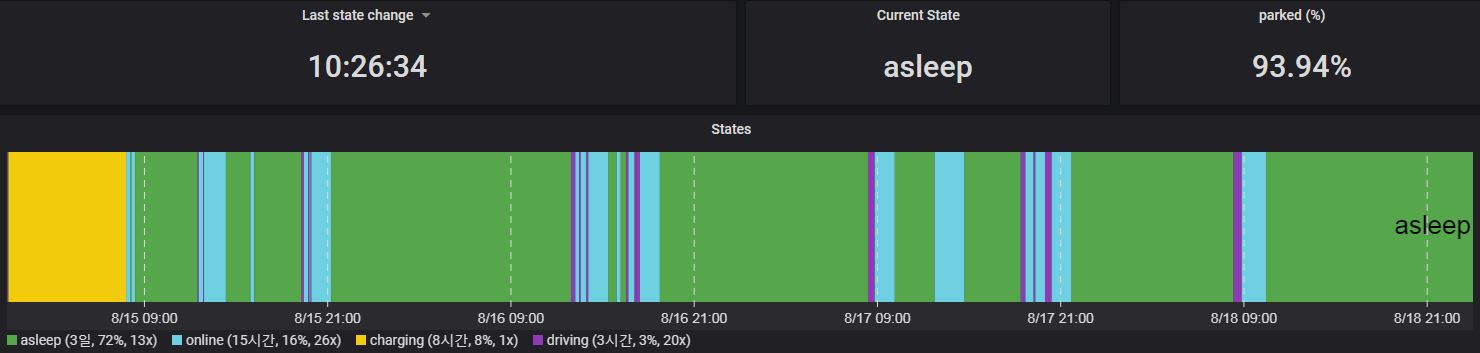
I, too, have struggled quite a bit with this problem for a while and using almost every method mentioned has been useless. But now it was almost completely solved, and the solution was to re-install a TESLA app on the phone. I don't know exactly, but the TESLA app was the source of the problem for me, and after that it almost goes into ASLEEP mode, except when the vehicle wakes up for about 15 minutes irregularly. I don't know if this will work for everyone, but I hope you give it a try.
 dachsgood
on 18 Aug 2020
dachsgood
on 18 Aug 2020
I, too, have struggled quite a bit with this problem for a while and using almost every method mentioned has been useless. But now it was almost completely solved, and the solution was to re-install a TESLA app on the phone. I don't know exactly, but the TESLA app was the source of the problem for me, and after that it almost goes into ASLEEP mode, except when the vehicle wakes up for about 15 minutes irregularly. I don't know if this will work for everyone, but I hope you give it a try.
What is ironic is that some nights (or days), I have no issues. It falls asleep immediately after driving. And then rotates and falls into a deep sleep.
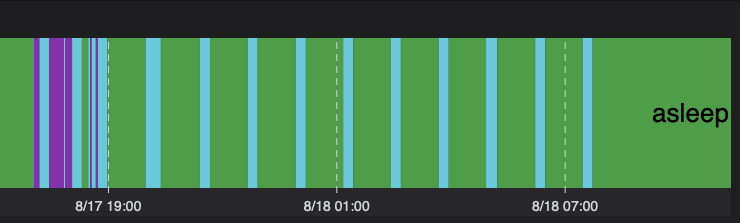
Yet the two days before, it was awake for 14 and 11 hours. No consistency:

Willing to try deleting the application, but I am not doing anything differently. I am confident @adriankumpf is not breaking anything :)
cwanja
on 18 Aug 2020
I, too, have struggled quite a bit with this problem for a while and using almost every method mentioned has been useless. But now it was almost completely solved, and the solution was to re-install a TESLA app on the phone. I don't know exactly, but the TESLA app was the source of the problem for me, and after that it almost goes into ASLEEP mode, except when the vehicle wakes up for about 15 minutes irregularly. I don't know if this will work for everyone, but I hope you give it a try.
Maybe, just maybe @dachsgood you are on to something with re-installing the application. Had to lock my car last night via the Tesla app and it stayed online for 12 hours. I noticed this morning and then decided to give your suggestion of deleting the application a try. Did, logged in, woke the car up and then within 15 minutes it was asleep again. And in a deep sleep.
Will say that over the past couple of days, I had not used the Tesla app just the fob (Model S) and the car was going to sleep without any issues.
As always, will continue to monitor.
cwanja
on 21 Aug 2020
I, too, have struggled quite a bit with this problem for a while and using almost every method mentioned has been useless. But now it was almost completely solved, and the solution was to re-install a TESLA app on the phone. I don't know exactly, but the TESLA app was the source of the problem for me, and after that it almost goes into ASLEEP mode, except when the vehicle wakes up for about 15 minutes irregularly. I don't know if this will work for everyone, but I hope you give it a try.
Welp. No luck. Back to the repeating cycle of being awake for 11 - 12 hours and then into a deep sleep.
cwanja
on 1 Sep 2020
This issue has been automatically marked as stale because it has not had recent activity. It will be closed if no further activity occurs. Thank you for your contributions.
![stale[bot] picture](https://avatars.githubusercontent.com/in/1724?v=4&s=40) stale[bot]
on 31 Oct 2020
stale[bot]
on 31 Oct 2020
Related issues
 kongomongo
·
5Comments
kongomongo
·
5Comments
 bastrik
·
3Comments
bastrik
·
3Comments
 DrMichael
·
4Comments
DrMichael
·
4Comments
 bahree
·
3Comments
bahree
·
3Comments
 olivercho
·
4Comments
olivercho
·
4Comments
Most helpful comment
There is a small progress with my online/asleep cycling issue or to be precise a possible workaround. I found out that when there is a mobile key (paired mobile phone) in the car or near to it, the switching of states stops and after about 15 mins the car can finally sleep continuously. The stand-by power consumption gets to normal 0,5% or 2,5km a day (average about 15-20W/h drain). Unfortunately, you need a spare phone or bluetooth beacon and it is probably not safe, because the car can be unlocked anytime. Would this help to stop the cycling pattern in your case @fzahle too? In a way it is similar to the observation of @cwanja - it seems that the car is looking for a key fob in an infinite loop.