Teslamate: Teslafi import PARTIALLY succeeds... How to debug remainder?
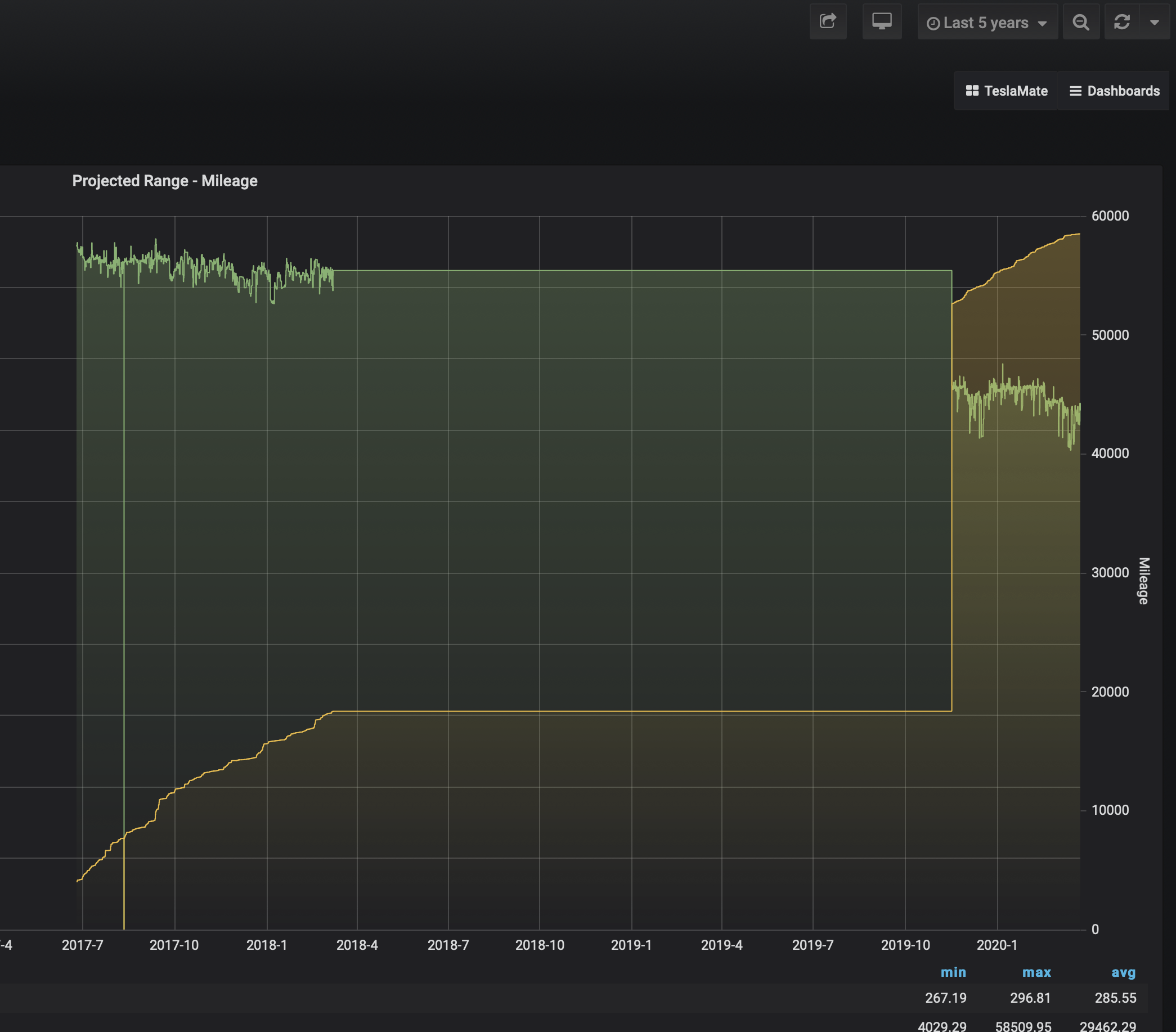
I have Teslafi data that starts in 06-2017. I've downloaded the teslafi csv files, and started into import process. It sorta worked. It did process everything UP UNTIL 03-07-2018. The next information appears to be 11-17-2019 when I first started logged with Teslamate. None of the files appear to add any information to the teslamate database - They say starting to import, then complete, but no drives/charging/etc added.
I'd love to get the remainder of the data in. There are trips I'd like to have recorded in the visits dashboard, and I'd LOVE to see if my projected range has declined steadily or if there is a drop-off somewhere... (see attached)
Any suggestions on how I can debug this further and hopefully get the remainder of the data imported?
Is there an Environment variable to increase the logging detail?
Ubuntu host machine, using the simple internal docker-compose.yaml to bring the system online.
Thanks!
 nicholsongreg
All 12 comments
Any suggestions on how I can debug this further and hopefully get the remainder of the data imported?
- Have you checked the relevant CSV files? It is possible that something went wrong with the export.
- Try to import the files into a fresh TeslaMate installation to see if this behavior is reproducible and to get the logs of that import.
- Alternatively, you can send me the relevant files so I can debug this locally.
 adriankumpf
on 25 Mar 2020
adriankumpf
on 25 Mar 2020
Fresh install, Bombs out in March 2018 as per the original install. Logs attached.
Sending the March 2018 teslafi file via email.
nicholsongreg
on 27 Mar 2020
Thanks. With the error message, fixing it was fairly straightforward. I'll release a new version with the fix soon.
adriankumpf
on 27 Mar 2020
Thank YOU! Hope that takes care of the issue!
nicholsongreg
on 27 Mar 2020
Continuing on this - That does fix this issue in a blank database. Unfortunately, I've got several months of data that is exclusive to Teslamate. Trying to start the import again, from the problematic 3/19 teslafi file doesn't allow me to pick it up and go.
Can we drop data from the Postgres database that is older than a specific date and allow me to import again? I've got plenty of backups, but the original import was when the feature debuted, and I've got data after that backup, obviously.
Thank you!
nicholsongreg
on 28 Mar 2020
Yes, I would also suggest dropping the imported data. Delete everything before a certain date from the following tables and then import again:
charging_processesdrivespositionsstatesupdates
adriankumpf
on 28 Mar 2020
That worked. Documenting in case someone has the same or similar issue. It would also be good in case an Import failed for whatever reason, so you can start over.
delete from charging_processes where start_date < '2019-01-01';
delete from drives where start_date < '2019-01-01';
delete from states where start_date < '2019-01-01';
delete from updates where start_date < '2019-01-01';
delete from positions where date < '2019-01-01';
I had a position and charging_process foreign key issue, but it was obviously from the failed import. Removed the locked rows in both tables and everything imported in without an issue.
Thanks very much for your help.
nicholsongreg
on 30 Mar 2020
Just wanted to add to this, that when running the delete from charging_process query, matching on end_date instead of start_date will purge all rows used by the following queries without getting foreign key issues:
delete from charging_processes where end_date < '2020-04-01';
delete from drives where start_date < '2020-04-01';
delete from states where start_date < '2020-04-01';
delete from updates where start_date < '2020-04-01';
delete from positions where date < '2020-04-01';
 gilrim
on 8 Apr 2020
gilrim
on 8 Apr 2020
Sorry to reopen this but I appear to have the same issue. I have imported a couple of years of TeslaFi data but have a gap in February, March, April and May 2020.
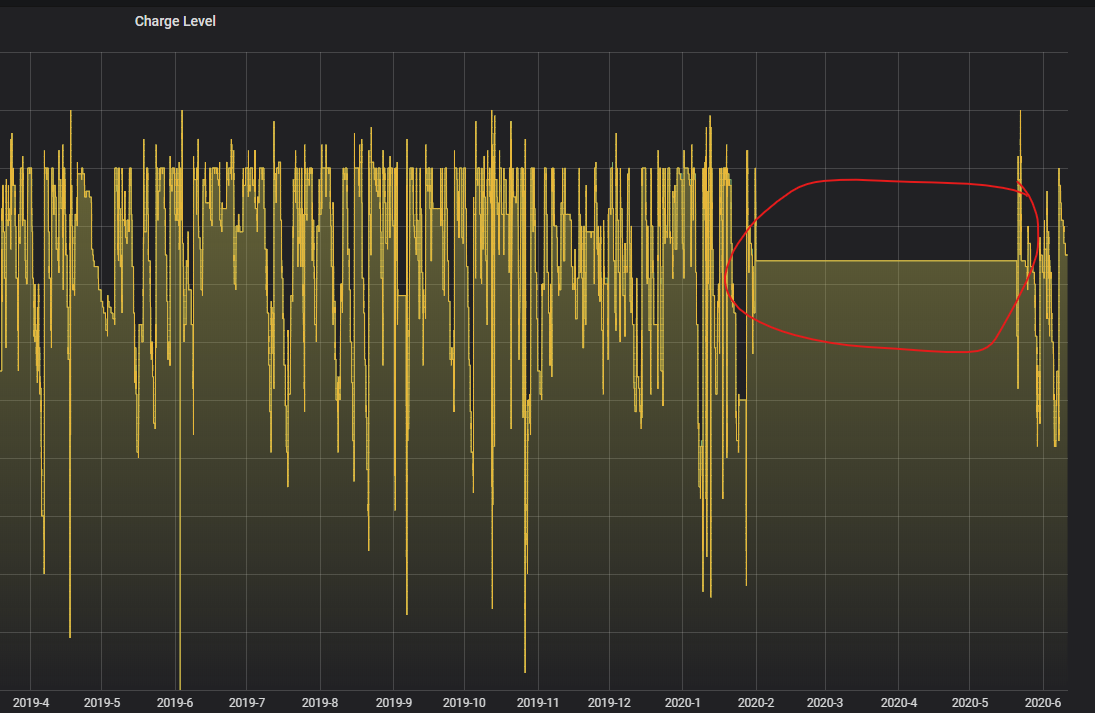
I had some failed imports and retried a few times.
I have confirmed that the csv files have data in them.
I am confused because I only installed TeslaMate on the 4th June 2020 so I would have thought this bug was fixed by then.
Can anyone give idiot-proof instructions on how to clear old data from the db? I am OK with Docker but not very knowledgeable on db admin commands. I still have TeslaFi running and have done all the time so I can happily trash all of the data in TeslaMate db and re-import if that's easier.
I tried opening the console for the postgres container and then entering "delete from charging_processes where end_date < '2020-01-06';" but go the following error: "bash: 2020-01-06: No such file or directory".
I am fairly sure it's me doing it all wrong. Perhaps I should be entering the commands at a normal console connected to my Ubuntu host...?
Any help before I trash TeslaMate and all associated containers and start again?
 Siggy101
on 11 Jun 2020
Siggy101
on 11 Jun 2020
You're just missing the part where you connect to pgsql before executing the queries,
see the below copypasta from my teslamate notes: :)
#
enter pgsql shell:
docker-compose exec database psql teslamate teslamate
#
Delete teslamate data before a given date:
delete from charging_processes where start_date < '2020-04-01';
delete from charging_processes where end_date < '2020-04-01';
delete from drives where start_date < '2020-04-01';
delete from states where start_date < '2020-04-01';
delete from updates where start_date < '2020-04-01';
delete from positions where date < '2020-04-01';
delete from charging_processes where start_date < '2020-04-19';
delete from charging_processes where end_date < '2020-04-19';
delete from drives where start_date < '2020-04-19';
delete from states where start_date < '2020-04-19';
delete from updates where start_date < '2020-04-19';
delete from positions where date < '2020-04-19';
#
list all charging processes, inc position id:
select start_date,end_date,position_id from charging_processes;
#
gilrim
on 11 Jun 2020
Thanks for the pointers but I am still completely lost.
I think it may be time to just scrap this and try again.
Siggy101
on 11 Jun 2020
Yep, I ran out of skill so baled and dumped all containers, volumes etc and pulled everything anew.
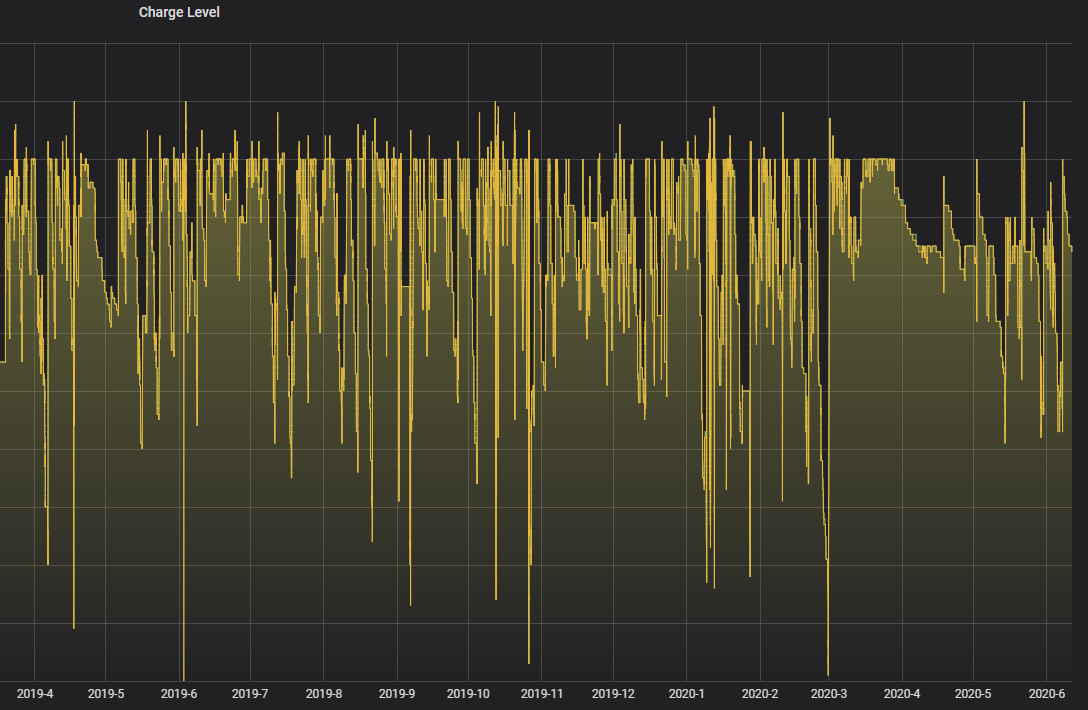
I imported all the same csv files and this time is worked perfectly with no gaps in the history.
I am still confused about why I hit this bug because it appeared to be fixed long before I installed TeslaMate but nevermind. All's well that ends well:
Siggy101
on 11 Jun 2020
Related issues
 tobiasehlert
·
4Comments
tobiasehlert
·
4Comments
 natrlhy
·
6Comments
natrlhy
·
6Comments
 olivercho
·
4Comments
olivercho
·
4Comments
 kongomongo
·
5Comments
kongomongo
·
5Comments
 DrMichael
·
4Comments
DrMichael
·
4Comments
Most helpful comment
That worked. Documenting in case someone has the same or similar issue. It would also be good in case an Import failed for whatever reason, so you can start over.
delete from charging_processes where start_date < '2019-01-01';delete from drives where start_date < '2019-01-01';delete from states where start_date < '2019-01-01';delete from updates where start_date < '2019-01-01';delete from positions where date < '2019-01-01';I had a position and charging_process foreign key issue, but it was obviously from the failed import. Removed the locked rows in both tables and everything imported in without an issue.
Thanks very much for your help.