Teslamate: Efficiency per outside temperature & updates
Is your feature request related to a problem? Please describe.
Feature requests:
Two Grafana feature requests - previous version next to updated version on the ‘Updates’ dashboard
Outside temperature efficiency table (per 10°) similar to that of TeslaFi (never personally used, only seen the table).
Describe the solution you'd like
See above. Believe the previous version is easy. Really not sure how easy the per 10° table is. Also considering my efficiency ratings do not come in, I cannot be much help in testing. Hopefully Tesla can resolve (see #125). Opened correspondence with Tesla.
Describe alternatives you've considered
None. New feature.
 cwanja
All 12 comments
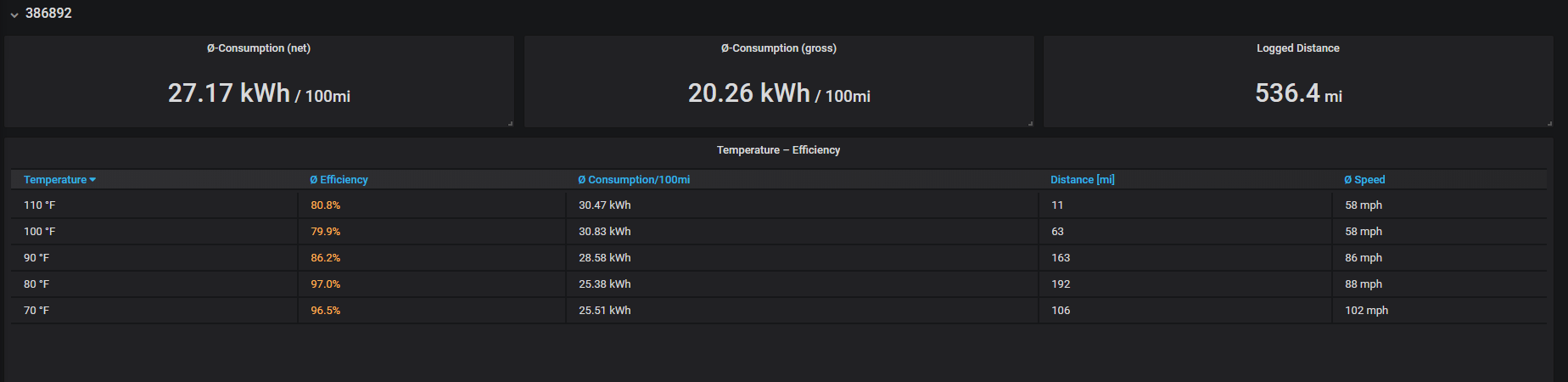
I'm confused, it seems like it currently has the efficiency vs outside temperature there.

Also seems to have the update versions next to each other.
Am I missing something?
 ADebelius
on 5 Sep 2019
ADebelius
on 5 Sep 2019
I'm confused, it seems like it currently has the efficiency vs outside temperature there.
Also seems to have the update versions next to each other.
Am I missing something?
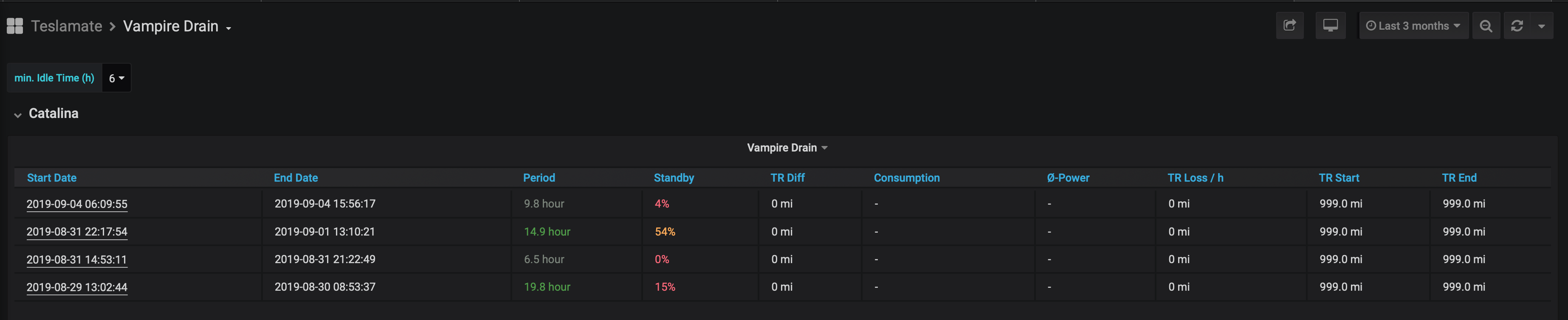
You are not! Thanks a ton for the screenshots. I am happy to see both are built in! As mentioned, my efficiency dashboard (among others) does not work nor does it display any data. I still think this is related to the 999 API value that my car is reporting.


cwanja
on 5 Sep 2019
Ah! Gotcha, unfortunately, I have not a clue when it comes to elixir, so I can't help you much there. Hopefully Adrian chimes in. Best of luck!
ADebelius
on 5 Sep 2019
@adriankumpf so heard back from Tesla - they claim (and this is a direct copy and paste):
We have checked all relevant values and verified they are reporting correctly. I highly recommend against the use of any third party scripts/software/hardware as any issues arising from them will not be covered under warranty. If you have an issue that affects the normal use of the vehicle, we would be happy to look into it. Thank you.
Obliviously, I am not concerned about TeslaMate breaking my car. However, I am curious about your thoughts around the "ideal_battery_range" reading 999. Is this messing with my dashboards? Are the Grafana dashboards configured to use this value to calculate some of the efficiencies? I feel like I know the answer to that is a yes, but just trying to brainstorm a solution.
I asked Tesla to go "on the record" (with a screenshot I provided, via a Terminal window with the API call) that the returned value is "reporting correct". See what they come back with. For some reason, I find that not to be the case.
cwanja
on 6 Sep 2019
Adrian, the efficiency calculations still seem to be off and driving an unrealistic range on my car both for charging reports as well as Degradation display. Specifically, efficiency page says the car is using a .189 efficiency factor but the derived efficiency factors are .142, .134 and .129. I think that this is still related to the Model S 90D sending the MDL3 code and, while now correctly identified as a Model S, the grafana tables are treating the car as a Model 3.
Any ideas of a fix? Possibly going in and manually overriding the database in some way? I'm familiar with SQL tables (MYSQL) but have never used Grafana and am not sure of the way to interact with/change the Postgres database. I'm open to ideas but suspect this is why many of us are seeing incorrect ranges displayed in some of the grafana pages. FYI, rated range on the "drives" page appears to be correct, so I think it is only the places that try to show theoretical range based on a calculation (such as the Charges and Degradation pages) that have the problem...
 drklain
on 6 Sep 2019
drklain
on 6 Sep 2019
@drklain, it's correctly identified as Model S 90D if it says so on the web interface below the car's name. I don't have the time to explain it in detail right now. To quote from the Changelog:
- Display the default and derived efficiency factor on the Efficiency dashboard to detect inaccuracies and to crowdsource the correct factors:
Note: If there is no default efficiency factor or you think the default factor for your vehicle might be wrong, please open an issue and attach a screenshot of the table showing the efficiency factor(s) for your vehicle.
 adriankumpf
on 6 Sep 2019
adriankumpf
on 6 Sep 2019
@drklain what value are you seeing in some of your dashboards? Not sure how connected our issues might be, but for example on the degradation page I see 1000+ projected miles.

cwanja
on 6 Sep 2019
I see a 348 mile projected range. I think the question is the efficiency factor. Mine shows as .189 (which is too high) while yours is showing a .999 (which is off the scale insane high). I believe the problem is related to Teslas change in codes where some Model S 90Ds are now reporting a MDL3 code and being treated as Model 3s. Have you pulled your option codes to see what your car is reporting? It's possible it is being mis-identified or put in a null-value state...
drklain
on 6 Sep 2019
I see a 348 mile projected range. I think the question is the efficiency factor. Mine shows as .189 (which is too high) while yours is showing a .999 (which is off the scale insane high). I believe the problem is related to Teslas change in codes where some Model S 90Ds are now reporting a MDL3 code and being treated as Model 3s. Have you pulled your option codes to see what your car is reporting? It's possible it is being mis-identified or put in a null-value state...
I did here https://github.com/adriankumpf/teslamate/issues/123#issuecomment-526357955
Not to throw this off further, but here are my codes:
"AD15,MDL3,PBSB,RENA,BT37,ID3W,RF3G,S3PB,DRLH,DV2W,W39B,APF0,COUS,BC3B,CH07,PC30,FC3P,FG31,GLFR,HL31,HM31,IL31,LTPB,MR31,FM3B,RS3H,SA3P,STCP,SC04,SU3C,T3CA,TW00,TM00,UT3P,WR00,AU3P,APH3,AF00,ZCST,MI00,CDM0"I own: 2019 (Raven) Model S, black exterior, white interior, 19" carbon slipstream, non-performance
It is definitely not a Model 3 (MDL3), it has more than 75 kWh (BT37), it does not have the Model 3 wood decor (ID3W), does not have the Model 3 glass roof (RF3G) - although, they could go to a single code for the glass roof, it is not RWD (DV2W), I hope it is better than AP firmware 2.0 (APF0) and actually AP HW3 which apparently has a code but seems I have hardware 2.5 (APH3), claims I have the Model 3 48amp charger (CH07), no HEPA filter (AF00).
Yes. I went through all my codes. ¯_(ツ)_/¯
Referenced against https://tesla-api.timdorr.com/vehicle/optioncodes
cwanja
on 6 Sep 2019
Yep, it looks like you are also a victim of the option code fiasco…ugh.
From: cwanja notifications@github.com
Reply-To: adriankumpf/teslamate reply@reply.github.com
Date: Friday, September 6, 2019 at 9:55 AM
To: adriankumpf/teslamate teslamate@noreply.github.com
Cc: "[email protected]" webmaster@klain.net, Mention mention@noreply.github.com
Subject: Re: [adriankumpf/teslamate] Efficiency per outside temperature & updates (#143)
I see a 348 mile projected range. I think the question is the efficiency factor. Mine shows as .189 (which is too high) while yours is showing a .999 (which is off the scale insane high). I believe the problem is related to Teslas change in codes where some Model S 90Ds are now reporting a MDL3 code and being treated as Model 3s. Have you pulled your option codes to see what your car is reporting? It's possible it is being mis-identified or put in a null-value state...
I did here #123 (comment)
Not to throw this off further, but here are my codes:
"AD15,MDL3,PBSB,RENA,BT37,ID3W,RF3G,S3PB,DRLH,DV2W,W39B,APF0,COUS,BC3B,CH07,PC30,FC3P,FG31,GLFR,HL31,HM31,IL31,LTPB,MR31,FM3B,RS3H,SA3P,STCP,SC04,SU3C,T3CA,TW00,TM00,UT3P,WR00,AU3P,APH3,AF00,ZCST,MI00,CDM0"
I own: 2019 (Raven) Model S, black exterior, white interior, 19" carbon slipstream, non-performance
It is definitely not a Model 3 (MDL3), it has more than 75 kWh (BT37), it does not have the Model 3 wood decor (ID3W), does not have the Model 3 glass roof (RF3G) - although, they could go to a single code for the glass roof, it is not RWD (DV2W), I hope it is better than AP firmware 2.0 (APF0) and actually AP HW3 which apparently has a code but seems I have hardware 2.5 (APH3), claims I have the Model 3 48amp charger (CH07), no HEPA filter (AF00).
Yes. I went through all my codes. ¯_(ツ)_/¯
Referenced against https://tesla-api.timdorr.com/vehicle/optioncodes
—
You are receiving this because you were mentioned.
Reply to this email directly, view it on GitHub, or mute the thread.
drklain
on 6 Sep 2019
Obliviously, I am not concerned about TeslaMate breaking my car. However, I am curious about your thoughts around the "ideal_battery_range" reading 999. Is this messing with my dashboards? Are the Grafana dashboards configured to use this value to calculate some of the efficiencies? I feel like I know the answer to that is a yes, but just trying to brainstorm a solution.
I asked Tesla to go "on the record" (with a screenshot I provided, via a Terminal window with the API call) that the returned value is "reporting correct". See what they come back with. For some reason, I find that not to be the case.
Yes, it is related to the invalid ideal_battery_range reading as you suspected @cwanja. The ideal range is used to calculate the projected range and efficiency, for example.
I'm not surprised that Tesla don't see any problem and they're kind of right since the bad reading does not "affect the normal use of the vehicle".
In the medium term, it will be possible to switch from ideal to rated range within TeslaMate. The rated range is already recorded. That means you won't lose any data until then.
adriankumpf
on 6 Sep 2019
Thanks for the response @adriankumpf - I saw that in your comment in another thread. Yea, I see how it is not affecting the vehicle, but it kind of surprises me that they have no desire to investigate to figure out why it is reporting that. Much less the other API values I provided to them.
Look forward to being able to toggle the rate in a future update of TeslaMate. Appreciate all your support, feedback and updates!
cwanja
on 6 Sep 2019
Related issues
 bastrik
·
3Comments
bastrik
·
3Comments
 netkruzer
·
6Comments
netkruzer
·
6Comments
 spacecosmos
·
5Comments
spacecosmos
·
5Comments
 Try2Fly
·
5Comments
Try2Fly
·
5Comments
 virtualm2000
·
4Comments
virtualm2000
·
4Comments