Teslamate: IOS Shortcut to wake teslamate
Do you have an example or instructions on how to create the shortcut to:
- listen for the bluetooth connection
- call the http file in your instructions
 drklain
All 15 comments
For the moment Automation for Shortcuts is not available. It was removed in the latest beta of iOS 13. Probably will be available in the final version of iOS 13.
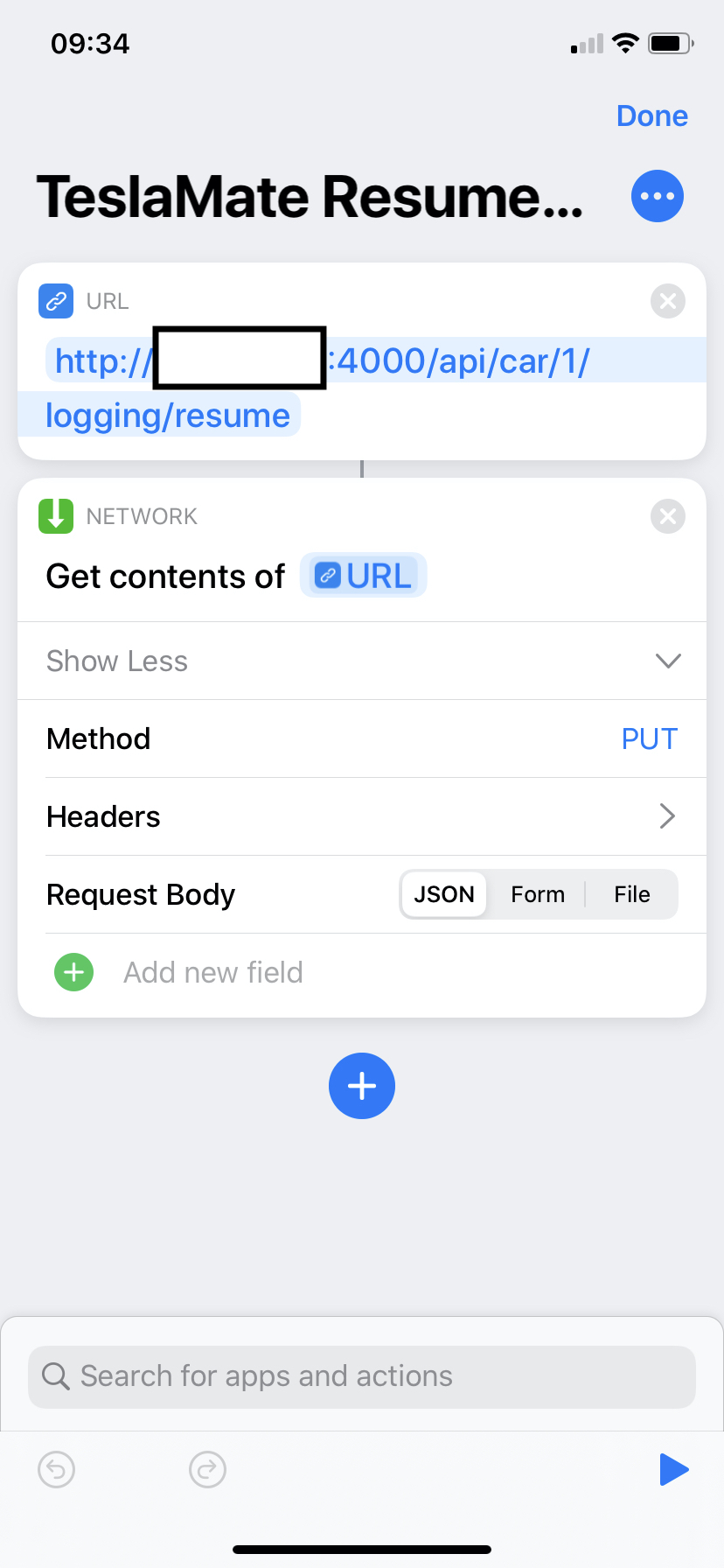
But you can still setup a shortcut and manually activate it when you are about to drive. You need this only when TeslaMate is waiting for the car to sleep. Bellow is the screenshot of my shortcut. Put your TeslaMate ip/hostname in the box. As per advice, be very careful with exposing your host to the internet.
 virtualm2000
on 27 Aug 2019
virtualm2000
on 27 Aug 2019
Thanks, that at least got it working manually. I was using the link provided in the instructions (different http call) and it wasn’t reacting…guess I’ll wait for the final IOS13 and hope it allows for the automated call as well!
From: virtualm2000 notifications@github.com
Reply-To: adriankumpf/teslamate reply@reply.github.com
Date: Tuesday, August 27, 2019 at 4:46 AM
To: adriankumpf/teslamate teslamate@noreply.github.com
Cc: "[email protected]" webmaster@klain.net, Author author@noreply.github.com
Subject: Re: [adriankumpf/teslamate] IOS Shortcut to wake teslamate (#122)
For the moment Automation for Shortcuts is not available. It was removed in the latest beta of iOS 13. Probably will be available in the final version of iOS 13.
But you can still setup a shortcut and manually activate it when you are about to drive. You need this only when TeslaMate is waiting for the car to sleep. Bellow is the screenshot of my shortcut. Put your TeslaMate ip/hostname in the box. As per advice, be very careful with exposing your host to the internet.
—
You are receiving this because you authored the thread.
Reply to this email directly, view it on GitHub, or mute the thread.
drklain
on 27 Aug 2019
OK, so I got two instances running - one on docker on raspberry pi, and another one on docker on synology. Because of the other issues with synology (see here), I created a raspberry pi one. Now the iOS shortcut works just fine with the instance running on synology, but when I try the same thing with the pi instance the http request times out.
On both, the cURL command via the shell works, and I can ssh and browse to them and this is on my LAN, so can't think of any issues on what. My knowledge of docker is limited, so don't know what is different between the two that could cause this - especially from iOS.
From the phone, I can't even browse to the raspberry pi instance, but I can from other machines - I know this is scope creep but any pointers would be appreciated! Thanks.
 bahree
on 30 Aug 2019
bahree
on 30 Aug 2019
I got this working, and I don't know why but I have had to plug in the Ethernet port, and continue to use the wifi. So this is working with that config. I also created two iOS shortcuts - which have a menu asking to resume or suspend, and using POST and another over ssh - happy to share if anyone is interested.
bahree
on 31 Aug 2019
Would love to have the info on how you built the IOS shortcuts!
From: Amit Bahree notifications@github.com
Sent: Saturday, August 31, 2019 10:51 AM
To: adriankumpf/teslamate teslamate@noreply.github.com
Cc: drklain webmaster@klain.net; Author author@noreply.github.com
Subject: Re: [adriankumpf/teslamate] IOS Shortcut to wake teslamate (#122)
I got this working, and I don't know why but I have had to plug in the Ethernet port, and continue to use the wifi. So this is working with that config. I also created two iOS shortcuts - which have a menu asking to resume or suspend, and using POST and another over ssh - happy to share if anyone is interested.
—
You are receiving this because you authored the thread.
Reply to this email directly, view it on GitHub https://github.com/adriankumpf/teslamate/issues/122?email_source=notifications&email_token=AM7PQTXEC3HDIPBAESI6N4DQHKAOBA5CNFSM4IP3G6OKYY3PNVWWK3TUL52HS4DFVREXG43VMVBW63LNMVXHJKTDN5WW2ZLOORPWSZGOD5TOGSY#issuecomment-526836555 , or mute the thread https://github.com/notifications/unsubscribe-auth/AM7PQTTMXMFAOBTMUMS6GJTQHKAOBANCNFSM4IP3G6OA . https://github.com/notifications/beacon/AM7PQTVGBMGQLRMRGOB4ZPLQHKAOBA5CNFSM4IP3G6OKYY3PNVWWK3TUL52HS4DFVREXG43VMVBW63LNMVXHJKTDN5WW2ZLOORPWSZGOD5TOGSY.gif
drklain
on 31 Aug 2019
I got two versions - one inspired by @virtualm2000 's post here that uses HTTP PUT (essentially same thing at the curl command does) and another that SSH's in and then runs the command.
I published both of them here and you can get them from here @drklain.
TeslaMate Logging Toggle - https://routinehub.co/shortcut/3443
TeslaMate Logging Toggle (over SSH) - https://routinehub.co/shortcut/3444
I like RoutineHub, as it allows versioning, etc.
Feel free to extend as you feel fit. Let me know if you get into any issues. I only tried this from my and my wife's iPhone (two different models). Not had a chance to try it from an iPad just yet.
bahree
on 1 Sep 2019
just as a sidenote: iOS Shortcut Automations are back in iOS 13.1 which will be released in about 2 weeks, so should be possible to do the fully automatic way in iOS then without any 3rd party app (don't have a car yet to confirm).
 Helmi
on 14 Sep 2019
Helmi
on 14 Sep 2019
Unfortunately it's not fully automatic. Because of the security concerns you have to be authenticated with the phone (code is entered, fingerprint/faceid recognised) to run any automation. As it is now, a prompt appears to run your automation when the phone connects to the car. Maybe Apple will allow trusted automation to run without authentication but I think it will not happen.
virtualm2000
on 14 Sep 2019
Well that's at least somewhat better. I look forward to the IOS 13.1 release...
drklain
on 15 Sep 2019
@adriankumpf the "competition" project (https://github.com/lephisto/tesla-apiscraper) claims "Monitoring will continue within 60 Seconds on car usage.". Maybe the source code could be worth looking at.
 krezac
on 16 Sep 2019
krezac
on 16 Sep 2019
TM continues to poll the car when it is asleep and notices when it wakes up. This FAQ entry explains why it may be advantageous to send the resume command manually anyway.
 adriankumpf
on 16 Sep 2019
adriankumpf
on 16 Sep 2019
just FYI, no Shortcuts in iOS 13.0. It supposed to be in 13.1 (released planned for 24th).
krezac
on 20 Sep 2019
@krezac that info is already in this thread ;)
FYI: I finally got a phone that's able to read NFC tags (XS does it, and 11 Pro now does it too). NFC tags can be used for automation without confirmation. The phone doesn't even need to be unlocked.
So this may be an alternative - you can easily get some NFC tags from amazon and stick them somewhere in the car. You only need to tap them with the phone to get the automation going and wakeup TM.
EDIT: looks like the phone doesn't need to be unlocked but for me I only got it working when the screen was on which is weird. At least it works without confirmation.
Helmi
on 21 Sep 2019
@Helmi there is one additional requirement if you are wanting to use iOS automation to run a shortcut to resume logging when triggered by reading the NFC tag - the URL for the PUT must use https otherwise the automation throws an error (even though a resume shortcut using http will work fine on its own).
 jmadra
on 26 Sep 2019
jmadra
on 26 Sep 2019
The new documentation hopefully answers many of the questions that have been asked in this thread. If you have any further questions that aren't answered in the docs, don't hesitate to open a new issue.
adriankumpf
on 21 Oct 2019
Related issues
 russinating
·
4Comments
russinating
·
4Comments
 DrMichael
·
4Comments
bahree
·
5Comments
DrMichael
·
4Comments
bahree
·
5Comments
 natrlhy
·
6Comments
natrlhy
·
6Comments
 tobiasehlert
·
4Comments
tobiasehlert
·
4Comments