Terser: Computed properties results incorrect code evaluating in Safari
Bug report or Feature request?
Bug
Version (complete output of terser -V)
terser 3.16.1
Complete CLI command or minify() options used
terser --compress -- in.js
terser input
(function() {
    function f(o) {
        return {[o.key]: o};
    }
    function g(o) {
        return o;
    }
    var obj = {key: 'xyz'.slice(1, -1)};
    var result = g(f(obj));
    console.log(result);
})();
terser output or error
!function(){var o,obj={key:"xyz".slice(1,-1)},result=function(o){return o}({[(o=obj).key]:o});console.log(result)}();
Expected result
This output code can be correctly evaluated in chrome 71.0.3578.98 which results:
{"y": {"key": "y"}}

In safari 12.0.2 (14606.3.4) it behaves incorrectly:
{"y": undefined}

It seems not safe to compress computed property key like this
 otakustay
All 3 comments
I run the following code in these browsers:
({[(console.log(1), 'x')]: (console.log(2), 1)})
In Chrome 72.0.3626.109 gets:
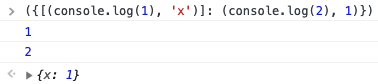
and Safari 12.0 (14606.1.36.1.9) gets:
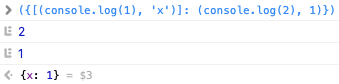
 LeuisKen
on 18 Feb 2019
LeuisKen
on 18 Feb 2019
I know this is actually a BUG of safari, however code introduced by tools like terser are unpredictable and hard to find root cause, it's better to avoid known compatibility issues in major browsers
otakustay
on 18 Feb 2019
I think we can piggy-back on the options we already have for Safari 10/11 on this.
We also need to enable these options by default as Safari has a lot of usage. I don't think it's reasonable for Terser to produce code that fails on a very used browser that people don't test their code on enough.
 fabiosantoscode
on 23 Feb 2019
fabiosantoscode
on 23 Feb 2019
Related issues
 aeschli
·
6Comments
aeschli
·
6Comments
 Shmasya
·
6Comments
Shmasya
·
6Comments
 papandreou
·
3Comments
papandreou
·
3Comments
 wagenet
·
3Comments
wagenet
·
3Comments
 marcusdarmstrong
·
3Comments
marcusdarmstrong
·
3Comments
Most helpful comment
I know this is actually a BUG of safari, however code introduced by tools like terser are unpredictable and hard to find root cause, it's better to avoid known compatibility issues in major browsers