Terraform: Unexpected cycle error on destroy
Terraform Version
Terraform v0.12.0
* provider.aws: version = "~> 2.11"
Terraform Configuration Files
module "vpc" {
  source     = "./modules/vpc"
  vpc_name   = "vpc-apn01-stage"
  vpc_cidr   = "172.31.0.0/16"
  vpc_env    = "stage"
  aws_region = "ap-northeast-1"
}

module "subnets_ap-northeast-1a" {
  source      = "./modules/subnets"
  vpc         = module.vpc
  subnet_az   = "ap-northeast-1a"

  public = {
      subnet_name = "sample1a_public"
      subnet_cidr = "172.31.1.0/24"
  }

  private = [
      {
        subnet_name = "sample1a_private1"
        subnet_cidr = "172.31.10.0/24"
      },
      {
        subnet_name = "sample1a_private2"
        subnet_cidr = "172.31.11.0/24"
      }
  ]
}
vpc module:
data "aws_caller_identity" "current" {
}

resource "aws_vpc" "this" {
  cidr_block = "${var.vpc_cidr}"

  tags = {
    Name        = "${var.vpc_name}"
    Environment = "${var.vpc_env}"
  }
}

resource "aws_internet_gateway" "igw" {
  vpc_id = "${aws_vpc.this.id}"

  tags = {
    Name = "igw-${var.vpc_name}"
  }
}

resource "aws_default_security_group" "default" {
  vpc_id = "${aws_vpc.this.id}"
}

resource "aws_key_pair" "deploy" {
  key_name   = "deploy-key"
  public_key = "ssh-rsa xxxx"
}

data "aws_region" "current" {
}

output "vpc_name" {
  value = "${var.vpc_name}"
}

output "vpc_cidr" {
  value = "${var.vpc_cidr}"
}

output "vpc_id" {
  value = "${aws_vpc.this.id}"
}

output "vpc_env" {
  value = "${var.vpc_env}"
}

output "aws_region" {
  value = "${data.aws_region.current.name}"
}

output "igw_id" {
  value = "${aws_internet_gateway.igw.id}"
}

output "default_security_group_id" {
  value = "${aws_default_security_group.default.id}"
}

output "account_id" {
  value = "${data.aws_caller_identity.current.account_id}"
}

output "deploy_key" {
  value = "${aws_key_pair.deploy.key_name}"
}
subnet module:
resource "aws_subnet" "public" {
  vpc_id            = "${var.vpc["vpc_id"]}"
  cidr_block        = "${var.public.subnet_cidr}"
  availability_zone = "${var.subnet_az}"

  tags = {
    Name = "${var.public.subnet_name}"
  }
}

resource "aws_route_table" "public_route_table" {
  vpc_id = "${var.vpc["vpc_id"]}"

  tags = {
    Name = "public-${var.subnet_az}"
  }
}

resource "aws_route_table" "private_route_table" {
  vpc_id = "${var.vpc["vpc_id"]}"

  tags = {
    Name = "private-${var.subnet_az}"
  }
}

resource "aws_route" "igw_route" {
  route_table_id         = "${aws_route_table.public_route_table.id}"
  destination_cidr_block = "0.0.0.0/0"
  gateway_id             = "${var.vpc["igw_id"]}"
}

resource "aws_route_table_association" "rt_assn" {
  subnet_id      = "${aws_subnet.public.id}"
  route_table_id = "${aws_route_table.public_route_table.id}"
}

resource "aws_eip" "nat" {
  vpc      = true
}

resource "aws_nat_gateway" "natgw" {
  allocation_id = "${aws_eip.nat.id}"
  subnet_id     = "${aws_subnet.public.id}"

  tags = {
    Name = "natgw-${var.subnet_az}"
  }
}

resource "aws_route" "nat_route" {
  route_table_id         = "${aws_route_table.private_route_table.id}"
  destination_cidr_block = "0.0.0.0/0"
  nat_gateway_id             = "${aws_nat_gateway.natgw.id}"
}

resource "aws_subnet" "private" {
  count             = length(var.private)
  vpc_id            = var.vpc["vpc_id"]
  cidr_block        = lookup(var.private[count.index], "subnet_cidr")
  availability_zone = var.subnet_az

  tags = {
    Name = lookup(var.private[count.index], "subnet_name")
  }
}

resource "aws_route_table_association" "rt_assn_private" {
  count          = length(var.private)
  subnet_id      = aws_subnet.private[count.index].id
  route_table_id = aws_route_table.private_route_table.id
}
Debug Output
Crash Output
Expected Behavior
terraform destroy should have removed resources created by vpc and subnet modules.
Actual Behavior
Error: Cycle: module.vpc.aws_key_pair.deploy (destroy), module.vpc.data.aws_caller_identity.current (destroy), module.vpc.aws_internet_gateway.igw (destroy), module.vpc.aws_default_security_group.default (destroy), module.vpc.aws_vpc.this (destroy), module.subnets_ap-northeast-1a.aws_route_table.public_route_table (destroy), module.subnets_ap-northeast-1a.aws_subnet.private[0] (destroy), module.subnets_ap-northeast-1a.aws_subnet.private[1] (destroy), module.subnets_ap-northeast-1a.aws_route.igw_route (destroy), module.subnets_ap-northeast-1a.aws_nat_gateway.natgw (destroy), module.subnets_ap-northeast-1a.aws_route_table_association.rt_assn (destroy), module.subnets_ap-northeast-1a.aws_subnet.public (destroy), module.subnets_ap-northeast-1a.aws_route_table_association.rt_assn_private[1] (destroy), module.subnets_ap-northeast-1a.aws_route_table_association.rt_assn_private[0] (destroy), module.subnets_ap-northeast-1a.aws_route_table.private_route_table (destroy), module.vpc.data.aws_region.current (destroy), module.subnets_ap-northeast-1a.var.vpc, output.subnets, module.subnets_ap-northeast-1a.aws_route.nat_route (destroy)
Steps to Reproduce
terraform initterraform applyterraform destroy
Additional Context
Terraform is running inside docker via gitlab CI runner. This behavior is only reproducible by running terraform destroy, removing the subnet module from the configuration and then running terraform apply results in a clean destroy by terraform. It seems that terraform is seeing some dependency between the vpc and subnet module that may not actually exist. The subnet module uses module.vpc as in input variable, however the vpc module does not have a dependency on any resource created by the subnet module.
Graphing the dependency via "terraform graph -verbose -draw-cycles" did not yield any insight as to where a cycle may be either: link
References
 ghost
ghost
All 17 comments
We are seeing something similar and a lot of digging in the debug output may have revealed the problem. Basically it seems that the module output gets a dependency upon the destruction of the resources in the module which causes the cycle.
Say I have "module A" with "resource A" producing "output A". In the root I have "resource B" which depends on "module A.output A".
Terraform figures out that "resource B" must be destroyed _before_ "resource A" - so
"resource A (destroy)" -> "resource B (destroy)"
so far so good. Also
"resource B (destroy)" -> "module A.output A"
which is also fine. Now comes the cycle because it seems that
"module A.output A" -> "resource A (prepare state)", "resource A (destroy)"
which then causes the cycle.
In my cases it is actually a provider in the root module which is dependent upon the output from a submodule so the cycle has a few extra steps - but in essense the cycle is caused by the module output becoming dependent on the destruction of the resource in the module.
Below is the part the output from our actually project. The module output gets dependent on "destroy" and ends up causing a cycle.
module.kubernetes.output.kube_config
module.kubernetes.azurerm_kubernetes_cluster.k8s (destroy)
module.kubernetes.azurerm_kubernetes_cluster.k8s (prepare state)
provider.kubernetes
module.kubernetes.output.kube_config
kubernetes_role_binding.seb-helm-binding (destroy)
kubernetes_role_binding.seb-helm-binding (prepare state)
provider.kubernetes
kubernetes_role_binding.seb-helm-binding (prepare state)
provider.kubernetes
module.kubernetes.azurerm_kubernetes_cluster.k8s (destroy)
kubernetes_role_binding.seb-helm-binding (destroy)
...
 langecode
on 12 Jul 2019
langecode
on 12 Jul 2019
I think I'm seeing an aspect of this issue.
Interestingly, I can run a destroy fine. Where I encounter a cycle error is if I increase a resource count, and then decrease it.
EG: create an instance using a module (passing a count to the module), attach IPs using another module based upon the output instance IDs from the former.
After decrease the count to the initial module, the cycle error pops up.
terraform graph -draw-cycles yields no red lines.
 neekz0r
on 15 Jul 2019
neekz0r
on 15 Jul 2019
@langecode it seems like we are experiencing this as well. Did you end up finding a work around? We're using the kube_admin_config from the azurerm_kubernetes_cluster in the provider block for Kubernetes.
edit: FWIW, a destroy then apply does work. The issue is updating the config and running apply.
 jpreese
on 16 Jul 2019
jpreese
on 16 Jul 2019
Tried moving around the provider declarations but it still seems to come down to my module output being dependent on the destruction of the resources in the module:
module.kubernetes.output.kube_config
module.kubernetes.azurerm_kubernetes_cluster.k8s (destroy)
module.kubernetes.azurerm_kubernetes_cluster.k8s (prepare state)
Which is a problem because destruction of the cluster is dependent on the kube_config output being used to destroy resources within the cluster.
langecode
on 16 Jul 2019
Yeah, it does seem a little silly that we need to destroy resources on a cluster that we are destroying.
jpreese
on 18 Jul 2019
I see the issue when attempting to change the SSD count of google_container_cluster which would force a recreate (destroy -> create).
No module use, no outputs. No cycles drawn on the graph.
 arbourd
on 30 Jul 2019
arbourd
on 30 Jul 2019
I have the same problem using only aws provider data sources
Here's a simple setup to reproduce
a/main.tf
data "aws_caller_identity" "current_aws_account" {
}
output "account_dns_zone" {
value = "my.existing.dns.zone.com"
}
b/main.tf
variable "common" {
}
data "aws_route53_zone" "account_zone" {
name = "${var.common.account_dns_zone}."
}
output "account_dns_zone_id" {
value = data.aws_route53_zone.account_zone.id
}
main.tf
provider "aws" {
region = "us-east-1"
}
module "mod_a" {
source = "./a"
providers = {
aws = aws
}
}
module "mod_b" {
source = "./b"
common = module.mod_a
providers = {
aws = aws
}
}
output "mod_b" {
value = module.mod_b
}
And a shell command used to destroy
terraform destroy -auto-approve -lock=true -lock-timeout=0s -input=false -parallelism=10 -refresh=true
 checkmypi
on 15 Oct 2019
checkmypi
on 15 Oct 2019
FYI: similar issue was fixed in latest terraform versions, might be this one is already fixed as well: https://github.com/hashicorp/terraform/issues/21662
 aliusmiles
on 2 Jan 2020
aliusmiles
on 2 Jan 2020
@aliusmiles unfortunately that's not the case I've tested it with 0.12.18 and I still get the same error
checkmypi
on 2 Jan 2020
I'm experiencing the same issue. I first saw this while using remote execution in Terraform Cloud. However, I discovered that terraform destroy locally works fine while terraform plan -destroy -out=destroy.tfplan followed by terraform apply destroy.tfplan does not.
Another thing that might be of interest is that graphing the plan isn't working either:
terraform graph -verbose -draw-cycles ./destroy.tfplan

Error: Failed to read module directory

Module directory  does not exist or cannot be read.
The issue seems to be that the plan is generating a cycle when configuring a provider with the output from a module.
Version 0.12.18 both on remote and local.
 simonklb
on 14 Jan 2020
simonklb
on 14 Jan 2020
However, I discovered that
terraform destroylocally works fine whileterraform plan -destroy -out=destroy.tfplanfollowed byterraform apply destroy.tfplandoes not.Version 0.12.18 both on remote and local.
I have seen exactly the same behaviour, and I never thought to try a direct destroy until I saw your message @simonklb .
I'm using 0.12.18 also, creating an AKS cluster in Azure and using the outputs from that to initialise the Kubernetes and Helm providers in the root module. Planning a destroy to a file and then applying that gives the Cycle error. Doing a direct terraform destroy does not.
 DevOpsFu
on 22 Jan 2020
DevOpsFu
on 22 Jan 2020
This is still an issue on Terraform Cloud as that runs the two separate commands opposed to the single destroy.
 eskp
on 4 May 2020
eskp
on 4 May 2020
Any workaround for Terraform Cloud? It will always do:
terraform plan -destroy -out=destroy.tfplan followed by terraform apply destroy.tfplan
 dkirrane
on 16 Jun 2020
dkirrane
on 16 Jun 2020
@dkirrane the workaround I used for Terraform Cloud was to switch to Local instead of Remote execution and run terraform destroy directly from my laptop. Not the best but it allows me to keep the state file up to date and better than deleting everything by hand.
 saranicole
on 17 Jul 2020
saranicole
on 17 Jul 2020
@saranicole What does it mean
switch to Local instead of Remote execution
 abdennour
on 5 Sep 2020
abdennour
on 5 Sep 2020
@abdennour as far as I understand that's about Terraform Cloud settings:
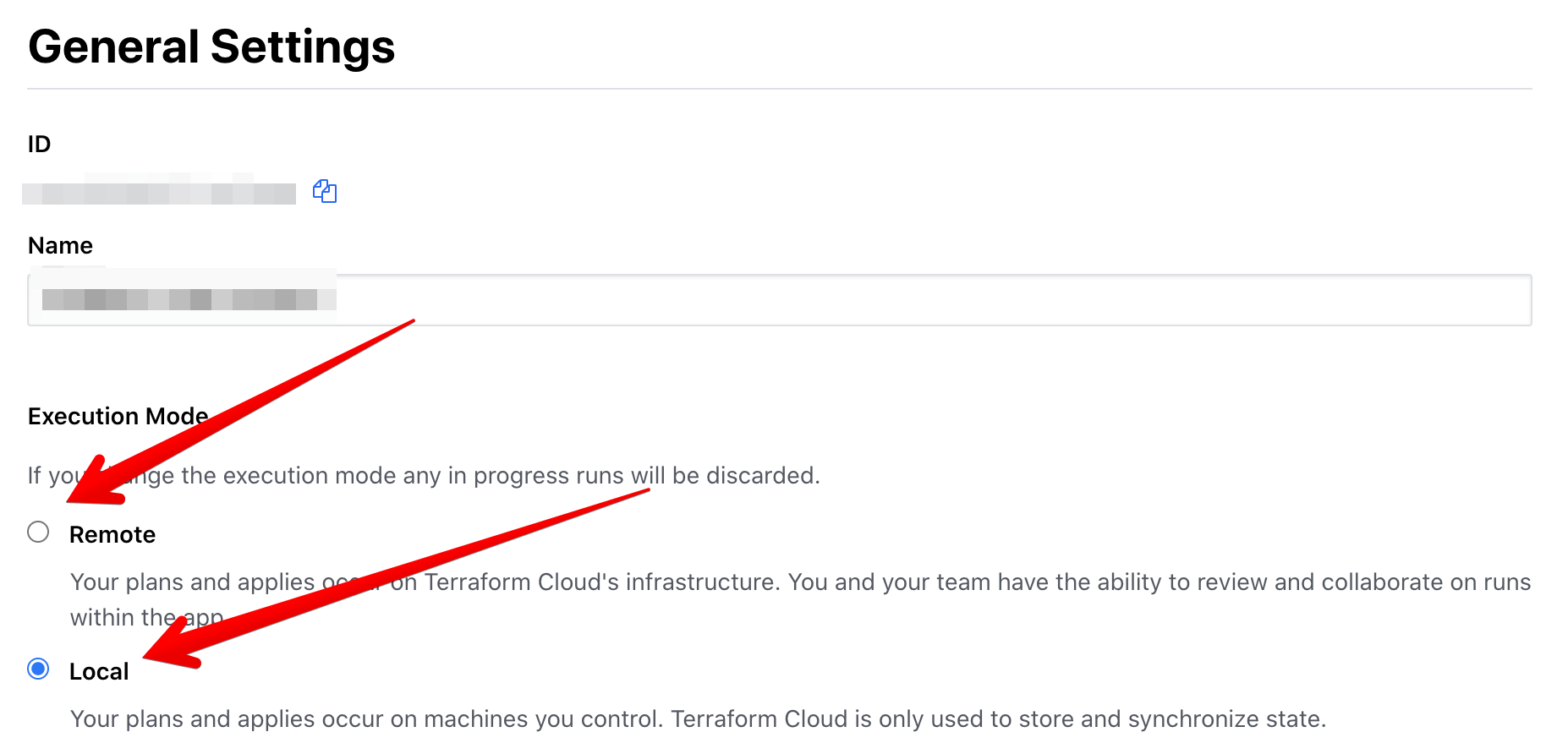
 okgolove
on 6 Sep 2020
okgolove
on 6 Sep 2020
Had a similar issue as @langecode and @jpreese outputting the kube_config from a module creating an AKS cluster and using it in the kubernetes provider block. I was getting the cycle on destroy through Terraform 0.13.2, but after updating to 0.13.3, the problem seems to have gone away for me.
 chrizkim
on 25 Sep 2020
chrizkim
on 25 Sep 2020
Related issues
 rnowosielski
·
3Comments
rnowosielski
·
3Comments
 larstobi
·
3Comments
larstobi
·
3Comments
 thebenwaters
·
3Comments
thebenwaters
·
3Comments
 c4milo
·
3Comments
c4milo
·
3Comments
 ketzacoatl
·
3Comments
ketzacoatl
·
3Comments
Most helpful comment
I'm experiencing the same issue. I first saw this while using remote execution in Terraform Cloud. However, I discovered that
terraform destroylocally works fine whileterraform plan -destroy -out=destroy.tfplanfollowed byterraform apply destroy.tfplandoes not.Another thing that might be of interest is that graphing the plan isn't working either:
The issue seems to be that the plan is generating a cycle when configuring a provider with the output from a module.
Version 0.12.18 both on remote and local.