Terraform: Invalid index when referencing output from module in 0.12
Terraform Version
Terraform v0.12.0-beta1
+ provider.azurerm v1.27.1
+ provider.random v2.1.1
Terraform Configuration Files
# Configure the Azure Provider
provider "azurerm" {

  version = "=1.27.1"
}

module "network" {
  source   = "Azure/network/azurerm"
  version  = "2.0.0"
  location = "West Europe"
  resource_group_name = "terraform-demo-rg"
     tags = {
        Source = "terraform"
    }
}

module "compute" {
  source              = "Azure/compute/azurerm"
  version             = "1.2.1"
  location            = "West Europe"
  resource_group_name = "terraform-demo-rg"
  vm_hostname         = "demowinvm"
  admin_password      = "ComplxP@ssw0rd!"
  vm_os_publisher = "OpenLogic"
  vm_os_sku = "7.5"
  vm_os_version = "latest"
   vm_os_offer = "CentOS"
  vnet_subnet_id      = module.network.vnet_subnets[0]
  data_disk_size_gb = "100"
     tags = {
        Source = "terraform"
    }
}
Expected Behavior
terraform plan should succeed
Actual Behavior
Error: Invalid index

  on main.tf line 31, in module "compute":
  31:   vnet_subnet_id      = module.network.vnet_subnets[0]
    |----------------
    | module.network.vnet_subnets is empty tuple

The given key does not identify an element in this collection value.
Steps to Reproduce
terraform initterraform plan
Additional Context
I am doing some initial testing of Terraform 0.12 using the Azure compute and Azure network modules, and hit this error when executing terraform plan.
The same configuration works fine in 0.11, where the following syntax is used to specify the subnet id.
vnet_subnet_id = "${module.network.vnet_subnets[0]}"
terraform 0.12upgrade was run against the above configuration, which updated the subnet id to the new syntax:
vnet_subnet_id = module.network.vnet_subnets[0]
 janegilring
All 26 comments
hi @janegilring ,
Thank you for reporting this issue. I see that you are using beta1 - have you tried this same configuration with the beta2 release?
If it's still an issue in beta2, it would help if we could see the output block from your network module - I'd like to reproduce this locally.
Thanks again!
 mildwonkey
on 1 May 2019
mildwonkey
on 1 May 2019
hi @mildwonkey ,
I missed the fact that beta2 was available. However, using that didn`t make any difference - the same error is provided.
I am using the official azurerm modules available from Terraform registry:
https://registry.terraform.io/modules/Azure/network/azurerm/2.0.0
https://registry.terraform.io/modules/Azure/compute/azurerm/1.2.1
I had to make 1 change in main.tf in the compute module:
provider "random" {
version = "~> 2.0"
}
The 1.0 version of the random provider wasn`t compatible with 0.12.
janegilring
on 1 May 2019
Hi @janegilring! Thanks for that additional context.
Unfortunately I've not been able to reproduce this yet. Here is what I tried, using the beta2 build...
First, I copied the root module source code you shared into a file on my machine and run terraform init, and got the same module dependency problem you saw:
$ terraform init
Initializing modules...
Downloading Azure/compute/azurerm 1.2.1 for compute...
- compute in .terraform/modules/compute/Azure-terraform-azurerm-compute-dbe0daa
- compute.os in .terraform/modules/compute/Azure-terraform-azurerm-compute-dbe0daa/os
Downloading Azure/network/azurerm 2.0.0 for network...
- network in .terraform/modules/network/Azure-terraform-azurerm-network-564155f
Initializing the backend...
Initializing provider plugins...
- Checking for available provider plugins...
Provider "random" v1.3.1 is not compatible with Terraform 0.12.0-beta2.
Provider version 2.1.0 is the earliest compatible version. Select it with
the following version constraint:
version = "~> 2.1"
Terraform checked all of the plugin versions matching the given constraint:
~> 1.0
Consult the documentation for this provider for more information on
compatibility between provider and Terraform versions.
- Downloading plugin for provider "azurerm (terraform-providers/azurerm)" (1.27.1)...
Error: incompatible provider version
So I edited the module in place to change that dependency to >= 1.0 instead and ran init again:
$ terraform init
Initializing modules...
Initializing the backend...
Initializing provider plugins...
- Checking for available provider plugins...
- Downloading plugin for provider "random (terraform-providers/random)" (2.1.2)...
Terraform has been successfully initialized!
You may now begin working with Terraform. Try running "terraform plan" to see
any changes that are required for your infrastructure. All Terraform commands
should now work.
If you ever set or change modules or backend configuration for Terraform,
rerun this command to reinitialize your working directory. If you forget, other
commands will detect it and remind you to do so if necessary.
So that left me with the following installed:
$ terraform version
Terraform v0.12.0-beta2
+ provider.azurerm v1.27.1
+ provider.random v2.1.2
But bext I tried terraform plan, and it succeeded for me:
$ terraform plan
Refreshing Terraform state in-memory prior to plan...
The refreshed state will be used to calculate this plan, but will not be
persisted to local or remote state storage.
------------------------------------------------------------------------
An execution plan has been generated and is shown below.
Resource actions are indicated with the following symbols:
+ create
Terraform will perform the following actions:
# module.compute.azurerm_availability_set.vm will be created
+ resource "azurerm_availability_set" "vm" {
+ id = (known after apply)
+ location = "westeurope"
+ managed = true
+ name = "demowinvm-avset"
+ platform_fault_domain_count = 2
+ platform_update_domain_count = 2
+ resource_group_name = "terraform-demo-rg"
+ tags = {
+ "Source" = "terraform"
}
}
# module.compute.azurerm_network_interface.vm[0] will be created
+ resource "azurerm_network_interface" "vm" {
+ applied_dns_servers = (known after apply)
+ dns_servers = (known after apply)
+ enable_accelerated_networking = false
+ enable_ip_forwarding = false
+ id = (known after apply)
+ internal_dns_name_label = (known after apply)
+ internal_fqdn = (known after apply)
+ location = "westeurope"
+ mac_address = (known after apply)
+ name = "nic-demowinvm-0"
+ network_security_group_id = (known after apply)
+ private_ip_address = (known after apply)
+ private_ip_addresses = (known after apply)
+ resource_group_name = "terraform-demo-rg"
+ tags = {
+ "Source" = "terraform"
}
+ virtual_machine_id = (known after apply)
+ ip_configuration {
+ application_gateway_backend_address_pools_ids = (known after apply)
+ application_security_group_ids = (known after apply)
+ load_balancer_backend_address_pools_ids = (known after apply)
+ load_balancer_inbound_nat_rules_ids = (known after apply)
+ name = "ipconfig0"
+ primary = (known after apply)
+ private_ip_address_allocation = "dynamic"
+ private_ip_address_version = "IPv4"
+ public_ip_address_id = (known after apply)
+ subnet_id = (known after apply)
}
}
# module.compute.azurerm_network_security_group.vm will be created
+ resource "azurerm_network_security_group" "vm" {
+ id = (known after apply)
+ location = "westeurope"
+ name = "demowinvm-22-nsg"
+ resource_group_name = "terraform-demo-rg"
+ security_rule = [
+ {
+ access = "Allow"
+ description = "Allow remote protocol in from all locations"
+ destination_address_prefix = "*"
+ destination_address_prefixes = []
+ destination_application_security_group_ids = []
+ destination_port_range = "22"
+ destination_port_ranges = []
+ direction = "Inbound"
+ name = "allow_remote_22_in_all"
+ priority = 100
+ protocol = "Tcp"
+ source_address_prefix = "*"
+ source_address_prefixes = []
+ source_application_security_group_ids = []
+ source_port_range = "*"
+ source_port_ranges = []
},
]
+ tags = {
+ "Source" = "terraform"
}
}
# module.compute.azurerm_public_ip.vm[0] will be created
+ resource "azurerm_public_ip" "vm" {
+ allocation_method = (known after apply)
+ fqdn = (known after apply)
+ id = (known after apply)
+ idle_timeout_in_minutes = 4
+ ip_address = (known after apply)
+ ip_version = "IPv4"
+ location = "westeurope"
+ name = "demowinvm-0-publicIP"
+ public_ip_address_allocation = "dynamic"
+ resource_group_name = "terraform-demo-rg"
+ sku = "Basic"
+ tags = {
+ "Source" = "terraform"
}
}
# module.compute.azurerm_resource_group.vm will be created
+ resource "azurerm_resource_group" "vm" {
+ id = (known after apply)
+ location = "westeurope"
+ name = "terraform-demo-rg"
+ tags = {
+ "Source" = "terraform"
}
}
# module.compute.azurerm_virtual_machine.vm-linux[0] will be created
+ resource "azurerm_virtual_machine" "vm-linux" {
+ availability_set_id = (known after apply)
+ delete_data_disks_on_termination = false
+ delete_os_disk_on_termination = false
+ id = (known after apply)
+ license_type = (known after apply)
+ location = "westeurope"
+ name = "demowinvm0"
+ network_interface_ids = (known after apply)
+ resource_group_name = "terraform-demo-rg"
+ tags = {
+ "Source" = "terraform"
}
+ vm_size = "Standard_DS1_V2"
+ boot_diagnostics {
+ enabled = false
}
+ identity {
+ identity_ids = (known after apply)
+ principal_id = (known after apply)
+ type = (known after apply)
}
+ os_profile {
+ admin_password = (sensitive value)
+ admin_username = "azureuser"
+ computer_name = "demowinvm0"
+ custom_data = "da39a3ee5e6b4b0d3255bfef95601890afd80709"
}
+ os_profile_linux_config {
+ disable_password_authentication = true
+ ssh_keys {
+ key_data = "..."
+ path = "/home/azureuser/.ssh/authorized_keys"
}
}
+ storage_data_disk {
+ caching = (known after apply)
+ create_option = (known after apply)
+ disk_size_gb = (known after apply)
+ lun = (known after apply)
+ managed_disk_id = (known after apply)
+ managed_disk_type = (known after apply)
+ name = (known after apply)
+ vhd_uri = (known after apply)
+ write_accelerator_enabled = (known after apply)
}
+ storage_image_reference {
+ offer = "CentOS"
+ publisher = "OpenLogic"
+ sku = "7.5"
+ version = "latest"
}
+ storage_os_disk {
+ caching = "ReadWrite"
+ create_option = "FromImage"
+ disk_size_gb = (known after apply)
+ managed_disk_id = (known after apply)
+ managed_disk_type = "Premium_LRS"
+ name = "osdisk-demowinvm-0"
+ os_type = (known after apply)
+ write_accelerator_enabled = false
}
}
# module.compute.random_id.vm-sa will be created
+ resource "random_id" "vm-sa" {
+ b64 = (known after apply)
+ b64_std = (known after apply)
+ b64_url = (known after apply)
+ byte_length = 6
+ dec = (known after apply)
+ hex = (known after apply)
+ id = (known after apply)
+ keepers = {
+ "vm_hostname" = "demowinvm"
}
}
# module.network.azurerm_resource_group.network will be created
+ resource "azurerm_resource_group" "network" {
+ id = (known after apply)
+ location = "westeurope"
+ name = "terraform-demo-rg"
+ tags = (known after apply)
}
# module.network.azurerm_subnet.subnet[0] will be created
+ resource "azurerm_subnet" "subnet" {
+ address_prefix = "10.0.1.0/24"
+ id = (known after apply)
+ ip_configurations = (known after apply)
+ name = "subnet1"
+ resource_group_name = "terraform-demo-rg"
+ virtual_network_name = "acctvnet"
}
# module.network.azurerm_virtual_network.vnet will be created
+ resource "azurerm_virtual_network" "vnet" {
+ address_space = [
+ "10.0.0.0/16",
]
+ dns_servers = []
+ id = (known after apply)
+ location = "westeurope"
+ name = "acctvnet"
+ resource_group_name = "terraform-demo-rg"
+ tags = {
+ "Source" = "terraform"
}
+ subnet {
+ address_prefix = (known after apply)
+ id = (known after apply)
+ name = (known after apply)
+ security_group = (known after apply)
}
}
Plan: 10 to add, 0 to change, 0 to destroy.
------------------------------------------------------------------------
Note: You didn't specify an "-out" parameter to save this plan, so Terraform
can't guarantee that exactly these actions will be performed if
"terraform apply" is subsequently run.
For the sake of completeness, I also ran terraform apply:
$ ~/apps/terraform-0.12.0-beta2/terraform apply
(same plan output as above elided)
Plan: 10 to add, 0 to change, 0 to destroy.
Do you want to perform these actions?
Terraform will perform the actions described above.
Only 'yes' will be accepted to approve.
Enter a value: yes
module.compute.random_id.vm-sa: Creating...
module.compute.random_id.vm-sa: Creation complete after 0s [id=rTqyOJBV]
module.network.azurerm_resource_group.network: Creating...
module.compute.azurerm_resource_group.vm: Creating...
module.network.azurerm_resource_group.network: Creation complete after 2s [id=/subscriptions/8708baf2-0a54-4bb4-905b-78d21ac150da/resourceGroups/terraform-demo-rg]
module.network.azurerm_virtual_network.vnet: Creating...
module.compute.azurerm_resource_group.vm: Creation complete after 4s [id=/subscriptions/8708baf2-0a54-4bb4-905b-78d21ac150da/resourceGroups/terraform-demo-rg]
module.compute.azurerm_public_ip.vm[0]: Creating...
module.compute.azurerm_availability_set.vm: Creating...
module.compute.azurerm_network_security_group.vm: Creating...
module.network.azurerm_virtual_network.vnet: Creation complete after 7s [id=/subscriptions/8708baf2-0a54-4bb4-905b-78d21ac150da/resourceGroups/terraform-demo-rg/providers/Microsoft.Network/virtualNetworks/acctvnet]
module.compute.azurerm_availability_set.vm: Creation complete after 4s [id=/subscriptions/8708baf2-0a54-4bb4-905b-78d21ac150da/resourceGroups/terraform-demo-rg/providers/Microsoft.Compute/availabilitySets/demowinvm-avset]
module.network.azurerm_subnet.subnet[0]: Creating...
module.network.azurerm_subnet.subnet[0]: Creation complete after 3s [id=/subscriptions/8708baf2-0a54-4bb4-905b-78d21ac150da/resourceGroups/terraform-demo-rg/providers/Microsoft.Network/virtualNetworks/acctvnet/subnets/subnet1]
module.compute.azurerm_network_security_group.vm: Creation complete after 7s [id=/subscriptions/8708baf2-0a54-4bb4-905b-78d21ac150da/resourceGroups/terraform-demo-rg/providers/Microsoft.Network/networkSecurityGroups/demowinvm-22-nsg]
module.compute.azurerm_public_ip.vm[0]: Creation complete after 7s [id=/subscriptions/8708baf2-0a54-4bb4-905b-78d21ac150da/resourceGroups/terraform-demo-rg/providers/Microsoft.Network/publicIPAddresses/demowinvm-0-publicIP]
module.compute.azurerm_network_interface.vm[0]: Creating...
module.compute.azurerm_network_interface.vm[0]: Creation complete after 4s [id=/subscriptions/8708baf2-0a54-4bb4-905b-78d21ac150da/resourceGroups/terraform-demo-rg/providers/Microsoft.Network/networkInterfaces/nic-demowinvm-0]
module.compute.azurerm_virtual_machine.vm-linux[0]: Creating...
module.compute.azurerm_virtual_machine.vm-linux[0]: Still creating... [10s elapsed]
module.compute.azurerm_virtual_machine.vm-linux[0]: Still creating... [20s elapsed]
module.compute.azurerm_virtual_machine.vm-linux[0]: Still creating... [30s elapsed]
module.compute.azurerm_virtual_machine.vm-linux[0]: Still creating... [40s elapsed]
module.compute.azurerm_virtual_machine.vm-linux[0]: Still creating... [50s elapsed]
module.compute.azurerm_virtual_machine.vm-linux[0]: Still creating... [1m0s elapsed]
module.compute.azurerm_virtual_machine.vm-linux[0]: Still creating... [1m10s elapsed]
module.compute.azurerm_virtual_machine.vm-linux[0]: Still creating... [1m20s elapsed]
module.compute.azurerm_virtual_machine.vm-linux[0]: Still creating... [1m30s elapsed]
module.compute.azurerm_virtual_machine.vm-linux[0]: Creation complete after 1m38s [id=/subscriptions/8708baf2-0a54-4bb4-905b-78d21ac150da/resourceGroups/terraform-demo-rg/providers/Microsoft.Compute/virtualMachines/demowinvm0]
Apply complete! Resources: 10 added, 0 changed, 0 destroyed.
It seems like there must be some other interesting difference in your environment that is making this behave differently, @janegilring. From reviewing both of those modules though, I'm having trouble developing any theories about what _could_ be a significant difference here.
If you're able, I think it would be useful to see the result of running terraform plan with the TF_LOG=trace environment variable set. If you can, please share the result of that in a gist (the full log output is too verbose for a GitHub comment) and that will hopefully give enough context for us to understand what is different about your environment vs. mine.
 apparentlymart
on 1 May 2019
apparentlymart
on 1 May 2019
Thanks for looking into this, @apparentlymart
I cloned my repo to a different computer, which also runs the same OS version and Terraform 0.12 beta 2. On that machine, it works without issues.
That is great, but I am also wondering why it is failing on the first machine when using the same configuration and same Terraform version.
I can try to run terraform plan with log tracing enabling as you suggested. It would be interesting to know why this happened on that machine.
janegilring
on 1 May 2019
Update: Before trying to re-produce with log tracing enabled, I tried to move terraform.tfstate and terraform.tfstate.backup to a different folder on the first computer where the issue was present. After doing that, it succeeds. If I move the files back, it fails with the same error message. Could the state file be corrupt somehow? Is it still interesting to get a log trace when re-producing the issue?
janegilring
on 1 May 2019
Ahh, if you were planning an update to an existing state then that could indeed lead to a different outcome. It may not be that the state file is _corrupt_, but that Terraform is in that case trying to plan some in-place updates or replacements for existing objects rather than to create new objects -- creating from scratch is generally simpler.
If you can share a trace file of planning with your existing state in-place, that would probably give us the best information to understand why the behavior is different in that case.
Some other information might be helpful too:
- You mentioned that you were trying out v0.12 for the first time here after using v0.11 for this configuration before. Did you already have a state created by v0.11 in place before you upgraded, such that Terraform v0.12 would've needed to read in an existing v0.11-created state as part of this run?
- Did you make any other changes to the configuration other than running
terraform 0.12upgradeon it before you ranterraform planto see this error? (Trying to figure out if this might result from Terraform v0.12 interpreting the existing state slightly differently than v0.11 would've) - When you upgraded from v0.11 to v0.12, did you upgrade the AzureRM provider at the same time or did you see at least one plan/apply succeed against the new version of the Azure provider but still using v0.11?
Thanks for any additional info you can provide! It sounds like this is an upgrade path issue, which means there are sadly more variables in play but it at least gives us some clues as to where to investigate next.
apparentlymart
on 1 May 2019
The trace-file is available here.
- I am new to Terraform, and have decided to try to learn using v0.12 in order to be ready to use it when it is released. Hence, I am pretty certain I did not have a state created by v0.11 before the issue arised.
- Besides making 1 change (bumping required version for the random provider from 1.0 to 2.0) in main.tf in the compute module, I can't recall making any other changes.
- I might have tried to run terraform plan using an older version on the AzureRM-provider, but I am not certain which one. Possibly, 1.25.
janegilring
on 2 May 2019
Thanks for the trace log and the additional information!
I've not yet been able to create a full reproduction, but I did notice some things from initial reading of the trace log that I wanted to capture as a starting point for whoever looks at this some more:
- The error is being raised during the implicit refresh phase that happens as part of
terraform plan. I see lots of mentions in the logs of the remote API returning 404 Not Found during refresh and thus the corresponding object being removed from the state. For example:
2019-05-02T08:24:13.077+0200 [DEBUG] plugin.terraform-provider-azurerm_v1.27.1_x4.exe: {"error":{"code":"ResourceNotFound","message":"The Resource 'Microsoft.Network/virtualNetworks/acctvnet' under resource group 'terraform-demo-rg' was not found."}} 2019/05/02 08:24:13 [TRACE] module.network: eval: *terraform.EvalWriteState 2019/05/02 08:24:13 [TRACE] EvalWriteState: removing state object for module.network.azurerm_subnet.subnet[0] 2019/05/02 08:24:13 [TRACE] [walkRefresh] Exiting eval tree: module.network.azurerm_subnet.subnet[0] 2019/05/02 08:24:13 [TRACE] vertex "module.network.azurerm_subnet.subnet[0]": visit complete 2019/05/02 08:24:13 [TRACE] vertex "module.network.azurerm_subnet.subnet": dynamic subgraph completed successfully 2019/05/02 08:24:13 [TRACE] vertex "module.network.azurerm_subnet.subnet": visit completeWith that said, it seems like the issue here is that Terraform is then attempting to evaluate downstream expressions like
module.network.vnet_subnets[0]in a context where these objects have been removed, and then failing because they don't exist.
I think this may be arising specifically because the expression is in a module argument, and thus Terraform needs to resolve that even during the refresh phase (because variable values are not tracked in the state). We shouldn't generally need to evaluate the configuration for resources during refresh because it's a state-only operation, but we do it just in case the value is used in a provider configuration, where it would therefore be needed even during refresh.
We may be able to resolve this by selectively pruning variables and outputs from the graph if they aren't a direct or indirect dependency of a provider node, thus skipping evaluating the argument expression during refresh if we're not going to use the result anyway.
For now, I think the workaround would unfortunately be to run terraform state rm against each of the instances whose remote object has been deleted outside of Terraform, forcing Terraform to forget about them. That is a pretty error-prone workaround (if you accidentally remove something that _does_ still exist then it'll be left behind) but should cause Terraform to skip those during refresh. In this case, I think that'd be:
terraform state rm module.network.azurerm_subnet.subnet
Though before doing that, probably best to run terraform show to see what exists in the state and verify that the subnets _are_ all now missing from the remote system.
apparentlymart
on 6 May 2019
I also have this kind of issue when creating an emr cluster and one of cluster wasn't created next next run fail
on outputs.tf line 6, in output "spark-emr-master-dns":
6: value = "${module.emr_spark.master_public_dns[0]}"
|----------------
| module.emr_spark.master_public_dns is empty tuple
Moreover, I can't even destroy the cluster after that. I've got the same error until I change code
to value = "${module.emr_spark.master_public_dns}" and then return it back...
 ghost
on 25 Jun 2019
ghost
on 25 Jun 2019
I also have this issue, while updating the state file.
Terraform v0.12.4
+ provider.azurerm v1.31.0
+ provider.helm v0.9.1
+ provider.kubernetes v1.7.0
+ provider.null v2.1.2
I have applied my terraform script & then tried to add more resources which uses the existing subnet.
Error: Invalid index
on ../../layer/regional/output.tf line 21, in output "aks_subnet_id":
21: value = module.vnet.vnet_subnet_ids[0]
|----------------
| module.vnet.vnet_subnet_ids is empty tuple
 Janendra
on 16 Jul 2019
Janendra
on 16 Jul 2019
Similar situation with route53. Created a zone with lifecycle { prevent_destroy = true }, deleted the zone manually. Subsequent applies gave me this:
Error: Invalid index
on .terraform/modules/zones/outputs.tf line 13, in output "delegation_set_id":
13: value = aws_route53_zone.this[var.zones[0]].delegation_set_id
|----------------
| aws_route53_zone.this is object with no attributes
| var.zones[0] is "apps.psu.edu"
The given key does not identify an element in this collection value.
Terraform v0.12.6
+ provider.aws v2.23.0
terraform state rm'ing just that one resource resolves the issue and lets an apply work.
Almost seems like invalid indexes in output values should return an empty value, but the problem is we don't really know the type of the object is empty. I've often wondered why outputs don't have types...
 acobaugh
on 12 Aug 2019
acobaugh
on 12 Aug 2019
Yup same problem except my index is coming from data.
Seems to me version 12 is not ready for prime time.
If I remove the index apply passes but then errors out on Invalid value for module argument.
Error: Invalid index
on ec2.tf line 13, in module "dev_ec2":
13: subnet_id = data.aws_subnet_ids.dev_app.ids[0]
This value does not have any indices.
Terraform version 12.6, I'm going to be switching back to 11.14 for now because this is slowing down my work and 12.6 is generating a bunch of errors on other stuff as well.
 CNFIT
on 21 Aug 2019
CNFIT
on 21 Aug 2019
I hit this issue today.
Deletion of the tfstate files per https://github.com/hashicorp/terraform/issues/21170#issuecomment-488351119 made it go away.
 ausfestivus
on 28 Oct 2019
ausfestivus
on 28 Oct 2019
I hit this issue over the weekend. Didn't try deleting the tfstate files, but I found a workaround that I used instead. Here's my diff:
- subnet_ids = ["${data.aws_subnet_ids.private.ids[0]}", "${data.aws_subnet_ids.private.ids[1]}"]
+ subnet_ids = "${slice(data.aws_subnet_ids.private.ids, 0, 1)}"
 chadasapp
on 28 Oct 2019
chadasapp
on 28 Oct 2019
I have this same issue. If I delete the state, the plan validation step works, but apply fails because i haven't yet imported the existing resources. If I delete the state, import existing resources, and apply, the validation step doesn't even work.
 joshschmitter
on 7 Nov 2019
joshschmitter
on 7 Nov 2019
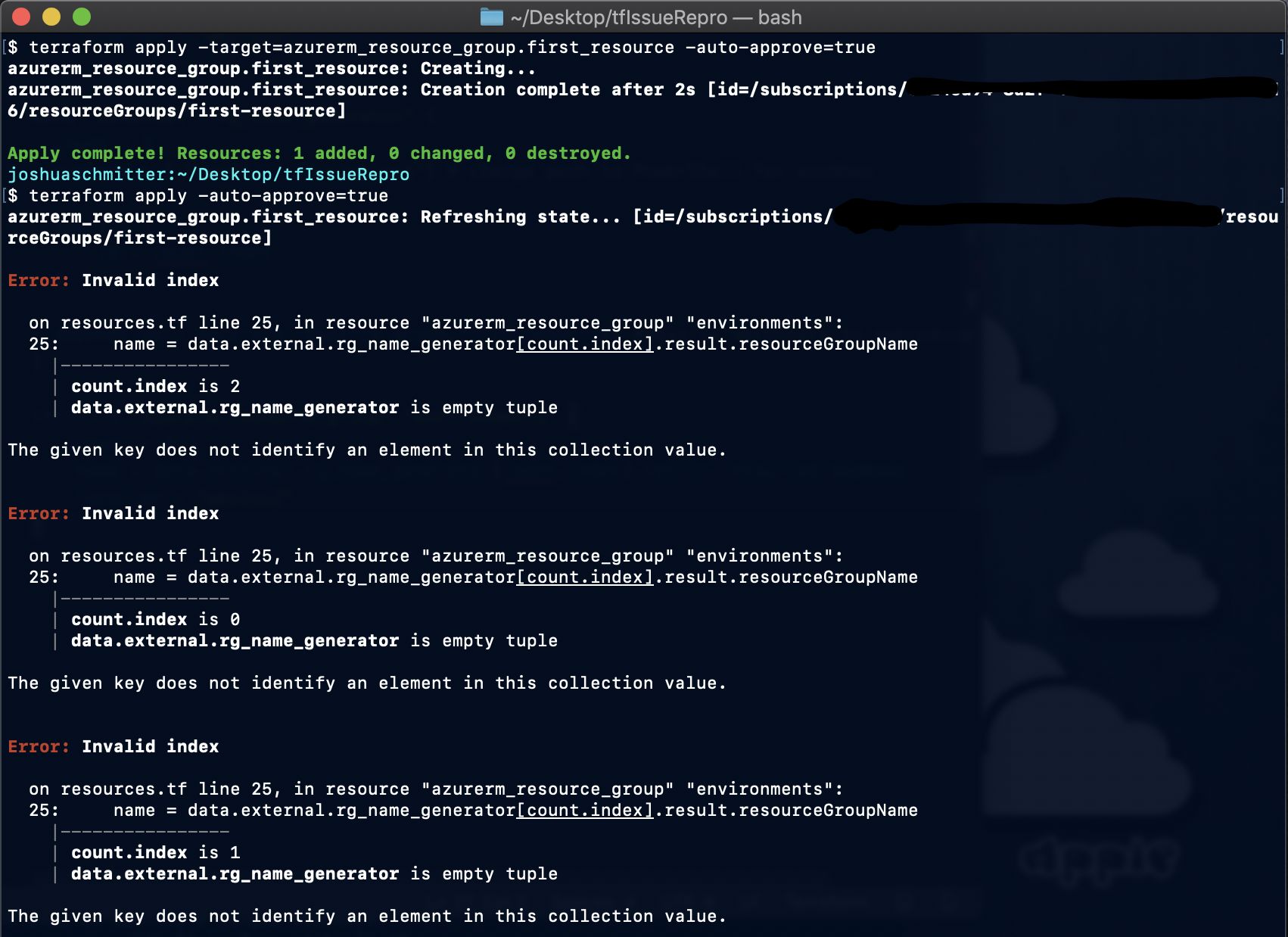
Ok, I figured out how to reproduce this:
use this terraform file:
# terraform version 0.12.8; I used macos, but should be reproducable on windows (see note in data block)
provider "azurerm" {
subscription_id = var.subscription_id
version = "~> 1.34.0"
}
resource "azurerm_resource_group" "first_resource" {
name = "first-resource"
location = "westus2"
}
data "external" "rg_name_generator" {
count = 3
program = [ "pwsh", "./Script.ps1"] # change pwsh to PowerShell for windows
query = {
id = count.index
}
depends_on = [azurerm_resource_group.first_resource] #this is necessary to reproduce the error
}
resource "azurerm_resource_group" "environments" {
count = 3
name = data.external.rg_name_generator[count.index].result.resourceGroupName
location = "westus2"
}
Along with powershell script file (Script.ps1):
$inputString = [Console]::In.ReadLine()
$inputObject = ConvertFrom-Json $inputString
$returnObject = @{resourceGroupName = "my-resourceGroup-$($inputObject.id)"}
$returnObject | ConvertTo-Json
first create only the first_resource:
terraform apply -target=azurerm_resource_group.first_resource
Then create the other dependant resources:
terraform apply
Result:
joshschmitter
on 7 Nov 2019
I've run into a similar problem under the following conditions:
- I have an EKS that creates it's own IGW, and on
terraform destroy, the gateway doesn't get cleaned up, so deleting the subnets, VPC, etc fails. - I tried to fix this by deleting the offending resources manually, which led to the
Invalid indexerrors when Terraform tried to fetch the state of the gateway. - I resolved this by running
terraform state rm <resource>
Doesn't fix the root issue, but at least got my system running again.
 z-bowen
on 14 Nov 2019
z-bowen
on 14 Nov 2019
@apparentlymart is there any plan to address this bug? I think I've provided a simple way to reproduce the issue in comment above.
joshschmitter
on 14 Nov 2019
I see same error message in an output for the latest Forseti Terraform module. Output is defined as follows:
_output "forseti-server-git-public-key-openssh" {
description = "The public OpenSSH key generated to allow the Forseti Server to clone the policy library repository."
value = tls_private_key.policy_library_sync_ssh[0].public_key_openssh
}_
And results in error:
_Error: Invalid index
on .terraform/modules/forseti/forseti-security-terraform-google-forseti-1ef45bf/modules/server/outputs.tf line 19, in output "forseti-server-git-public-key-openssh":
19: value = tls_private_key.policy_library_sync_ssh[0].public_key_openssh
|----------------
| tls_private_key.policy_library_sync_ssh is empty tuple
The given key does not identify an element in this collection value._
 nycnewman
on 10 Dec 2019
nycnewman
on 10 Dec 2019
I'm having this issue whenever I try to output a property from a resource with a count:
output "pubsub_topic" {
value = "${google_pubsub_topic.pubsub_topic[0].name}"
depends_on = [google_storage_notification.bucket_notification[0].bucket]
}
output "pubsub_subscription" {
value = "${google_pubsub_subscription.pubsub_subscription[0].name}"
}
output "pubsub_bucket" {
value = "${google_storage_bucket.storage_bucket[0].name}"
}
 sjortiz
on 12 Dec 2019
sjortiz
on 12 Dec 2019
after searching everywhere I found that the right way to do it is this:
https://github.com/hashicorp/terraform/issues/18744#issuecomment-416497799
output "pubsub_topic" {
  value = "${google_pubsub_topic.pubsub_topic.*.name}"
}
Use the wildcard instead of the fixed index, and then use the fixed index when passing the value as a var to another module, e.g.:
pubsub_topic = "${module.bucket_pub_sub.pubsub_topic[0]}"
works like a champ
sjortiz
on 12 Dec 2019
@sjortiz It doesn't work in 0.12.
 fii
on 12 Dec 2019
fii
on 12 Dec 2019
@sjortiz It doesn't work in 0.12.
@fii This is what I have
bash-3.2$ terraform --version
Terraform v0.12.18
+ provider.google v3.2.0
sjortiz
on 12 Dec 2019
Confirmed what @sjortiz said, using a wildcard, the documentation does not change this information as far as I can tell:
resource "local_file" "digitalocean_kubeconfig" {
  count         = var.enable ? 1 : 0
  content       = digitalocean_kubernetes_cluster.k8s[count.index].kube_config[0].raw_config
  filename      = "${path.module}/digitalocean_kubeconfig"
}

output "digitalocean_kubeconfig_path" {
  description = "Kubernetes configuration file name"
  value       = local_file.digitalocean_kubeconfig.*.filename
}
 yordis
on 27 Dec 2019
yordis
on 27 Dec 2019
Hello,
The errors here appear to all be related to problems evaluating certain configurations during refresh. Since the refresh phase itself has been removed for 0.14, these errors should no longer be relevant. After 0.14, any similar errors should be reported as new issues.
Thanks!
 jbardin
on 13 Oct 2020
jbardin
on 13 Oct 2020
I'm going to lock this issue because it has been closed for _30 days_ ⏳. This helps our maintainers find and focus on the active issues.
If you have found a problem that seems similar to this, please open a new issue and complete the issue template so we can capture all the details necessary to investigate further.
![hashibot[bot] picture](https://avatars2.githubusercontent.com/in/8332?v=4&s=40) hashibot[bot]
on 12 Nov 2020
hashibot[bot]
on 12 Nov 2020
Related issues
 thebenwaters
·
3Comments
thebenwaters
·
3Comments
 rjinski
·
3Comments
rjinski
·
3Comments
 pawelsawicz
·
3Comments
pawelsawicz
·
3Comments
 carl-youngblood
·
3Comments
carl-youngblood
·
3Comments
 sprokopiak
·
3Comments
sprokopiak
·
3Comments
Most helpful comment
after searching everywhere I found that the right way to do it is this:
https://github.com/hashicorp/terraform/issues/18744#issuecomment-416497799
Use the wildcard instead of the fixed index, and then use the fixed index when passing the value as a var to another module, e.g.:
works like a champ