Terraform: 0.11.10 reports out of date when it's not
Edit: FIXED as per @mitchellh below
If still failing, remove your checkpoint cache:
rm ~/.terraform.d/checkpoint_cache
Original Issue:
Terraform Version
Terraform v0.11.10

Your version of Terraform is out of date! The latest version
is v0.11.10. You can update by downloading from www.terraform.io/downloads.html
Debug Output
→ TF_LOG=trace terraform -v
2018/10/23 14:31:15 [INFO] Terraform version: 0.11.10  17850e9a55d33c43d7c31fd6ac122ba97a51d899
2018/10/23 14:31:15 [INFO] Go runtime version: go1.11.1
2018/10/23 14:31:15 [INFO] CLI args: []string{"/usr/local/bin/terraform-0.11.10", "-v"}
2018/10/23 14:31:15 [DEBUG] Attempting to open CLI config file: /Users/eedwards/.terraformrc
2018/10/23 14:31:15 [DEBUG] File doesn't exist, but doesn't need to. Ignoring.
2018/10/23 14:31:15 [INFO] CLI command args: []string{"version", "-v"}
Terraform v0.11.10
2018/10/23 14:31:15 [DEBUG] checking for provider in "."
2018/10/23 14:31:15 [DEBUG] checking for provider in "/usr/local/bin"
2018/10/23 14:31:15 [INFO] Failed to read plugin lock file .terraform/plugins/darwin_amd64/lock.json: open .terraform/plugins/darwin_amd64/lock.json: no such file or directory
2018/10/23 14:31:15 [DEBUG] plugin: waiting for all plugin processes to complete...

Your version of Terraform is out of date! The latest version
is v0.11.10. You can update by downloading from www.terraform.io/downloads.html
Expected Behavior
Not out of date.
Actual Behavior
Out of date.
Steps to Reproduce
terraform -v
 eedwards-sk
All 13 comments
Hi @eedwards-sk! Thanks for reporting this.
This is being investigated right now.
 apparentlymart
on 24 Oct 2018
apparentlymart
on 24 Oct 2018
@eedwards-sk @apparentlymart I can confirm I am experiencing this as well. It looks like the info.Outdated flag is not being set correctly and possibly defaulting to False:

 adamzerella
on 24 Oct 2018
adamzerella
on 24 Oct 2018
Have the same issue (MacOS binary)
 vliubko
on 24 Oct 2018
vliubko
on 24 Oct 2018
Same on Linux x86_64 binary:
$ terraform -v
Terraform v0.11.10

Your version of Terraform is out of date! The latest version
is v0.11.10. You can update by downloading from www.terraform.io/downloads.html
 mbevc1
on 24 Oct 2018
mbevc1
on 24 Oct 2018
This may be a coincidence, but I noticed that the checkpoint API (https://checkpoint-api.hashicorp.com/v1/check/terraform) is returning current_version slightly differently.
Previously it would return just the number component of the release. E.g. 0.11.10. Now it is returning it with the v prefix, e.g. v0.11.10. I wonder if this is causing a string comparison to fail and it thinks it is not the most recent release.
 cayla
on 24 Oct 2018
cayla
on 24 Oct 2018
@eedwards-sk @apparentlymart I can confirm I am experiencing this as well. It looks like the
info.Outdatedflag is not being set correctly and possibly defaulting toFalse:Line 110 in d4ac684
if info.Outdated {
It seems like it's set to true looking at the bool for outDated (https://checkpoint-api.hashicorp.com/v1/check/terraform) so the if clause runs and says it's outdated.
 kamigerami
on 24 Oct 2018
kamigerami
on 24 Oct 2018
This should be fixed now, we deployed a fixed checkpoint API!
 mitchellh
on 24 Oct 2018
mitchellh
on 24 Oct 2018
fixed on a new version?
currently still failing (maybe waiting for propagation?)
→ terraform -v
Terraform v0.11.10
+ provider.aws v1.41.0
+ provider.tls v1.2.0

Your version of Terraform is out of date! The latest version
is v0.11.10. You can update by downloading from www.terraform.io/downloads.html
You're likely seeing a cache. I just ran it locally on two machines (with 0.11.10) and didn't get that error. I think the cache is ~/.terraform.d/checkpoint_cache. If you remove that it should work. The cache itself should clear within 24 hours or so.
mitchellh
on 24 Oct 2018
@mitchellh
Booya!
Thanks for the fix :D
(and for hashicorp <3)
$ eedwards @ eedwardslt-mac in ~/dev/consul-cluster/terraform ± |master U:2 ?:5 ✗| [11:29:06]
→ rm ~/.terraform.d/checkpoint_cache
$ eedwards @ eedwardslt-mac in ~/dev/consul-cluster/terraform ± |master U:2 ?:5 ✗| [11:30:55]
→ terraform -v
Terraform v0.11.10
+ provider.aws v1.41.0
+ provider.tls v1.2.0
@cayla the current_version difference you noticed is now also corrected. So it only shows 0.11.10 again without the v prefix.
 svanharmelen
on 25 Oct 2018
svanharmelen
on 25 Oct 2018
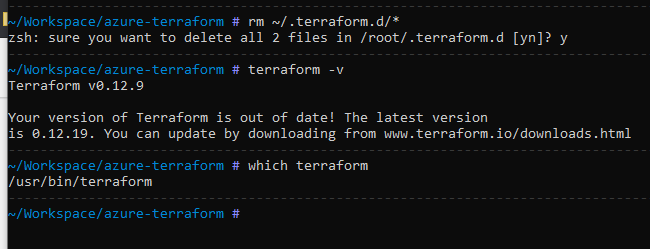
is this still an issue with 0.12.19? running on alpine
 HarriKwok
on 14 Jan 2020
HarriKwok
on 14 Jan 2020
I'm going to lock this issue because it has been closed for _30 days_ ⏳. This helps our maintainers find and focus on the active issues.
If you have found a problem that seems similar to this, please open a new issue and complete the issue template so we can capture all the details necessary to investigate further.
![hashibot[bot] picture](https://avatars2.githubusercontent.com/in/8332?v=4&s=40) hashibot[bot]
on 15 Jan 2020
hashibot[bot]
on 15 Jan 2020
Related issues
 cpoole
·
3Comments
cpoole
·
3Comments
 Seraf
·
3Comments
Seraf
·
3Comments
 shanmugakarna
·
3Comments
shanmugakarna
·
3Comments
 thebenwaters
·
3Comments
thebenwaters
·
3Comments
 larstobi
·
3Comments
larstobi
·
3Comments
Most helpful comment
You're likely seeing a cache. I just ran it locally on two machines (with 0.11.10) and didn't get that error. I think the cache is
~/.terraform.d/checkpoint_cache. If you remove that it should work. The cache itself should clear within 24 hours or so.