Terraform: Unable to provision AWS instance via remote-exec. Unable to connect
Terraform Version
Terraform v0.11.3
- provider.aws v1.11.0
Terraform Configuration Files
I wasn't sure where to place the connection block so I tried both of the following and got the same result. I find, in general, that Terraform documentation isn't very clear and could use a lot more examples to help understand different features.
  provisioner "remote-exec" {
    inline = [
      "sudo -S apt-get update",
      "sudo apt-get install -y python-minimal"
    ]
    connection {
      type        = "ssh"
      agent       = false
      private_key = "${file("~/.ssh/deployer-east2.pem")}"
      user        = "ubuntu"
    }
  }
  connection {
    type        = "ssh"
    agent       = false
    private_key = "${file("~/.ssh/deployer-east2.pem")}"
    user        = "ubuntu"
  }
  provisioner "remote-exec" {
    inline = [
      "sudo -S apt-get update",
      "sudo apt-get install -y python-minimal"
    ]
  }


md5-e6ba3193c303bc2a731d5940cf5001a4


Error: Error applying plan:

1 error(s) occurred:

* aws_instance.backend: 1 error(s) occurred:

* timeout
Expected Behavior
I expect the provisioner to work
Actual Behavior
The instance is not created
Steps to Reproduce
terraform apply
Additional Context
None
References
None
 jmvbxx
All 10 comments
Hi @jmvbxx,
You can have the connection block in either place to apply to a specific provisioner, or all provisioners.
As for what is going on in your example, the log output may help if there are any specific errors listed.
If it was timing out attempting to connect to the host, and the host was up, did it have a public IP address with a subnet and security group that allows ssh access?
 jbardin
on 6 Apr 2018
jbardin
on 6 Apr 2018
Thanks for the reply. I'll run this afternoon and check logs. All of our instances are the same where they only allow SSH from within our VPC, private subnets/instances access via NAT and don't have public IP address. As far as the host being up, I "assumed" it was because Terraform has never let me down in the proper ordering of actions.
jmvbxx
on 11 Apr 2018
Here's the output I got
2018-04-28T15:24:39.486-0500 [DEBUG] plugin.terraform: remote-exec-provisioner (internal) 2018/04/28 15:24:39 [DEBUG] connecting to TCP connection for SSH
2018-04-28T15:24:54.488-0500 [DEBUG] plugin.terraform: remote-exec-provisioner (internal) 2018/04/28 15:24:54 [ERROR] connection error: dial tcp 11.0.3.137:22: i/o timeout
2018-04-28T15:24:54.488-0500 [DEBUG] plugin.terraform: remote-exec-provisioner (internal) 2018/04/28 15:24:54 [WARN] retryable error: dial tcp 11.0.3.137:22: i/o timeout
2018-04-28T15:24:54.488-0500 [DEBUG] plugin.terraform: remote-exec-provisioner (internal) 2018/04/28 15:24:54 [INFO] sleeping for 20s
2018/04/28 15:24:58 [ERROR] root: eval: *terraform.EvalApplyProvisioners, err: timeout - last error: dial tcp 11.0.3.137:22: i/o timeout
2018/04/28 15:24:58 [ERROR] root: eval: *terraform.EvalSequence, err: timeout - last error: dial tcp 11.0.3.137:22: i/o timeout
2018/04/28 15:24:58 [DEBUG] plugin: waiting for all plugin processes to complete...
2018-04-28T15:24:58.475-0500 [DEBUG] plugin.terraform: remote-exec-provisioner (internal) 2018/04/28 15:24:58 [ERR] plugin: plugin server: accept unix /tmp/plugin678249530: use
of closed network connection
A bit of an old ticket but has anyone had a chance to look at this? Thanks!
jmvbxx
on 16 Jul 2018
Hi @jmvbxx,
There doesn't look to be any issue with terraform from your log snippet there. (Since there's no info in the original post here, we should probably close this out as we can't tell if it's related at all to your particular issue).
The error output seems pretty straightforward, the host running terraform cannot connect directly to 11.0.3.137:22. Are you certain that is the correct IP, and you can connect to that port from the same host running terraform? Is the host taking longer to come online than the timeout? IIRC 11/8 is a DoD address block, is there any extra filtering going on between you and the remote host?
None of these questions are things we can answer for you, but if you can provide the circumstances where you can and cannot connect we may be able to see if it's something terraform can resolve.
jbardin
on 16 Jul 2018
I am new here but could it be that you have more than one vpc default and maybe you need to select another in console and update the inbound rul for the default sec group?!. I don;t know
 iAreGitHugger
on 9 Jan 2019
iAreGitHugger
on 9 Jan 2019
I find, in general, that Terraform documentation isn't very clear and could use a lot more examples to help understand different features.
+1. I've literally spent the entire day just trying to execute a command via remote-exec on an ec2 instance.
 QuotableWater7
on 22 Mar 2019
QuotableWater7
on 22 Mar 2019
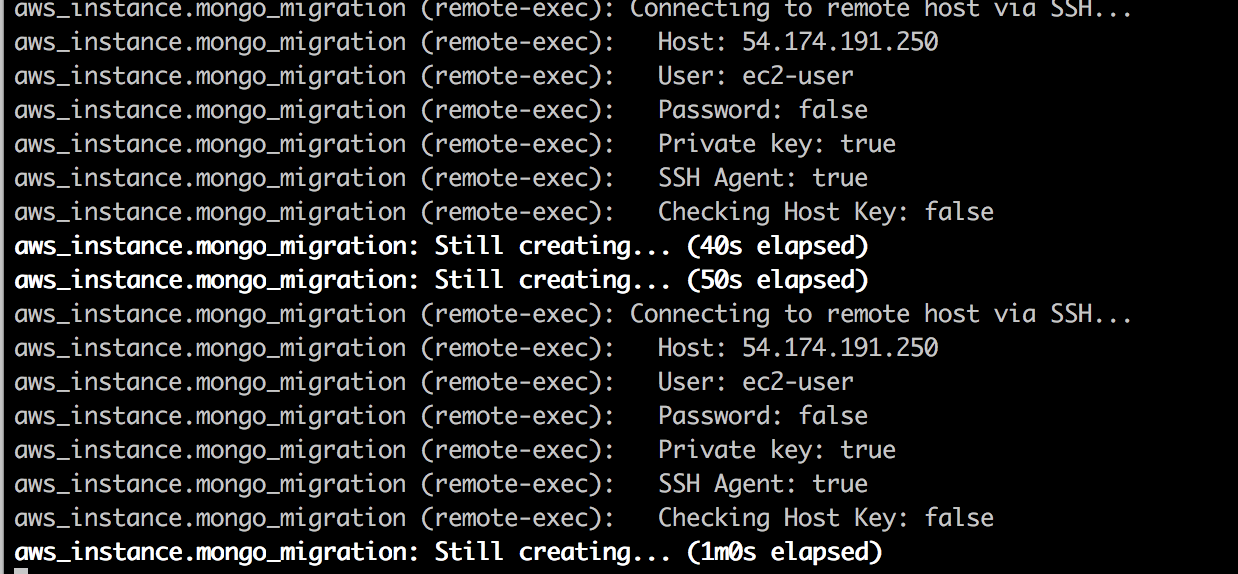
I repeatedly get these messages while trying to use my .pem key:
Here is my setup code:
resource "aws_instance" "example" {
ami = "ami-2757f631"
instance_type = "t2.micro"
count = 1
connection {
type = "ssh"
user = "ec2-user"
private_key = "${file("~/some-path/my-key.pem")}"
}
tags {
Name = "instance-${count.index}"
}
provisioner "remote-exec" {
inline = [
"sudo yum install -y docker",
"sudo service docker start",
// etc
]
}
}
I had the same problem. I thought it is related to the fact that there is no public ip assigned yet while instance is provisioning. It worked by extracting the provisioner part into null_resource as below.
resource "aws_eip" "bastion_eip" {
    instance = "${aws_instance.bastion_host.id}"
    vpc      = true
    tags = {
        Name = "bastion_host"
    }
}
resource "null_resource" "connect_bastion1" {
  connection {
    host        = "${aws_eip.bastion_eip.public_ip}"
    user        = "ec2-user"
    private_key = "${file(var.private_key)}"
  }
  provisioner "remote-exec" {
    inline = [
      "echo "a" > a.txt,
    ]
  }
  depends_on = ["aws_eip.bastion_eip"]
 mehmetaydogdu
on 28 Mar 2019
mehmetaydogdu
on 28 Mar 2019
I'm going to lock this issue because it has been closed for _30 days_ ⏳. This helps our maintainers find and focus on the active issues.
If you have found a problem that seems similar to this, please open a new issue and complete the issue template so we can capture all the details necessary to investigate further.
![hashibot[bot] picture](https://avatars2.githubusercontent.com/in/8332?v=4&s=40) hashibot[bot]
on 13 Aug 2019
hashibot[bot]
on 13 Aug 2019
Related issues
 franklinwise
·
3Comments
franklinwise
·
3Comments
 rkulagowski
·
3Comments
rkulagowski
·
3Comments
 carl-youngblood
·
3Comments
carl-youngblood
·
3Comments
 zeninfinity
·
3Comments
zeninfinity
·
3Comments
 jrnt30
·
3Comments
jrnt30
·
3Comments
Most helpful comment
I had the same problem. I thought it is related to the fact that there is no public ip assigned yet while instance is provisioning. It worked by extracting the provisioner part into null_resource as below.